
自定义textbox加入左右晃动效果
应用开发过程中经常会要求用户在textbox进行输入。例如:登陆,发布。
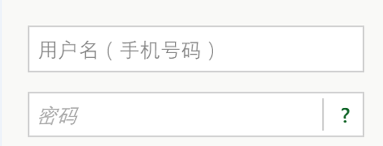
而一般没进行输入的时候我们都会简单的进行弹窗提示用户输入。 前阵子ios的同学搞了一个左右晃动的效果,觉得还不错,于是也搞了个出来。
为方便使用,自定义ShakeTextbox继承TextBox定义晃动、与正常情况的两种状态。
[TemplateVisualState(Name = ShakeTextbox.ShakeVisualState, GroupName = ShakeTextbox.ActivityVisualStateGroup)]

    [TemplateVisualState(Name = ShakeTextbox.CommonVisualState, GroupName = ShakeTextbox.ActivityVisualStateGroup)]

    public class ShakeTextbox:TextBox

    {

        private const string ActivityVisualStateGroup = "ActivityStates";

        private const string ShakeVisualState = "Shake";

        private const string CommonVisualState = "Common";

        public void Shake()

        {

            VisualStateManager.GoToState(this, ShakeTextbox.ShakeVisualState, false);

            atimer = new Timer(callback, null, , Timeout.Infinite);

        }

        Timer atimer;

        void callback(object state)

        {

            Dispatcher.BeginInvoke(() =>

            {

                VisualStateManager.GoToState(this, ShakeTextbox.CommonVisualState, false);

            });

            atimer.Dispose();

        }

    }
app.xaml中写入ShakeTextbox的style。VisualState x:Name="Shake"实现左右晃动的动画效果
<Style TargetType="LocalControl:ShakeTextbox">

            <Setter Property="Template">

                <Setter.Value>

                    <ControlTemplate TargetType="LocalControl:ShakeTextbox">

                        <Grid x:Name="grid" Background="Transparent" RenderTransformOrigin="0.5,0.5">

                            <VisualStateManager.VisualStateGroups>

                                <VisualStateGroup x:Name="ActivityStates">

                                    <VisualState x:Name="Shake">

                                        <Storyboard>

                                            <DoubleAnimationUsingKeyFrames Storyboard.TargetProperty="(UIElement.RenderTransform).(CompositeTransform.TranslateX)" Storyboard.TargetName="grid">

                                                <EasingDoubleKeyFrame KeyTime="0" Value="0"/>

                                                <EasingDoubleKeyFrame KeyTime="0:0:0.1" Value="-9"/>

                                                <EasingDoubleKeyFrame KeyTime="0:0:0.2" Value="8.5"/>

                                                <EasingDoubleKeyFrame KeyTime="0:0:0.3" Value="-7.5"/>

                                                <EasingDoubleKeyFrame KeyTime="0:0:0.4" Value="6"/>

                                                <EasingDoubleKeyFrame KeyTime="0:0:0.5" Value="-4"/>

                                                <EasingDoubleKeyFrame KeyTime="0:0:0.6" Value="1.5"/>

                                                <EasingDoubleKeyFrame KeyTime="0:0:0.7" Value="0"/>

                                            </DoubleAnimationUsingKeyFrames>

                                        </Storyboard>

                                    </VisualState>

                                    <VisualState x:Name="Common"/>

                                </VisualStateGroup>

                            </VisualStateManager.VisualStateGroups>

                            <Grid.RenderTransform>

                                <CompositeTransform/>

                            </Grid.RenderTransform>

                            <Border x:Name="MainBorder" BorderBrush="{TemplateBinding BorderBrush}" BorderThickness="{TemplateBinding BorderThickness}" Background="{TemplateBinding Background}" Margin="{StaticResource PhoneTouchTargetOverhang}"/>

                            <Border x:Name="ReadonlyBorder" BorderBrush="{StaticResource PhoneDisabledBrush}" BorderThickness="{TemplateBinding BorderThickness}" Background="Transparent" Margin="{StaticResource PhoneTouchTargetOverhang}" Visibility="Collapsed"/>

                            <Border BorderBrush="Transparent" BorderThickness="{TemplateBinding BorderThickness}" Background="Transparent" Margin="{StaticResource PhoneTouchTargetOverhang}">

                                <ContentControl x:Name="ContentElement" BorderThickness="0" HorizontalContentAlignment="Stretch" Margin="{StaticResource PhoneTextBoxInnerMargin}" Padding="{TemplateBinding Padding}" VerticalContentAlignment="Stretch"/>

                            </Border>

                        </Grid>

                    </ControlTemplate>

                </Setter.Value>

            </Setter>

        </Style>
最后在页面中使用ShakeTextbox,只要判断ShakeTextbox.Test为空的时候调用ShakeTextbox自带的Shake方法即可。
demo 链接:http://files.cnblogs.com/fatlin/Test.rar
备注:由于本码农的开发工具是vs2013,低版本的vs目测打不开。
自定义textbox加入左右晃动效果的更多相关文章
- WPF自定义TextBox及ScrollViewer
原文:WPF自定义TextBox及ScrollViewer 寒假过完,在家真心什么都做不了,可能年龄大了,再想以前那样能专心坐下来已经不行了.回来第一件事就是改了项目的一个bug,最近又新增了一个新的 ...
- 自定义view实现水波纹效果
水波纹效果: 1.标准正余弦水波纹: 2.非标准圆形液柱水波纹: 虽说都是水波纹,但两者在实现上差异是比较大的,一个通过正余弦函数模拟水波纹效果,另外一个会运用到图像的混合模式(PorterDuffX ...
- ios7自带的晃动效果
ios7自带的晃动效果 by 伍雪颖 - (void)registerEffectForView:(UIView *)aView depth:(CGFloat)depth; { UIInterpola ...
- 继承control的自定义TextBox
继承control的自定义TextBox 下面来介绍一下本人写的一个自定义的textbox,首先说一下写这个控件遇到的几个难点:第一.关联输入法:第二.画字符串和焦点线 先随便上两张效果图吧: 下面这 ...
- CSS3左右间歇晃动效果
今天在做一个活动页面时,产品想要在页面中添加一个吸引人注意的小图片左右晃动的效果,并且该效果是间歇执行的.我一想应该挺简单的吧,二话没说就答应了,谁知在真正实现的时候才发现还是有些许困难的.于是就在网 ...
- android 自定义scrollview 仿QQ空间效果 下拉伸缩顶部图片,上拉回弹 上拉滚动顶部title 颜色渐变
首先要知道 自定义scrollview 仿QQ效果 下拉伸缩放大顶部图片 的原理是监听ontouch事件,在MotionEvent.ACTION_MOVE事件时候,使用不同倍数的系数,重置布局位置[ ...
- 自定义modal一个控制器的效果, presentViewController
presentViewController 一.主要用途 弹出模态ViewController是IOS变成中很有用的一个技术,UIKit提供的一些专门用于模态显示的ViewController,如UI ...
- WPF用样式实现TextBox的虚拟提示效果
[版权声明]本文为博主原创,未经允许禁止用作商业用途,如有转载请注明出处. 话说好多软件和网站都能实现虚拟提示,好吧这个名词是我自己起的,因为我也不知道这么形容这个效果. 效果描述:在TextBox没 ...
- WPF 自定义TextBox
1.TextBox前加图标. 效果: <TextBox Width="300" Height="30" Style="{StaticResour ...
随机推荐
- iOS iphone5屏幕适配 autosizing
转自:http://blog.sina.com.cn/s/blog_a843a8850101jxhh.html iphone5出来了,从不用适配的我们也要像android一样适配不同分辨率的屏幕了. ...
- Anatomy of the Linux kernel--转
ref:http://www.ibm.com/developerworks/linux/library/l-linux-kernel/?S_TACT=105AGX52&S_CMP=cn-a-l ...
- golang之websocket 源码分析
下载go的websocket包. 1. 通过google官方的方法, 需要hg来同步代码. 由于墙的原因, 还需要设置代理. 比较麻烦 2. http://gopm.io/ 通过该网站下载, 这是go ...
- excel,access常用公式函数VBA代码汇总文章
批量将CSV导入access alt+f11 打开access的vbe环境 Sub test() Dim SQL As String Dim MyPath As String Dim MyPathDb ...
- C# 之 user32函数库
using System; using System.Collections.Generic; using System.Linq; using System.Text; using System.R ...
- 快递鸟API接口调用代码示例(免费不限量)
import java.io.BufferedReader; import java.io.IOException; import java.io.InputStreamReader; import ...
- [置顶] 《算法导论》习题解答搬运&&学习笔记 索引目录
开始学习<算法导论>了,虽然是本大部头,可能很难一下子看完,我还是会慢慢地研究的. 课后的习题和思考有些是很有挑战性的题目,我等蒻菜很难独立解决. 然后发现了Google上有挺全的algo ...
- jQuery源码dom ready分析
一.前言 在平时开发web项目时,我们使用jquery框架时,可能经常这样来使用$(document).ready(fn),$(function(){}),这样使用的原因是在浏览器把DOM树渲染好之前 ...
- 公用的stringUtil工具
(function(){ var ISCHINESE = /[\u4e00-\u9fa5]/; var getData = function( value , maxLenth , isStrick ...
- 【转】C#之继承
本文意在巩固基础知识,并不是对其进行深入剖析,如若对各位高手没有什么作用,请绕过. 本文为原创文,所有示例均是博主测试过的,欢迎大家批评指正,如有转载请标明出处,谢谢. 继承.封装和多态是面向对象编程 ...