
asp.net core 依赖注入问题
最近.net core可以跨平台了,这是一个伟大的事情,为了可以赶上两年以后的跨平台部署大潮,我也加入到了学习之列。今天研究的是依赖注入,但是我发现一个问题,困扰我很久,现在我贴出来,希望可以有人帮忙解决或回复一下。
背景:我测试.net自带的依赖注入生命周期,一共三个:Transient、Scope、Single三种,通过一个GUID在界面展示,但是我发现scope和single的每次都是相同的,并且single实例的guid值每次都会改变。
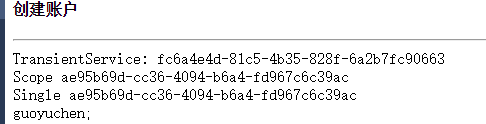
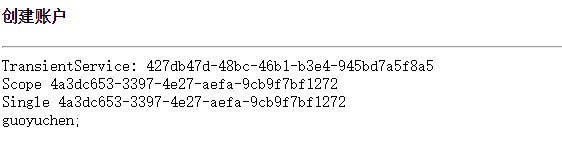
通过截图可以看到scope和Single每次浏览器刷新都会改变,scope改变可以理解,就是每次请求都会改变。但是single 每次都改变就不对了。应该保持一个唯一值才对。
Program.cs代码:启动代码
 namespace CoreStudy

 {

     public class Program

     {

         public static void Main(string[] args)

         {

             Encoding.RegisterProvider(CodePagesEncodingProvider.Instance);

             var host = new WebHostBuilder()

                 .UseKestrel()//使用服务器serve

                 .UseContentRoot(Directory.GetCurrentDirectory())

                 .UseIISIntegration()//使用IIS

                 .UseStartup<Startup>()//使用起始页

                 .Build();//IWebHost

             host.Run();//构建用于宿主应用程序的IWebHost

             //然后启动它来监听传入的HTTP请求

         }

     }

 }
Startup.cs 文件代码
 namespace CoreStudy

 {

     public class Startup

     {

         public Startup(IHostingEnvironment env, ILoggerFactory logger)

         {

             var builder = new ConfigurationBuilder()

                 .SetBasePath(env.ContentRootPath)

                 .AddJsonFile("appsettings.json", optional: true, reloadOnChange: true)

                 .AddJsonFile($"appsettings.{env.EnvironmentName}.json", optional: true)

                 .AddEnvironmentVariables();

             builder.AddInMemoryCollection();

         }

         // This method gets called by the runtime. Use this method to add services to the container.

         // For more information on how to configure your application, visit http://go.microsoft.com/fwlink/?LinkID=398940

         public void ConfigureServices(IServiceCollection services)

         {//定义服务

             services.AddMvc();

             services.AddLogging();

             services.AddTransient<IPersonRepository, PersonRepository>();

             services.AddTransient<IGuidTransientAppService, TransientAppService>();

             services.AddScoped<IGuidScopeAppService, ScopeAppService>();

             services.AddSingleton<IGuidSingleAppService, SingleAppService>();

         }

         // This method gets called by the runtime. Use this method to configure the HTTP request pipeline.

         public void Configure(IApplicationBuilder app, IHostingEnvironment env, ILoggerFactory loggerFactory, IApplicationLifetime appLifetime)

         {//定义中间件

             if (env.IsDevelopment())

             {

                 app.UseDeveloperExceptionPage();

                 app.UseBrowserLink();

                 app.UseDatabaseErrorPage();

             }

             else

             {

                 app.UseExceptionHandler("/Home/Error");

             }

             app.UseStaticFiles();

             //app.UseStaticFiles(new StaticFileOptions() {

             //      FileProvider=new PhysicalFileProvider(Path.Combine(Directory.GetCurrentDirectory(),@"staticFiles")),

             //       RequestPath="/staticfiles"

             // });

             //默认路由设置

             app.UseMvc(routes =>

             {

                 routes.MapRoute(name: "default", template: "{controller=Person}/{action=Index}/{id?}");

             });

         }

     }

 }
请注意22-26行,注册了三种不同生命周期的实例,transientService、scopeService以及singleService。
对应的接口定义:
 namespace CoreStudy

 {

     public interface IGuideAppService

     {

         Guid GuidItem();

     }

     public interface IGuidTransientAppService:IGuideAppService

     { }

     public interface IGuidScopeAppService:IGuideAppService

     { }

     public interface IGuidSingleAppService:IGuideAppService

     { }

 }

 namespace CoreStudy

 {

     public class GuidAppService : IGuideAppService

     {

         private readonly Guid item;

         public GuidAppService()

         {

             item = Guid.NewGuid();

         }

         public Guid GuidItem()

         {

             return item;

         }

     }

     public class TransientAppService:GuidAppService,IGuidTransientAppService

     {

     }

     public class ScopeAppService:GuidAppService,IGuidScopeAppService

     { }

     public class SingleAppService:GuidAppService,IGuidSingleAppService

     { }

 }
代码很简单,只是定义了三种不同实现类。
控制器中 通过构造函数注入方式注入:
 namespace CoreStudy.Controllers

 {

     /// <summary>

     /// 控制器方法

     /// </summary>

     public class PersonController : Controller

     {

         private readonly IGuidTransientAppService transientService;

         private readonly IGuidScopeAppService scopedService;

         private readonly IGuidSingleAppService singleService;

         private IPersonRepository personRepository = null;

         /// <summary>

         /// 构造函数

         /// </summary>

         /// <param name="repository"></param>

         public PersonController(IGuidTransientAppService trsn, IGuidScopeAppService scope, IGuidSingleAppService single)

         {

             this.transientService = trsn;

             this.scopedService = scope;

             this.singleService = single;

         }

         /// <summary>

         /// 主页方法

         /// </summary>

         /// <returns></returns>

         public IActionResult Index()

         {

             ViewBag.TransientService = this.transientService.GuidItem();

             ViewBag.scopeService = this.scopedService.GuidItem();

             ViewBag.singleservice = this.scopedService.GuidItem();

             return View();

         }

     }

 }
控制器对应的视图文件Index.cshtm
 @{

     ViewData["Title"] = "Person Index";

     Layout = null;

 }

 <form asp-controller="person"  method="post" class="form-horizontal" role="form">

      <h4>创建账户</h4>

     <hr />

    <div class="row">

        <div class="col-md-4">

            <span>TransientService:</span>

            @ViewBag.TransientService

        </div>

    </div>

     <div class="row">

         <span>Scope</span>

         @ViewBag.ScopeService

     </div>

     <div class="row">

         <span>Single</span>

         @ViewBag.SingleService

     </div>

     <div class="col-md-4">

         @await Component.InvokeAsync("Greeting");

     </div>

 </form>
其他无关代码就不粘贴了,希望各位能给个解释,我再看一下代码,是否哪里需要特殊设置。
答案在PersonController 类的 35行,此问题主要是为了能够更好的理解依赖注入
.Net Core来了,我们又可以通过学习来涨工资了。
asp.net core 依赖注入问题的更多相关文章
- # ASP.NET Core依赖注入解读&使用Autofac替代实现
标签: 依赖注入 Autofac ASPNETCore ASP.NET Core依赖注入解读&使用Autofac替代实现 1. 前言 2. ASP.NET Core 中的DI方式 3. Aut ...
- 实现BUG自动检测 - ASP.NET Core依赖注入
我个人比较懒,能自动做的事绝不手动做,最近在用ASP.NET Core写一个项目,过程中会积累一些方便的工具类或框架,分享出来欢迎大家点评. 如果以后有时间的话,我打算写一个系列的[实现BUG自动检测 ...
- [译]ASP.NET Core依赖注入深入讨论
原文链接:ASP.NET Core Dependency Injection Deep Dive - Joonas W's blog 这篇文章我们来深入探讨ASP.NET Core.MVC Core中 ...
- asp.net core 依赖注入几种常见情况
先读一篇注入入门 全面理解 ASP.NET Core 依赖注入, 学习一下基本使用 然后学习一招, 不使用接口规范, 直接写功能类, 一般情况下可以用来做单例. 参考https://www.cnblo ...
- ASP.NET Core依赖注入——依赖注入最佳实践
在这篇文章中,我们将深入研究.NET Core和ASP.NET Core MVC中的依赖注入,将介绍几乎所有可能的选项,依赖注入是ASP.Net Core的核心,我将分享在ASP.Net Core应用 ...
- 自动化CodeReview - ASP.NET Core依赖注入
自动化CodeReview系列目录 自动化CodeReview - ASP.NET Core依赖注入 自动化CodeReview - ASP.NET Core请求参数验证 我个人比较懒,能自动做的事绝 ...
- ASP.NET Core 依赖注入最佳实践——提示与技巧
在这篇文章,我将分享一些在ASP.NET Core程序中使用依赖注入的个人经验和建议.这些原则背后的动机如下: 高效地设计服务和它们的依赖. 预防多线程问题. 预防内存泄漏. 预防潜在的BUG. 这篇 ...
- ASP.NET Core依赖注入最佳实践,提示&技巧
分享翻译一篇Abp框架作者(Halil İbrahim Kalkan)关于ASP.NET Core依赖注入的博文. 在本文中,我将分享我在ASP.NET Core应用程序中使用依赖注入的经验和建议. ...
- ASP.NET Core依赖注入解读&使用Autofac替代实现【转载】
ASP.NET Core依赖注入解读&使用Autofac替代实现 1. 前言 2. ASP.NET Core 中的DI方式 3. Autofac实现和自定义实现扩展方法 3.1 安装Autof ...
- ASP.NET Core 依赖注入基本用法
ASP.NET Core 依赖注入 ASP.NET Core从框架层对依赖注入提供支持.也就是说,如果你不了解依赖注入,将很难适应 ASP.NET Core的开发模式.本文将介绍依赖注入的基本概念,并 ...
随机推荐
- 编写高质量代码:改善Java程序的151个建议(第8章:异常___建议114~117)
建议114:不要在构造函数中抛出异常 Java异常的机制有三种: Error类及其子类表示的是错误,它是不需要程序员处理也不能处理的异常,比如VirtualMachineError虚拟机错误,Thre ...
- mount报错: you must specify the filesystem type
在linux mount /dev/vdb 到 /home 分区时报错: # mount /dev/vdb /homemount: you must specify the filesystem ty ...
- 用Kotlin创建第一个Android项目(KAD 01)
原文标题:Create your first Android project using Kotlin (KAD 01) 作者:Antonio Leiva 时间:Nov 21, 2016 原文链接:h ...
- mysql 写入优化
1 主从分离 从表读取,主表可以去掉索引 2 先写入到文件或redis,定时刷新到库 3 用nginx 4 分库 分表 每个库表的数据总量少了 插入会快一点 5 最大限度减少查库的次数 6 一条sql ...
- Create a bridge using a tagged vlan (8021.q) interface
SOLUTION VERIFIED April 27 2013 KB26727 Environment Red Hat Enterprise Linux 5 Red Hat Enterprise Li ...
- python-time 模块
1.时间戳是以秒为单位的浮点小数,时间戳以自1970年1月1日午夜到现在经过了的时间来表示 2.时间模块引入方式:import time 3.返回时间戳 time.time() 4.返回时间元组:ti ...
- 学习笔记:Maven构造版本号的方法解决浏览器缓存问题
需要解决的问题 在做WEB系统开发时,为了提高性能会利用浏览器的缓存功能,其实即使不显式的申明缓存,现代的浏览器都会对静态文件(js.css.图片之类)缓存.但也正因为这个问题导致一个问题,就是资源的 ...
- Spring7:基于注解的Spring MVC(下篇)
Model 上一篇文章<Spring6:基于注解的Spring MVC(上篇)>,讲了Spring MVC环境搭建.@RequestMapping以及参数绑定,这是Spring MVC中最 ...
- AWS的SysOps认证考试样题解析
刚考过了AWS的developer认证,顺手做了一下SysOps的样题.以下是题目和答案. When working with Amazon RDS, by default AWS is respon ...
- 关于apue.3e中apue.h的使用
关于apue.3e中apue.h的使用 近来要学一遍APUE第三版,并于此开博做为记录. 先下载源文件: # url: http://http//www.apuebook.com/code3e.htm ...