
AutoMapper(三)
自定义类型转换
有时,需要完全控制一个类型到另一个类型的转换。一个类型一点都不像另一个类型,而且转换函数已经存在了,在这种情况下,你想要从一个“宽松”的类型转换成一个更强壮的类型,例如一个string的源类型到一个int32的目标类型。
这里有两个类Source和Destination,要把前者映射到后者,代码如下:
public class Source

{

    public string Value1 { get; set; }

    public string Value2 { get; set; }

    public string Value3 { get; set; }

}
public class Destination

{

    public int Value1 { get; set; }

    public DateTime Value2 { get; set; }

    public Type Value3 { get; set; }

}
截至发稿前,官方文档这样描述的“因为AutoMapper不清楚从string到int,Datetime或Type的映射,如果要尝试映射的话,AutoMapper就会抛出异常(在映射时和配置检查时)”。为了创建 这些类型的映射,我们必须提供自定义的类型转换器,我们有三种方法这样做:
 void ConvertUsing(Func<TSource, TDestination> mappingFunction);

 void ConvertUsing(ITypeConverter<TSource, TDestination> converter);

 void ConvertUsing<TTypeConverter>() where TTypeConverter : ITypeConverter<TSource, TDestination>;
但是,我先不实现自定义的类型转换器试一下:
namespace ThirdAutoMapper

{

    class Program

    {

        static void Main(string[] args)

        {

            Mapper.CreateMap<Source, Destination>();

            var source = new Source

            {

                Value1 = "",

                Value2 = "05/11/2015",

                Value3 = "ThirdAutoMapper.Source"

            };

            var destination = Mapper.Map<Destination>(source);

            Console.WriteLine("destination.Value1={0}", destination.Value1);

            Console.WriteLine("destination.Value2={0}", destination.Value2);

            Console.Read();

        }

    }

}
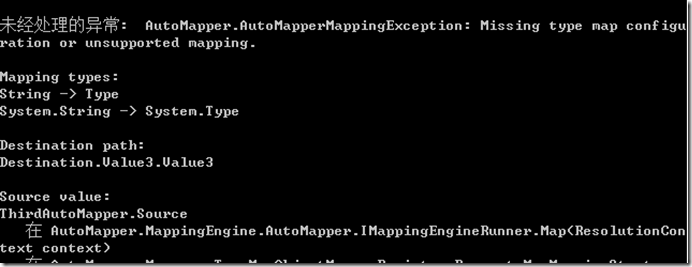
出现如下错误,但从错误看来,只有从string到Type类型映射时,出现了错误,其他两种类型呢?
现在我们将源类型和目标类型的第三个属性Value3注释掉,同时注释掉参与映射前的源类型对象的Value3属性,再来试一下。
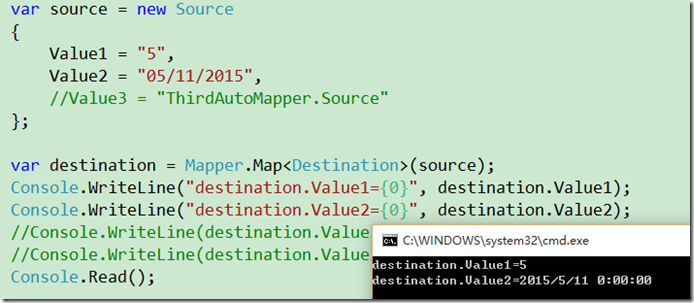
果然,发现映射成功。也就说说最新版的AutoMapper默认可以将string类型映射为int和DateTime类型了。但是string还是没办法映射为Type类型。
对于以上AutoMapper的API给出的三种转换方法,第一个选择只是输入一个源返回一个目标的函数,这对于简单场合是有效的,但是对于更大的案例会变得难以处理。在更复杂的情况下,我们可以一个自定义的类型转换器,通过实现ITypeConverter<TSource, TDestination>接口创建:
第一种方法:
public class CustomTypeConverter : ITypeConverter<Source, Destination>

{

    public Destination Convert(ResolutionContext context)

    {

        Source src = context.SourceValue as Source;

        var dest = new Destination

        {

            Value1 = System.Convert.ToInt32(src.Value1),

            Value2 = System.Convert.ToDateTime(src.Value2),

            Value3 = context.SourceType

        };

        return dest;

    }

}
然后给AutoMapper提供一个自定义类型的转换器或者AutoMapper在运行时能实例化的简化类型。对于上面的源/目标类型的映射配置就得以实现了:
修改Main方法中的代码为:
static void Main(string[] args)

{

    Mapper.CreateMap<Source, Destination>().ConvertUsing<CustomTypeConverter>();

    var source = new Source

    {

        Value1 = "",

        Value2 = "05/11/2015",

        Value3 = typeof(Source).ToString()
    };

    var destination = Mapper.Map<Destination>(source);

    Console.WriteLine("destination.Value1={0}", destination.Value1);

    Console.WriteLine("destination.Value2={0}", destination.Value2);

    Console.WriteLine(destination.Value3.ToString()==source.Value3);

    Console.WriteLine(destination.Value3);

    Console.Read();

}
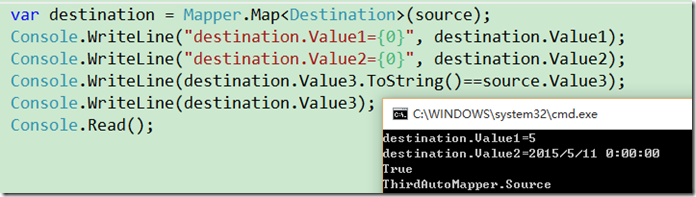
测试结果如下,映射成功!
第二种方法:
每个类型分别实现ITypeConverter接口:
public class DateTimeTypeConverter:ITypeConverter<string,DateTime>

{

    public DateTime Convert(ResolutionContext context)

    {

        return System.Convert.ToDateTime(context.SourceValue);

    }

}

public class TypeTypeConverter : ITypeConverter<string, Type>

{

    public Type Convert(ResolutionContext context)

    {

        return context.SourceValue == typeof(Source).ToString() ? typeof(Source) : typeof(Destination);

    }

}
static void Main(string[] args)

{

    //我看网上很多这种写法,包括官方文档,但是我这样写编译错误,可能是现在的AutoMapper不支持了吧

   // Mapper.CreateMap<string, int>().ConvertUsing( Convert.ToInt32);

    Mapper.CreateMap<string, int>().ConvertUsing((context, intNum) => Convert.ToInt32(context.SourceValue));

    Mapper.CreateMap<string, DateTime>().ConvertUsing(new DateTimeTypeConverter().Convert);

    Mapper.CreateMap<string, Type>().ConvertUsing<TypeTypeConverter>();

    Mapper.CreateMap<Source, Destination>();

    //Mapper.CreateMap<Source, Destination>().ConvertUsing<CustomTypeConverter>();

    var source = new Source

    {

        Value1 = "",

        Value2 = "05/11/2015",

        Value3 = typeof(Source).ToString()

    };

    var destination = Mapper.Map<Destination>(source);

    Console.WriteLine("destination.Value1={0}", destination.Value1);

    Console.WriteLine("destination.Value2={0}", destination.Value2);

    Console.WriteLine(destination.Value3.ToString()==source.Value3);

    Console.WriteLine(destination.Value3);

    Console.Read();

}
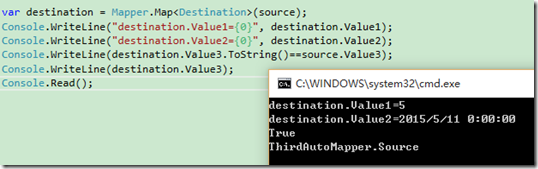
测试结果,同样完美通过。
AutoMapper(三)的更多相关文章
- NetCore+AutoMapper多个对象映射到一个Dto对象
目录 一. 定义源映射类和被映射类DTO二.注入AutoMapper三.配置映射四.写测试 一.定义源映射对象 为了体现AutoMapper映射特性,在SocialAttribute中的Name属性没 ...
- ABP源码分析三十一:ABP.AutoMapper
这个模块封装了Automapper,使其更易于使用. 下图描述了改模块涉及的所有类之间的关系. AutoMapAttribute,AutoMapFromAttribute和AutoMapToAttri ...
- DTO学习系列之AutoMapper(三)
本篇目录: Custom Type Converters-自定义类型转换器 Custom Value Resolvers-自定义值解析器 Null Substitution-空值替换 Containe ...
- 一步一步创建ASP.NET MVC5程序[Repository+Autofac+Automapper+SqlSugar](三)
前言 上一篇<一步一步创建ASP.NET MVC5程序[Repository+Autofac+Automapper+SqlSugar](二)>我们通过如下操作: 创建实体及工具类 创建Re ...
- 【AutoMapper官方文档】DTO与Domin Model相互转换(中)
写在前面 AutoMapper目录: [AutoMapper官方文档]DTO与Domin Model相互转换(上) [AutoMapper官方文档]DTO与Domin Model相互转换(中) [Au ...
- AutoMapper(二)
返回总目录 首先,先创建一个控制台项目,引用AutoMapper程序集,创建三个类User,UserDto,UserMappingProfile,下面的知识点的演示都以此项目为基础,代码分别如下: n ...
- 五步掌握OOM框架AutoMapper基本使用
本文版权归博客园和作者吴双本人共同所有,转载和爬虫请注明原文地址 www.cnblogs.com/tdws 写在前面 OOM顾名思义,Object-Object-Mapping实体间相互转换,Aut ...
- 使用Adminlite + ASP.NET MVC5(C#) + Entityframework + AutoFac + AutoMapper写了个api接口文档管理系统
一.演示: 接口查看:http://apidoc.docode.top/ 接口后台:http://apiadmin.docode.top/ 登录:administrator,123456 二.使用到的 ...
- AutoMapper使用手册(一)
阅读目录 1. 介绍 2. 基本使用 3. 自动分割映射(Flattening) 4. 自定义字段映射(Projection) 5. 验证配置(Configuration validation) 介绍 ...
随机推荐
- Database Replay和Consolidated Database replay
简介 在数据库的迁移和升级场景中,我们经常会遇到一个问题:在做压力测试时,如何模拟真实的业务压力,解决这个问题的方法有很多,比如:应用方开发模拟程序或者使用压力测试工具模拟,如load runner, ...
- 干货分享:让你分分钟学会 JS 闭包
闭包,是 Javascript 比较重要的一个概念,对于初学者来讲,闭包是一个特别抽象的概念,特别是ECMA规范给的定义,如果没有实战经验,很难从定义去理解它.因此,本文不会对闭包的概念进行大篇幅描述 ...
- 一个粗心的Bug,JSON格式不规范导致AJAX错误
一.事件回放 今天工作时碰到了一个奇怪的问题,这个问题很早很早以前也碰到过,不过没想到过这么久了竟然又栽在这里. 当时正在联调一个项目,由于后端没有提供数据接口,于是我直接本地建立了一个 json ...
- FREERTOS 手册阅读笔记
郑重声明,版权所有! 转载需说明. FREERTOS堆栈大小的单位是word,不是byte. 根据处理器架构优化系统的任务优先级不能超过32,If the architecture optimized ...
- Dapper逆天入门~强类型,动态类型,多映射,多返回值,增删改查+存储过程+事物案例演示
Dapper的牛逼就不扯蛋了,答应群友做个入门Demo的,现有园友需要,那么公开分享一下: 完整Demo:http://pan.baidu.com/s/1i3TcEzj 注 意 事 项:http:// ...
- angular2系列教程(九)Jsonp、URLSearchParams、中断选择数据流
大家好,今天我们要讲的是http模块的第二部分,主要学习ng2中Jsonp.URLSearchParams.observable中断选择数据流的用法. 例子
- SDWebImage源码解读之SDWebImageCache(上)
第五篇 前言 本篇主要讲解图片缓存类的知识,虽然只涉及了图片方面的缓存的设计,但思想同样适用于别的方面的设计.在架构上来说,缓存算是存储设计的一部分.我们把各种不同的存储内容按照功能进行切割后,图片缓 ...
- 开源一款简单清爽的日历组件,JavaScript版的
源码会在最后给出地址,需要的朋友自己去下载.最近项目需要做一个日程安排的功能,就是点击日历的某一天弹出一个录入页面,填完信息后保存当天的日程安排.有日程的日期会有不同的标记(比如加一个背景色啥的).网 ...
- jquery实现下拉框多选
一.说明 本文是利用EasyUI实现下拉框多选功能,在ComboxTree其原有的基础上对样式进行了改进,样式表已上传demo,代码如下 二.代码 <!DOCTYPE html PUBLIC & ...
- 让 asp.net 在 mac 上飞
.NET 不跨平台一直饱受争议,虽然微软前端时间放出些消息,要支持.NET跨平台的发展,但是微软一直坚持着不主动.不拒绝.不负责的三不态度,仍然用一种软件帝国的心态,折腾着一些毫无新意的东西.微软想要 ...