
19-21Consent Page页实现
1-在授权服务端建立相应的显示ViewModel
namespace MvcCookieAuthSample.Models

{

    public class ConsentViewModel

    {

        public string ClientId { get; set; }

        public string ClientName { get; set; }

        public string Client { get; set; }

        public string ClientLogUrl { get; set; }

        public bool AllowRememberConsent { get; set; }

        public string ClientUrl { get; set; }

        public IEnumerable<ScopeViewModel> IdentityScopes { get; set; }

        public IEnumerable<ScopeViewModel> ResourceScopes { get; set; }

    }

}
namespace MvcCookieAuthSample.Models

{

    public class ScopeViewModel

    {

        public string Name { get; set; }

        public string DisplayName { get; set; }

        public string Description { get; set; }

        public bool Emphasize { get; set; }

        public bool Required { get; set; }

        public bool Checked { get; set; }

    }

}
2-新建相应的授权页ConsentController,
using Microsoft.AspNetCore.Mvc;

using System;

using System.Collections.Generic;

using System.Linq;

using System.Threading.Tasks;

using IdentityServer4.Test;

using IdentityServer4.Services;

using IdentityServer4.Stores;

using MvcCookieAuthSample.Models;

using IdentityServer4.Models;

namespace MvcCookieAuthSample.Controllers

{

    public class ConsentController:Controller

    {

        private readonly IClientStore _clientStore;

        private readonly IResourceStore _resourceStore;

        private readonly IIdentityServerInteractionService _identityServerInteractionService;

        public ConsentController(

             IClientStore clientStore,

             IResourceStore resourceStore,

             IIdentityServerInteractionService identityServerInteractionService )

        {

            _clientStore = clientStore;

            _resourceStore = resourceStore;

            _identityServerInteractionService = identityServerInteractionService;

        }

        public async Task<IActionResult> Index(string returnUrl)

        {

            Models.ConsentViewModel model = await BuildConsentViewModel(returnUrl);

            if (model == null)

            {

            }

            return View(model);

        }

        private async Task<ConsentViewModel> BuildConsentViewModel(string returnUrl)

        {

            var request = await _identityServerInteractionService.GetAuthorizationContextAsync(returnUrl);

            if (request == null)

                return null;

            var client = await _clientStore.FindEnabledClientByIdAsync(request.ClientId);

            var resources = await _resourceStore.FindEnabledResourcesByScopeAsync(request.ScopesRequested);

            return CreateConsentViewModel(request, client, resources);

        }

        private ConsentViewModel CreateConsentViewModel(AuthorizationRequest request, Client client, Resources resources)

        {

            var vm = new ConsentViewModel();

            vm.ClientName = client.ClientName;

            vm.ClientLogUrl = client.LogoUri;

            vm.ClientUrl = client.ClientUri;

            vm.AllowRememberConsent = client.AllowRememberConsent;

            vm.IdentityScopes = resources.IdentityResources.Select(i=>CreateScopeViewModel(i));

            vm.ResourceScopes = resources.ApiResources.SelectMany(i=>i.Scopes).Select(i=>CreateScopeViewModel(i));

            return vm;

        }

        private ScopeViewModel CreateScopeViewModel(IdentityResource identityResource)

        {

            return new ScopeViewModel

            {

                Name = identityResource.Name,

                DisplayName = identityResource.DisplayName,

                Description = identityResource.Description,

                Required = identityResource.Required,

                Checked = identityResource.Required,

                Emphasize = identityResource.Emphasize

            };

        }

        private ScopeViewModel CreateScopeViewModel(Scope scope)

        {

            return new ScopeViewModel

            {

                Name = scope.Name,

                DisplayName = scope.DisplayName,

                Description = scope.Description,

                Required = scope.Required,

                Checked = scope.Required,

                Emphasize = scope.Emphasize

            };

        }

    }

}
3-编写相应的index.cshtml
@using MvcCookieAuthSample.ViewModel;

@model ConsentViewModel

<div class="row page-header">

    <div class="col-sm-10">

        @if (string.IsNullOrWhiteSpace(Model.ClientLogUrl))

        {

            <div>

                <img src="@Model.ClientLogUrl" />

            </div>

        }

        <h1>

            @Model.ClientName

            <small>希望使用你的账号</small>

        </h1>

    </div>

</div>

<div class="row">

    <form>

        @if (Model.IdentityScopes.Any())

        {

            <div class="panel">

                <div class="panel-heading">

                    <span class="glyphicon glyphicon-tasks"></span>

                    identity应用权限

                </div>

                <ul class="list-group">

                    @foreach (var scope in Model.IdentityScopes)

                    {

                        @await Html.PartialAsync("_ScopeListItem", scope);

                    }

                </ul>

            </div>

        }

        @if (Model.ResourceScopes.Any())

        {

            <div class="panel">

                <div class="panel-heading">

                    <span class="glyphicon glyphicon-tasks"></span>

                    resource应用权限

                </div>

                <ul class="list-group">

                    @foreach (var scope in Model.ResourceScopes)

                    {

                        await Html.PartialAsync("_ScopeListItem", scope);

                    }

                </ul>

            </div>

        }

    </form>

</div>
4- _ScopeListItem.cshtml分页视图
@*

    For more information on enabling MVC for empty projects, visit http://go.microsoft.com/fwlink/?LinkID=397860

*@

@using MvcCookieAuthSample.ViewModel;

@model ScopeViewModel

<li>

    <label>

        <input type="checkbox"

               name="ScopesConsented"

               id="scopes_@Model.Name"

               value="@Model.Name"

               checked="@Model.Checked"

               disabled="@Model.Required" />

        <strong>@Model.Name</strong>

        @if (Model.Emphasize)

        {

            <span class="glyphicon glyphicon-exclamation-sign"></span>

        }

    </label>

    @if (string.IsNullOrEmpty(Model.Description))

    {

        <div>

            <label for="scopes_@Model.Name"> @Model.Description</label>

        </div>

    }

</li>
5-Config.cs
namespace MvcCookieAuthSample

{

    public class Config

    {

        public static IEnumerable<ApiResource> GetApiResources() {

            return new List<ApiResource>() {

                 new ApiResource("api1","api DisplayName")

            };

        }

        public static IEnumerable<Client> GetClients()

        {

            return new List<Client>() {

                 new Client(){

                     ClientId="mvc",

                     ClientName="mvc Name",

                     ClientUri="http://localhost:5001",

                      AllowRememberConsent=true,

                      AllowedGrantTypes= GrantTypes.Implicit,

                      ClientSecrets= new List<Secret>(){

                          new Secret("secret".Sha256())

                      },

                      RedirectUris = {"http://localhost:5001/signin-oidc" },

                      PostLogoutRedirectUris = { "http://localhost/signout-callback-oidc"},

                      RequireConsent=true,//启用客户端手动授权

                      AllowedScopes={

                          IdentityServerConstants.StandardScopes.Profile,

                          IdentityServerConstants.StandardScopes.OpenId,

                      }

                 }

            };

        }

        public static IEnumerable<IdentityResource> GetIdentityResources()

        {

            return new List<IdentityResource>() {

                new IdentityResources.OpenId(),

               new IdentityResources.Email(),

               new IdentityResources.Profile()

            };

        }

        public static List<TestUser> GetTestUsers()

        {

            return new List<TestUser>() {

                 new TestUser(){

                       SubjectId="oa001",

                       Username="qinzb",

                       Password=""

                 }

            };

        }

    }

}
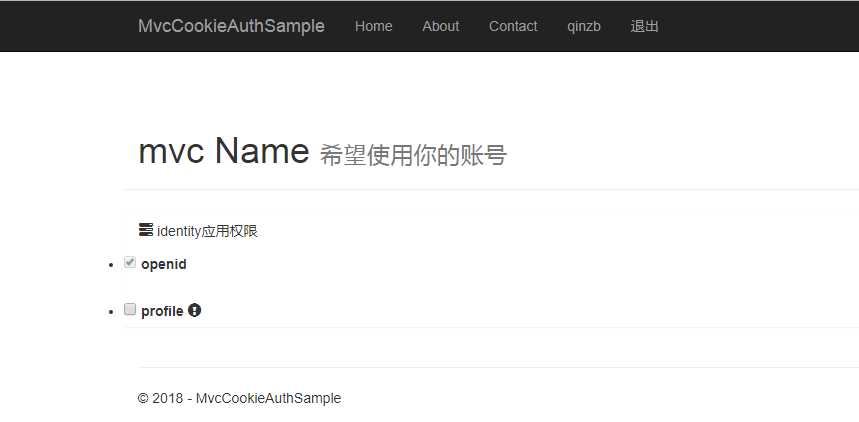
6-显示结果
19-21Consent Page页实现的更多相关文章
- page 页 分页 分段
小结: 1. 页:磁盘和内存间传输数据的最小单位: MySQL: What is a page? https://stackoverflow.com/questions/4401910/mysql-w ...
- 动态添加XtraTabControl的page页和子窗体
using System; using System.Collections.Generic; using System.Linq; using System.Reflection; using Sy ...
- angular -- ng-ui-route路由及其传递参数?page页面版
前面有说过 ng-ui-route 使用 script 标签来做,但是很多时候,会通过引入模板页面的方式来实现: 具体代码: <!DOCTYPE html> <html lang=& ...
- wordpress中page页添加非插件留言板功能
把下面的代码插入到page页面中即可 <!-- 留言板 --> <div class="wrap"> <div id="primary&qu ...
- 19、Page Object 实例
项目目录介绍: CalcuatorPage.java文件代码: package example; import io.appium.java_client.android.AndroidDriver; ...
- DBCC page 数据页 堆 底层数据分布大小计算
1.行的总大小: Row_Size = Fixed_Data_Size + Variable_Data_Size + Null_Bitmap + 4(4是指行标题开销) 开销定义: Fixed_Dat ...
- 复合页( Compound Page )
复合页(Compound Page)就是将物理上连续的两个或多个页看成一个 独立的大页,它能够用来创建hugetlbfs中使用的大页(hugepage). 也能够用来创建透明大页( ...
- 人人都是 DBA(VIII)SQL Server 页存储结构
当在 SQL Server 数据库中创建一张表时,会在多张系统基础表中插入所创建表的信息,用于管理该表.通过目录视图 sys.tables, sys.columns, sys.indexes 可以查看 ...
- Swift - 页控件(UIPageControl)的用法
使用页控件可以用来展示多个桌面.比如很多应用第一次登陆时,会在开始页面使用页控件来介绍功能,通过左右滑动来切换页. 通常我们使用UIPageControl和UIScrollView相互结合来实现多页切 ...
随机推荐
- Java 基本IO操作
1.基本IO操作 有时候我们编写的程序除了自身会定义一些数据信息外,还需要引用外界的数据,或是将自身的数据发送到外界,这时我们需要使用输入与输出. 1)输入与输出 输入:是一个从外 ...
- Spark Broadcast内幕解密:Broadcast运行机制彻底解密、Broadcast源码解析、Broadcast最佳实践
本课主题 Broadcast 运行原理图 Broadcast 源码解析 Broadcast 运行原理图 Broadcast 就是将数据从一个节点发送到其他的节点上; 例如 Driver 上有一张表,而 ...
- 【深入理解JAVA虚拟机】第5部分.高效并发.1.Java内存模型与线程。
1.概述 摩尔定律:描述处理器晶体管数量与运行效率之间的发展关系.Amdahl定律:通过系统中并行化与串行化的比重来描述多处理器系统能获得的运算加速能力. 从摩尔定律到Amdahl定律的转变,代表了近 ...
- LINQPad 编译调试C#代码的工具推荐
LinqPad介绍 学习C#代码的好帮手,很容易调试C#代码片段. LINQPad 4 支持.NET Framework 4.0 / 4.5 ,专业调试LINQ,lambda等特性,完全取代Snipp ...
- [原]Linux 命令行浏览器
真是没有做不到只有想不到! Linux下竟然有命令行式的浏览器:W3m SPC向下翻页 b向上翻页 J 向下滚动一行 K 向上滚动一行 > 右移一屏 < 左移一屏 TAB 转到下个超链接 ...
- 如何使用Excel选择整列排序
在excel中,排序的时候弹窗提示“若要执行此操作,所有合并单元格需大小相同”,该怎么操作才能实现排序呢?接下来,小编就和大家分享具体操作. 工具/原料 excel 方法/步骤 打开出 ...
- careercup-扩展性和存储限制10.6
题目 你有10亿个url,每个url对应一个非常大的网页.你怎么检测重复的网页? 解答 网页大,数量多,要把它们载入内存是不现实的. 因此我们需要一个更简短的方式来表示这些网页.而hash表正是干这事 ...
- jsp页面运行的步骤以及原理
1.jsp页面在服务器端的执行步骤: 1)将jsp页面翻译成java文件 2)编译 java-class 3)执行返回结果(html页面)给客户端. 2.jsp页面运行的原理: jsp在服务器端运行 ...
- Office365学习笔记—Xslt自定义列表视图
1,在Office365中需要添加自定义的视图!用Spd添加视图,这儿我添加一个testView! (1)打开testView.aspx将</ZoneTemplate>节点中的内容全部删除 ...
- java模拟浏览器发送请求
package test; import java.io.BufferedReader; import java.io.DataOutputStream; import java.io.IOExcep ...