
19-21Consent Page页实现
1-在授权服务端建立相应的显示ViewModel
namespace MvcCookieAuthSample.Models

{

    public class ConsentViewModel

    {

        public string ClientId { get; set; }

        public string ClientName { get; set; }

        public string Client { get; set; }

        public string ClientLogUrl { get; set; }

        public bool AllowRememberConsent { get; set; }

        public string ClientUrl { get; set; }

        public IEnumerable<ScopeViewModel> IdentityScopes { get; set; }

        public IEnumerable<ScopeViewModel> ResourceScopes { get; set; }

    }

}
namespace MvcCookieAuthSample.Models

{

    public class ScopeViewModel

    {

        public string Name { get; set; }

        public string DisplayName { get; set; }

        public string Description { get; set; }

        public bool Emphasize { get; set; }

        public bool Required { get; set; }

        public bool Checked { get; set; }

    }

}
2-新建相应的授权页ConsentController,
using Microsoft.AspNetCore.Mvc;

using System;

using System.Collections.Generic;

using System.Linq;

using System.Threading.Tasks;

using IdentityServer4.Test;

using IdentityServer4.Services;

using IdentityServer4.Stores;

using MvcCookieAuthSample.Models;

using IdentityServer4.Models;

namespace MvcCookieAuthSample.Controllers

{

    public class ConsentController:Controller

    {

        private readonly IClientStore _clientStore;

        private readonly IResourceStore _resourceStore;

        private readonly IIdentityServerInteractionService _identityServerInteractionService;

        public ConsentController(

             IClientStore clientStore,

             IResourceStore resourceStore,

             IIdentityServerInteractionService identityServerInteractionService )

        {

            _clientStore = clientStore;

            _resourceStore = resourceStore;

            _identityServerInteractionService = identityServerInteractionService;

        }

        public async Task<IActionResult> Index(string returnUrl)

        {

            Models.ConsentViewModel model = await BuildConsentViewModel(returnUrl);

            if (model == null)

            {

            }

            return View(model);

        }

        private async Task<ConsentViewModel> BuildConsentViewModel(string returnUrl)

        {

            var request = await _identityServerInteractionService.GetAuthorizationContextAsync(returnUrl);

            if (request == null)

                return null;

            var client = await _clientStore.FindEnabledClientByIdAsync(request.ClientId);

            var resources = await _resourceStore.FindEnabledResourcesByScopeAsync(request.ScopesRequested);

            return CreateConsentViewModel(request, client, resources);

        }

        private ConsentViewModel CreateConsentViewModel(AuthorizationRequest request, Client client, Resources resources)

        {

            var vm = new ConsentViewModel();

            vm.ClientName = client.ClientName;

            vm.ClientLogUrl = client.LogoUri;

            vm.ClientUrl = client.ClientUri;

            vm.AllowRememberConsent = client.AllowRememberConsent;

            vm.IdentityScopes = resources.IdentityResources.Select(i=>CreateScopeViewModel(i));

            vm.ResourceScopes = resources.ApiResources.SelectMany(i=>i.Scopes).Select(i=>CreateScopeViewModel(i));

            return vm;

        }

        private ScopeViewModel CreateScopeViewModel(IdentityResource identityResource)

        {

            return new ScopeViewModel

            {

                Name = identityResource.Name,

                DisplayName = identityResource.DisplayName,

                Description = identityResource.Description,

                Required = identityResource.Required,

                Checked = identityResource.Required,

                Emphasize = identityResource.Emphasize

            };

        }

        private ScopeViewModel CreateScopeViewModel(Scope scope)

        {

            return new ScopeViewModel

            {

                Name = scope.Name,

                DisplayName = scope.DisplayName,

                Description = scope.Description,

                Required = scope.Required,

                Checked = scope.Required,

                Emphasize = scope.Emphasize

            };

        }

    }

}
3-编写相应的index.cshtml
@using MvcCookieAuthSample.ViewModel;

@model ConsentViewModel

<div class="row page-header">

    <div class="col-sm-10">

        @if (string.IsNullOrWhiteSpace(Model.ClientLogUrl))

        {

            <div>

                <img src="@Model.ClientLogUrl" />

            </div>

        }

        <h1>

            @Model.ClientName

            <small>希望使用你的账号</small>

        </h1>

    </div>

</div>

<div class="row">

    <form>

        @if (Model.IdentityScopes.Any())

        {

            <div class="panel">

                <div class="panel-heading">

                    <span class="glyphicon glyphicon-tasks"></span>

                    identity应用权限

                </div>

                <ul class="list-group">

                    @foreach (var scope in Model.IdentityScopes)

                    {

                        @await Html.PartialAsync("_ScopeListItem", scope);

                    }

                </ul>

            </div>

        }

        @if (Model.ResourceScopes.Any())

        {

            <div class="panel">

                <div class="panel-heading">

                    <span class="glyphicon glyphicon-tasks"></span>

                    resource应用权限

                </div>

                <ul class="list-group">

                    @foreach (var scope in Model.ResourceScopes)

                    {

                        await Html.PartialAsync("_ScopeListItem", scope);

                    }

                </ul>

            </div>

        }

    </form>

</div>
4- _ScopeListItem.cshtml分页视图
@*

    For more information on enabling MVC for empty projects, visit http://go.microsoft.com/fwlink/?LinkID=397860

*@

@using MvcCookieAuthSample.ViewModel;

@model ScopeViewModel

<li>

    <label>

        <input type="checkbox"

               name="ScopesConsented"

               id="scopes_@Model.Name"

               value="@Model.Name"

               checked="@Model.Checked"

               disabled="@Model.Required" />

        <strong>@Model.Name</strong>

        @if (Model.Emphasize)

        {

            <span class="glyphicon glyphicon-exclamation-sign"></span>

        }

    </label>

    @if (string.IsNullOrEmpty(Model.Description))

    {

        <div>

            <label for="scopes_@Model.Name"> @Model.Description</label>

        </div>

    }

</li>
5-Config.cs
namespace MvcCookieAuthSample

{

    public class Config

    {

        public static IEnumerable<ApiResource> GetApiResources() {

            return new List<ApiResource>() {

                 new ApiResource("api1","api DisplayName")

            };

        }

        public static IEnumerable<Client> GetClients()

        {

            return new List<Client>() {

                 new Client(){

                     ClientId="mvc",

                     ClientName="mvc Name",

                     ClientUri="http://localhost:5001",

                      AllowRememberConsent=true,

                      AllowedGrantTypes= GrantTypes.Implicit,

                      ClientSecrets= new List<Secret>(){

                          new Secret("secret".Sha256())

                      },

                      RedirectUris = {"http://localhost:5001/signin-oidc" },

                      PostLogoutRedirectUris = { "http://localhost/signout-callback-oidc"},

                      RequireConsent=true,//启用客户端手动授权

                      AllowedScopes={

                          IdentityServerConstants.StandardScopes.Profile,

                          IdentityServerConstants.StandardScopes.OpenId,

                      }

                 }

            };

        }

        public static IEnumerable<IdentityResource> GetIdentityResources()

        {

            return new List<IdentityResource>() {

                new IdentityResources.OpenId(),

               new IdentityResources.Email(),

               new IdentityResources.Profile()

            };

        }

        public static List<TestUser> GetTestUsers()

        {

            return new List<TestUser>() {

                 new TestUser(){

                       SubjectId="oa001",

                       Username="qinzb",

                       Password=""

                 }

            };

        }

    }

}
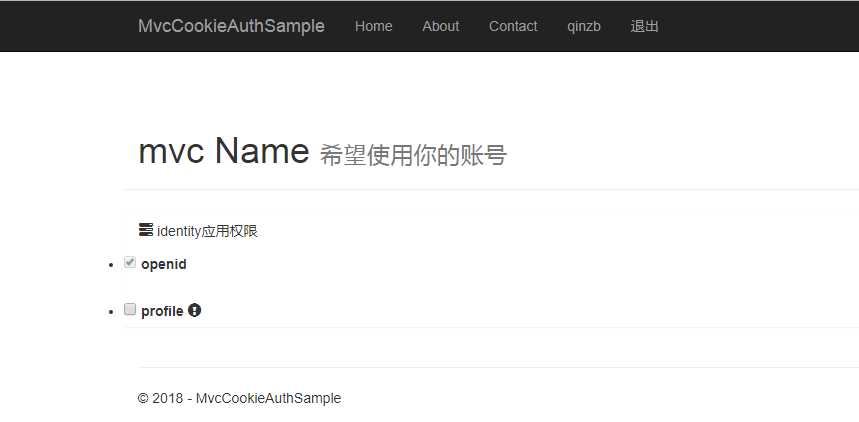
6-显示结果
19-21Consent Page页实现的更多相关文章
- page 页 分页 分段
小结: 1. 页:磁盘和内存间传输数据的最小单位: MySQL: What is a page? https://stackoverflow.com/questions/4401910/mysql-w ...
- 动态添加XtraTabControl的page页和子窗体
using System; using System.Collections.Generic; using System.Linq; using System.Reflection; using Sy ...
- angular -- ng-ui-route路由及其传递参数?page页面版
前面有说过 ng-ui-route 使用 script 标签来做,但是很多时候,会通过引入模板页面的方式来实现: 具体代码: <!DOCTYPE html> <html lang=& ...
- wordpress中page页添加非插件留言板功能
把下面的代码插入到page页面中即可 <!-- 留言板 --> <div class="wrap"> <div id="primary&qu ...
- 19、Page Object 实例
项目目录介绍: CalcuatorPage.java文件代码: package example; import io.appium.java_client.android.AndroidDriver; ...
- DBCC page 数据页 堆 底层数据分布大小计算
1.行的总大小: Row_Size = Fixed_Data_Size + Variable_Data_Size + Null_Bitmap + 4(4是指行标题开销) 开销定义: Fixed_Dat ...
- 复合页( Compound Page )
复合页(Compound Page)就是将物理上连续的两个或多个页看成一个 独立的大页,它能够用来创建hugetlbfs中使用的大页(hugepage). 也能够用来创建透明大页( ...
- 人人都是 DBA(VIII)SQL Server 页存储结构
当在 SQL Server 数据库中创建一张表时,会在多张系统基础表中插入所创建表的信息,用于管理该表.通过目录视图 sys.tables, sys.columns, sys.indexes 可以查看 ...
- Swift - 页控件(UIPageControl)的用法
使用页控件可以用来展示多个桌面.比如很多应用第一次登陆时,会在开始页面使用页控件来介绍功能,通过左右滑动来切换页. 通常我们使用UIPageControl和UIScrollView相互结合来实现多页切 ...
随机推荐
- 设计模式:观察者(Observer)模式
设计模式:观察者(Observer)模式 一.前言 观察者模式其实最好的名称应该是“发布订阅”模式,和我们现在大数据之中的发布订阅方式比较类似,但是也有区别的地方,在上一个设计模式,我们学习的是仲 ...
- February 18 2017 Week 7 Saturday
It is not easy to meet each other in such a big world. 世界这么大,能遇见不容易. Sometimes we choose to trust in ...
- Ubuntu Tweak (linux下的优化大师)
Ubuntu Tweak 是中国人开发的一款专门为Ubuntu准备的配置.调整工具,它类似与compiz,但是界面更友好. 下面是安装命令: 第一步:添加tweak源 sudo add-apt-rep ...
- UOJ #62. 【UR #5】怎样跑得更快
题目分析 显然不可能高斯消元. 考虑反演. \(b_i=\sum\limits_{j=1}^n\gcd(i,j)^C\cdot \text{lcm}(i,j)^D\cdot x_j\) \(b_i=\ ...
- BZOJ1037:[ZJOI2008]生日聚会Party(DP)
Description 今天是hidadz小朋友的生日,她邀请了许多朋友来参加她的生日party.hidadz带着朋友们来到花园中,打算坐成一排玩游戏. 为了游戏不至于无聊,就座的方案应满足如下条件: ...
- PHP 中的 cURL 爬虫实战基础
最近准备入手 PHP 爬虫,发现 PHP 的 cURL 这一知识点不可越过.本文探讨基础实战,需要提前了解命令行的使用并会进行 PHP 的环境搭建. cURL 的概念 cURL,Client URL ...
- DataTable和Json的相互转换
1 #region DataTable 转换为Json字符串实例方法 2 /// <summary> 3 /// GetClassTypeJosn 的摘要说明 4 /// </sum ...
- C#XML格式字符串取节点数据
XML格式的字符串: <xml><return_code><![CDATA[{0}]]></return_code><return_msg> ...
- div拖动
<!DOCTYPE html><html xmlns:th="http://www.thymeleaf.org"><head> <meta ...
- Nginx自定义模块编写:根据post参数路由到不同服务器
Nginx自定义模块编写:根据post参数路由到不同服务器 2014-05-05 15:27 blogread IT技术博客 字号:T | T Nginx可以轻松实现根据不同的url 或者 get参数 ...