
AssemblyExecuteAdapter
BizTalk custom adapter
AssemblyExecuteAdapter
功能
更为方便的扩展BizTalk custom adapter 的交互方式,只需要实现IAssemblyExecute 接口就可以让BizTalk AssemblyExecuteAdapter 执行需要的业务逻辑。
代码
AssemblyExecuteAdapterTransmitterEndpoint.cs
通过配置需要加载的dll 文件来执行dll 内部处理逻辑
private Stream SendAssemblyExecuteAdapterRequest(IBaseMessage msg, AssemblyExecuteAdapterTransmitProperties config)
{
VirtualStream responseStream = null;
string charset = string.Empty;
IBaseMessagePart bodyPart = msg.BodyPart;
Stream btsStream;
string messageid = msg.MessageID.ToString("D");
if (null != bodyPart && (null != (btsStream = bodyPart.GetOriginalDataStream())))
{
try
{
Type assemblyExecuteType = Type.GetType(config.AssemblyName);
IAssemblyExecute assemblyexecute = (IAssemblyExecute)Activator.CreateInstance(assemblyExecuteType);
object inputparameters = null;
if (!string.IsNullOrEmpty(config.InputParameterXml))
{
XmlDocument inputXml = new XmlDocument();
inputXml.LoadXml(config.InputParameterXml);
inputparameters = assemblyexecute.GetInputParameter(inputXml);
}
Stream stream = assemblyexecute.ExecuteResponse(btsStream, inputparameters);
#region saveresponsemessage
string responsefilename = string.Empty;
if (config.SaveResponseMessagePath != string.Empty && config.SaveResponseMessagePath != "N")
{
if (!Directory.Exists(config.SaveResponseMessagePath))
Directory.CreateDirectory(config.SaveResponseMessagePath);
responsefilename = Path.Combine(config.SaveResponseMessagePath, "res_" + messageid + ".txt");
SaveFile(responsefilename, stream);
stream.Seek(0, SeekOrigin.Begin);
}
#endregion
if (config.IsTwoWay)
{
responseStream = new VirtualStream(stream);
}
}
catch(Exception e)
{
#region saveerrormessage
string errorfilename = string.Empty;
if (config.SaveErrorMessagePath != string.Empty && config.SaveErrorMessagePath != "N") {
if (!Directory.Exists(config.SaveErrorMessagePath))
Directory.CreateDirectory(config.SaveErrorMessagePath);
errorfilename = Path.Combine(config.SaveErrorMessagePath ,messageid + ".txt");
SaveFile(errorfilename, btsStream);
}
#endregion
string Source = "AssemblyExecuteAdapter";
string Log = "Application";
string Event = e.Message + "\r\n request message saved :" + errorfilename;
if (!EventLog.SourceExists(Source))
EventLog.CreateEventSource(Source, Log);
EventLog.WriteEntry(Source, Event, EventLogEntryType.Error);
throw;
}
}
return responseStream;
}
配置
配置发送端口
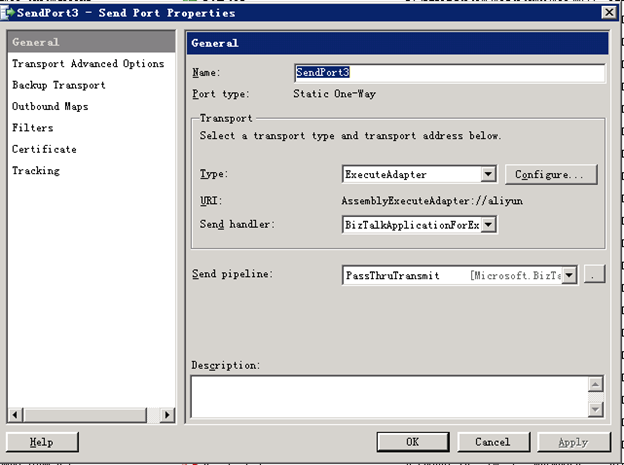
配置参数
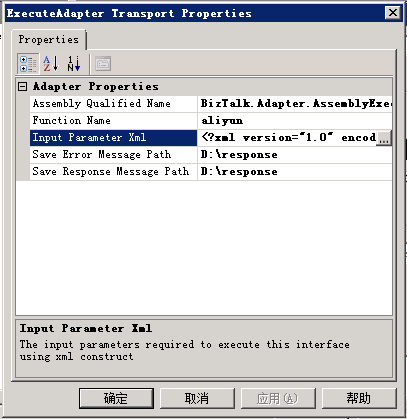
Assembly qualified name:实现了IAssemblyExecute接口的dll文件
Function Name: 这个adapter的功能名称,确保唯一
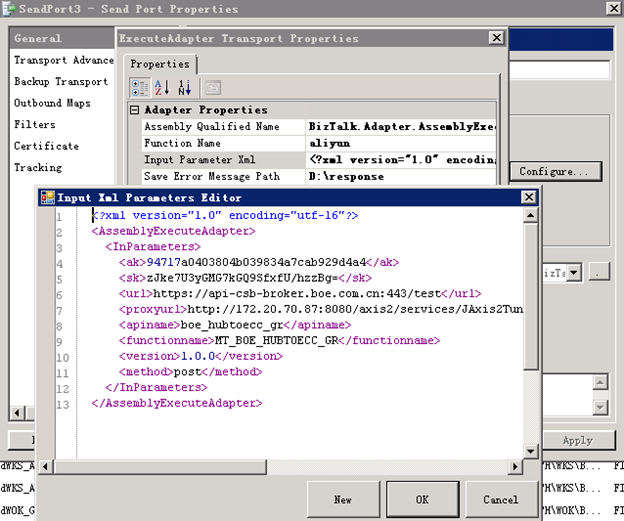
Input Parameter Xml: 执行ExecuteResponse需要的参数以XML的形式提供
Save Error Message Path:保存错误报文的路径
Save Response Message Path:保存执行ExecuteResponse方法返回的结果
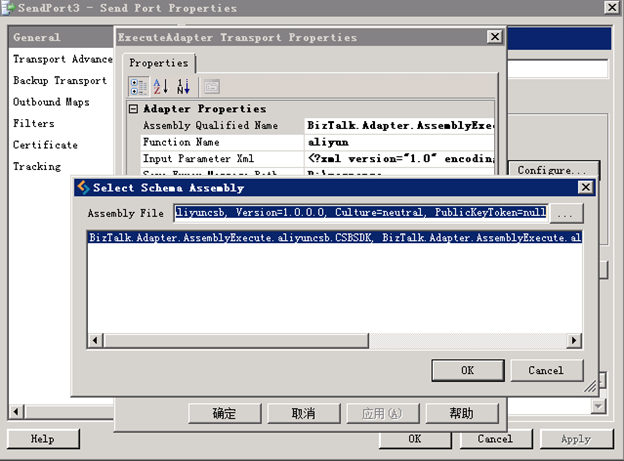
选择实现了IAssemblyExecute 接口的dll文件
编辑输入参数
AssemblyExecuteAdapter的更多相关文章
随机推荐
- 常用Oracle进程资源查询语句(运维必看)
(一)根据程序名称查找相关信息select A.process,B.spid,A.sid,A.serial#,A.sql_address,A.username,A.program,A.status,A ...
- 使用netflix Zuul 代理你的微服务
构建 "微服务" 时的一个常见挑战是为系统的使用者提供一个统一的接口.您的服务被分割成一个个积木式的小程序,事实上这些细节本不应该对用户可见. 为了解决这个问题, Netflix ...
- Topshelf 一个简化Windows服务开发的宿主服务框架
Topshelf是 基于.net框架开发的宿主服务框架.该框架简化了服务的创建,开发人员只需要使用 Topshelf编写一个控制台程序,就能安装为Windows服务.之所以这样原因非常简单:调试一个控 ...
- C# Redis实战(五)
五.删除数据 在C# Redis实战(四)中讲述了如何在Redis中写入key-value型数据,本篇将讲述如何删除Redis中数据. 1.void Delete(T entity);删除函数的运用 ...
- htop命令使用详解
一.htop 简介 htop 是Linux系统中的一个互动的进程查看器,一个文本模式的应用程序(在控制台或者X终端中),需要ncurses.与Linux传统的top相比,htop更加人性化.它可让用户 ...
- Lastpass——密码管理工具
Lastpass是一个优秀的在线密码管理器和页面过滤器,采用了强大的加密算法,自动登录/云同步/跨平台/支持多款浏览器. 我之前一直都在使用这个工具,不过都是在浏览器上以扩展的方式使用,在火狐浏览器上 ...
- asp.net-基础-20180319
建立动态web . .net的一部分. HTML:超文本标记语言.WWW浏览器上文档的格式化语言. HTTP:超文本传输协议.WWW浏览器与服务器应用层通信协议. 静态页面:不需要服务器额外代码处理的 ...
- IP地址与域名的关系
1.IP地址:IP地址是用来唯一标识互联网上计算机的逻辑地址,让电脑之间可以相互通信. 每台连网计算机都依靠IP地址来互相区分.相互联系 2.域名:由于IP地址是数字标识,使用时难以记忆和书写,因此在 ...
- 智能合约语言 Solidity 教程系列2 - 地址类型介绍
Solidity教程系列第二篇 - Solidity地址类型介绍. 写在前面 Solidity是以太坊智能合约编程语言,阅读本文前,你应该对以太坊.智能合约有所了解,如果你还不了解,建议你先看以太坊是 ...
- go语言defer panic recover用法总结
defer defer是go提供的一种资源处理的方式.defer的用法遵循3个原则 在defer表达式被运算的同时,defer函数的参数也会被运算.如下defer的表达式println运算的同时,其入 ...