
eclipse springmvc+Thymeleaf
修改pom.xml引入Thymeleaf相关包:
<project xmlns="http://maven.apache.org/POM/4.0.0"

    xmlns:xsi="http://www.w3.org/2001/XMLSchema-instance"

    xsi:schemaLocation="http://maven.apache.org/POM/4.0.0 http://maven.apache.org/maven-v4_0_0.xsd">

    <modelVersion>4.0.0</modelVersion>

    <groupId>xuan</groupId>

    <artifactId>springmvc</artifactId>

    <packaging>war</packaging>

    <version>0.0.1-SNAPSHOT</version>

    <name>springmvc Maven Webapp</name>

    <url>http://maven.apache.org</url>

    <properties>

        <spring.version>4.1.3.RELEASE</spring.version>

        <thymeleaf.version>2.1.2.RELEASE</thymeleaf.version>

    </properties>

    <dependencies>

        <dependency>

            <groupId>junit</groupId>

            <artifactId>junit</artifactId>

            <version>3.8.1</version>

            <scope>test</scope>

        </dependency>

        <dependency>

            <groupId>org.springframework</groupId>

            <artifactId>spring-core</artifactId>

            <version>${spring.version}</version>

        </dependency>

        <dependency>

            <groupId>org.springframework</groupId>

            <artifactId>spring-web</artifactId>

            <version>${spring.version}</version>

        </dependency>

        <dependency>

            <groupId>org.springframework</groupId>

            <artifactId>spring-webmvc</artifactId>

            <version>${spring.version}</version>

        </dependency>

        <dependency>

            <groupId>org.springframework</groupId>

            <artifactId>spring-beans</artifactId>

            <version>${spring.version}</version>

        </dependency>

        <dependency>

            <groupId>org.thymeleaf</groupId>

            <artifactId>thymeleaf-spring4</artifactId>

            <version>${thymeleaf.version}</version>

        </dependency>

        <dependency>

            <groupId>org.thymeleaf</groupId>

            <artifactId>thymeleaf</artifactId>

            <version>${thymeleaf.version}</version>

        </dependency>

    </dependencies>

    <build>

        <finalName>springmvc</finalName>

    </build>

</project>
修改springmvc-servlet.xml:
<?xml version="1.0" encoding="UTF-8"?>

<beans xmlns="http://www.springframework.org/schema/beans"

    xmlns:xsi="http://www.w3.org/2001/XMLSchema-instance"

    xmlns:p="http://www.springframework.org/schema/p"

    xmlns:mvc="http://www.springframework.org/schema/mvc"

    xmlns:context="http://www.springframework.org/schema/context"

    xmlns:util="http://www.springframework.org/schema/util"

    xsi:schemaLocation="http://www.springframework.org/schema/beans http://www.springframework.org/schema/beans/spring-beans-3.0.xsd

            http://www.springframework.org/schema/context http://www.springframework.org/schema/context/spring-context-3.0.xsd

            http://www.springframework.org/schema/mvc http://www.springframework.org/schema/mvc/spring-mvc-3.0.xsd

            http://www.springframework.org/schema/util http://www.springframework.org/schema/util/spring-util-3.0.xsd">

    <!-- 激活@Controller模式 -->

    <mvc:annotation-driven />

    <!-- 对包中的所有类进行扫描,以完成Bean创建和自动依赖注入的功能 需要更改 -->

    <context:component-scan

        base-package="org.xuan.springmvc.controller" />

    <mvc:resources location="/static/" mapping="/static/**" />

    <!-- 模板解析器 -->

    <bean id="templateResolver"

        class="org.thymeleaf.templateresolver.ServletContextTemplateResolver">

        <property name="prefix" value="/WEB-INF/templates/" />

        <property name="suffix" value=".html" />

        <property name="templateMode" value="HTML5" />

        <property name="cacheable" value="false" />

        <property name="characterEncoding" value="UTF-8" />

    </bean>

    <bean id="templateEngine"

        class="org.thymeleaf.spring4.SpringTemplateEngine">

        <property name="templateResolver" ref="templateResolver" />

    </bean>

    <bean class="org.thymeleaf.spring4.view.ThymeleafViewResolver">

        <property name="templateEngine" ref="templateEngine" />

        <property name="characterEncoding" value="UTF-8" />

    </bean>

</beans>
在WEB-INF下面新建templates目录,在templates下面新建hello.html:
<html xmlns:th="http://www.thymeleaf.org">

<head>

<meta charset="UTF-8" />

<script type="text/javascript" src="static/js/jquery-1.10.2.min.js"

    th:src="@{/static/js/jquery-1.10.2.min.js}"></script>

<script th:inline="javascript">

  $(function(){

   var _ctx = [[${application.ctx}]];

    alert("Project ContextPath:"+_ctx);

    alert("路径:"+$("#ctx").val());

  });

</script>

<title>Spring MVC + Thymeleaf Example</title>

</head>

<body>

    <!-- Project ContextPath -->

    <input type="hidden" id="ctx" th:value="${application.ctx}" /> Hello,

    <span th:text="${name}" />!

    <br /> Hello,

    <span th:text="${query}" />!

    <br /> Hello,

    <span th:text="${submit}" />!

    <br />

    <a th:href="@{/query?name=a_href}"> query</a>

    <br />

    <form th:action="@{/submit}">

        <input type="text" name="name" /><input type="text" name="age" />

        <button type="submit">submit</button>

    </form>

</body>

</html>
修改MainController.java:
package org.xuan.springmvc.controller;

import org.springframework.stereotype.Controller;

import org.springframework.ui.ModelMap;

import org.springframework.web.bind.annotation.PathVariable;

import org.springframework.web.bind.annotation.RequestMapping;

import org.springframework.web.bind.annotation.RequestMethod;

import org.springframework.web.bind.annotation.RequestParam;

import org.springframework.web.servlet.ModelAndView;

@Controller

public class MainController {

    @RequestMapping(value = "/{name}", method = RequestMethod.GET)

    public String getMovie(@PathVariable String name, ModelMap model) {

        model.addAttribute("name", name);

        model.addAttribute("query", "");

        model.addAttribute("submit", "");

        return "hello";

    }

    @RequestMapping(value = "/query", method = RequestMethod.GET)

    public String query(@RequestParam("name") String name, ModelMap model) {

        model.addAttribute("name", "");

        model.addAttribute("query", name);

        model.addAttribute("submit", "");

        return "hello";

    }

    @RequestMapping(value = "/submit", method = RequestMethod.GET)

    public String submit(@RequestParam("name") String name, @RequestParam("age") String age, ModelMap model) {

        model.addAttribute("name", "");

        model.addAttribute("query", "");

        model.addAttribute("submit", name + age);

        return "hello";

    }

}
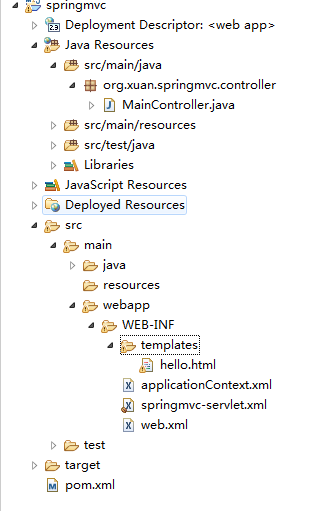
整个项目的目录结构如下:
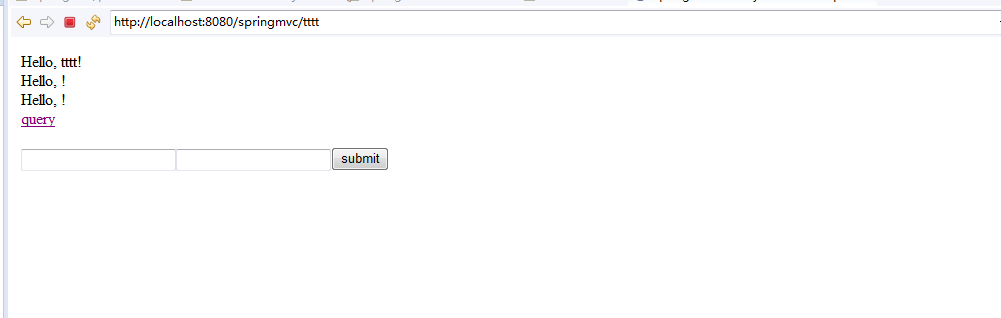
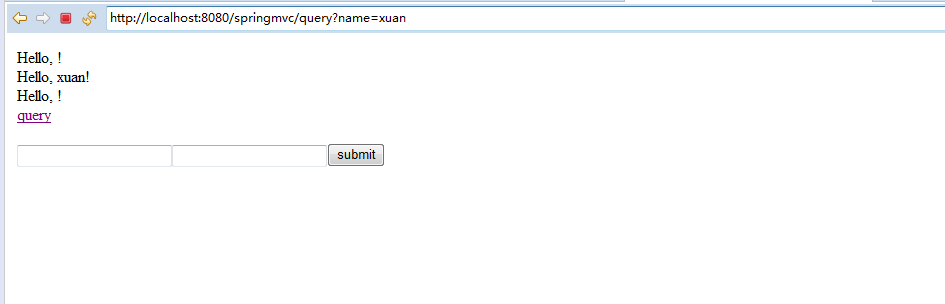
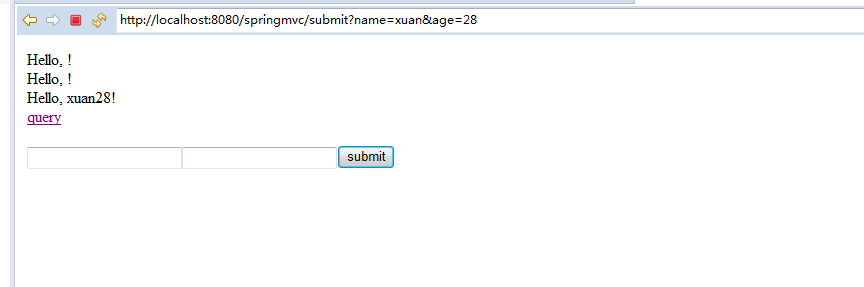
运行效果:
1
2
3
eclipse springmvc+Thymeleaf的更多相关文章
- SpringMvc+thymeleaf+HTML5中文乱码问题
SpringMvc+thymeleaf+HTML5环境下遇到中文乱码...... 按照以往经验逐个排查,开发环境统一为utf-8编码,服务器也配置了编码过滤器,tomcat也是utf-8编码.前台页面 ...
- 第6章—渲染web视图—SpringMVC+Thymeleaf 处理表单提交
SpringMVC+Thymeleaf 处理表单提交 thymleaf处理表单提交的方式和jsp有些类似,也有点不同之处,这里操作一个小Demo,并说明: 1.demo的结构图如下所示: pom.xm ...
- SpringMVC+Thymeleaf 简单使用
一.简介 1.Thymeleaf 在有网络和无网络的环境下皆可运行,而且完全不需启动WEB应用,即它可以让美工在浏览器查看页面的静态效果,也可以让程序员在服务器查看带数据的动态页面效果.浏览器解释 h ...
- 关于eclipse使用thymeleaf时,提示标签不显示及后续问题的解方法
因为thymeleaf 使用快捷键提示,不提示标签信息. 在使用网上说的的install new software安装插件的时候 报错: Unable to read repository at ht ...
- springmvc+thymeleaf搭建框架启动报错
最近项目开发需要用到thymeleaf前端界面模板引擎,所以提前了解学习一下,但是在框架搭建好了之后启动tomcat一直提示如下错误: org.springframework.beans.factor ...
- SpringMVC+Thymeleaf +HTML的简单框架
一.问题 项目中需要公众号开发,移动端使用的是H5,但是如果不用前端框架的话,只能考虑JS前端用ajax解析JSON字符串了.今天我们就简单的说下前端框架Thymeleaf如何解决这个问题的: 二.开 ...
- 【springmvc thymeleaf】springmvc整合thymeleaf
概述 Thymeleaf提供了一组Spring集成,使您可以将其用作Spring MVC应用程序中JSP的全功能替代品. 这些集成将使您能够: @Controller像使用JSP一样,将Spring ...
- 解决SpringMVC+Thymeleaf中文乱码
乱码效果截图 解决办法:在org.thymeleaf.templateresolver.ServletContextTemplateResolver和org.thymeleaf.spring5.vie ...
- UndertowServer+SpringMVC+Thymeleaf模板引擎构建轻量级的web项目
这两周需要写一个页面来请求另一个服务中的接口,服务器采用了超轻量级的undertow,模板引擎采用的是Thymeleaf,在寻找页面资源位置这个地方难住了我.下面分享一下,这方面的代码. Spring ...
随机推荐
- AngularJS进阶(二十二)实现时间选择插件
JS实现时间选择插件 引导语 在项目开发过程中,需要实现根据以日期为筛选条件之一,故需要实现时间选择插件.对于未接触的新事物,自己总是感觉不明觉厉.其实,有些实现可以使用很简单的方法即可.以此为例,偶 ...
- 菜鸟玩云计算之十九:Hadoop 2.5.0 HA 集群安装第2章
菜鸟玩云计算之十九:Hadoop 2.5.0 HA 集群安装第2章 cheungmine, 2014-10-26 在上一章中,我们准备好了计算机和软件.本章开始部署hadoop 高可用集群. 2 部署 ...
- 一键安装 redmine on windows 和发邮件设置
一键安装 redmine on windows 和发邮件设置 1)使用http://bitnami.org/stack/redmine一键安装redmine (windows). 2)修改下面的文件: ...
- Shell Scripts - 循环while,until,for
while...do...done until...do...done for...do...done
- 在linux下搭建STM32工程
转载自康神博客:http://blog.csdn.net/u013298300/article/details/50243935 在LINUX下开始一个STM32工程 在LINUX下开始一个STM32 ...
- 熊猫猪新系统测试之二:Mac OS X 10.10 优胜美地
在第一篇windows 10技术预览版测试之后,本猫为大家呈现另一个刚刚才更新的mac操作系统:"优胜美地".苹果同样一改以猫科动物为代号命名的传统,在10.9的Mavericks ...
- MariaDB/MySQL用户和权限管理
本文目录: 1.权限验证 1.1 权限表 1.2 图解认证和权限分配的两个阶段 1.3 权限生效时机 2.用户管理 2.1 创建用户 2.2 create user和alter user 2.3 记录 ...
- struts2.1.8+hibernate2.5.6+spring3.0(ssh2三大框架)常见异常原因和解决方案
---------------------------------------------------------------------------------------------------- ...
- 致IT之路的先驱者和旅人
1,图灵和香农 故事的开始,要从计算机之父图灵和信息论的创始人香农开始说起.图灵最大的贡献是发明了图灵机,关于图灵机如果要让人明白究竟有什么用,从如何实现一个半导体电路图灵机这方面理解比较好.只要一个 ...
- iframe中 父页面和子页面查找元素的方法
从父页面中查找iframe子页面中对象的方法:JS: document.getElementById('iframe').contentWindow //查找iframe加载的页面的window对象 ...