
Allow Only Ajax Requests For An Action In ASP.NET Core
ASP.NET Core offers attributes such as [HttpGet] and [HttpPost] that allow you to restrict the HTTP verbs used to invoke an action. You can also use HttpRequest object's Method property to detect the HTTP verb behind the current request. However, at times you need to know whether a request is an Ajax request or not. You may also need to restrict an action only to Ajax calls. Although thee is no inbuilt way to accomplish this task, you can easily implement such a feature in your application. This article discusses how.
Detecting HTTP method and Ajax request
In order to know the HTTP method being used by the current request you can use the following line of code :
string method = HttpContext.Request.Method;
The HttpRequest object's Method property returns HTTP verb being used by the current request such as GET and POST.
Detecting whether a request is an Ajax request or not requires a bit of different code. The Method property will return the HTTP method whether a request is an Ajax request or otherwise. So, you need to check a special HTTP header. The following line of code shows that :
string requestedWith =

HttpContext.Request.Headers["X-Requested-With"];
The X-Requested-With header returns a string that indicates whether it's an Ajax request or not. An Ajax request will have this header set to XMLHttpRequest. This header value won't be present for normal GET and POST requests (non-Ajax requests).
Ok. So, how do we ensure that our action code gets invoked only if it's an Ajax request. Let's write a fragment of code :
public IActionResult Index()

{

    string method = HttpContext.Request.Method;

    string requestedWith =

HttpContext.Request.Headers["X-Requested-With"];

    if (method=="POST")

    {

        if(requestedWith == "XMLHttpRequest")

        {

            // code goes here

        }

    }

    return View();

}
Suppose we want to ensure that our action code gets executed only when it's an Ajax POST request. The above piece of code does just that.
Extension method that detects an Ajax request
Although the above piece of code works as expected, it lacks reusability. Let's make it easy to use by wrapping it in an extension method to HttpRequest object.
public static class HttpRequestExtensionMethods

{

    public static bool IsAjax(this

HttpRequest request, string httpVerb = "")

    {

        if (request == null)

        {

            throw new ArgumentNullException

("Request object is Null.");

        }

        if (!string.IsNullOrEmpty(httpVerb))

        {

            if (request.Method != httpVerb)

            {

                return false;

            }

        }

        if (request.Headers != null)

        {

            return request.Headers["X-Requested-With"]

== "XMLHttpRequest";

        }

        return false;

    }

}
The above code defines an extension method called IsAjax() on the HttpRequest object. The IsAjax() method also takes httpVerb parameter that can be used to specify an HTTP verb such as GET or POST.
The second if condition checks whether current request's HTTP method matches with what has been provided in the IsAjax() method's httpVerb parameter. If it doesn't a value of false is returned to the caller.
The third if condition checks whether the request is an Ajax request or not. It does so using the X-Requested-With header. If X-Requested-With header value is not XMLHttpRequest we return false.
Once this extension method is added you can see it in the controller like this :
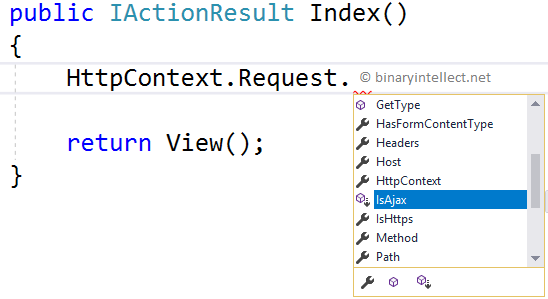
And you can use it like this :
bool isAjax = HttpContext.Request.IsAjax("POST");
The above call to IsAjax() returns true only if the request under consideration is an Ajax POST request.
Creating custom [Ajax] attribute
So far so good. Let's improvise our code further. We will now wrap the Ajax checking logic in a custom attribute named [Ajax] so that you can use it like this :
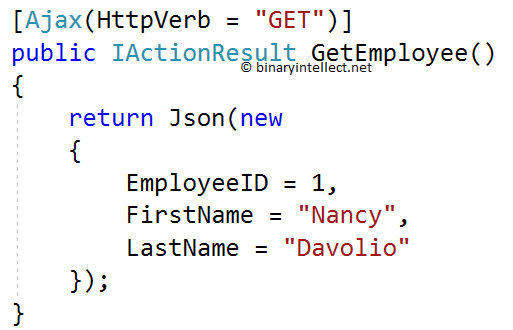
As you can see the GetEmployee() action is decorated with [Ajax] attribute. And the HttpVerb property of [Ajax] is set to GET.
The [Ajax] attribute ensures that GetEmployee() is invoked only if the request is an Ajax GET request.
Let's dissect the code that makes the [Ajax] attribute:
public class AjaxAttribute : ActionMethodSelectorAttribute

{

    public string HttpVerb { get; set; }

    public override bool IsValidForRequest

(RouteContext routeContext, ActionDescriptor action)

    {

        return routeContext.HttpContext.

Request.IsAjax(HttpVerb);

    }

}
Here, we create AjaxAttribute class, a custom ActionMethodSelectorAttribute. This attribute does the conditional checking of whether a request is an Ajax request or not.
The [Ajax] has HttpVerb property and it also overrides the IsValidForRequest() method. Inside we simply call IsAjax() extension method we created earlier. You can also put the entire request checking logic inside the IsValidForRequest() method.
Testing our code
In order to test our code let's make an Ajax GET and POST request to the GetEmplooyee() action. Notice that the GetEmployee() returns a JSON with certain EmoployeeID, FirstName, and LastName.
<h1>Welcome!</h1>

<button type="button" id="button1">Make Ajax Call</button>

<form method="post" action="/home/GetEmployee">

    <button type="submit" id="button2">Submit Form</button>

</form>
The above markup is from Index.cshtml. It shows two <button> elements - one making Ajax request and the other making normal non-Ajax POST request.
A dash of jQuery code is used to make a GET request to the GetEmployees() :
$(document).ready(function () {

    $("#button").click(function () {

        $.get("/home/GetEmployee", function (data) {

            alert(data.employeeID + " " +

            data.firstName + " " +

            data.lastName);

        });

    });

});
I won't go into the details of this jQuery code since it is quite straightforward. If suffices to say that the code code attempts to calls the GetEmployee() action using GET method.
The following figure shows a sample run of the page.
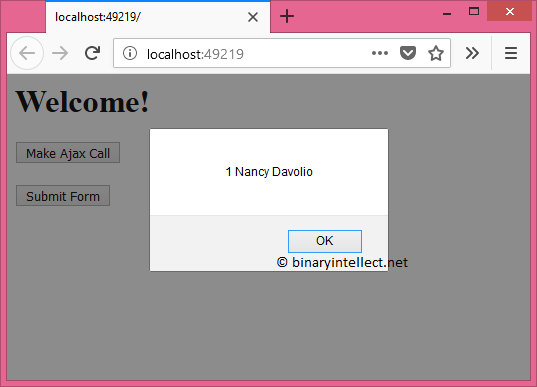
What if we make a non-Ajax POST request? See the following run :
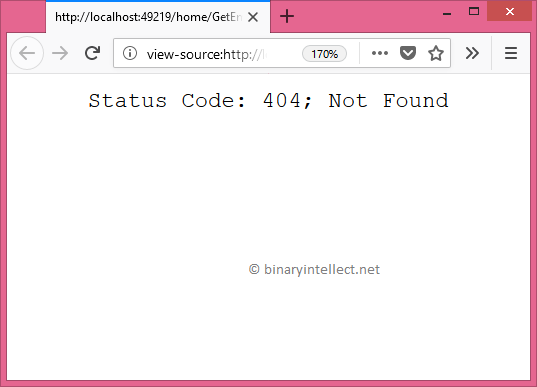
As you can see, this time the server returns HTTP status code 404. That's because the request is not an Ajax request. Moreover it's a POST request. So, the [Ajax[ is going to treat it as an invalid request and won't allow the GetEmployees() to execute.
That's it for now! Keep coding !!
Allow Only Ajax Requests For An Action In ASP.NET Core的更多相关文章
- Ajax跨域问题及解决方案 asp.net core 系列之允许跨越访问(Enable Cross-Origin Requests:CORS) c#中的Cache缓存技术 C#中的Cookie C#串口扫描枪的简单实现 c#Socket服务器与客户端的开发(2)
Ajax跨域问题及解决方案 目录 复现Ajax跨域问题 Ajax跨域介绍 Ajax跨域解决方案 一. 在服务端添加响应头Access-Control-Allow-Origin 二. 使用JSONP ...
- [React] Create a queue of Ajax requests with redux-observable and group the results.
With redux-observable, we have the power of RxJS at our disposal - this means tasks that would other ...
- MVC中使用Ajax提交数据 Jquery Ajax方法传值到action
Jquery Ajax方法传值到action <script type="text/javascript"> $(document).ready(function(){ ...
- 再谈Jquery Ajax方法传递到action 【转载】
原创作品,允许转载,转载时请务必以超链接形式标明文章 原始出处 .作者信息和本声明.否则将追究法律责任.http://cnn237111.blog.51cto.com/2359144/984466 之 ...
- 再谈Jquery Ajax方法传递到action(转)
之前写过一篇文章Jquery Ajax方法传值到action,本文是对该文的补充. 假设 controller中的方法是如下: public ActionResult ReadPerson(Perso ...
- 转 Using $.ajaxPrefilter() To Configure AJAX Requests In jQuery 1.5
Using $.ajaxPrefilter() To Configure AJAX Requests In jQuery 1.5 Posted February 18, 2011 at 6:29 PM ...
- Ajax跨域请求action方法,无法传递及接收cookie信息(应用于系统登录认证及退出)解决方案
最近的项目中涉及到了应用ajax请求后台系统登录,身份认证失败,经过不断的调试终于找到解决方案. 应用场景: 项目测试环境:前端应用HTML,js,jQuery ajax请求,部署在Apache服务器 ...
- ASP.NET Core 1.0中实现文件上传的两种方式(提交表单和采用AJAX)
Bipin Joshi (http://www.binaryintellect.net/articles/f1cee257-378a-42c1-9f2f-075a3aed1d98.aspx) Uplo ...
- Upload Files In ASP.NET Core 1.0 (Form POST And JQuery Ajax)
Uploading files is a common requirement in web applications. In ASP.NET Core 1.0 uploading files and ...
随机推荐
- celery异步消息处理框架
Celery 1.什么是Clelery Celery是一个简单.灵活且可靠的,处理大量消息的分布式系统 专注于实时处理的异步任务队列 同时也支持任务调度 Celery架构 Celery的架构由三部分组 ...
- EffectiveJava阅读笔记(一)
考虑用静态工厂方法代替构造器 一.概述 二.使用静态工厂的优势 获取类对象的两种方式: 使用公有构造方法 静态工厂方法 1.介绍 有名称 不必每次调用时创建一个新对象 可以返回原类型的任何子类型对象 ...
- Asp.Net MVC Unobtrusive Ajax
1. Unobtrusive JavaScript介绍 说到Unobtrusive Ajax,就要谈谈UnobtrusiveJavaScript了,所谓Unobtrusive JavaScript ...
- ASP.NET应用程序服务器集群方案
本文采用Nginx来实现ASP.NET程序集群化. 准备环境 首先准备Nginx环境,Windows版本下载链接:http://nginx.org/en/download.html 解压后文件格式如下 ...
- 解决Win10系统下 C# DateTime 出现星期几的问题
昨天晚上写代码的时候偶然发现 DateTime 里出现了星期几,当时一阵凌乱,去网上百度没有详细解决办法,很多人说可以用用 ToString 解决. 也有部分人说可以修改系统时间的显示,我打算试一下看 ...
- Netty中的Channel之数据冲刷与线程安全(writeAndFlush)
本文首发于本博客,如需转载,请申明出处. GitHub项目地址 InChat 一个轻量级.高效率的支持多端(应用与硬件Iot)的异步网络应用通讯框架 前言 本文预设读者已经了解了一定的Netty基础知 ...
- Spring RestTemplate详解
Spring RestTemplate详解 1.什么是REST? REST(RepresentationalState Transfer)是Roy Fielding 提出的一个描述互联系统架构风格 ...
- 倒计时5S秒自动关闭弹窗
<!DOCTYPE html> <html> <head> <meta charset="UTF-8"> <title> ...
- css文字超出一行用点表示
1,css超出一行用点表示 white-space:nowrap; overflow:hidden; text-overflow:ellipsis; 2,css超出二行用点表示 overflow:hi ...
- 【Android】用Cubism 2制作自己的Live2D——官方App样例源码学习(4)!
前言- 这是最后一个重要的类了——LAppLive2DManager,流程什么的也清晰了,话不多说我们来康康吧! LAppLive2DManager- public class LAppLive2DM ...