
WPF中TabControl控件和ListBox控件的简单应用(MVVM)
本文主要实现下图所示的应用场景:
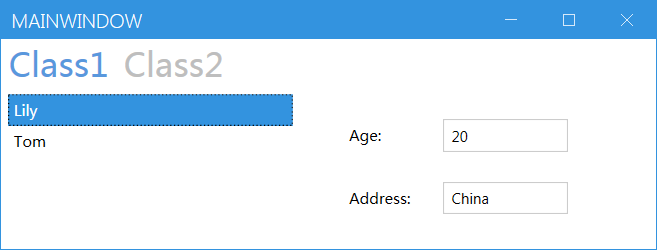
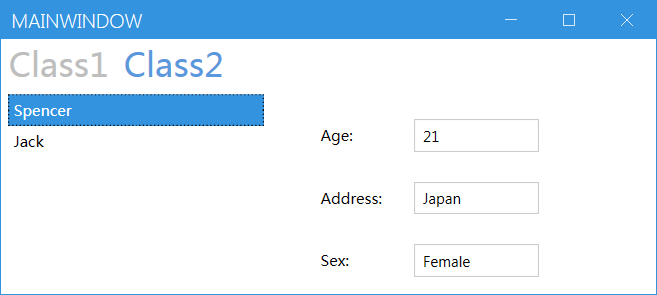
对于Class1页,会显示用户的age和address属性,对于Class2页,会显示用户的age,address和sex属性。在左边的ListBox中选择对应的用户,右侧会显示其对应的属性信息。
xaml代码如下:
<Controls:MetroWindow x:Class="TabControlAndListBoxDemo.MainWindow"

        xmlns="http://schemas.microsoft.com/winfx/2006/xaml/presentation"

        xmlns:x="http://schemas.microsoft.com/winfx/2006/xaml"

        xmlns:d="http://schemas.microsoft.com/expression/blend/2008"

        xmlns:mc="http://schemas.openxmlformats.org/markup-compatibility/2006"

                      xmlns:Controls="http://metro.mahapps.com/winfx/xaml/controls"

                      xmlns:i="clr-namespace:System.Windows.Interactivity;assembly=System.Windows.Interactivity"

        xmlns:local="clr-namespace:TabControlAndListBoxDemo"

        mc:Ignorable="d"

        Title="MainWindow" Height="450" Width="800">

    <Grid>

        <TabControl  TabStripPlacement="Top" Name="tabcontrol">

            <i:Interaction.Triggers>

                <i:EventTrigger EventName="SelectionChanged">

                    <i:InvokeCommandAction Command="{Binding Path=SelectionChangedEvent}"

                                          CommandParameter="{Binding ElementName=tabcontrol, Path=SelectedIndex}"/>

                </i:EventTrigger>

            </i:Interaction.Triggers>

            <TabItem Header="Class1" >

                <Grid Visibility="{Binding Path=Class1Flag}">

                    <Grid.ColumnDefinitions>

                        <ColumnDefinition Width="40*"/>

                        <ColumnDefinition Width="50*"/>

                    </Grid.ColumnDefinitions>

                    <ListBox ItemsSource="{Binding Path=Users_Class1}" Name="listbox1" Grid.Column="0" Grid.ColumnSpan="1">

                        <ListBox.ItemTemplate>

                            <DataTemplate>

                                <TextBlock Text="{Binding Path=Name}"/>

                            </DataTemplate>

                        </ListBox.ItemTemplate>

                    </ListBox>

                    <StackPanel Grid.Column="1">

                        <Canvas Height="30" Margin="20,20,0,0">

                            <Label Content="Age:" Canvas.Left="20"/>

                            <TextBox Canvas.Left="100" Width="100" Text="{Binding ElementName=listbox1, Path=SelectedItem.Age}"/>

                        </Canvas>

                        <Canvas Height="30" Margin="20,20,0,0">

                            <Label Content="Address:" Canvas.Left="20"/>

                            <TextBox Canvas.Left="100" Width="100" Text="{Binding ElementName=listbox1, Path=SelectedItem.Address}"/>

                        </Canvas>

                    </StackPanel>

                </Grid>

            </TabItem>

            <TabItem Header="Class2">

                <Grid Visibility="{Binding Path=Class2Flag}">

                    <Grid.ColumnDefinitions>

                        <ColumnDefinition Width="40*"/>

                        <ColumnDefinition Width="60*"/>

                    </Grid.ColumnDefinitions>

                    <ListBox ItemsSource="{Binding Path=Users_Class2}" Name="listbox2" Grid.Column="0">

                        <ListBox.ItemTemplate>

                            <DataTemplate>

                                <TextBlock Text="{Binding Path=Name}"/>

                            </DataTemplate>

                        </ListBox.ItemTemplate>

                    </ListBox>

                    <StackPanel Grid.Column="1" Visibility="{Binding Path=Class2Flag}">

                        <Canvas Height="30" Margin="20,20,0,0">

                            <Label Content="Age:" Canvas.Left="20"/>

                            <TextBox Canvas.Left="100" Width="100" Text="{Binding ElementName=listbox2, Path=SelectedItem.Age}"/>

                        </Canvas>

                        <Canvas Height="30" Margin="20,20,0,0">

                            <Label Content="Address:" Canvas.Left="20"/>

                            <TextBox Canvas.Left="100" Width="100" Text="{Binding ElementName=listbox2, Path=SelectedItem.Address}"/>

                        </Canvas>

                        <Canvas Height="30" Margin="20,20,0,0">

                            <Label Content="Sex:" Canvas.Left="20"/>

                            <TextBox Canvas.Left="100" Width="100" Text="{Binding ElementName=listbox2, Path=SelectedItem.Sex}"/>

                        </Canvas>

                    </StackPanel>

                </Grid>

            </TabItem>

        </TabControl>

    </Grid>

</Controls:MetroWindow>
对应的ViewModel的代码如下:
namespace TabControlAndListBoxDemo

{

    public class MainWindowViewModel : INotifyPropertyChanged

    {

        public event PropertyChangedEventHandler PropertyChanged;

        private List<User> class1 = new List<User>();

        private List<User> class2 = new List<User>();

        private string class1flag = "hidden";

        private string class2flag = "hidden";

        public List<User> Users_Class1

        {

            get { return class1; }

            set

            {

                class1 = value;

                if (PropertyChanged != null)

                    PropertyChanged(this, new PropertyChangedEventArgs("Users_Class1"));

            }

        }

        public List<User> Users_Class2

        {

            get { return class2; }

            set

            {

                class2 = value;

                if (PropertyChanged != null)

                    PropertyChanged(this, new PropertyChangedEventArgs("Users_Class2"));

            }

        }

        public string Class1Flag

        {

            get { return class1flag; }

            set

            {

                class1flag = value;

                if (PropertyChanged != null)

                    PropertyChanged(this, new PropertyChangedEventArgs("Class1Flag"));

            }

        }

        public string Class2Flag

        {

            get { return class2flag; }

            set

            {

                class2flag = value;

                if (PropertyChanged != null)

                    PropertyChanged(this, new PropertyChangedEventArgs("Class2Flag"));

            }

        }

        public DelegateCommand SelectionChangedEvent { get; }

        public MainWindowViewModel()

        {

            Initiate();

            SelectionChangedEvent = new DelegateCommand(SelectionChangedEventHandler);

        }

        private void Initiate()

        {

            Users_Class1.Add(new User() { Name = "Lily", Age = 20, Address = "China" });

            Users_Class1.Add(new User() { Name = "Tom", Age = 20, Address = "US" });

            Users_Class2.Add(new User() { Name = "Spencer", Age = 21, Address = "Japan",Sex="Female" });

            Users_Class2.Add(new User() { Name = "Jack", Age = 21, Address = "UK", Sex = "Male" });

        }

        private void SelectionChangedEventHandler(object sender, DelegateCommandEventArgs args)

        {

            int Index = Convert.ToInt16(args.Parameter);

            if(Index == 0)

            {

                Class1Flag = "Visible";

                Class2Flag = "Hidden";

            }

            if(Index == 1)

            {

                Class1Flag = "Hidden";

                Class2Flag = "Visible";

            }

        }

    }

}
WPF中TabControl控件和ListBox控件的简单应用(MVVM)的更多相关文章
- C# 在DataGridView中,点击单元格调出 TreeView控件 或 ListBox控件
1.调出 TreeView控件 或 ListBox控件 private void deductGrid1_CellClick(object sender, DataGridViewCellEvent ...
- ComboxBox控件、checklistbox控件和listbox控件的组合开发
第一步:先创建一个WinForm窗体应用程序,按照下图所示的进行布局. 第二步:为ComboxBox控件.checklistbox控件和listbox控件和button控件设置属性 第三步:在代码中的 ...
- WPF中在摄像头视频上叠加控件的解决方案
一.视频呈现 前段时间,在一个wpf的项目中需要实时显示ip摄像头,对此的解决方案想必大家都应该知道很多.在winform中,我们可以将一个控件(一般用panel或者pictruebox)的句柄丢给摄 ...
- WPF中。。DataGrid 实现时间控件和下拉框控件
DatePicker 和新的 DataGrid 行 用户与 DataGrid 中日期列的交互给我造成了很大的麻烦. 我通过将一个 Data Source 对象拖动到 WPF 窗口上,创建了一个 Dat ...
- WPF中查找指定类型的父控件
/// <summary> /// 查找父控件 /// </summary> /// <typeparam name="T"></type ...
- C# WinForm 中Console 重定向输出到ListBox控件中显示
{ VoidAction action = { lstBox.Items. ...
- WPF中实现多选ComboBox控件
在WPF中实现带CheckBox的ComboBox控件,让ComboBox控件可以支持多选. 将ComboBox的ItemsSource属性Binding到一个Book的集合, public clas ...
- 【WPF学习】第二十三章 列表控件
WPF提供了许多封装项的集合的控件,本章介绍简单的ListBox和ComboBox控件,后续哈会介绍更特殊的控件,如ListView.TreeView和ToolBar控件.所有这些控件都继承自Item ...
- WPF进阶技巧和实战03-控件(3-文本控件及列表控件)
系列文章链接 WPF进阶技巧和实战01-小技巧 WPF进阶技巧和实战02-布局 WPF进阶技巧和实战03-控件(1-控件及内容控件) WPF进阶技巧和实战03-控件(2-特殊容器) WPF进阶技巧和实 ...
随机推荐
- Vscode不能连接应用商店
删除这两个文件即可: 1.C:\Users\Administrator\.vscode 2.C:\Users\Administrator\AppData\Roaming\Code
- IDEA包名分层问题
解决办法: 将默认的"Hide empty Middle Packages"或者"compact middle packages"勾选项去掉,这样就不会把中间空 ...
- 集合框架-LinkedHashSet集合(有序唯一)
1 package cn.itcast.p4.hashset.demo; 2 3 import java.util.HashSet; 4 import java.util.Iterator; 5 im ...
- 『无为则无心』Python函数 — 38、Python中的异常
目录 1.异常概念 2.了解异常 3.异常的写法 (1)语法 (2)快速体验 (3)捕获指定异常 (4)异常中的else (5)异常中的finally (6)总结 1.异常概念 定义:程序在运行过程当 ...
- Asp-Net-Core开发笔记:接口返回json对象出现套娃递归问题
前言 看了下推送记录,一个月前,OK,我又变成月更了o(╯□╰)o,这绝对不行![○・`Д´・ ○] 所以今天来更新了 其实不是我懒得更新或者是太忙,其实是最近在写一篇很长的博客,一直没写完( Ĭ ^ ...
- python16day
昨日回顾 自定义模块 模块的两种执行方式:脚本方式.调用方式 name 模块导入的方式 相对导入 random:获取随机数相关 今日内容 常用模块的介绍 time:和时间相关 datetime os ...
- 信奥题库(OI题库)8月月赛T1题解 幂次数
0.前置知识 分解质因数 快速幂(不必要) 1.思路 首先,我们知道一个正整数(设它为 \(a\) )一定能分解成这样的形式: \[a= \prod_{i\in N^*} p_i^{c_i} \] 其 ...
- 学习Java第4天
今天所作的工作: 1.类 2.类的构造方法 3.静态变量 4.类的主方法 5.对象 今天没有完成昨天的工作安排,因为发现进入类之后的编程思想发生的变化,相对与c++的逻辑既有较大的相似性又有不同的性质 ...
- 来自开发者的点赞!HMS Core荣获多个行业奖项
2021年,HMS Core发布全新HMS Core 6,为全球开发者提供多终端.跨OS.全场景的华为移动服务核心能力,和开发者共同成长.通过和开发者在行业解决方案.业务场景创新和商业增长上的持续合作 ...
- 洛谷P5019 [NOIP2018 提高组] 铺设道路
题目描述 春春是一名道路工程师,负责铺设一条长度为 n 的道路. 铺设道路的主要工作是填平下陷的地表.整段道路可以看作是 n 块首尾相连的区域,一开始,第 i 块区域下陷的深度为 di. 春春每天可以 ...