
Highcharts 动态图
Highcharts 动态图
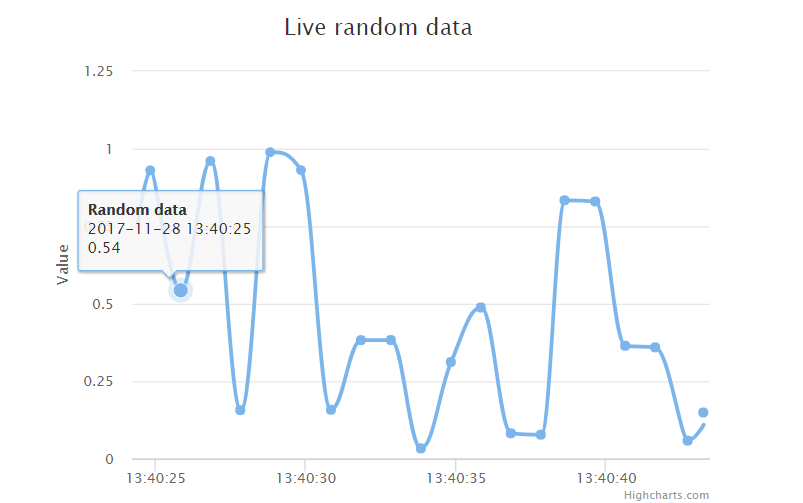
每秒更新曲线图
chart.events
chart.event 属性中添加 load 方法(图表加载事件)。在 1000 毫秒内随机产生数据点并生成图表。
chart: {

   events: {

      load: function () {

         // 图表每秒更新一次

         var series = this.series[0];

         setInterval(function () {

            var x = (new Date()).getTime(), // 当期时间

            y = Math.random();

            series.addPoint([x, y], true, true);

         }, 1000);

      }

   }

}
实例
文件名:highcharts_dynamic_spline.htm
<html>

<head>

<meta charset="UTF-8" />

<title>Highcharts 教程 | 菜鸟教程(runoob.com)</title>

<script src="http://apps.bdimg.com/libs/jquery/2.1.4/jquery.min.js"></script>

<script src="http://code.highcharts.com/highcharts.js"></script></head>

<body>

<div id="container" style="width: 550px; height: 400px; margin: 0 auto"></div>

<script language="JavaScript">

$(document).ready(function() {

   var chart = {

      type: 'spline',

      animation: Highcharts.svg, // don't animate in IE < IE 10.

      marginRight: 10,

      events: {

         load: function () {

            // set up the updating of the chart each second

            var series = this.series[0];

            setInterval(function () {

               var x = (new Date()).getTime(), // current time

               y = Math.random();

               series.addPoint([x, y], true, true);

            }, 1000);

         }

      }

   };

   var title = {

      text: 'Live random data'

   };

   var xAxis = {

      type: 'datetime',

      tickPixelInterval: 150

   };

   var yAxis = {

      title: {

         text: 'Value'

      },

      plotLines: [{

         value: 0,

         width: 1,

         color: '#808080'

      }]

   };

   var tooltip = {

      formatter: function () {

      return '<b>' + this.series.name + '</b><br/>' +

         Highcharts.dateFormat('%Y-%m-%d %H:%M:%S', this.x) + '<br/>' +

         Highcharts.numberFormat(this.y, 2);

      }

   };

   var plotOptions = {

      area: {

         pointStart: 1940,

         marker: {

            enabled: false,

            symbol: 'circle',

            radius: 2,

            states: {

               hover: {

                 enabled: true

               }

            }

         }

      }

   };

   var legend = {

      enabled: false

   };

   var exporting = {

      enabled: false

   };

   var series= [{

      name: 'Random data',

      data: (function () {

         // generate an array of random data

         var data = [],time = (new Date()).getTime(),i;

         for (i = -19; i <= 0; i += 1) {

            data.push({

               x: time + i * 1000,

               y: Math.random()

            });

         }

         return data;

      }())

   }];

   var json = {};

   json.chart = chart;

   json.title = title;

   json.tooltip = tooltip;

   json.xAxis = xAxis;

   json.yAxis = yAxis;

   json.legend = legend;

   json.exporting = exporting;

   json.series = series;

   json.plotOptions = plotOptions;Highcharts.setOptions({

      global:{

         useUTC:false}});

   $('#container').highcharts(json);});</script></body></html>
以上实例输出结果为:
通过点击添加数据
chart.events
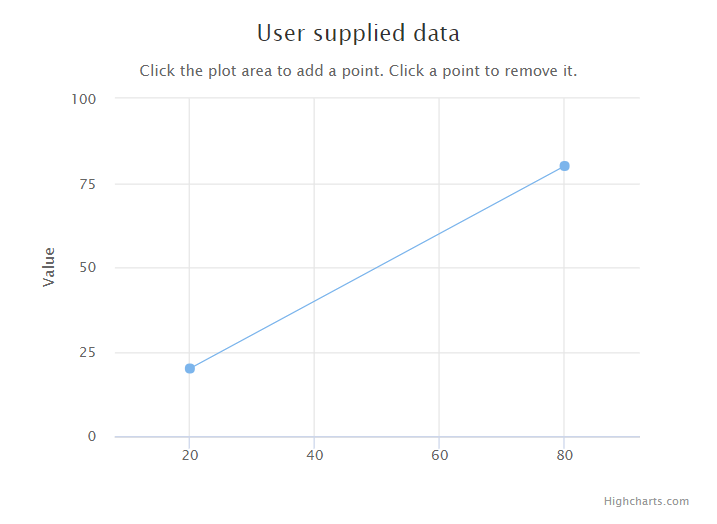
在 chart.event 属性中添加 click 方法(整个图表的绘图区上所发生的点击事件)。该方法在图表绘图区上发生点击时会添加新的数据点。
chart: {

   events: {

      click: function (e) {

         // 获取点击坐标和数据项

         var x = e.xAxis[0].value,

         y = e.yAxis[0].value,

         series = this.series[0];

         // 添加点击的坐标

         series.addPoint([x, y]);

      }

   }

}
实例
文件名:highcharts_dynamic_click.htm
<html>

<head>

<title>Highcharts 教程 | 菜鸟教程(runoob.com)</title>

   <script src="http://apps.bdimg.com/libs/jquery/2.1.4/jquery.min.js"></script>

   <script src="/try/demo_source/highcharts.js"></script>

</head>

<body>

<div id="container" style="width: 550px; height: 400px; margin: 0 auto"></div>

<script language="JavaScript">

$(document).ready(function() {

   var chart = {

      type: 'scatter',

      margin: [70, 50, 60, 80],

      events: {

         click: function (e) {

            // find the clicked values and the series

            var x = e.xAxis[0].value,

            y = e.yAxis[0].value,

            series = this.series[0];

            // Add it

            series.addPoint([x, y]);

         }

      }

   };

   var title = {

      text: 'User supplied data'

   };

   var subtitle = {

      text: 'Click the plot area to add a point. Click a point to remove it.'

   };

   var xAxis = {

      gridLineWidth: 1,

      minPadding: 0.2,

      maxPadding: 0.2,

      maxZoom: 60

   };

   var yAxis = {

      title: {

         text: 'Value'

      },

      minPadding: 0.2,

      maxPadding: 0.2,

      maxZoom: 60,

      plotLines: [{

         value: 0,

         width: 1,

         color: '#808080'

      }]

   };

   var legend = {

      enabled: false

   };

   var exporting = {

      enabled: false

   };

   var plotOptions = {

      series: {

         lineWidth: 1,

         point: {

            events: {

               'click': function () {

                  if (this.series.data.length > 1) {

                     this.remove();

                  }

               }

            }

         }

      }

   };


   var series= [{

      data: [[20, 20], [80, 80]]

   }];

   var json = {};

   json.chart = chart;

   json.title = title;

   json.subtitle = subtitle;

   json.xAxis = xAxis;

   json.yAxis = yAxis;

   json.legend = legend;

   json.exporting = exporting;

   json.series = series;

   json.plotOptions = plotOptions;

   $('#container').highcharts(json);

});

</script>

</body>

</html>
以上实例输出结果为:
Highcharts 动态图的更多相关文章
- HighChartS cpu利用率动态图(Java版)
来源:http://www.cnblogs.com/haifg/p/3217699.html 最近项目需要监控服务器cpu的利用率,并做成动态图.在网上查找了一些资料,最终选择了HighChart ...
- Wpf 中使用gif格式的动态图
第一种方法:使用winform插件 <WindowsFormsHost xmlns:wf="clr-namespace:System.Windows.Forms;assembly=S ...
- 在sublime text 中的Emmet快捷键动态图演示
Emmet的前身是大名鼎鼎的Zen coding,如果你从事Web前端开发的话,对该插件一定不会陌生.它使用仿CSS选择器的语法来生成代码,大大提高了HTML/CSS代码编写的速度,比如下面的演示: ...
- GIMP也疯狂之动态图的制作(四)
本篇文章为gimp制作动态图的第四篇.在之前的基础上简单的拓展了下思路.就能做出蛮实用的动态图.本文将介绍两个动态图.第一个为在一张静态图上添加动态图,第二个图为修改部分渐变. 效果: 素材: 其实, ...
- GIMP也疯狂之动态图的制作(三)
Note:本篇文章内容为linux下利用gimp和其它工具组合完成截取制作GIF图的一种实现,制作更为灵活,但并不方便,如果不需要那么高的定制性,并追求方便高效.可以使用类似QQ影音之类的软件,自带截 ...
- iOS开发中在UIWebView中添加Gif动态图
开发是一件很有趣的事,偶尔在程序中添加一些小东西,会给你的应用增色不少.比如,当你的某些功能暂时还不准备上线时,可以先一个放展示Gif动态图的UIWebView上去,既可以告诉用户APP以后会有的功能 ...
- 那些过目不忘的无线端交互设计(DRIBBBLE GIF动态图)
Dribbble精选:Dribbble上令人惊叹的无线端交互设计!来自全球牛人们的奇思妙想,新颖动人的交互在这一张张GIF动态图上一览无余!当然界面一样打动人心,腾出手点赞的同时!记得另存哟:) 作者 ...
- GIF动态图制作
GIF动态图制作 博客写了也有一阵了,一直好奇大牛的博客里demo的动态图是怎么做的,今天抽空研究了一下,找了一个软件,以后再发现有好的工具再继续推荐 GIF制作工具--LICEcap 效果要比下面的 ...
- 4.14Python数据处理篇之Matplotlib系列(十四)---动态图的绘制
目录 目录 前言 (一)需求分析 (二)随机数的动态图 1.思路分析: 2.源代码: 2.输出效果: 目录 前言 学习matplotlib已经到了尾声,没有必要再继续深究下去了,现今只是学了一些基础的 ...
随机推荐
- 160726 smarty 笔记(1)
模板里面显示变量:1.变量要写在Smarty标记之间,变量名以$开头<{$test}>2.支持所有类的数据,包括数组(关联数组),对象关联数组在模板显示的时候,除了可以使用php语法之外, ...
- 《mysql必知必会》读书笔记--触发器及管理事务处理
触发器 触发器是MySQL响应DELETE,INSERT,UPDATE而自动执行的一条MySQL语句,其他语句不支持触发器. 创建触发器时,需要4个条件: 唯一的触发器名 触发器关联的表 触发器应该响 ...
- 第三方库(JSONModel)出现file not found
http://stackoverflow.com/questions/5198905/h-file-not-found 具体方法: 在导航栏中 点击 Product --> Clean 成功之后 ...
- 适配移动端的在图片上生成水波纹demo
<!DOCTYPE html> <html lang="zh"> <head> <meta charset="UTF-8&q ...
- 制作RPM包
RPM包制作过程 1.1 前期工作 1)创建打包用的目录rpmbuild/{BUILD,SPECS,RPMS, SOURCES,SRPMS} 建议使用普通用户,在用户家目录中创建 2)确定好制作的对象 ...
- Top-Down笔记 #01# 计算机网络概述
因特网 网络核心 分组交换网中的时延.丢包和吞吐量 协议层次及其服务模型 面对攻击的网络 计算机网络和因特网的历史 小结(自己写的...) [什么是因特网?] 具体构成描述 1.与因特网相连的设备被称 ...
- 为MarS Board安装无线网卡Linux驱动
玩了几天MarS Board,发现要了解Linux是如何工作的,从嵌入式开发板玩起最有效率.因为会遇到无数的问题和未知领域,然后在解决问题的过程中有深入了解Linux的机会. 为这块开发板专门买了 ...
- WCF可靠性会话之服务分流
可靠性绘画答条件: (1)服务绑定支持可靠性绘画:特别是netTcpBinding.wsHttpBinding及wsDualHttpBinding. wsDualHtttpBinding可靠性绘画始终 ...
- 20145321 《Java程序设计》第8周学习总结
20145321 <Java程序设计>第8周学习总结 教材学习内容总结 第十五章 时间与日期 15.1 日志 1.使用日志的起点是Logger类,要取得Logger类,必须使用Logger ...
- 20145321 《Java程序设计》第6周学习总结
20145321 <Java程序设计>第6周学习总结 教材学习内容总结 第十章 输入输出 10.1 InputStream OutputStream 1.数据有来源与目的,衔接两者的是串流 ...