
js之3D轮播图
.gif)
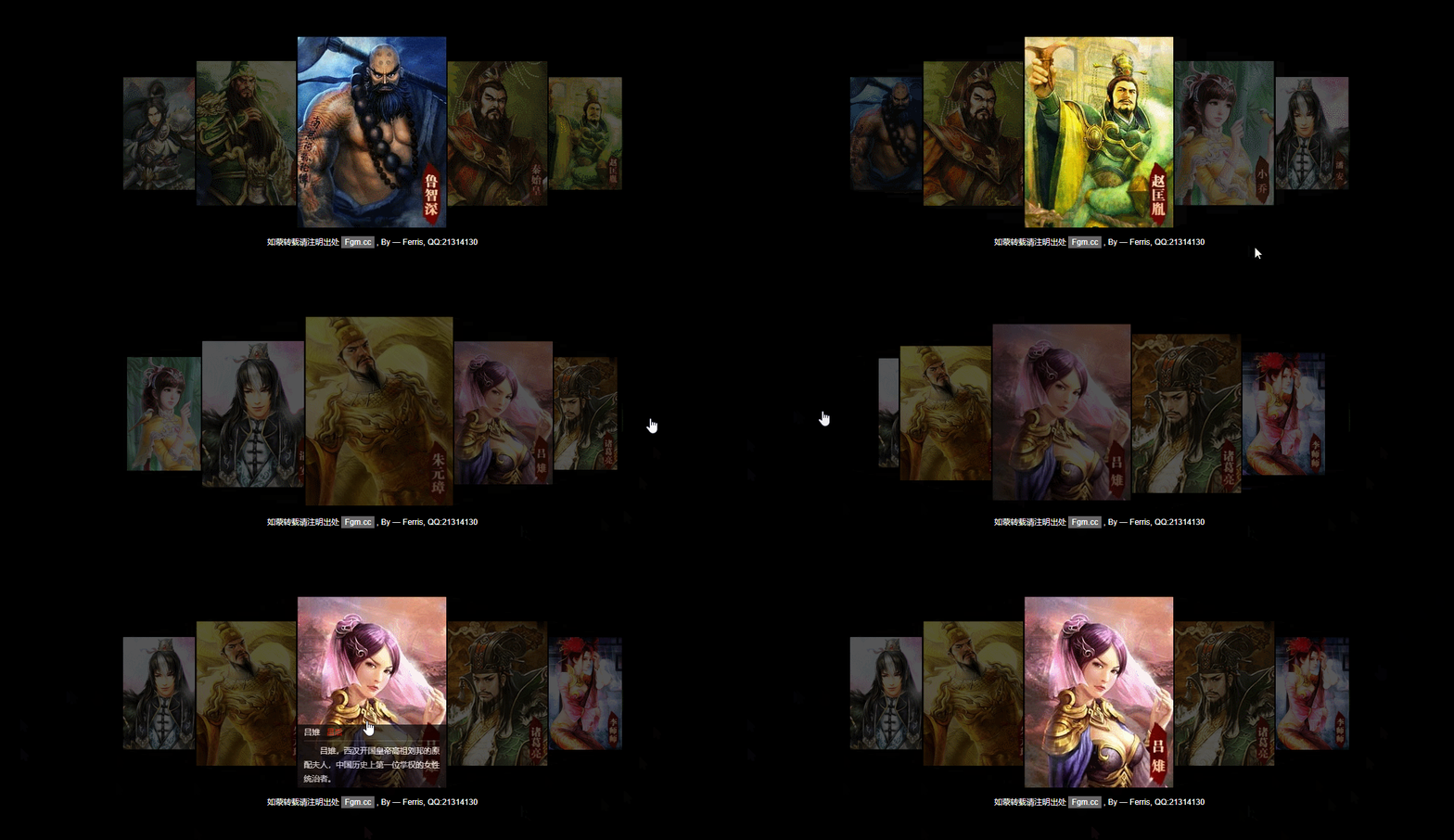
<!DOCTYPE html PUBLIC "-//W3C//DTD XHTML 1.0 Transitional//EN" "http://www.w3.org/TR/xhtml1/DTD/xhtml1-transitional.dtd">

<!-- saved from url=(0036)http://fgm.cc/learn/lesson10/08.html -->

<html xmlns="http://www.w3.org/1999/xhtml"><head><meta http-equiv="Content-Type" content="text/html; charset=UTF-8">

<title>仿腾讯游戏《英雄杀》官网Flash效果</title>

<style type="text/css">

body,div,ul,li,h4,p{margin:0;padding:0;}

body{font:12px/1.8 arial;color:#fff;background:url(img/yxs/home_bg.jpg) 50% 0 no-repeat #000;}

a{color:#fff;text-decoration:none;background:#666;padding:2px 5px;}

a:hover{background:#F90;}

#box{position:relative;width:754px;height:292px;margin:115px auto 0;}

#box ul{position:relative;width:754px;height:292px;}

#box li{position:absolute;border:2px solid #000;list-style:none;background:#000;width:0;height:0;top:146px;left:377px;z-index:0;cursor:pointer;overflow:hidden;border-radius:3px;}

#box li img{width:100%;height:100%;vertical-align:top;}

#box li div{position:absolute;bottom:-100px;width:100%;height:100px;background:#000;filter:alpha(opacity=70);opacity:0.7;}

#box li div h4{margin:0 10px;font:12px/24px arial;border-bottom:1px #333 solid;}

#box li div h4 span{color:red;margin-left:10px;}

#box li div p{margin:5px 10px 0;text-indent:2em;}

#box .prev, #box .next{position:absolute;top:50%;width:39px;height:80px;margin-top:-40px;overflow:hidden;text-indent:-999px;cursor:pointer;background:url(img/yxs/btn.png) no-repeat;}

#box .prev{left:-60px;}

#box .next{right:-60px;background-position:-39px 0;}

#copyright{padding-top:10px;text-align:center;}

</style>

<script type="text/javascript">

function ZoomPic ()

{

    this.initialize.apply(this, arguments)

}

ZoomPic.prototype =

{

    initialize : function (id)

    {

        var _this = this;

        this.wrap = typeof id === "string" ? document.getElementById(id) : id;

        this.oUl = this.wrap.getElementsByTagName("ul")[0];

        this.aLi = this.wrap.getElementsByTagName("li");

        this.prev = this.wrap.getElementsByTagName("pre")[0];

        this.next = this.wrap.getElementsByTagName("pre")[1];

        this.timer = null;

        this.aSort = [];

        this.iCenter = 3;

        this._doPrev = function () {return _this.doPrev.apply(_this)};

        this._doNext = function () {return _this.doNext.apply(_this)};

        this.options = [

            {width:120, height:150, top:71, left:134, zIndex:1},

            {width:130, height:170, top:61, left:0, zIndex:2},

            {width:170, height:218, top:37, left:110, zIndex:3},

            {width:224, height:288, top:0, left:262, zIndex:4},

            {width:170, height:218, top:37, left:468, zIndex:3},

            {width:130, height:170, top:61, left:620, zIndex:2},

            {width:120, height:150, top:71, left:496, zIndex:1}

        ];

        for (var i = 0; i < this.aLi.length; i++) this.aSort[i] = this.aLi[i];

        this.aSort.unshift(this.aSort.pop());

        this.setUp();

        this.addEvent(this.prev, "click", this._doPrev);

        this.addEvent(this.next, "click", this._doNext);

        this.doImgClick();

        this.timer = setInterval(function ()

        {

            _this.doNext()

        }, 3000);

        this.wrap.onmouseover = function ()

        {

            clearInterval(_this.timer)

        };

        this.wrap.onmouseout = function ()

        {

            _this.timer = setInterval(function ()

            {

                _this.doNext()

            }, 3000);

        }

    },

    doPrev : function ()

    {

        this.aSort.unshift(this.aSort.pop());

        this.setUp()

    },

    doNext : function ()

    {

        this.aSort.push(this.aSort.shift());

        this.setUp()

    },

    doImgClick : function ()

    {

        var _this = this;

        for (var i = 0; i < this.aSort.length; i++)

        {

            this.aSort[i].onclick = function ()

            {

                if (this.index > _this.iCenter)

                {

                    for (var i = 0; i < this.index - _this.iCenter; i++) _this.aSort.push(_this.aSort.shift());

                    _this.setUp()

                }

                else if(this.index < _this.iCenter)

                {

                    for (var i = 0; i < _this.iCenter - this.index; i++) _this.aSort.unshift(_this.aSort.pop());

                    _this.setUp()

                }

            }

        }

    },

    setUp : function ()

    {

        var _this = this;

        var i = 0;

        for (i = 0; i < this.aSort.length; i++) this.oUl.appendChild(this.aSort[i]);

        for (i = 0; i < this.aSort.length; i++)

        {

            this.aSort[i].index = i;

            if (i < 7)

            {

                this.css(this.aSort[i], "display", "block");

                this.doMove(this.aSort[i], this.options[i], function ()

                {

                    _this.doMove(_this.aSort[_this.iCenter].getElementsByTagName("img")[0], {opacity:100}, function ()

                    {

                        _this.doMove(_this.aSort[_this.iCenter].getElementsByTagName("img")[0], {opacity:100}, function ()

                        {

                            _this.aSort[_this.iCenter].onmouseover = function ()

                            {

                                _this.doMove(this.getElementsByTagName("div")[0], {bottom:0})

                            };

                            _this.aSort[_this.iCenter].onmouseout = function ()

                            {

                                _this.doMove(this.getElementsByTagName("div")[0], {bottom:-100})

                            }

                        })

                    })

                });

            }

            else

            {

                this.css(this.aSort[i], "display", "none");

                this.css(this.aSort[i], "width", 0);

                this.css(this.aSort[i], "height", 0);

                this.css(this.aSort[i], "top", 37);

                this.css(this.aSort[i], "left", this.oUl.offsetWidth / 2)

            }

            if (i < this.iCenter || i > this.iCenter)

            {

                this.css(this.aSort[i].getElementsByTagName("img")[0], "opacity", 30)

                this.aSort[i].onmouseover = function ()

                {

                    _this.doMove(this.getElementsByTagName("img")[0], {opacity:100})

                };

                this.aSort[i].onmouseout = function ()

                {

                    _this.doMove(this.getElementsByTagName("img")[0], {opacity:35})

                };

                this.aSort[i].onmouseout();

            }

            else

            {

                this.aSort[i].onmouseover = this.aSort[i].onmouseout = null

            }

        }

    },

    addEvent : function (oElement, sEventType, fnHandler)

    {

        return oElement.addEventListener ? oElement.addEventListener(sEventType, fnHandler, false) : oElement.attachEvent("on" + sEventType, fnHandler)

    },

    css : function (oElement, attr, value)

    {

        if (arguments.length == 2)

        {

            return oElement.currentStyle ? oElement.currentStyle[attr] : getComputedStyle(oElement, null)[attr]

        }

        else if (arguments.length == 3)

        {

            switch (attr)

            {

                case "width":

                case "height":

                case "top":

                case "left":

                case "bottom":

                    oElement.style[attr] = value + "px";

                    break;

                case "opacity" :

                    oElement.style.filter = "alpha(opacity=" + value + ")";

                    oElement.style.opacity = value / 100;

                    break;

                default :

                    oElement.style[attr] = value;

                    break

            }

        }

    },

    doMove : function (oElement, oAttr, fnCallBack)

    {

        var _this = this;

        clearInterval(oElement.timer);

        oElement.timer = setInterval(function ()

        {

            var bStop = true;

            for (var property in oAttr)

            {

                var iCur = parseFloat(_this.css(oElement, property));

                property == "opacity" && (iCur = parseInt(iCur.toFixed(2) * 100));

                var iSpeed = (oAttr[property] - iCur) / 5;

                iSpeed = iSpeed > 0 ? Math.ceil(iSpeed) : Math.floor(iSpeed);

                if (iCur != oAttr[property])

                {

                    bStop = false;

                    _this.css(oElement, property, iCur + iSpeed)

                }

            }

            if (bStop)

            {

                clearInterval(oElement.timer);

                fnCallBack && fnCallBack.apply(_this, arguments)

            }

        }, 30)

    }

};

window.onload = function ()

{

    new ZoomPic("box");

};

</script>

</head>

<body>

<div id="box">

    <pre class="prev">prev</pre>

    <pre class="next">next</pre>

    <ul>

    <li style="display: block; width: 120px; height: 150px; top: 71px; left: 131px; z-index: 1;"><img src="./仿腾讯游戏《英雄杀》官网Flash效果_files/10.jpg" style="opacity: 0.35;"><div style="bottom: -100px;"><h4>杨延昭<span>天狼星</span></h4><p>杨延昭是北宋抗辽大将杨业的长子,自幼就受到其父抵抗契丹、收复失地的思想影响。</p></div></li><li style="display: block; width: 130px; height: 170px; top: 61px; left: 2px; z-index: 2;"><img src="./仿腾讯游戏《英雄杀》官网Flash效果_files/11.jpg" style="opacity: 0.35;"><div style="bottom: -100px;"><h4>关羽<span>武圣</span></h4><p>关羽,字云长,本字长生,河东解县人(今山西省运城市),东汉末年三国时期刘备的重要将领。</p></div></li><li style="display: block; width: 170px; height: 218px; top: 37px; left: 114px; z-index: 3;"><img src="./仿腾讯游戏《英雄杀》官网Flash效果_files/12.jpg" style="opacity: 0.35;"><div><h4>鲁智深<span>花和尚</span></h4><p>鲁智深,梁山泊第十三位好汉,绰号花和尚。因为见郑屠欺侮金翠莲父女,三拳打死了镇关西。</p></div></li><li style="display: block; width: 224px; height: 288px; top: 0px; left: 267px; z-index: 4;"><img src="./仿腾讯游戏《英雄杀》官网Flash效果_files/13.jpg" style="opacity: 0.35;"><div><h4>赢政<span>秦始皇</span></h4><p>秦始皇,赢姓,赵氏,名政,秦庄襄王之子。秦始皇22岁时,在雍城举行国君成人加冕仪式。开始"亲理朝政"。</p></div></li><li style="display: block; width: 170px; height: 218px; top: 37px; left: 472px; z-index: 3;"><img src="./仿腾讯游戏《英雄杀》官网Flash效果_files/14.jpg" style="opacity: 0.35;"><div><h4>赵匡胤<span>宋太祖</span></h4><p>赵匡胤,中国北宋王朝的建立者,庙号太祖,汉族,涿州(今河北)人。出身军人家庭。高祖赵眺,祖父赵敬。</p></div></li><li style="display: block; width: 130px; height: 170px; top: 61px; left: 617px; z-index: 2;"><img src="./仿腾讯游戏《英雄杀》官网Flash效果_files/1.jpg" style="opacity: 0.35;"><div><h4>小乔<span>国色天香</span></h4><p>小乔,三国时期的主要女性人物之一。在三国时归属吴国,国色流离、资貌绝伦,是当时有名的东吴美女。</p></div></li><li style="display: block; width: 117px; height: 146px; top: 71px; left: 493px; z-index: 1;"><img src="./仿腾讯游戏《英雄杀》官网Flash效果_files/2.jpg" style="opacity: 0.35;"><div><h4>潘安<span>花样美男</span></h4><p>潘安,西晋文学家,本名潘岳。中国古代最著名的美男子之首、"金谷二十四友"之首。</p></div></li><li style="display: none; width: 0px; height: 0px; top: 37px; left: 377px; z-index: 1;"><img src="./仿腾讯游戏《英雄杀》官网Flash效果_files/3.jpg" style="opacity: 0.35;"><div style="bottom: -100px;"><h4>朱元璋<span>明太祖</span></h4><p>朱元璋,明王朝的开国皇帝,建立了全国统一的封建政权。</p></div></li><li style="display: none; width: 0px; height: 0px; top: 37px; left: 377px; z-index: 1;"><img src="./仿腾讯游戏《英雄杀》官网Flash效果_files/4.jpg" style="opacity: 0.35;"><div><h4>吕雉<span>吕后</span></h4><p>吕雉,西汉开国皇帝高祖刘邦的原配夫人,中国历史上第一位掌权的女性统治者。</p></div></li><li style="display: none; width: 0px; height: 0px; top: 37px; left: 377px; z-index: 1;"><img src="./仿腾讯游戏《英雄杀》官网Flash效果_files/5.jpg" style="opacity: 0.35;"><div><h4>诸葛亮<span>卧龙</span></h4><p>诸葛亮,蜀汉丞相,三国时期杰出的政治家、战略家、发明家、军事家。</p></div></li><li style="display: none; width: 0px; height: 0px; top: 37px; left: 377px; z-index: 1;"><img src="./仿腾讯游戏《英雄杀》官网Flash效果_files/6.jpg" style="opacity: 0.35;"><div><h4>李师师<span>青楼歌妓</span></h4><p>李师师,北宋末年色艺双绝的名妓,其事迹多见于野史,笔记小说。据传曾深受宋徽宗喜爱。</p></div></li><li style="display: none; width: 0px; height: 0px; top: 37px; left: 377px; z-index: 1;"><img src="./仿腾讯游戏《英雄杀》官网Flash效果_files/7.jpg" style="opacity: 0.35;"><div><h4>陈圆圆<span>乱世红颜</span></h4><p>陈圆圆,名沅,明末清初苏州名姬,浙江金华人氏。"容辞闲雅,额秀頣丰",有名士大家风度。</p></div></li><li style="display: none; width: 0px; height: 0px; top: 37px; left: 377px; z-index: 1;"><img src="./仿腾讯游戏《英雄杀》官网Flash效果_files/8.jpg" style="opacity: 0.35;"><div><h4>扁鹊<span>神医</span></h4><p>扁鹊精于内、外、妇、儿、五官等科,应用针灸、按摩、汤药、热熨等法治疗疾病,被尊为医祖。</p></div></li><li style="display: none; width: 0px; height: 0px; top: 37px; left: 377px; z-index: 1;"><img src="./仿腾讯游戏《英雄杀》官网Flash效果_files/9.jpg" style="opacity: 0.35;"><div><h4>西施<span>西子</span></h4><p>西施,名夷光,春秋时间越国人,今浙江诸暨市城关苎萝村。同范蠡同卒于陶(定陶)。</p></div></li></ul>

</div>

<div id="copyright">如蒙转载请注明出处 <a href="http://js.fgm.cc/">Fgm.cc</a> , By — Ferris, QQ:21314130</div>

</body></html>
js之3D轮播图的更多相关文章
- jQuery与原生js实现banner轮播图
jQuery与原生js实现banner轮播图: (jq需自己加载)(图片需自己加载) <!DOCTYPE html> <html> <head> <meta ...
- 原生JS实现简易轮播图
原生JS实现简易轮播图(渐变?) 最近做网页总是会用到轮播图,我就把之前写的轮播图单独拿出来吧,如果有...如果真的有人也需要也可以复制去用用啊..哈~.. window.onload = funct ...
- CSS3之3D轮播图
<!DOCTYPE html> <html lang="en"> <head> <meta charset="UTF-8&quo ...
- JS+css3焦点轮播图PC端
<!DOCTYPE html> <html lang="en"> <head> <meta charset="UTF-8&quo ...
- js原生实现轮播图效果(面向对象编程)
面向对象编程js原生实现轮播图效果 1.先看效果图 2.需要实现的功能: 自动轮播 点击左右箭头按钮无缝轮播 点击数字按钮切换图片 分析:如何实现无缝轮播? 在一个固定大小的相框里有一个ul标签,其长 ...
- JS学习笔记--轮播图效果
希望通过自己的学习收获哪怕收获一点点,进步一点点都是值得的,加油吧!!! 本章知识点:index this for if else 下边我分享下通过老师教的方式写的轮播图,基础知识实现: 1.css代 ...
- 3d轮播图(另一种方式,可以实现的功能更为强大也更为灵活,简单一句话,比酷狗优酷的炫)
前不久我做了一个3d仿酷狗的轮播图,用的技术原理就是简单的jquery遍历+css样式读写. 这次呢,我们换一种思路(呵呵其实换汤不换药),看到上次那个轮播吗?你有没有发现用jquery的animat ...
- 3d轮播图——类似酷狗的轮播
说到轮播图,其实只要是跟web开发相关的无论是前端后端应该都不陌生,各种各样的轮播图,从以前的单纯的平面山水画遮盖滑动或滚动,到Jquery的animate甚至是h5+css3,各种炫酷的轮播图更是层 ...
- 原生 js 左右切换轮播图
使用方法: 可能很多人对轮播图感兴趣,下面奉上本人的 原生 js 轮播代码复制 js 到页面的最底部,样式在 css 里改,js 基本不用动,有什么不懂的可以 加本人 QQ172360937 咨询 或 ...
随机推荐
- POJ-2418 Hardwood Species(二叉搜索树)
思路就是先将每个单词存进二叉树中,没出现一次,修改该单词所在结点的cnt++: 最后通过递归中序遍历输出结果. 思路很清晰,主要注意一下指针的使用,想一想为什么要这么用? 简单的解释就是,insert ...
- layer弹出层的关闭及父页面的刷新问题
当在主页面执行添加或修改时,用弹出层是比较好的选择,如何关闭弹出层并对父级页面进行操作呢 首先在父级页面中打开一个添加页面(弹出层) 在添加页面的表单提交函数中添加如下代码: function for ...
- Animal_human_kp人脸与马脸迁移学习GitHub 论文实现
Interspecies Knowledge Transfer for Facial Keypoint Detection关键点检测 Github地址:Interspecies Knowledge ...
- C语言之浅析网络包解析
1.这几天研究skynet中的 lua-netpack.c 中的解析数据包过程.于是把lua部分去掉,修改了一些接口,留下解包相关的代码.再结合云风写的网络代码的例子, 写了一个最简单形式的客户端封包 ...
- php入门(二)
PHP字符串变量: 1.PHP strlen() 函数 <?php $str1="abcd"; $str2="efgh"; $str=$str1.$str ...
- Location对象常用知识
产品终于上线,后期主要是优化了.在开发过程中用到了很多location对象的知识,趁现在有时间先整理一下. Location 对象存储在 Window 对象的 Location 属性中,可通过wind ...
- mongodb禁止外网访问以及添加账号
未曾料到被黑客勒索比特币的戏码竟然降临到我的身上,几个月的技术积累付之一炬.怪只怪自己学艺不精,心存侥幸和无知,不过经此一役,方知网络安全防护的重要性. 一直未给自己的mongodb数据库设置账号密码 ...
- spring mvc: xml生成
spring mvc: xml生成 准备: javax.xml.bind.annotation.XmlElement; javax.xml.bind.annotation.XmlRootElement ...
- iometer测试磁盘IO性能
of Outstanding I/Os per target – 被选中worker的每个磁盘一次所允许的未处理的异步I/O的数量.模拟测试多个应用向 IO 请求读写,默认是 1.通常不用这个参数,除 ...
- bzoj1007: [HNOI2008]水平可见直线 单调栈维护凸壳
在xoy直角坐标平面上有n条直线L1,L2,...Ln,若在y值为正无穷大处往下看,能见到Li的某个子线段,则称Li为可见的,否则Li为被覆盖的.例如,对于直线:L1:y=x; L2:y=-x; L3 ...