
设计模式11---组合模式(Composite Pattern)
一、组合模式定义
将对象组合成树形结构以表示“部分-整体”的层次结构,使得用户对单个对象和组合对象的使用具有一致性。Compose objects into tree structures to represent part-whole hierarchies. Composite lets clients treat individual objects and compositions of objects uniformly.

如上图所示(截取自《Head First Design Patterns》一书),主要包括三个部分:
1. Component抽象组件。定义参加组合对象的共有方法和属性,可以定义一些默认的函数或属性。
2. Leaf叶子节点。构成组合树的最小构建单元。
3. Composite树枝节点组件。它的作用是组合树枝节点和叶子节点形成一个树形结构。
Component : 组合中的对象声明接口,在适当的情况下,实现所有类共有接口的默认行为。声明一个接口用于访问和管理 Component 的子部件。
 abstract class Component {

     protected String name;

     public Component(String name) {

         this.name = name;

     }

     public abstract void Add(Component c);

     public abstract void Remove(Component c);

     public abstract void Display(int depth);

 }
Leaf : 表示叶节点对象。叶子节点没有子节点。
 class Leaf extends Component {

     public Leaf(String name) {

         super(name);

     }

     @Override

     public void Add(Component c) {

         System.out.println("Can not add to a leaf");

     }

     @Override

     public void Remove(Component c) {

         System.out.println("Can not remove from a leaf");

     }

     @Override

     public void Display(int depth) {

         String temp = "";

         for (int i = 0; i < depth; i++)

             temp += '-';

         System.out.println(temp + name);

     }

 }
Composite : 定义枝节点行为,用来存储子部件,在 Component 接口中实现与子部件相关的操作。例如 Add 和 Remove。
 class Composite extends Component {

     private List<Component> children = new ArrayList<Component>();

     public Composite(String name) {

         super(name);

     }

     @Override

     public void Add(Component c) {

         children.add(c);

     }

     @Override

     public void Remove(Component c) {

         children.remove(c);

     }

     @Override

     public void Display(int depth) {

         String temp = "";

         for (int i = 0; i < depth; i++)

             temp += '-';

         System.out.println(temp + name);

         for (Component c : children) {

             c.Display(depth + 2);

         }

     }

 }
Client : 通过 Component 接口操作结构中的对象。
 public class CompositePattern {

 public static void main(String[] args) {

     Composite root = new Composite("root");

     root.Add(new Leaf("Leaf A"));

     root.Add(new Leaf("Leaf B"));

     Composite compX = new Composite("Composite X");

     compX.Add(new Leaf("Leaf XA"));

     compX.Add(new Leaf("Leaf XB"));

     root.Add(compX);

     Composite compXY = new Composite("Composite XY");

     compXY.Add(new Leaf("Leaf XYA"));

     compXY.Add(new Leaf("Leaf XYB"));

     compX.Add(compXY);

     root.Display(1);

 }

 }
二、组合模式优势
节点自由扩展增加。使用组合模式,如果想增加一个树枝节点或者叶子节点都是很简单的,只要找到它的父节点就可以了,非常容易扩展,符合“开闭原则”。应用最广的模式之一。应用在维护和展示部分-整体关系的场景,如树形菜单、文件夹管理等等。一棵树形结构的所有节点都是Component,局部和整体对调用者来说都是一样的,没有区别,所以高层模块不比关心自己处理的是单个对象还是整个组合结构,简化了高层模块的代码。
1、可以清楚地定义分层次的复杂对象,表示对象的全部或部分层次,使得增加新构件也更容易。
2、客户端调用简单,客户端可以一致的使用组合结构或其中单个对象。
3、定义了包含叶子对象和容器对象的类层次结构,叶子对象可以被组合成更复杂的容器对象,而这个容器对象又可以被组合,这样不断递归下去,可以形成复杂的树形结构。
4、更容易在组合体内加入对象构件,客户端不必因为加入了新的对象构件而更改原有代码。
组合模式的缺点: 使设计变得更加抽象,对象的业务规则如果很复杂,则实现组合模式具有很大挑战性,而且不是所有的方法都与叶子对象子类都有关联。
使用场景:
1、需要表示一个对象整体或部分层次,在具有整体和部分的层次结构中,希望通过一种方式忽略整体与部分的差异,可以一致地对待它们。
2、让客户能够忽略不同对象层次的变化,客户端可以针对抽象构件编程,无须关心对象层次结构的细节。
三、组合模式在Android源码中的应用
在Android源码中,都能找到使用组合模式的例子,其中在《Android源码学习之观察者模式应用》介绍到的ViewGroup和View的结构就是一个组合模式,结构图如下所示:
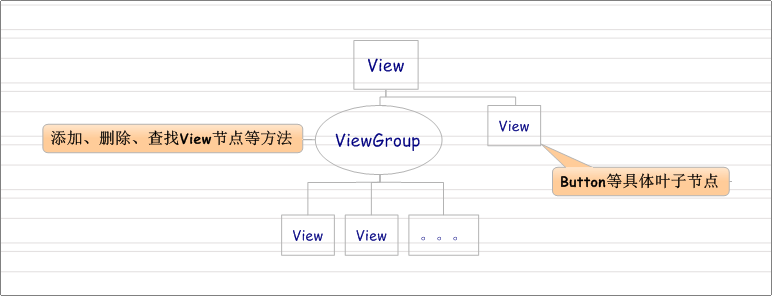
现在来看看它们是如何利用组合模式组织在一起的,首先在View类定义了有关具体操作,然后在ViewGroup类中继承View类,并添加相关的增加、删除和查找孩子View节点,代码如下:
/*
 * @attr ref android.R.styleable#ViewGroup_clipChildren

 * @attr ref android.R.styleable#ViewGroup_clipToPadding

 * @attr ref android.R.styleable#ViewGroup_layoutAnimation

 * @attr ref android.R.styleable#ViewGroup_animationCache

 * @attr ref android.R.styleable#ViewGroup_persistentDrawingCache

 * @attr ref android.R.styleable#ViewGroup_alwaysDrawnWithCache

 * @attr ref android.R.styleable#ViewGroup_addStatesFromChildren

 * @attr ref android.R.styleable#ViewGroup_descendantFocusability

 * @attr ref android.R.styleable#ViewGroup_animateLayoutChanges

 */

public abstract class ViewGroup extends View implements ViewParent, ViewManager {
接着看增加孩子节点函数:
  /**

     * Adds a child view. If no layout parameters are already set on the child, the

     * default parameters for this ViewGroup are set on the child.

     *

     * @param child the child view to add

     *

     * @see #generateDefaultLayoutParams()

     */

    public void addView(View child) {

        addView(child, -1);

    }

    /**

     * Adds a child view. If no layout parameters are already set on the child, the

     * default parameters for this ViewGroup are set on the child.

     *

     * @param child the child view to add

     * @param index the position at which to add the child

     *

     * @see #generateDefaultLayoutParams()

     */

    public void addView(View child, int index) {

        LayoutParams params = child.getLayoutParams();

        if (params == null) {

            params = generateDefaultLayoutParams();

            if (params == null) {

                throw new IllegalArgumentException("generateDefaultLayoutParams() cannot return null");

            }

        }

        addView(child, index, params);

    }

    /**

     * Adds a child view with this ViewGroup's default layout parameters and the

     * specified width and height.

     *

     * @param child the child view to add

     */

    public void addView(View child, int width, int height) {

        final LayoutParams params = generateDefaultLayoutParams();

        params.width = width;

        params.height = height;

        addView(child, -1, params);

    }

    /**

     * Adds a child view with the specified layout parameters.

     *

     * @param child the child view to add

     * @param params the layout parameters to set on the child

     */

    public void addView(View child, LayoutParams params) {

        addView(child, -1, params);

    }

    /**

     * Adds a child view with the specified layout parameters.

     *

     * @param child the child view to add

     * @param index the position at which to add the child

     * @param params the layout parameters to set on the child

     */

    public void addView(View child, int index, LayoutParams params) {

        if (DBG) {

            System.out.println(this + " addView");

        }

        // addViewInner() will call child.requestLayout() when setting the new LayoutParams

        // therefore, we call requestLayout() on ourselves before, so that the child's request

        // will be blocked at our level

        requestLayout();

        invalidate(true);

        addViewInner(child, index, params, false);

    }
在ViewGroup中我们找到了添加addView()方法,有了增加孩子节点,肯定有相对应删除孩子节点的方法,接着看:
 @Override

 public void removeView(View view) {

      if (removeViewInternal(view)) {

          requestLayout();

          invalidate(true);

      }

  }

 private boolean removeViewInternal(View view) {

     final int index = indexOfChild(view);

     if (index >= 0) {

         removeViewInternal(index, view);

         return true;

     }

     return false;

 }

 private void removeViewInternal(int index, View view) {

     if (mTransition != null) {

         mTransition.removeChild(this, view);

     }

     boolean clearChildFocus = false;

     if (view == mFocused) {

         view.unFocus(null);

         clearChildFocus = true;

     }

     if (view == mFocusedInCluster) {

         clearFocusedInCluster(view);

     }

     view.clearAccessibilityFocus();

     cancelTouchTarget(view);

     cancelHoverTarget(view);

     if (view.getAnimation() != null ||

             (mTransitioningViews != null && mTransitioningViews.contains(view))) {

         addDisappearingView(view);

     } else if (view.mAttachInfo != null) {

        view.dispatchDetachedFromWindow();

     }

     if (view.hasTransientState()) {

         childHasTransientStateChanged(view, false);

     }

     needGlobalAttributesUpdate(false);

     removeFromArray(index);

     if (view == mDefaultFocus) {

         clearDefaultFocus(view);

     }

     if (clearChildFocus) {

         clearChildFocus(view);

         if (!rootViewRequestFocus()) {

             notifyGlobalFocusCleared(this);

         }

     }

     dispatchViewRemoved(view);

     if (view.getVisibility() != View.GONE) {

         notifySubtreeAccessibilityStateChangedIfNeeded();

     }

     int transientCount = mTransientIndices == null ? 0 : mTransientIndices.size();

     for (int i = 0; i < transientCount; ++i) {

         final int oldIndex = mTransientIndices.get(i);

         if (index < oldIndex) {

             mTransientIndices.set(i, oldIndex - 1);

         }

     }

     if (mCurrentDragStartEvent != null) {

         mChildrenInterestedInDrag.remove(view);

     }

 }
同样的,也有查找获得孩子节点的函数:
    /**

     * Returns the view at the specified position in the group.

     *

     * @param index the position at which to get the view from

     * @return the view at the specified position or null if the position

     *         does not exist within the group

     */

    public View getChildAt(int index) {

        if (index < 0 || index >= mChildrenCount) {

            return null;

        }

        return mChildren[index];

    }
注:其中具体叶子节点,如Button,它是继承TextView的,TextView是继承View的,代码如下:
public class TextView extends View implements ViewTreeObserver.OnPreDrawListener {

    ......

}
注:其中使用(继承)到ViewGroup类的有我们常用的容器类(包装和容纳各种View),如LinearLayout、FrameLayout等,代码如下:
public class LinearLayout extends ViewGroup {

    public static final int HORIZONTAL = 0;

    public static final int VERTICAL = 1;
......
}
public class FrameLayout extends ViewGroup {
  ...
}

public class RelativeLayout extends ViewGroup {
  private static final String LOG_TAG = "RelativeLayout";

  private static final boolean DEBUG_GRAPH = false;
  ...
}

public class AbsoluteLayout extends ViewGroup {

   public AbsoluteLayout(Context context) {
     super(context);
  }

}
四、基本控件继承关系图
最后送上“基本控件继承关系图”:
设计模式11---组合模式(Composite Pattern)的更多相关文章
- 乐在其中设计模式(C#) - 组合模式(Composite Pattern)
原文:乐在其中设计模式(C#) - 组合模式(Composite Pattern) [索引页][源码下载] 乐在其中设计模式(C#) - 组合模式(Composite Pattern) 作者:weba ...
- 二十四种设计模式:组合模式(Composite Pattern)
组合模式(Composite Pattern) 介绍将对象组合成树形结构以表示"部分-整体"的层次结构.它使得客户对单个对象和复合对象的使用具有一致性.示例有一个Message实体 ...
- 【设计模式】组合模式 Composite Pattern
树形结构是软件行业很常见的一种结构,几乎随处可见, 比如: HTML 页面中的DOM,产品的分类,通常一些应用或网站的菜单,Windows Form 中的控件继承关系,Android中的View继承 ...
- python 设计模式之组合模式Composite Pattern
#引入一 文件夹对我们来说很熟悉,文件夹里面可以包含文件夹,也可以包含文件. 那么文件夹是个容器,文件夹里面的文件夹也是个容器,文件夹里面的文件是对象. 这是一个树形结构 咱们生活工作中常用的一种结构 ...
- 设计模式-12组合模式(Composite Pattern)
1.模式动机 很多时候会存在"部分-整体"的关系,例如:大学中的部门与学院.总公司中的部门与分公司.学习用品中的书与书包.在软件开发中也是这样,例如,文件系统中的文件与文件夹.窗体 ...
- 设计模式系列之组合模式(Composite Pattern)——树形结构的处理
说明:设计模式系列文章是读刘伟所著<设计模式的艺术之道(软件开发人员内功修炼之道)>一书的阅读笔记.个人感觉这本书讲的不错,有兴趣推荐读一读.详细内容也可以看看此书作者的博客https:/ ...
- 浅谈设计模式--组合模式(Composite Pattern)
组合模式(Composite Pattern) 组合模式,有时候又叫部分-整体结构(part-whole hierarchy),使得用户对单个对象和对一组对象的使用具有一致性.简单来说,就是可以像使用 ...
- 设计模式 - 组合模式(composite pattern) 迭代器(iterator) 具体解释
组合模式(composite pattern) 迭代器(iterator) 具体解释 本文地址: http://blog.csdn.net/caroline_wendy 參考组合模式(composit ...
- java_设计模式_组合模式_Composite Pattern(2016-08-12)
概念: 组合模式(Composite Pattern)将对象组合成树形结构以表示“部分-整体”的层次结构,组合模式使得用户对单个对象和组合对象的使用具有一致性. 有时候又叫做部分-整体模式,它使我们树 ...
- C#设计模式——组合模式(Composite Pattern)
一.概述 在软件开发中,我们往往会遇上类似树形结构的对象体系.即某一对象既可能在树形结构中作为叶节点存在,也可能作为分支节点存在.比如在文件系统中,文件是作为叶节点存在,而文件夹就是分支节点.在设计这 ...
随机推荐
- vim批量在文件每行添加内容以及查询cloudstack模板是否是增量
一.接着上文(更改cloudstack二级存储),从cloud数据库里查出的所有模板名称以及模板位置语句 SELECT tpl.`name`,img.id, img.`url`,tplref.`ins ...
- 移动终端App测试点归纳
以下所有测试最后必须在真机上完整的执行. 1 安装.卸载测试 1.1 在真机上.第三方软件(xy苹果助手.91.安卓助手)的安装与卸载 1.2 安装在手机卡上 或 SD卡上 (不同的IOS和安卓版本) ...
- Cisco交换机配置VLAN与TRUNK
0x00前言: 今日在学校里学习了如何搭建vlan和配置等等还有trunk. 由于快下课了.尽快写. 0x01准备: Cisco模拟器 0x02正文: 要求: VLAN 10 左边的IP:192.16 ...
- Warning: require(): open_basedir restriction in effect. File(/www/wwwroot/../thinkphp/start.php) is not within the allowed path(s):
Warning: require(): open_basedir restriction in effect. File(/www/wwwroot//../thinkphp/start.php) is ...
- 跟着太白老师学python day11 可迭代对象和迭代器
如果对象的属性中有__iter__属性就说明是可迭代的,容器类的数据类型都是可迭代对象 如果对象的属性中既有__iter__属性也有__next__属性,就说明这个对象是迭代器 如何判断一个函数是不是 ...
- 跟着太白老师学python day11 函数名的应用 globals(), locals()
1. 函数名就是内存地址 def func(): ') print(func) >>>> <function func at 0x00000000003DC1E0> ...
- WPF Grid 用 C# 代码后台设置
WPF Grid 用 C# 代码后台设置 运行环境:Window7 64bit,.NetFramework4.61,C# 6.0: 编者:乌龙哈里 2017-02-21 参考: System.Wind ...
- objective-C: NSString应该用initWithFormat? 还是 stringWithFormat?
今天在看书上的一段代码时,发现NSString实例化时,有时用的是initWithFormat方法,有时用的是stringWithFormat,到底应该如何选择呢? 区别: 1.initWithFor ...
- golang之strings
针对golang中的字符串的介绍,提供了一些常用的函数和方法 package main import ( "fmt" "strings" ) func main ...
- Flat Shading
[Flat Shading] Per-vertex渲染技术是针对每个顶点进行渲染计算,然后把计算得到的颜色值和这个顶点关联起来.然后在多边形的面上进行颜色插值以后的平滑的渲染效果.这也叫做Gourau ...