
【Html5】表单全选、全不选
以下为页面效果图 用HBuilder做 谷歌浏览器

index.html代码
<!DOCTYPE html>
<html>
<head>
<meta charset="utf-8" />
<title></title>
<link rel="stylesheet" href="bootstrap-3.3.7-dist/css/bootstrap.css" />
<script type="text/javascript" src="js/jquery-3.2.1.min.js" ></script>
<script type="text/javascript" src="bootstrap-3.3.7-dist/js/bootstrap.js" ></script>
<script>
function qx(){
//第一步我们要获取所有的复选框
var chk = document.getElementsByName("chk");
//alert(chk.length);
for (var i=0;i<chk.length;i++) {
//赋值
chk[i].checked=true;
}
}
function fx(){
//第一步我们要获取所有的复选框
var chk = document.getElementsByName("chk");
//alert(chk.length);
for (var i=0;i<chk.length;i++) {
//反选 加 非 !
chk[i].checked=!chk[i].checked;
}
}
function qbx(){
//第一步我们要获取所有的复选框
var chk = document.getElementsByName("chk");
//alert(chk.length);
for (var i=0;i<chk.length;i++) {
//赋值
chk[i].checked=false;
}
} </script>
</head>
<body>
<br /><br /><br /><br /> <table class="table table-striped table-hover table-bordered table-condensed table-responsive">
<thead>
<th>选择</th>
<th>账号</th>
<th>密码</th>
<th>年龄</th>
<th>删除</th>
</thead>
<tbody>
<tr>
<td><input type="checkbox" value="0" name="chk"></td>
<td><input type="text" value="" name="account" placeholder="请输入账号" class="form-control"></td>
<td><input type="password" value="" name="password" placeholder="请输入密码" class="form-control"></td>
<td><input type="number" value="" name="age" placeholder="请输入年龄" class="form-control"></td>
<td><button class="btn btn-danger" >删除</button></td>
</tr>
<tr>
<td><input type="checkbox" value="0" name="chk"></td>
<td><input type="text" value="" name="account" placeholder="请输入账号" class="form-control"></td>
<td><input type="password" value="" name="password" placeholder="请输入密码" class="form-control"></td>
<td><input type="number" value="" name="age" placeholder="请输入年龄" class="form-control"></td>
<td><button class="btn btn-danger" >删除</button></td>
</tr>
<tr>
<td><input type="checkbox" value="0" name="chk"></td>
<td><input type="text" value="" name="account" placeholder="请输入账号" class="form-control"></td>
<td><input type="password" value="" name="password" placeholder="请输入密码" class="form-control"></td>
<td><input type="number" value="" name="age" placeholder="请输入年龄" class="form-control"></td>
<td><button class="btn btn-danger" >删除</button></td>
</tr>
<tr>
<td><input type="checkbox" value="0" name="chk"></td>
<td><input type="text" value="" name="account" placeholder="请输入账号" class="form-control"></td>
<td><input type="password" value="" name="password" placeholder="请输入密码" class="form-control"></td>
<td><input type="number" value="" name="age" placeholder="请输入年龄" class="form-control"></td>
<td><button class="btn btn-danger" >删除</button></td>
</tr>
<tr>
<td><input type="checkbox" value="0" name="chk"></td>
<td><input type="text" value="" name="account" placeholder="请输入账号" class="form-control"></td>
<td><input type="password" value="" name="password" placeholder="请输入密码" class="form-control"></td>
<td><input type="number" value="" name="age" placeholder="请输入年龄" class="form-control"></td>
<td><button class="btn btn-danger" >删除</button></td>
</tr>
<tr>
<td><input type="checkbox" value="0" name="chk"></td>
<td><input type="text" value="" name="account" placeholder="请输入账号" class="form-control"></td>
<td><input type="password" value="" name="password" placeholder="请输入密码" class="form-control"></td>
<td><input type="number" value="" name="age" placeholder="请输入年龄" class="form-control"></td>
<td><button class="btn btn-danger" >删除</button></td>
</tr>
<tr>
<td><input type="checkbox" value="0" name="chk"></td>
<td><input type="text" value="" name="account" placeholder="请输入账号" class="form-control"></td>
<td><input type="password" value="" name="password" placeholder="请输入密码" class="form-control"></td>
<td><input type="number" value="" name="age" placeholder="请输入年龄" class="form-control"></td>
<td><button class="btn btn-danger" >删除</button></td>
</tr>
<tr>
<td><input type="checkbox" value="0" name="chk"></td>
<td><input type="text" value="" name="account" placeholder="请输入账号" class="form-control"></td>
<td><input type="password" value="" name="password" placeholder="请输入密码" class="form-control"></td>
<td><input type="number" value="" name="age" placeholder="请输入年龄" class="form-control"></td>
<td><button class="btn btn-danger" >删除</button></td>
</tr> </tbody>
<tfoot>
<tr>
<td colspan="5" align="center">
<button class="btn btn-success" onclick="qx()">全选</button>
<button class="btn btn-warning" onclick="fx()">反选</button>
<button class="btn btn-info" onclick="qbx()">全不选</button>
</td>
</tr> </tfoot>
</table>
<br /><br /><br />
 <form method="get" style="float: right;">

             <!--required必填             maxlength最大长度           min最小值           number只能填数字        autofocus光标自动对焦-->

             <input type="text" value="" name="name" required maxlength="6" autofocus placeholder="请输入姓名"/><br /><br />

             <input type="password" value="" name="password" required maxlength="12"placeholder="请输入密码"/><br /><br />

             <input type="number" value="" name="age" required min="18"  placeholder="请输入年龄"/><br /><br />

             <input type="submit" value="提交" />

</form> </body>
</html>
index.html
其中 全选和反选的思想就是把复选框的值赋值相反就行
全选:
chk[i].checked=true;
全不选:
chk[i].checked=false;
反选:(这个思想真的很好,就是与之前的相反就行)
chk[i].checked=!chk[i].checked;
<form method="get" style="float: right;">
<!--required必填 maxlength最大长度 min最小值 number只能填数字 autofocus光标自动对焦-->
<input type="text" value="" name="name" required maxlength="6" autofocus placeholder="请输入姓名"/><br /><br />
<input type="password" value="" name="password" required maxlength="12"placeholder="请输入密码"/><br /><br />
<input type="number" value="" name="age" required min="18" placeholder="请输入年龄"/><br /><br />
<input type="submit" value="提交" />
</form>
这段代码就是一个简单的表单验证
比再去单独写一段验证方法要来的简单便捷一些
效果的话可以网页上查看
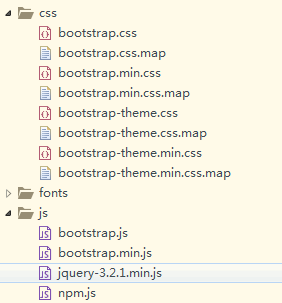
页面需要引用几个js和css文件
2017-08-31 18:56:39
【Html5】表单全选、全不选的更多相关文章
- jQuery html5Validate基于HTML5表单验证插件
更新于2016-02-25 前面提到的新版目前线上已经可以访问: http://mp.gtimg.cn/old_mp/assets/js/common/ui/Validate.js demo体验狠狠地 ...
- HTML5表单验证(4个实用的表单美化案例)
multipart/form-data 在使用包含文件上传控件的表单时,必须使用autocomplete="on" 自动补全功能novalidate 不验证 <form en ...
- Ideal Forms – 帮助你建立响应式 HTML5 表单
Ideal Forms 是建立和验证响应式 HTML5 表单的终极框架.它刚刚发布 V3 版本,更小,更快,更具可扩展性.它支持实时验证,完全自适应(适应容器,没有 CSS 媒体查询需要),键盘支持, ...
- HTML5表单及其验证
随笔- 15 文章- 1 评论- 115 HTML5表单及其验证 HTML表单一直都是Web的核心技术之一,有了它我们才能在Web上进行各种各样的应用.HTML5 Forms新增了许多新控件及其A ...
- HTML5表单新属性
HTML5表单新属性 autofocus 自动聚焦 <input type="text" autofocus> placeholder占位文本 tel ...
- HTML5 表单元素和属性
HTML5 表单元素和属性学习 版权声明:未经博主授权,内容严禁转载 ! 表单元素简介 无论实现提交功能还是展示页面功能,表单在HTML中的作用都十分重要. 在其他版本的HTML中,表单能够包含的元素 ...
- 完善:HTML5表单新特征简介与举例——张鑫旭
一.前言一撇 其实关于HTML5的表单特征早在去年“你必须知道的28个HTML5特征.窍门和技术”一文中就有所介绍(在第十一项),不过,有些遗憾的是,此部分的介绍是以视频形式展示的,其实,是视频还好啦 ...
- html5-5 HTML5表单元素和内嵌框架
html5-5 HTML5表单元素和内嵌框架 一.总结 一句话总结:单选框和多选框选的时候外面加label就可以实现选后面文字也可以选中了 1.html5如何实现文件上传? 必须加上enctype ...
- 实现跨浏览器html5表单验证
div:nth-of-type(odd){ float: left; clear: left; } .origin-effect > div:nth-of-type(even){ float: ...
- html5表单验证
表单验证为终端用户检测无效的数据并标记这些错误,是一种用户体验的优化. 下面展现浏览器自带的验证功能也可在移动端中查看: HTML部分: <!DOCTYPE html> <html ...
随机推荐
- 【ZIP】打包过滤指定目录和文件
zip -r project.zip project/ -x@exclude.lst #目录过滤 # 直接目录,如 public public/* # 嵌套目录 如 node_modules */no ...
- OpenCV笔记(I)
这里记一下开始入手OpenCV碰到的一些问题以及解决办法.学习参考书是<OpenCV 4 计算机视觉项目实战(原书第2版)>,ISBN:978-7-111-63164-4. Ubuntu ...
- SSL交互简述及nginx双向认证配置
一.证书生成. 1.SSL Server生成私钥/公钥对.server.key(加密)/server.pub(解密):2.server.pub生成请求文件server.csr,包含server的一些信 ...
- 转(HBuilder 打包流程)
1.运行HBuilder---百度搜索HBuilder,官网下载安装包,解压,运行HBuilder.exe.注册账号,并登陆 2.新建app---在左边右键,选择新建APP,或者,点击中间的新建app ...
- RPC框架pigeon源码分析
Pigeon是一个分布式服务通信框架(RPC),是美团点评最基础的底层框架之一.已开源,链接:https://github.com/dianping/pigeon 从接下来三个方面来分析pigeon的 ...
- mac下phpize编译提示Cannot find autoconf解决办法
mac下phpize编译如下报错: /usr/bin/phpizeConfiguring for:PHP Api Version: 20121113Zend Module Api No: 201212 ...
- Linux系统中的硬件问题如何排查?(6)
Linux系统中的硬件问题如何排查?(6) 2013-03-27 10:32 核子可乐译 51CTO.com 字号:T | T 在Linux系统中,对于硬件故障问题的排查可能是计算机管理领域最棘手的工 ...
- 基于Ubuntu 搭建 WordPress 个人博客 - 开发者实验室 - 腾讯云
1.准备 LAMP 环境 安装 Apache2 在终端输入该命令 ,使用 apt-get 安装 Apache2: sudo apt-get install apache2 -y 安装好后,您可以通过访 ...
- 关于python pip安装第三方库 jieba 中文分词工具后提示"ImportError: cannot import name 'Random'"报错问题
具体错误提示如下: >>> import jieba Traceback (most recent call last): File "<stdin>" ...
- PHP基础教程 php 网络上关于设计模式一些总结
1.单例模式 单例模式顾名思义,就是只有一个实例.作为对象的创建模式,单例模式确保某一个类只有一个实例,而且自行实例化并向整个系统提供这个实例. 单例模式的要点有三个: 一是某个类只能有一个实例; 二 ...