
.Net Core身份认证:IdentityServer4实现OAuth 2.0 客户端模式
一、客户端模式介绍
客户端模式(Client Credentials Grant)是指客户端直接向认证服务(Authorization Server)发送认证请求,获取token,进行认证,一般适用于受信任的客户端。
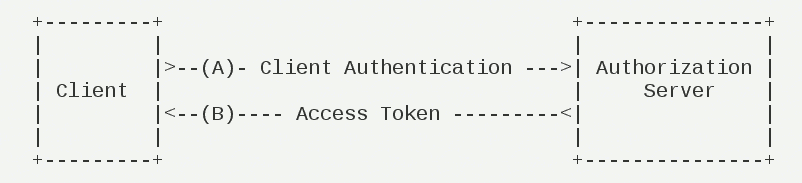
请求步骤为:
- 客户端向认证服务器进行认证,并请求一个访问令牌
token;- 认证服务器进行认证,通过之后,返回客户端一个访问令牌。
二、创建认证服务
- 创建一个认证服务
IdentityServerCenter,通过NuGet安装IdentityServer4;- 添加配置资源与客户端的文件,引入
using IdentityServer4.Models
   public class Config

    {

        public static IEnumerable<ApiResource> GetResources()

        {

            return new List<ApiResource> {

                    new ApiResource {

                        Name = "ImageResource",

                        Scopes={ new Scope ("ImageResource")},//Scopes必须配置,否则获取token时返回 invalid_scope

                    },

                    new ApiResource { Name = "FileResourse" },

                    new ApiResource { Name="Api",    Scopes={new Scope ("Api") } }

                };

        }

        public static IEnumerable<Client> GetClients()

        {

            return new List<Client> {

                    new Client {

                        ClientId = "ClientId",

                        AllowedGrantTypes =GrantTypes.ClientCredentials,//授权模式:客户端模式

                        AllowedScopes={ "ImageResource","Api" }, //允许访问的资源 GetResources()中配置的

                       ClientSecrets={ new Secret { Value= "ClientSecret".Sha256(), Expiration=DateTime.Now.AddMinutes(5)} }

                    } };

        }

    }
- 注入
IdentityServer4,添加IdentityServer4配置
        public void ConfigureServices(IServiceCollection services)

        {

            //注入IdentityServer   添加IdentityServer4配置

            services.AddIdentityServer()

                .AddDeveloperSigningCredential()

                .AddInMemoryApiResources(Config.GetResources()) //添加配置的资源ApiResource

                .AddInMemoryClients(Config.GetClients());//添加配置的客户端Client

          //  services.AddMvc().SetCompatibilityVersion(CompatibilityVersion.Version_2_1);

        }
- 使用
IdentityServer4
     public void Configure(IApplicationBuilder app, IHostingEnvironment env)

        {

            //使用IdentityServer

            app.UseIdentityServer();

        }
- 启动项
由于未使用MVC,访问该api返回404。IdentityServer4提供一个地址可获取相关配置项。
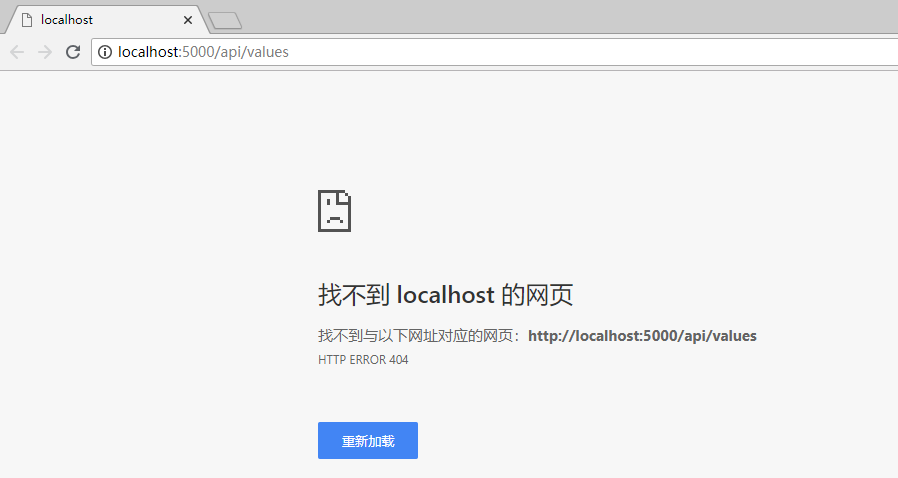
http://examplehostname.com.well-known/openid-configuration/
访问 http://localhost:5000/.well-known/openid-configuration 将返回的信息序列化如下

scopes_supported": ["ImageResource", "Api", "offline_access"]即为Config中配置的访问的资源AllowedScopes。
- 使用
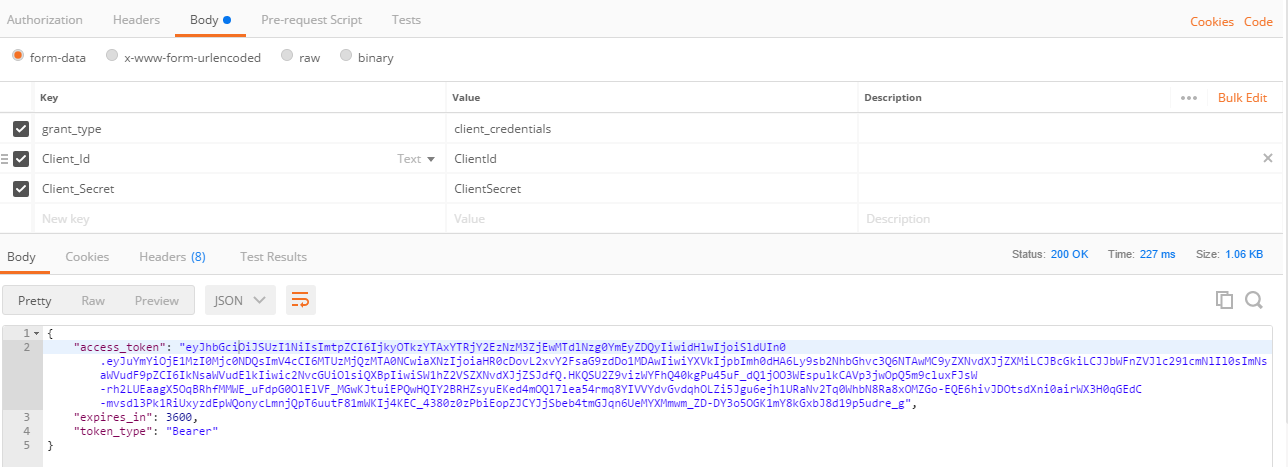
postman获取token
grant_type为客户端授权client_credentials,client_id与Client_Secret为Config中配置的ClientId与Secret。接下来创建一个可访问的资源。
三、创建资源服务
- 创建一个资源服务项目
ImageResourceApi- 注入认证
 public void ConfigureServices(IServiceCollection services)

        {

            services.AddAuthentication(config => {

                config.DefaultScheme = "Bearer";

            }).AddIdentityServerAuthentication(option=> {

                option.ApiName = "ImageResource";

                option.Authority = "http://localhost:5000"; //认证服务的url

                option.ApiSecret = "ClientSecret".ToSha256();// 访问的secret

                option.RequireHttpsMetadata = false;

            });

            services.AddMvc().SetCompatibilityVersion(CompatibilityVersion.Version_2_1);

        }

      public void Configure(IApplicationBuilder app, IHostingEnvironment env)

        {

            if (env.IsDevelopment())

            {

                app.UseDeveloperExceptionPage();

            }

            else

            {

                app.UseHsts();

            }

            app.UseHttpsRedirection();

            //使用认证

            app.UseAuthentication();

            app.UseMvc();

        }
- 启动资源服务,返回401未授权;
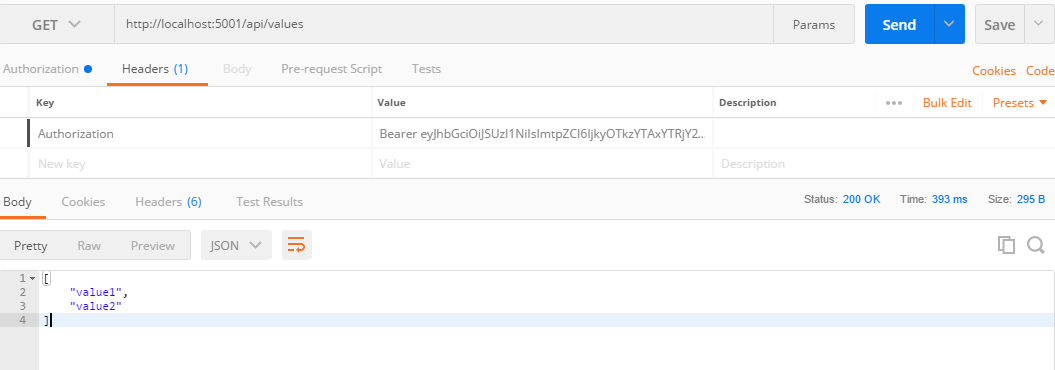
- 使用
postman带着token请求资源服务ImageResourceApi,请求成功。
.Net Core身份认证:IdentityServer4实现OAuth 2.0 客户端模式的更多相关文章
- .Net Core身份认证:IdentityServer4实现OAuth 2.0 客户端模式 - 简书
原文:.Net Core身份认证:IdentityServer4实现OAuth 2.0 客户端模式 - 简书 一.客户端模式介绍 客户端模式(Client Credentials Grant)是指客户 ...
- 深入解读 ASP.NET Core 身份认证过程
长话短说:上文我们讲了 ASP.NET Core 基于声明的访问控制到底是什么鬼? 今天我们乘胜追击:聊一聊ASP.NET Core 中的身份验证. 身份验证是确定用户身份的过程. 授权是确定用户是否 ...
- 在PHP应用中简化OAuth2.0身份验证集成:OAuth 2.0 Client
在PHP应用中简化OAuth2.0身份验证集成:OAuth 2.0 Client 阅读目录 验证代码流程 Refreshing a Token Built-In Providers 这个包能够让你 ...
- .Net Core:身份认证组件
类库组件 .NET Core的身份认证使用的类库如下图:常用的 Microsoft.AspNetCore.Authorization Microsoft.AspNetCore.Authorizatio ...
- Core身份认证
Core中实现一个基础的身份认证 注:本文提到的代码示例下载地址> How to achieve a basic authorization in ASP.NET Core 如何在ASP.NET ...
- .NET 黑魔法 - asp.net core 身份认证 - Policy
身份认证几乎是每个项目都要集成的功能,在面向接口(Microservice)的系统中,我们需要有跨平台,多终端支持等特性的认证机制,基于token的认证方式无疑是最好的方案.今天我们就来介绍下在.Ne ...
- 使用 IdentityServer4 实现 OAuth 2.0 与 OpenID Connect 服务
IdentityServer4 是 ASP.NET Core 的一个包含 OIDC 和 OAuth 2.0 协议的框架.最近的关注点在 ABP 上,默认 ABP 也集成 IdentityServer4 ...
- IdentityServer4 实现 OAuth 2.0(密码模式 - HTTP Post 方式)
之前写了一篇文章:<IdentityServer4 实现 OpenID Connect 和 OAuth 2.0> 上面这篇文章虽然详细,但都是点到为止的介绍,并没有实际应用的示例,所以,后 ...
- IdentityServer4:IdentityServer4+API+Client实践OAuth2.0客户端模式(1)
一.OAuth2.0 1.OAuth2.0概念 OAuth2.0(Open Authorization)是一个开放授权协议:第三方应用不需要接触到用户的账户信息(如用户名密码),通过用户的授权访问用户 ...
随机推荐
- mysql 性能调优 参数随写
set global innodb_buffer_pool_size = 12*1024*1024*1024;set global bulk_insert_buffer_size = 12582912 ...
- POJ:3371 Connect the Cities(最小生成树)
http://acm.hdu.edu.cn/showproblem.php?pid=3371 AC代码: /** /*@author Victor /* C++ */ #include <bit ...
- 2019牛客多校第三场A Graph Games 分块思想
题意:给你一张无向图,设s(x)为与x直接相连的点的集合,题目中有两种操作: 1:1 l r 将读入的边的序列中第l个到第r个翻转状态(有这条边 -> 没这条边, 没这条边 -> 有这条边 ...
- rabbitmq一个连接多个信道channel
https://www.cnblogs.com/eleven24/p/10326718.html
- SVN 的安装及配置
1.安装subversion yum install subversion 2.创建仓库目录 mkdir /svn 3. 为项目3创建仓库 svnadmin create /svn/proj3 4.修 ...
- oracle 数据恢复
闪回表删除之前 flashback table t1 to before drop; 如果彻底删除表此方法无效 若要彻底删除表,则使用语句:drop table <table_name> ...
- 第06章 AOP XML
第06章 以XML方式配置切面 1.概述 除了使用AspectJ注解声明切面,Spring也支持在bean配置文件中声明切面.这种声明是通过aop名称空间中的XML元素完成的. 正常情况下,基于注解的 ...
- array_reduce — 用回调函数迭代地将数组简化为单一的值
定义和用法 array_reduce() 函数向用户自定义函数发送数组中的值,并返回一个字符串. 注释:如果数组是空的且未传递 initial 参数,该函数返回 NULL. 说明 array_redu ...
- [REPRINT]MySQL Indexing Explained
https://atech.blog/viaduct/mysql-indexes-primer What are Indexes? Every time your web application ru ...
- 区间第k大的几种解法
区间第K大问题,变化包括带修改和不带修改,强制在线和允许离线 修改主要是单点修改,我们前面也只讨论这种情况. 接下来我们从编程复杂度和时空复杂度来讨论几种做法. 1.整体二分(编程复杂度:低-中,时间 ...