
IdentityServer4:IdentityServer4+API+Client实践OAuth2.0客户端模式(1)
一、OAuth2.0
1、OAuth2.0概念
OAuth2.0(Open Authorization)是一个开放授权协议;第三方应用不需要接触到用户的账户信息(如用户名密码),通过用户的授权访问用户资源
OAuth的步骤一般如下:
1、客户端要求用户给予授权
2、用户同意给予授权
3、根据上一步获得的授权,向认证服务器请求令牌(token)
4、认证服务器对授权进行认证,确认无误后发放令牌
5、客户端使用令牌向资源服务器请求资源
6、资源服务器使用令牌向认证服务器确认令牌的正确性,确认无误后提供资源
该协议的参与者至少包含:
RO (resource owner): 资源所有者:用户。
RS (resource server): 资源服务器:数据中心;它存储资源,并处理对资源的访问请求。如:API资源,相册服务器、博客服务器。
AS (authorization server): 授权服务器
Client: 第三方应用
2、授权模式
四种模式:
1、授权码模式(authorization code)
2、简化模式(implicit)
3、密码模式(resource owner password credentials)
4、客户端模式(client credentials)
二、IdentityServer + API+Client演示客户端模式
客户端模式(ClientCredentials):经常运用于服务器对服务器中间通讯使用;步骤如下:
1、客户端直接用自身的信息向授权服务器请求token:
HTTP请求:
granttype:授权类型
scope:授权范围
     POST /token HTTP/1.1

     Host: server.example.com

     Authorization: Basic czZCaGRSa3F0MzpnWDFmQmF0M2JW

     Content-Type: application/x-www-form-urlencoded

     grant_type=client_credentials&scope=api001
2、授权服务器验证信息后返回token
     HTTP/1.1  OK

     Content-Type: application/json;charset=UTF-

     Cache-Control: no-store

     Pragma: no-cache

     {

       "access_token":"2YotnFZFEjr1zCsicMWpAA",

       "token_type":"example",

       "expires_in":,

       "example_parameter":"example_value"

     }

下面通过一个快速示例理解;快速示例将通过服务器与服务器直接通过api访问数据;
1、授权服务端;
这里将通过IdnetityServer4实现一个标准的Oauth2.0协议的服务端;
引用IdentityServer4包
新建ASP.NET Core Web Application ——Empty项目;这里通过程序包控制台添加IdentityServer4引用包
Install-Package IdentityServer4
定义API资源、定义客户端
新建类Config.cs;定义资源Scopes、Client;
using IdentityServer4.Models;

using System;

using System.Collections.Generic;

using System.Linq;

using System.Threading.Tasks;

namespace Practice.IdentityServer

{

    public class Config

    {

        //scopes定义

        public static IEnumerable<ApiResource> GetApiResource()

        {

            return new List<ApiResource>

            {

                //给api资源定义一个scopes

                new ApiResource("api1","my api")

            };

        }

        //客户端注册,客户端能够访问的资源(通过:AllowedScopes)

        public static IEnumerable<Client> GetClient()

        {

            return new List<Client>

            {

                new Client

                {

                    ClientId="client",

                    AllowedGrantTypes=GrantTypes.ClientCredentials,

                    ClientSecrets={new Secret("secrect".Sha256())},

                    AllowedScopes={"api"}

                }

            };

        }

    }

}
把资源和客户端、存储方式、添加到service container(DI system)
using System;

using System.Collections.Generic;

using System.Linq;

using System.Threading.Tasks;

using Microsoft.AspNetCore.Builder;

using Microsoft.AspNetCore.Hosting;

using Microsoft.AspNetCore.Http;

using Microsoft.Extensions.DependencyInjection;

using Microsoft.Extensions.Logging;

namespace Practice.IdentityServer

{

    public class Startup

    {

        // 添加服务到容器(add services to the container)DI系统.

        public void ConfigureServices(IServiceCollection services)

        {

            services.AddIdentityServer()

                .AddTemporarySigningCredential()

                .AddInMemoryApiResources(Config.GetApiResource())

                .AddInMemoryClients(Config.GetClient());

        }

        //配置HTTP request 管道(pipeline).

        public void Configure(IApplicationBuilder app, IHostingEnvironment env, ILoggerFactory loggerFactory)

        {

            loggerFactory.AddConsole(LogLevel.Debug);

            if (env.IsDevelopment())

            {

                app.UseDeveloperExceptionPage();

            }

            app.UseIdentityServer();

            //app.Run(async (context) =>

            //{

            //    await context.Response.WriteAsync("Hello World!");

            //});

        }

    }

}
配置
注意:使用自宿的方式调试;会把日志输出到控制台;自宿的配置方式:
方法1:

方法2:

配置地址:
在program.cs添加一句:.UseUrls("http://localhost:5000") 设置调试url;
运行
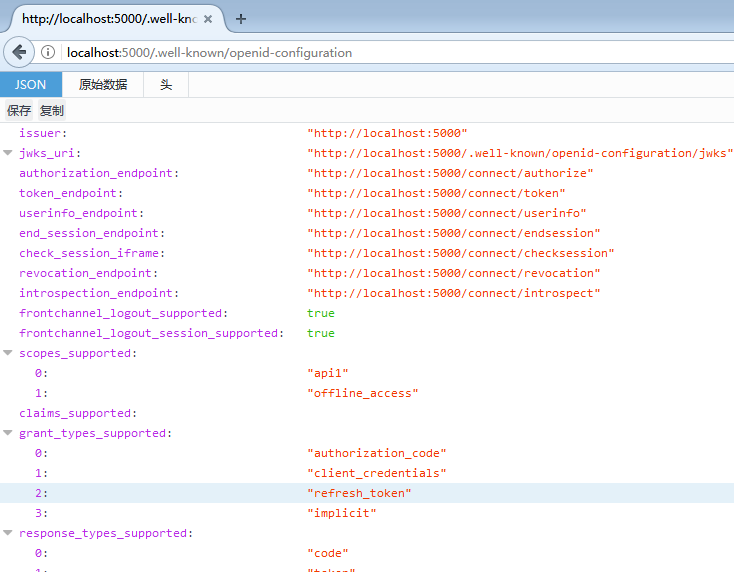
运行、通过http://localhost:5000/.well-known/openid-configuration访问 ;可以看到是一个restful的api;
2、API资源
新建ASP.NET Core Web API 项目;添加中间件IdentityServer4.AccessTokenValidation 包引用

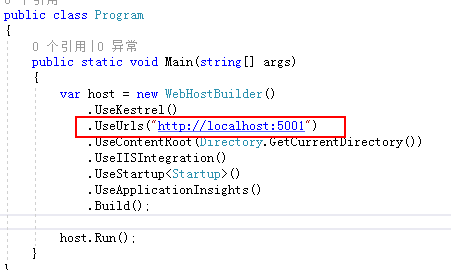
配置api的地址
添加控制器
[Route("identity")]

    [Authorize]

    public class IdentityController : Controller

    {

        [HttpGet]

        public IActionResult Get()

        {

            return new JsonResult(from a in User.Claims select new { a.Type,a.Value});

        }

    }
配置
把授权中间件配置到api host里;IdentityServer4.AccessTokenValidation这里的主要作用
1、验证token令牌,确保token令牌的Issuer发行者是经过注册认证可信任的发行者;
2、验证token令牌,确保这个令牌的授权范围(scope)包括授权使用这个api
    public class Startup

    {

        public Startup(IHostingEnvironment env)

        {

            var builder = new ConfigurationBuilder()

                .SetBasePath(env.ContentRootPath)

                .AddJsonFile("appsettings.json", optional: false, reloadOnChange: true)

                .AddJsonFile($"appsettings.{env.EnvironmentName}.json", optional: true)

                .AddEnvironmentVariables();

            Configuration = builder.Build();

        }

        public IConfigurationRoot Configuration { get; }

        // This method gets called by the runtime. Use this method to add services to the container.

        public void ConfigureServices(IServiceCollection services)

        {

            // Add framework services.

            services.AddMvcCore()

                .AddAuthorization()

                .AddJsonFormatters();

        }

        // This method gets called by the runtime. Use this method to configure the HTTP request pipeline.

        public void Configure(IApplicationBuilder app, IHostingEnvironment env, ILoggerFactory loggerFactory)

        {

            loggerFactory.AddConsole(Configuration.GetSection("Logging"));

            loggerFactory.AddDebug();

            app.UseIdentityServerAuthentication(new IdentityServerAuthenticationOptions {

                Authority = "http://localhost:5000",

                RequireHttpsMetadata=false,

                ApiName="api1"

            });

            app.UseMvc();

        }

    }
运行后,直接浏览器访问http://localhost:5001/identity会被拒绝说明成功;访问这个api需要在http请求的header加入token才可以访问;
3、Client客户端
新建.Net Core——控制台应用;添加中间件

IdentityModel是官方提供给我们的一个Client类库;当然用户也可以自行构建原始的http协议访问API;
public class Program

    {

        public static void Main(string[] args) => MainAsync().GetAwaiter().GetResult();

        private static async Task MainAsync()

        {

            //

            var dico = await DiscoveryClient.GetAsync("http://localhost:5000");

            //token

            var tokenClient = new TokenClient(dico.TokenEndpoint, "client", "secret");

            var tokenresp = await tokenClient.RequestClientCredentialsAsync("api1");

            if (tokenresp.IsError)

            {

                Console.WriteLine(tokenresp.Error);

                return;

            }

            Console.WriteLine(tokenresp.Json);

            Console.WriteLine("\n\n");

            var client = new HttpClient();

            client.SetBearerToken(tokenresp.AccessToken);

            var resp = await client.GetAsync("http://localhost:5000/identity");

            if (!resp.IsSuccessStatusCode)

            {

                Console.WriteLine(resp.StatusCode);

            }

            else

            {

                var content = await resp.Content.ReadAsStringAsync();

                Console.WriteLine(JArray.Parse(content));

            }

        }

    }
DiscoveryClient类:IdentityModel提供给我们通过基础地址(如:http://localhost:5000)就可以访问令牌服务端;当然可以根据上面的restful api里面的url自行构建;上面就是通过基础地址,获取一个TokenClient;(对应restful的url:token_endpoint "http://localhost:5000/connect/token")
RequestClientCredentialsAsync方法:请求令牌;
获取令牌后,就可以通过构建http请求访问API接口;这里使用HttpClient构建请求,获取内容;
运行效果:

我们换一种原始的方式模拟这个流程
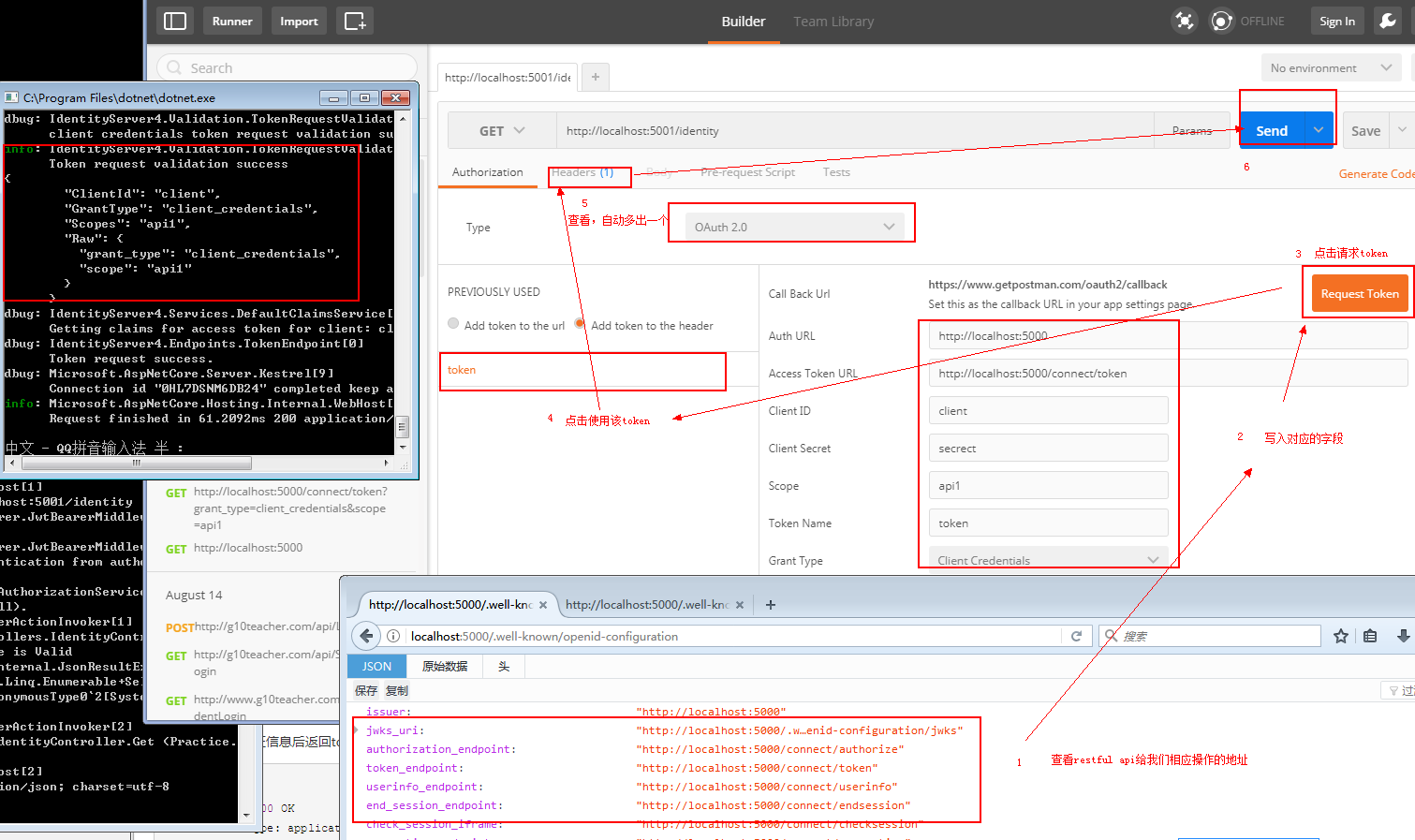
打开Postman:按照restful api页面的说明,依次进行下面的步骤操作,一个很原始的http流程就熟悉了;自行查看原图
资料:
http://wiki.connect.qq.com/%E4%BD%BF%E7%94%A8implicit_grant%E6%96%B9%E5%BC%8F%E8%8E%B7%E5%8F%96access_token
IdentityServer4:IdentityServer4+API+Client实践OAuth2.0客户端模式(1)的更多相关文章
- IdentityServer4:IdentityServer4+API+Client+User实践OAuth2.0密码模式(2)
一.密码模式实操 仍然使用第一节的代码:做如下改动: 1.授权服务端 前面我们使用项目:Practice.IdentityServer作为授权服务器 修改项目的Config.cs类: 添加测试用户,并 ...
- .Net Core身份认证:IdentityServer4实现OAuth 2.0 客户端模式 - 简书
原文:.Net Core身份认证:IdentityServer4实现OAuth 2.0 客户端模式 - 简书 一.客户端模式介绍 客户端模式(Client Credentials Grant)是指客户 ...
- IdentityServer4之SSO(基于OAuth2.0、OIDC)单点登录、登出
IdentityServer4之SSO(基于OAuth2.0.OIDC)单点登录.登出 准备 五个Web站点: 1.localhost:5000 : 认证服务器.2 ...
- Spring Boot Security Oauth2之客户端模式及密码模式实现
Spring Boot Security Oauth2之客户端模式及密码模式实现 示例主要内容 1.多认证模式(密码模式.客户端模式) 2.token存到redis支持 3.资源保护 4.密码模式用户 ...
- Ubuntu宝塔面板设置网站 Apache Server API为Apache 2.0 Handler模式
用过宝塔面板(https://www.bt.cn)的谁用谁知道: 以下来自官网的介绍: “宝塔Linux面板是提升运维效率的服务器管理软件,支持一键LAMP/LNMP/集群/监控/网站/FTP/数据 ...
- oauth2.0密码模式详解
oauth2.0密码模式 欢迎关注博主公众号「Java大师」, 专注于分享Java领域干货文章http://www.javaman.cn/sb2/oauth-password 如果你高度信任某个应用, ...
- .Net Core身份认证:IdentityServer4实现OAuth 2.0 客户端模式
一.客户端模式介绍 客户端模式(Client Credentials Grant)是指客户端直接向认证服务(Authorization Server)发送认证请求,获取token,进行认证,一般适用于 ...
- RESTful API架构和oauth2.0认证机制(概念版)
1. 什么是REST REST全称是Representational State Transfer,中文意思是表述(编者注:通常译为表征)性状态转移. 它首次出现在2000年Roy Fielding的 ...
- [PHP] 调用微博API 发微博OAuth2.0
在实际测试中出现很多问题, 第一就是按照文档调用ACCESS_TOKEN的时候费老劲啦,因为是编辑线上的,有好多中文空格,没有看出来!整了好久! 第二个就是在调用api发微博的时候出现乱码!必须把发送 ...
随机推荐
- poj3080 Blue Jeans【KMP】【暴力】
Blue Jeans Time Limit: 1000MS Memory Limit: 65536K Total Submissions:21746 Accepted: 9653 Descri ...
- .NET Core开发日志——ADO.NET与SQL Server
在.NET世界,如果想要对数据库进行操作,总少不了ADO.NET的身影.在.NET Core里同样离不开那些熟悉的类库与API.这里简略地介绍下如何通过ADO.NET对SQL Server进行不同的处 ...
- [No0000D6]端口-进程查询.bat
@echo off color a Title XP端口-进程查询 setlocal enabledelayedexpansion echo ╔- -╗ echo 本机开放的端口及使用该端口的进程 e ...
- shell监控之列出1小时内cpu占用最多的10个进程
脚本内容如下: -------------------------------------------------------------------------------------------- ...
- git修改提交的用户名
场景分析 试想一下这样的场景,你先在自己的电脑上上创建了一个项目,并且把他添加到了git仓库,然后提交到了Github.但是,下一次,你在公司的电脑上clone了这个项目,并且修改了文件,当你提交到G ...
- yum下载rpm包
方法一:downloadonly插件 1.安装插件 yum -y install yum-download 2.下载httpd软件包到当前文件夹内 yum -y install httpd -dow ...
- cv_list
cv_list hmz http://cse.sjtu.edu.cn/OS/OS_files/page0012.htm 邹恒明博士: 美国密歇根大学(University of Michigan-An ...
- Oracle shrink table
shrink必须开启行迁移功能. alter table table_name enable row movement ; 在oracle中可以使用alter table table_name shr ...
- Mysql 数据库几种引擎的区别比较
· MyISAM:默认的MySQL插件式存储引擎,它是在Web.数据仓储和其他应用环境下最常使用的存储引擎之一.注意,通过更改STORAGE_ENGINE配置变量,能够方便地更改MySQL服务器的默认 ...
- 对web标准化(或网站重构)知道哪些相关的知识,简述几条你知道的Web标准?
网页主要有三部分组成:结构(Structrue).表现(Presentation)和行为(Behavior).对应的网站标准也分为三方面: 1.结构化标准语言,主要包括XHTML和XML: 2.表现标 ...