
实战build-react(三)+ style-components
npm install --save style-components
https://www.jianshu.com/p/27788be90605(copy)
"axios": "^0.18.0",
"immutable": "^3.8.2", //不可修改变量插件
"react": "^16.4.0",
"react-dom": "^16.4.0",
"react-loadable": "^5.4.0",
"react-redux": "^5.0.7",
"react-router": "^4.3.1",
"react-router-dom": "^4.3.1", // 路由
"react-scripts": "1.1.4",
"react-transition-group": "^2.3.1", //动画
"redux": "^4.0.0",
"redux-immutable": "^4.0.0",
"redux-thunk": "^2.3.0", //允许action返回函数
"styled-components": "^3.3.2" //全局css
创建完基础框架
写完一个模块,然后创建store,验证store,然后对store进行优化
涉及到Redux Devtool 和 reducer的分模块化
拆分actionCreators和constants的js文件
npm install immutable
npm install redux-immutable --save
npm install react-redux --save
npm install react-router --save
npm install redux-thunk --save
npm install styled-components --save
创建全局sotre

sotre/index.js
import {createStore,compose, applyMiddleware} from 'redux';

import thunk from 'redux-thunk';

import reducer from './reducer';

const composeEnhancers = window.__REDUX_DEVTOOLS_EXTENSION_COMPOSE__ || compose;

const store=createStore(reducer, composeEnhancers(

    applyMiddleware(thunk)

));

export default store;
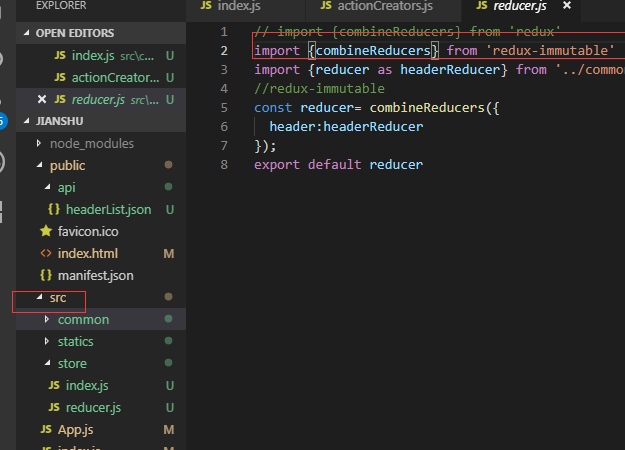
sotre/reducer.js
import {combineReducers} from 'redux-immutable'

// import {reducer as headerReducer} from '../common/header/store';

const reducer= combineReducers({

  // header:headerReducer,

});

export default reducer;
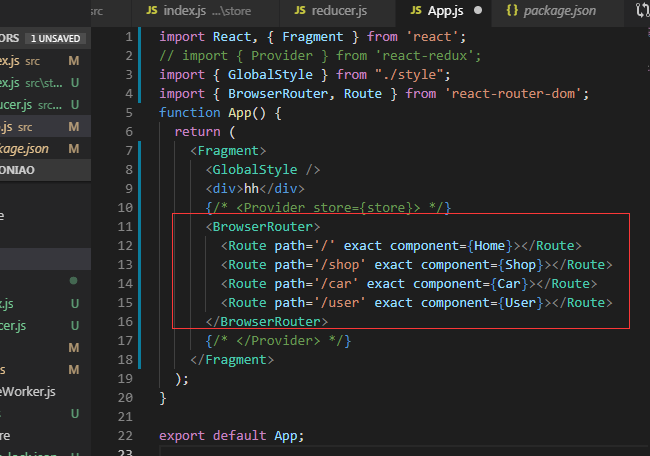
app.js添加路由
import Home from './pages/home';

import Shop from './pages/shop';

import Car from './pages/car';

import User from './pages/user';
   <BrowserRouter>

        <Route path='/' exact component={Home}></Route>

        <Route path='/shop' exact component={Shop}></Route>

        <Route path='/car' exact component={Car}></Route>

        <Route path='/user' exact component={User}></Route>

      </BrowserRouter>
每个模块目录结构,先创建index.js文件

home/index.js
import React, { PureComponent } from 'react';

class Home extends PureComponent {

  render() {

    return (

      <div>Home</div>

    )

  }

  componentDidMount() {

  }

}

export default Home;
如果有公共组件
创建common文件夹

编写style.js文件(相当于css)
import styled from 'styled-components';

export  const HeaderWrapper=styled.div`

  height:58px;

  background-color: #fff;

  border-bottom:1px solid #f0f0f0;

`;
引入style.js
import {

  HeaderWrapper,

  Logo,

  Nav,

  NavItem,

  NavSearch,

} from './style';
nav导航添加链接
import { Link } from 'react-router-dom';

<Link to={'/detail/' + item.get('id')}>

  <div className='nav-item flexca'>商城</div>

</Link>
sotre 连接专题
先修改APP.js,把 Provider放开,引入sotre
先修改模块主js文件,引入connect,actionCreators
import React, { PureComponent } from 'react';

import { connect } from 'react-redux';

import { actionCreators } from './store';

import { Link } from 'react-router-dom';

import {

  NavBar,

} from './style';

class TabBar extends PureComponent {

  render() {

    const { setBackColor,navNumber } = this.props;

    console.log(navNumber )
//直接函数setBackColor,传参()=>setBackColor(0)
return ( <NavBar className='flex'>

        {/* <Link className='nav-item flexca' to={'/'}  onClick={setBackColor(0)}> */}

          {/* 商城 */}

        {/* </Link> */}
      </NavBar>

    )

  }

  componentDidMount() {

  }

  // setBackColor(){

  //   console.log(1)

  // }

}

const mapState = (state) => ({

  navNumber: state.getIn(['tabBar', 'navNumber'])

});

const mapDispatch = (dispatch) => ({

  setBackColor(number) {

    console.log(1111)

    dispatch(actionCreators.setBackColor(number))

  }

});

export default connect(mapState, mapDispatch)(TabBar);
reducer.js
index.js
import reducer from './reducer';

import * as actionCreators from './actionCreators';

import * as constants from './constants';

export {reducer,actionCreators,constants}
constants.js
actionCreators.js
成功后,浏览器这样变化
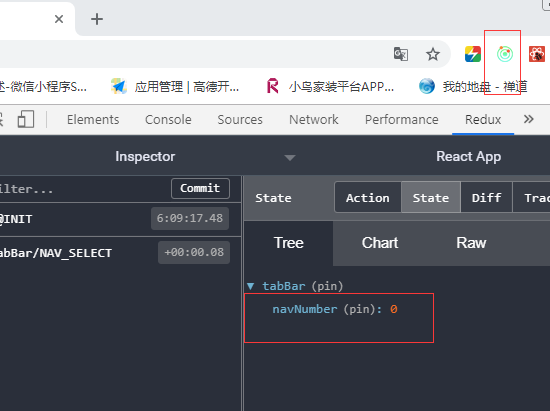
引入immutable模块,'模块'中的store/reducer文件引入immutable来锁定state
引入redux-immutable模块,'项目'store//reducer文件引入redux-immutable
注意:immutable 模块 fromJS(data)处理过的数据已经不是普通的数据,不许与相同类型的数据进行组合,
并且成功后页面表象没有任何编号,但数据确实是全新的数据,不是原始state,注意immutable 流和redux流


如果页面没报错,数据还没出来,就改怀疑有没有 数据.toJS();这样才能把数据转为普通js数据,才能执行js函数
实战build-react(三)+ style-components的更多相关文章
- 【转】Facebook React 和 Web Components(Polymer)对比优势和劣势
原文转自:http://segmentfault.com/blog/nightire/1190000000753400 译者前言 这是一篇来自 StackOverflow 的问答,提问的人认为 Rea ...
- Facebook React 和 Web Components(Polymer)对比优势和劣势
目录结构 译者前言 Native vs. Compiled 原生语言对决预编译语言 Internal vs. External DSLs 内部与外部 DSLs 的对决 Types of DSLs - ...
- 基于 abp vNext 和 .NET Core 开发博客项目 - Blazor 实战系列(三)
系列文章 基于 abp vNext 和 .NET Core 开发博客项目 - 使用 abp cli 搭建项目 基于 abp vNext 和 .NET Core 开发博客项目 - 给项目瘦身,让它跑起来 ...
- AspNetCore-MVC实战系列(三)之个人中心
AspNetCore - MVC实战系列目录 . 爱留图网站诞生 . git源码:https://github.com/shenniubuxing3/LovePicture.Web . AspNetC ...
- react实战系列 —— React 中的表单和路由的原理
其他章节请看: react实战 系列 React 中的表单和路由的原理 React 中的表单是否简单好用,受控组件和非受控是指什么? React 中的路由原理是什么,如何更好的理解 React 应用的 ...
- 工作经常使用的SQL整理,实战篇(三)
原文:工作经常使用的SQL整理,实战篇(三) 工作经常使用的SQL整理,实战篇,地址一览: 工作经常使用的SQL整理,实战篇(一) 工作经常使用的SQL整理,实战篇(二) 工作经常使用的SQL整理,实 ...
- [SQL SERVER系列]工作经常使用的SQL整理,实战篇(三)[原创]
工作经常使用的SQL整理,实战篇,地址一览: 工作经常使用的SQL整理,实战篇(一) 工作经常使用的SQL整理,实战篇(二) 工作经常使用的SQL整理,实战篇(三) 接着本系列前面两篇继续讨论. 有时 ...
- SAS数据挖掘实战篇【三】
SAS数据挖掘实战篇[三] 从数据挖掘概念到SAS EM模块和大概的流程介绍完之后,下面的规划是[SAS关联规则案例][SAS聚类][SAS预测]三个案例的具体操作步骤,[SAS的可视化技术]和[SA ...
- 手把手和你一起实现一个Web框架实战——EzWeb框架(三)[Go语言笔记]Go项目实战
手把手和你一起实现一个Web框架实战--EzWeb框架(三)[Go语言笔记]Go项目实战 代码仓库: github gitee 中文注释,非常详尽,可以配合食用 本篇代码,请选择demo3 这一篇文章 ...
- [Recompose] Configure Recompose to Build React Components from RxJS Streams
Recompose provides helper functions to stream props using an Observable library of your choice into ...
随机推荐
- 一些常用的字符串函数(CLR函数)
原代码来自:东莞--小小大神 使用 --聚合函数 SELECT father_key,dbo.String_Agg(department_name) FROM dbo.b_department GRO ...
- Hive Error : Java heap space 解决方案
Java heap space问题一般解决方案: 设置 set io.sort.mb=10; 排序所使用的内存数量,默认值是100M,和mapred.child.java.opts相对应,opts默认 ...
- Node.js 博客搭建
Node.js 博客搭建:https://www.linuxidc.com/Linux/2017-02/140115.htm https://www.cnblogs.com/mrcln/p/93087 ...
- AT2294 Eternal Average
题目 题目给我们的这个东西可以转化为一棵\(k\)叉树,有\(n+m\)个叶子节点,其中\(m\)个权值为\(1\),\(n\)个权值为\(0\),每个非叶子节点的权值为其儿子的平均值,现在问你根节点 ...
- $Prufer$序列
\(Prufer\)序列 \(Prufer\)序列与树的相互转换: 树->\(Prufer\)序列 找到一个编号最小的叶子结点,把这个点删掉并且把跟他连着的那个点的编号加入\(Prufer\)序 ...
- ubuntu18下lamp虚拟路劲配置
一.配置二级域名 修改hosts文件,模拟dns解析. 位置:/etc/hosts 添加 127.0.0.1 myweb.service.com 二.创建项目目录 apache默认目录是/var m ...
- Spark RDD理解-总结
1.spark是什么 快速.通用.可扩展的分布式计算引擎. 2. 弹性分布式数据集RDD RDD(Resilient Distributed Dataset),是Spark中最基本的数据抽象结构,表示 ...
- 在vue中使用async/await遇到的坑
最近无聊在搞一些新的东西,今天就遇到一个async/await的坑: 因为我用的不是vue官方的脚手架,所以遇到这样的问题: await is a reserved word 这样的警告,我猜应该是缺 ...
- 【golang】浅析rune数据类型
golang中string底层是通过byte数组实现的.中文字符在unicode下占2个字节,在utf-8编码下占3个字节,而golang默认编码正好是utf-8. golang中还有一个byte数据 ...
- Jquery复习(六)之remove()易忘点和trigger()
过滤被删除的元素 jQuery remove() 方法也可接受一个参数,允许您对被删元素进行过滤. 该参数可以是任何 jQuery 选择器的语法. 下面的例子删除 class="italic ...