
django rest framework用户认证
django rest framework用户认证
- 进入rest framework的Apiview
 @classmethod

     def as_view(cls, **initkwargs):

         """

         Store the original class on the view function.

         This allows us to discover information about the view when we do URL

         reverse lookups.  Used for breadcrumb generation.

         """

         if isinstance(getattr(cls, 'queryset', None), models.query.QuerySet):

             def force_evaluation():

                 raise RuntimeError(

                     'Do not evaluate the `.queryset` attribute directly, '

                     'as the result will be cached and reused between requests. '

                     'Use `.all()` or call `.get_queryset()` instead.'

                 )

             cls.queryset._fetch_all = force_evaluation

         view = super().as_view(**initkwargs)

         view.cls = cls

         view.initkwargs = initkwargs

         # Note: session based authentication is explicitly CSRF validated,

         # all other authentication is CSRF exempt.

         return csrf_exempt(view)
django的类视图是调用内部的as_view方法来实现CBV,在第18行调用了父类的as_view,父类的as_view调用了dispatch方法,这里在ApiView自定义了dispatch
     def dispatch(self, request, *args, **kwargs):

         """

         `.dispatch()` is pretty much the same as Django's regular dispatch,

         but with extra hooks for startup, finalize, and exception handling.

         """

         self.args = args

         self.kwargs = kwargs

         request = self.initialize_request(request, *args, **kwargs)

         self.request = request

         self.headers = self.default_response_headers  # deprecate?

         try:

             self.initial(request, *args, **kwargs)

             # Get the appropriate handler method

             if request.method.lower() in self.http_method_names:

                 handler = getattr(self, request.method.lower(),

                                   self.http_method_not_allowed)

             else:

                 handler = self.http_method_not_allowed

             response = handler(request, *args, **kwargs)

         except Exception as exc:

             response = self.handle_exception(exc)

         self.response = self.finalize_response(request, response, *args, **kwargs)

         return self.response
和django的dispatch类似,第8,9行对request进行了封装
     def initialize_request(self, request, *args, **kwargs):

         """

         Returns the initial request object.

         """

         parser_context = self.get_parser_context(request)

         return Request(

             request,

             parsers=self.get_parsers(),

             authenticators=self.get_authenticators(),

             negotiator=self.get_content_negotiator(),

             parser_context=parser_context

         )
封装函数内部返回的是Request对象
 class Request:

     """

     Wrapper allowing to enhance a standard `HttpRequest` instance.

     Kwargs:

         - request(HttpRequest). The original request instance.

         - parsers_classes(list/tuple). The parsers to use for parsing the

           request content.

         - authentication_classes(list/tuple). The authentications used to try

           authenticating the request's user.

     """

     def __init__(self, request, parsers=None, authenticators=None,

                  negotiator=None, parser_context=None):

         assert isinstance(request, HttpRequest), (

             'The `request` argument must be an instance of '

             '`django.http.HttpRequest`, not `{}.{}`.'

             .format(request.__class__.__module__, request.__class__.__name__)

         )

         self._request = request

         self.parsers = parsers or ()

         self.authenticators = authenticators or ()

         self.negotiator = negotiator or self._default_negotiator()

         self.parser_context = parser_context

         self._data = Empty

         self._files = Empty

         self._full_data = Empty

         self._content_type = Empty

         self._stream = Empty

         if self.parser_context is None:

             self.parser_context = {}

         self.parser_context['request'] = self

         self.parser_context['encoding'] = request.encoding or settings.DEFAULT_CHARSET

         force_user = getattr(request, '_force_auth_user', None)

         force_token = getattr(request, '_force_auth_token', None)

         if force_user is not None or force_token is not None:

             forced_auth = ForcedAuthentication(force_user, force_token)

             self.authenticators = (forced_auth,)
Request对象的初始化函数,它将原生django的request对象赋值给self._request,所以在ApiView视图中想使用原生的request要用request._request来使用
- 查看self.authenticators
- self.authenticators等于传进来的authenticators
- 在ApiView内部定义了get_authenticators方法,它会被authenticators来接受
     def get_authenticators(self):

         """

         Instantiates and returns the list of authenticators that this view can use.

         """

         return [auth() for auth in self.authentication_classes]
这个方法回去self.authentication_classes里面找定义好的对象再将其实例化
- 定义自定义验证类
from rest_framework.views import APIView

from django.http import HttpResponse

from rest_framework.authentication import BaseAuthentication

from rest_framework.exceptions import AuthenticationFailed

class MyAuthentication(BaseAuthentication):

    def authenticate(self, request):

        if not request._request.GET.get('name'):

            raise AuthenticationFailed

        return ('user', None)

    def authenticate_header(self, request):

        pass

class MyView(APIView):

    authentication_classes = [MyAuthentication]

    def get(self, request):
       user = request.user

        return HttpResponse(user)
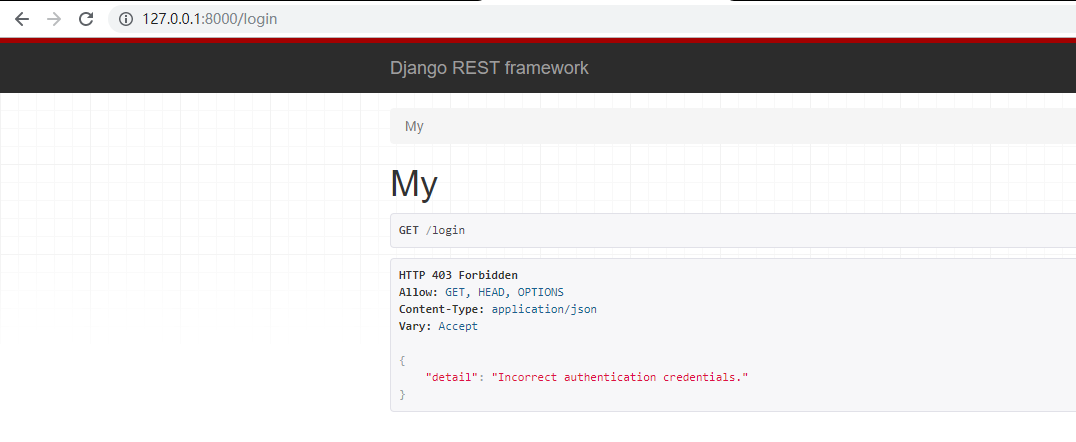
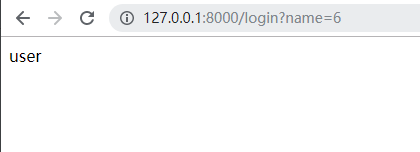
验证类继承BaseAuthentication(不继承也可以,但都要实现authenticate)方法,在authenticate里面实现用户的认证,最后返回一个元祖,第一个元素为user对象,该对象被request.user接受, 第二个元素会被request.auth捕捉
- 效果
django rest framework用户认证的更多相关文章
- Django Rest framework 之 认证
django rest framework 官网 django rest framework 之 认证(一) django rest framework 之 权限(二) django rest fra ...
- Django 中的用户认证
Django 自带一个用户认证系统,这个系统处理用户帐户.组.权限和基于 cookie 的 会话.本文说明这个系统是如何工作的. 概览 认证系统由以下部分组成: 用户 权限:控制用户进否可以执行某项任 ...
- Django rest framework 的认证流程(源码分析)
一.基本流程举例: urlpatterns = [ url(r'^admin/', admin.site.urls), url(r'^users/', views.HostView.as_view() ...
- Django Rest Framework用户访问频率限制
一. REST framework的请求生命周期 基于rest-framework的请求处理,与常规的url配置不同,通常一个django的url请求对应一个视图函数,在使用rest-framewor ...
- Django组件之用户认证组件
一.auth模块 from django.contrib import auth django.contrib.auth中提供了许多方法,这里主要介绍其中的三个: 1.1 .authenticate( ...
- Django Rest Framework之认证
代码基本结构 url.py: from django.conf.urls import url, include from web.views.s1_api import TestView urlpa ...
- 使用django实现自定义用户认证
参考资料:https://docs.djangoproject.com/en/1.10/topics/auth/customizing/ 直接拉到最后看栗子啦 django自定义用户认证(使用自 ...
- 09 Django组件之用户认证组件
没有学习Django认证组件之前使用装饰器方法 from django.shortcuts import render, HttpResponse, redirect from app01.MyFor ...
- Django组件之用户认证
auth模块 1 from django.contrib import auth django.contrib.auth中提供了许多方法,这里主要介绍其中的三个: 1.1 .authenticate( ...
随机推荐
- Python——项目-小游戏
开始我们的项目 飞机大战 1 项目的初体验 以及前期准备 游戏初体验画面 验证一下本地第三方包有没有导入 python3 -m pygame.examples.aliens 如果没有出现游戏画面请先安 ...
- 深入理解JS引擎的执行机制
深入理解JS引擎的执行机制 1.灵魂三问 : JS为什么是单线程的? 为什么需要异步? 单线程又是如何实现异步的呢? 2.JS中的event loop(1) 3.JS中的event loop(2) 4 ...
- 免费获取 Jetbrain 全家桶使用兑换码的正确姿势!
自今年1月份以Jetbrain公司严厉打击旗下开发工具产品(如:IntelliJ IDEA.WebStorm.PyCharm等)的盗版破解以来.求新破解方式.分享新破解方法的帖子或信息经常可以在各技术 ...
- LeetCode-最长回文串
题目描述: 给定一个包含大写字母和小写字母的字符串,找到通过这些字母构造成的最长的回文串. 在构造过程中,请注意区分大小写.比如 "Aa" 不能当做一个回文字符串. 注意:假设字符 ...
- vscode在执行 npm任务的时候,会先执行package的name@version 然后命令名 加 当前路径,问题是我的引入路径e是小写的,会导致调试错误,解决方案:没找到,先手书吧
vscode在执行 npm任务的时候,会先执行package的name@version 然后命令名 加 当前路径,问题是我的引入路径e是小写的,会导致调试错误,解决方案:没找到 Executing t ...
- @on-row-click="$emit('on-row-click', arguments[0], arguments[1])" 行内返回事件的一种写法
@on-row-click="$emit('on-row-click', arguments[0], arguments[1])"
- 我在使用DriverManager时发现的问题
小白今天在连接数据库的时候,心里面突然想起之前有大佬说没有必要添加一条"com.mysql.jdbc.Driver",当时也实验了确实可行,但是这个可是驱动地址,难道是不用添加是根 ...
- Fiddler1 简单使用
1.Fiddler下载地址:https://www.telerik.com/download/fiddler 2.Fiddler设置: Fiddler是强大的抓包工具,它的原理是以web代理服务器的形 ...
- git常用命令学习配详细说明
原文链接 把当前目录变成Git可以管理的仓库 git init 查看仓库当前的状态 git status 添加新/变动文件 git add <文件名> // 添加某个新文件(目录) git ...
- Spring Cloud 系列之 Alibaba Sentinel 服务哨兵
前文中我们提到 Netflix 中多项开源产品已进入维护阶段,不再开发新的版本,就目前来看是没有什么问题的.但是从长远角度出发,我们还是需要考虑是否有可替代产品使用.比如本文中要介绍的 Alibaba ...