
iOS-自定义 UITabBarController
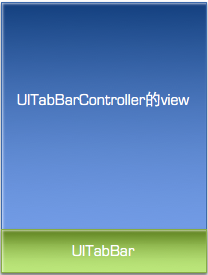
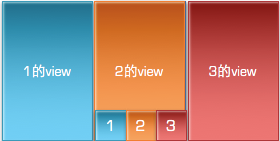
*title;
*image;
*selectedImage;


YSCTabBar类继承自
UIView,并添加3个Button模拟UITabBarItem;
            #import "YSCTabBarController.h"

            #import "YSCTabBar.h"

            #import "OneViewController.h"

            #import "TwoViewController.h"

            #import "ThreeViewController.h"

            @interface YSCTabBarController () <YSCTabBarDelegate>

            @end

            @implementation YSCTabBarController

            - (void)viewDidLoad {

                [super viewDidLoad];

                [self loadViewVC];

                YSCTabBar *tabBar = [[YSCTabBar alloc] initWithFrame:self.tabBar.frame WithCount:self.viewControllers.count];

                tabBar.delegate = self;

                [self.view addSubview:tabBar];

            }

            - (void)loadViewVC {

                OneViewController *oneVC = [[OneViewController alloc] init];

                TwoViewController *twoVC = [[TwoViewController alloc] init];

                ThreeViewController *threeVC = [[ThreeViewController alloc] init];

                self.viewControllers = @[oneVC,twoVC,threeVC];

            }

            - (void)yscTabbar:(YSCTabBar *)tabar index:(NSInteger)index {

                self.selectedIndex = index;

            }

@end #import "YSCTabBar.h"
@implementation YSCTabBar
- (instancetype)initWithFrame:(CGRect)frame WithCount:(NSInteger )count {
if (self = [super initWithFrame:frame]) {
CGFloat W = [UIScreen mainScreen].bounds.size.width / count;
CGFloat H = 49;
for (int i = 0; i < count; i ++) {
CGFloat X = i * W;
UIButton *btn = [[UIButton alloc] initWithFrame:CGRectMake(X, 0, W, H)];
btn.tag = i;
btn.backgroundColor = [UIColor colorWithRed:((float)arc4random_uniform(256) / 255.0) green:((float)arc4random_uniform(256) / 255.0) blue:((float)arc4random_uniform(256) / 255.0) alpha:1.0];
[self addSubview:btn];
[btn addTarget:self action:@selector(btnClick:) forControlEvents:UIControlEventTouchUpInside];
}
}
return self;
}
- (void)btnClick:(UIButton *)btn{
if ([self.delegate respondsToSelector:@selector(yscTabbar:index:)]) {
[self.delegate yscTabbar:self index:btn.tag];
}
}
@end #import "OneViewController.h"
@interface OneViewController ()
@end
@implementation OneViewController
- (void)viewDidLoad {
[super viewDidLoad];
// Do any additional setup after loading the view.
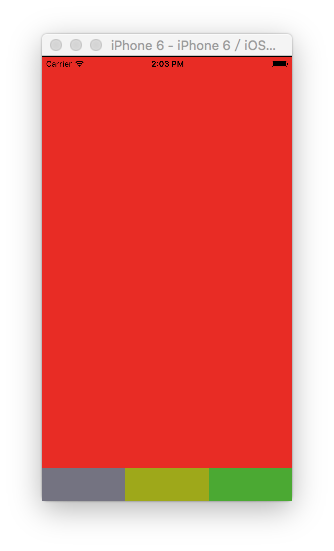
self.view.backgroundColor = [UIColor redColor];
}
@endYSCTabBarController:
- (BOOL)application:(UIApplication *)application didFinishLaunchingWithOptions:(NSDictionary *)launchOptions {

    // Override point for customization after application launch.

    self.window = [[UIWindow alloc] initWithFrame:[UIScreen mainScreen].bounds];

    YSCTabBarController *tabVC = [[YSCTabBarController alloc] init];

    self.window.rootViewController = tabVC;

    [self.window makeKeyAndVisible];

    return YES;

}
index:(NSInteger)index {
self.selectedIndex=
index;
iOS-自定义 UITabBarController的更多相关文章
- iOS 自定义UITabBarController的tabBar
#import <UIKit/UIKit.h> @interface AppDelegate : UIResponder <UIApplicationDeleg ...
- 【iOS自定义键盘及键盘切换】详解
[iOS自定义键盘]详解 实现效果展示: 一.实现的协议方法代码 #import <UIKit/UIKit.h> //创建自定义键盘协议 @protocol XFG_KeyBoardDel ...
- iOS自定义的UISwitch按钮
UISwitch开关控件 开关代替了点选框.开关是到目前为止用起来最简单的控件,不过仍然可以作一定程度的定制化. 一.创建 UISwitch* mySwitch = [[ UISwitchalloc] ...
- 如何实现 iOS 自定义状态栏
给大家介绍如何实现 iOS 自定义状态栏 Sample Code: 01 UIWindow * statusWindow = [[UIWindow alloc] initWithFrame:[UIAp ...
- 自定义UITabbarController控制器
自定义UITabbarController控制器 这是定制UITabbarController的基本原理,没有进行功能性封装. 效果: 源码地址: https://github.com/YouXi ...
- iOS自定义组与组之间的距离以及视图
iOS自定义组与组之间的距离以及视图 //头视图高度 - (CGFloat)tableView:(UITableView *)tableView heightForHeaderInSection:(N ...
- iOS 自定义转场动画
代码地址如下:http://www.demodashi.com/demo/12955.html 一.总效果 本文记录分享下自定义转场动画的实现方法,具体到动画效果:新浪微博图集浏览转场效果.手势过渡动 ...
- iOS 自定义转场动画浅谈
代码地址如下:http://www.demodashi.com/demo/11612.html 路漫漫其修远兮,吾将上下而求索 前记 想研究自定义转场动画很久了,时间就像海绵,挤一挤还是有的,花了差不 ...
- iOS自定义转场动画实战讲解
iOS自定义转场动画实战讲解 转场动画这事,说简单也简单,可以通过presentViewController:animated:completion:和dismissViewControllerA ...
随机推荐
- vuecli3.x与vuecli2.x 主要区别
3.0 新加入了 TypeScript 以及 PWA 的支持 部分命令发生了变化: 下载安装 npm install -g vue@cli 删除了vue list 创建项目 vue create ...
- Gitlab 安装、升级、备份、恢复、汉化等
一.Gitlab安装 1. 基于yum方式安装Gitlab 安装步骤如下 (1)配置yum源 # vim /etc/yum.repos.d/gitlab-ce.repo (2)复制如下内容并保存(注意 ...
- 使用基于MVC2模式创建新闻网站
1.什么是MVC MVC全名是Model View Controller,是模型(model)-视图(view)-控制器(controller)的缩写,一种软件设计典范,用一种业务逻辑.数据.界面显示 ...
- 02 Redis数据结构基础
一.客户端命令行参数 1.-x 从标准输入读取一个参数,等价于set k v [root@localhost etc]# echo -en 'v1'|redis-cli -a foobared -x ...
- netty 实现简单的rpc调用
yls 2020/5/23 netty 实现简单rpc准备 使用netty传输java bean对象,可以使用protobuf,也可以通过json转化 客户端要将调用的接口名称,方法名称,参数列表的类 ...
- C语言基础知识(四)——位操作
一.进制基础知识 1.通常,1字节(Byte)包含8位(bit).C语言用字节表示储存系统字符集所需的大小. 2.对于一个1字节8位的二进制数,最右边(第0位)是最低阶位,最左边(第1位)是最高阶位, ...
- C# 使用RestClient 调用接口
最近做项目使用RestClient 向第三方接口推送数据.不废话直接贴代码 /// <summary> /// 获取Token /// </summary> /// <r ...
- Mybaties 的缓存
1.mybaties 默认会话是一级缓存,没有开启二级缓存.开启方式在mapper文件中设置<cache /> 2.<cache eviction="LRU" f ...
- uni-app运行到浏览器跨域H5页面的跨域问题解决方案
官方文档对跨域的解决方案推荐: https://ask.dcloud.net.cn/article/35267 更方便的解决方案 项目根目录直接创建一个vue.config.js文件,并在里面配置代理 ...
- 面向对象案例-学生信息管理系统V1.1
1.学生类 package com.qfedu.student.entity; /** * 学生类实体 * * @author GGGXXC * */ public class Student { p ...