
Android选项卡学习
什么是选项卡

顶部的导航条就是选项卡了。
Android开发中添加选项卡的步骤
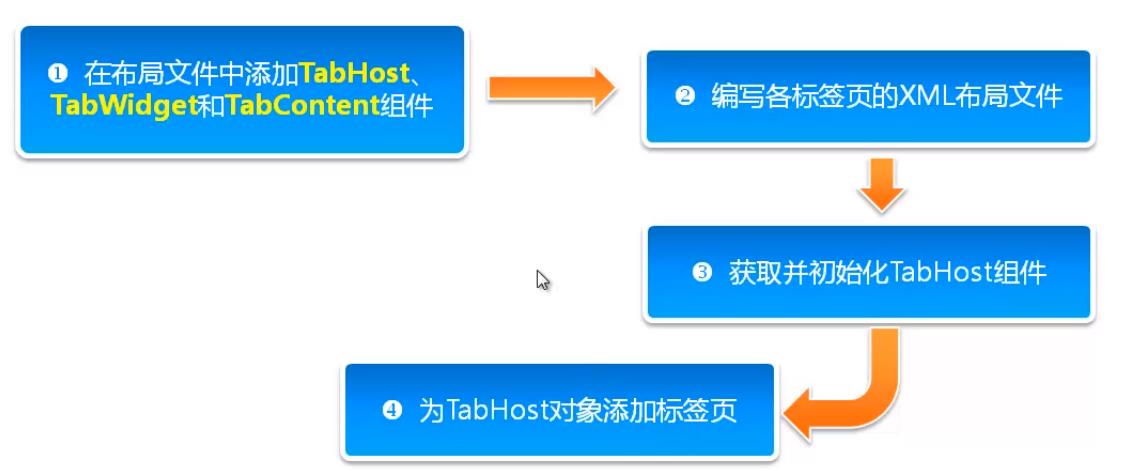
图片不太懂上代码:
activity_main.xml
<?xml version="1.0" encoding="utf-8"?>

<TabHost xmlns:android="http://schemas.android.com/apk/res/android"

    xmlns:app="http://schemas.android.com/apk/res-auto"

    xmlns:tools="http://schemas.android.com/tools"

    android:layout_width="match_parent"

    android:layout_height="match_parent"

    android:id="@android:id/tabhost"

    tools:context=".MainActivity">

    <LinearLayout

        android:layout_width="match_parent"

        android:layout_height="match_parent"

        android:orientation="vertical">

        <TabWidget

            android:layout_width="match_parent"

            android:layout_height="wrap_content"

            android:id="@android:id/tabs"></TabWidget>

        <FrameLayout

            android:id="@android:id/tabcontent"

            android:layout_width="match_parent"

            android:layout_height="match_parent">

        </FrameLayout>

    </LinearLayout>

</TabHost>
tab1.xml
<?xml version="1.0" encoding="utf-8"?>

<LinearLayout xmlns:android="http://schemas.android.com/apk/res/android"

    android:id="@+id/left"

    android:orientation="vertical"

    android:layout_width="match_parent"

    android:layout_height="match_parent">

    <ImageView

        android:layout_width="match_parent"

        android:layout_height="match_parent"

        android:src="@drawable/bg_left"></ImageView>

</LinearLayout>
tab2.xml文件和tab1几号一样就是改个id和改个图片就好了。
MainActivity.java
package com.example.selectitem;

import androidx.appcompat.app.AppCompatActivity;

import android.os.Bundle;

import android.view.LayoutInflater;

import android.view.View;

import android.widget.TabHost;

public class MainActivity extends AppCompatActivity {

    @Override

    protected void onCreate(Bundle savedInstanceState) {

        super.onCreate(savedInstanceState);

        setContentView(R.layout.activity_main);

        TabHost tabHost = (TabHost) findViewById(android.R.id.tabhost);

        tabHost.setup();

        LayoutInflater inflater = LayoutInflater.from(this);

        inflater.inflate(R.layout.tab1,tabHost.getTabContentView());

        inflater.inflate(R.layout.tab2,tabHost.getTabContentView());

        tabHost.addTab(tabHost.newTabSpec("tab1").setIndicator("性感服装").setContent(R.id.left));

        tabHost.addTab(tabHost.newTabSpec("tab2").setIndicator("清纯服装").setContent(R.id.right));

    }

}
效果:

Android选项卡学习的更多相关文章
- Android开发学习之路-RecyclerView滑动删除和拖动排序
Android开发学习之路-RecyclerView使用初探 Android开发学习之路-RecyclerView的Item自定义动画及DefaultItemAnimator源码分析 Android开 ...
- Android开发学习路线图
Android开发学习方法: Android是一个比较庞大的体系,从底层的Linux内核到上层的应用层,各部分的内容跨度也比较大.因此,一个好的学习方法对我们学习Android开发很重要. 在此建议, ...
- Android动画学习(二)——Tween Animation
前两天写过一篇Android动画学习的概述,大致的划分了下Android Animation的主要分类,没有看过的同学请移步:Android动画学习(一)——Android动画系统框架简介.今天接着来 ...
- Android自动化学习笔记:编写MonkeyRunner脚本的几种方式
---------------------------------------------------------------------------------------------------- ...
- Android自动化学习笔记之MonkeyRunner:官方介绍和简单实例
---------------------------------------------------------------------------------------------------- ...
- android开发学习笔记000
使用书籍:<疯狂android讲义>——李刚著,2011年7月出版 虽然现在已2014,可我挑来跳去,还是以这本书开始我的android之旅吧. “疯狂源自梦想,技术成就辉煌.” 让我这个 ...
- Android Animation学习(六) View Animation介绍
Android Animation学习(六) View Animation介绍 View Animation View animation系统可以用来执行View上的Tween animation和F ...
- Android Animation学习(五) ApiDemos解析:容器布局动画 LayoutTransition
Android Animation学习(五) ApiDemos解析:容器布局动画 LayoutTransition Property animation系统还提供了对ViewGroup中的View改变 ...
- Android Animation学习(四) ApiDemos解析:多属性动画
Android Animation学习(四) ApiDemos解析:多属性动画 如果想同时改变多个属性,根据前面所学的,比较显而易见的一种思路是构造多个对象Animator , ( Animator可 ...
随机推荐
- Angular SPA基于Ocelot API网关与IdentityServer4的身份认证与授权(四)
在上一讲中,我们已经完成了一个完整的案例,在这个案例中,我们可以通过Angular单页面应用(SPA)进行登录,然后通过后端的Ocelot API网关整合IdentityServer4完成身份认证.在 ...
- WordPress 获取文章内容页特色图像地址
WordPress获取特色图像地址主要需要用到两个函数get_post_thumbnail_id和wp_get_attachment_image_src.下面是分别获取小.中.大.完整.指定图片规格的 ...
- 基于 kubeadm 搭建高可用的kubernetes 1.18.2 (k8s)集群 三 集群可用性测试
1. 创建nginx ds # 写入配置 $ cat > nginx-ds.yml <<EOF apiVersion: v1 kind: Service metadata: name ...
- 【深度学习】PyTorch之Squeeze()和Unsqueeze()
1. unsqueeze() 该函数用来增加某个维度.在PyTorch中维度是从0开始的. import torch a = torch.arange(0, 9) print(a) 结果: tenso ...
- [JavaWeb基础] 006.Struts1的配置和简单使用
1.框架简介 采用Struts能开发出基于MVC(Model-View-Controller)设计模式的应用构架,用于快速开发Java Web应用.Struts实现的重点在C(Controller), ...
- UML ——六种依赖关系.md
在UML类图中,常见的有以下几种关系: 泛化(Generalization), 实现(Realization), 关联(Association), 聚合(Aggregation), 组合(Compos ...
- Redis 入门到分布式 (三) Redis客户端的使用
个人博客网:https://wushaopei.github.io/ (你想要这里多有) 一.Java客服端:jedis 获取Jedis Jedis基本使用 Jedis连接池使用 1.Jedis ...
- Web 三维组态的仿真运用案例:民航飞机的数据监控
前言 在飞机航行的过程中,客舱里座位上方的荧屏上,除了播放电视剧和广告之外,还会时不时的切换到一个飞机航行的监控系统.这个监控系统的主要目的是,让乘客可以了解到飞机在航行过程中的整体状况.距离目的地的 ...
- Java实现蓝桥杯 算法提高 线段和点
算法提高 线段和点 时间限制:1.0s 内存限制:256.0MB 提交此题 问题描述 有n个点和m个区间,点和区间的端点全部是整数,对于点a和区间[b,c],若a>=b且a<=c,称点a满 ...
- java实现第七届蓝桥杯冰雹数
题目8.冰雹数 题目描述 任意给定一个正整数N, 如果是偶数,执行: N / 2 如果是奇数,执行: N * 3 + 1 生成的新的数字再执行同样的动作,循环往复. 通过观察发现,这个数字会一会儿上升 ...