
Flutter保持页面状态AutomaticKeepAliveClientMixin
使用bottomNavigationBar切换底部tab,再切换回来就会丢失之前的状态(重新渲染列表,丢失滚动条位置)。
解决方法
使用 AutomaticKeepAliveClientMixin
重写 bool get wantKeepAlive => true;
build方法中调用super.build(context);
class _MovieListState extends State<MovieList> with AutomaticKeepAliveClientMixin {

  List movieList = new List();

  @override

  bool get wantKeepAlive => true;

  @override

  Widget build(BuildContext context) {

    super.build(context);

    return ListView.builder(

      itemCount: movieList.length,

      itemBuilder: (context, index) {

        return MovieItem(

          item: movieList[index],

        );

      },

    );

  }

}
达到保存列表状态的效果
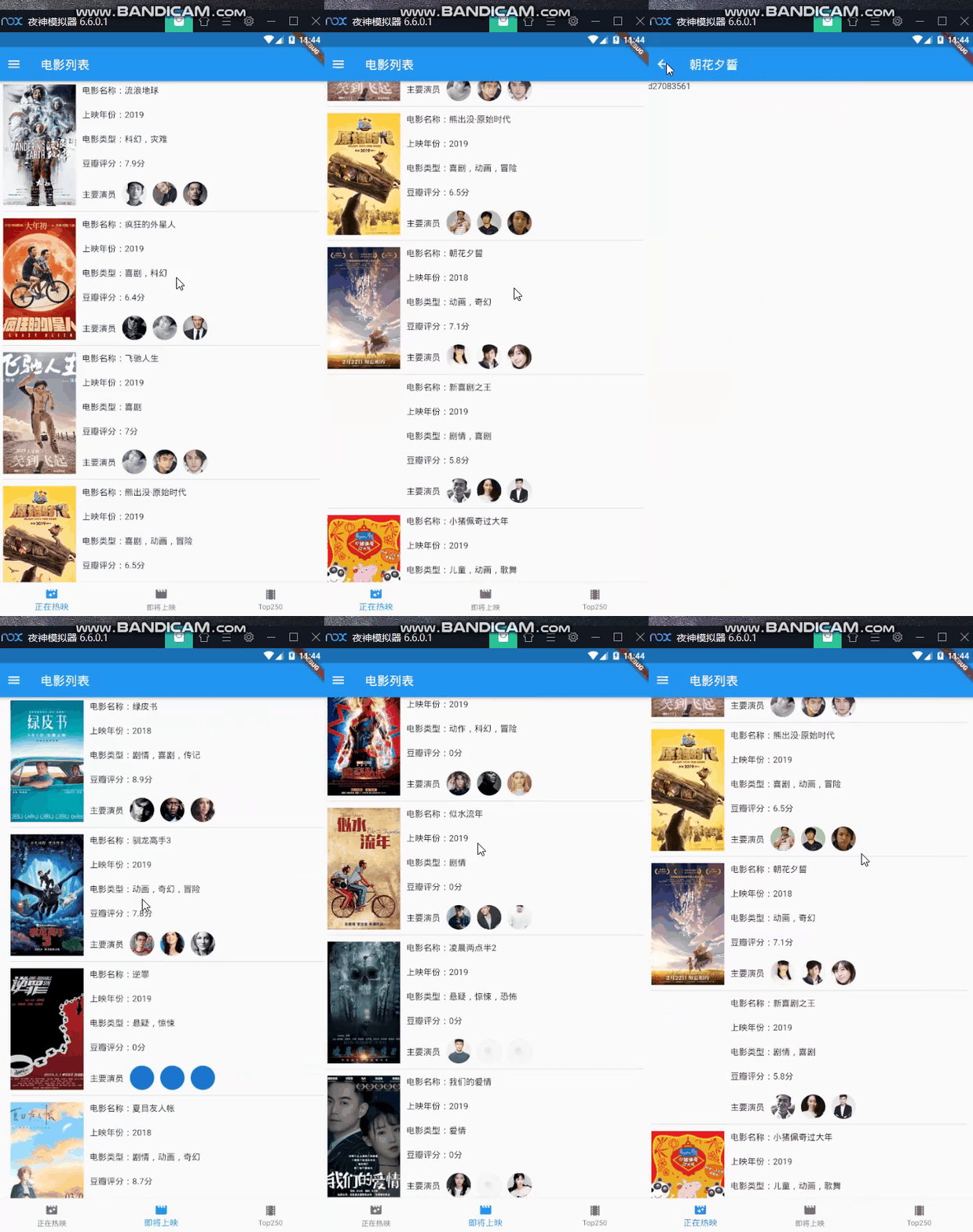
引用自官网的说明:
Subclasses must implement wantKeepAlive, and their build methods must call
super.build(the return value will always return null, and should be ignored).Then, whenever wantKeepAlive's value changes (or might change), the subclass should call updateKeepAlive.
The type argument
Tis the type of the StatefulWidget subclass of the State into which this class is being mixed.
参考链接:
Flutter保持页面状态AutomaticKeepAliveClientMixin的更多相关文章
- flutter 保持页面状态
import 'package:flutter/material.dart'; import 'KeepAliveDemo.dart'; void main() => runApp(MyApp( ...
- Flutter 之页面状态保持
一般情况下,我们使用tab切换的时候希望操作完毕之后,能够记住上个页面的状态, 但是使用Flutter的BottomNavigationBar的 时候默认是不记录页面状态的,即切换页面会导致重新加载. ...
- Flutter移动电商实战 --(16)切换后页面状态的保持AutomaticKeepAliveClientMixin
底栏切换每次都重新请求是一件非常恶心的事,flutter 中提供了AutomaticKeepAliveClientMixin 帮我们完成页面状态保存效果. 1.AutomaticKeepAliveCl ...
- Flutter实战视频-移动电商-16.补充_保持页面状态
16.补充_保持页面状态 修正一个地方: 设置了item的高度为380 横向列表为380.最终build的高度也增加了50为430. 增加了上面的高度以后,下面那个横线划掉的价格可以显示出来了. 但是 ...
- 16-Flutter移动电商实战-切换后页面状态的保持AutomaticKeepAliveClientMixin
底栏切换每次都重新请求是一件非常恶心的事,flutter 中提供了AutomaticKeepAliveClientMixin 帮我们完成页面状态保存效果. 1.AutomaticKeepAliveCl ...
- 09 Flutter底部Tab切换保持页面状态的几种方法
IndexedStack:保此所有页面的状态: AutomaticKeepAliveClientMixin:保此部分页面的状态: 修改的页面代码: 页面效果: Tabs.dart import 'pa ...
- 巧用location.hash保存页面状态
在我们的项目中,有大量ajax查询表单+结果列表的页面,由于查询结果是ajax返回的,当用户点击列表的某一项进入详情页之后,再点击浏览器回退按钮返回ajax查询页面,这时大家都知道查询页面的表单和结果 ...
- Windows Phone开发(9):关于页面状态
原文:Windows Phone开发(9):关于页面状态 按照一般做法,刚学会如何导航,还是不够的,因为要知道,手机里面的每个页面,就如同Web页面一样,是无状态的. 啥是无状态?如果我们玩过Web开 ...
- 四:理解Page类的运行机制(例:基于PageStatePersister的页面状态存取)
有人说类似gridview datalist这样的控件最好不要用在高并发,IO大的网站中企业应用中为了快速开发到可以用一用因为这是一类"沉重"的组件我们姑且不谈这种看法的正确性(我 ...
随机推荐
- 导出Wireless组中的成员
get-adgroupmember -Identity wireless |export-csv -path C:\Group.csv -Encoding UTF8
- 从程序到系统:建立一个更智能的世界——记Joseph Sifakis“21世纪的计算”大会主题演讲
Sifakis"21世纪的计算"大会主题演讲" title="从程序到系统:建立一个更智能的世界--记Joseph Sifakis"21世纪的计算&q ...
- Python 装饰器 多装饰器同时装饰一个函数 多参数函数
装饰器是在不修改源代码的情况下,使用装饰器增加原函数的功能. 在软件开发中有一个原则——"开放-封闭",简单地说就是已经实现的功能不允许被修改,但可以被扩展. 封闭:已经实现的功能 ...
- [LC] 80. Remove Duplicates from Sorted Array II
Given a sorted array nums, remove the duplicates in-place such that duplicates appeared at most twic ...
- highcharys去掉x轴,y轴轴线和刻度
x轴 xAxis: { lineWidth :,//去掉x轴线 tickWidth:,//去掉刻度 labels: { enabled: false },//去掉刻度数字 }, y轴 yAxis: { ...
- 吴裕雄--天生自然 R语言开发学习:图形初阶
# ----------------------------------------------------# # R in Action (2nd ed): Chapter 3 # # Gettin ...
- cesium入门示例-矢量化单体分类
实现楼层的分层选择和属性信息展示,该功能基于大雁塔倾斜数据实现单体化分类显示. 数据准备: 1.大雁塔倾斜数据,已转换为3dTiles,参考cesium入门示例-3dTiles加载的第2节osgb数据 ...
- 实战:CentOS 7.2 / Zabbix3.4安装graphtrees
众所周知的 Zabbix图形显示问题,决定使用graphtrees 插件. 环境:CentOS7.2 + Zabbix 3.4 1)首先切换到root用户以获得足够的权限将资源下载到 /usr/sha ...
- 签章新的pom文件
<?xml version="1.0" encoding="UTF-8"?> <project xmlns="http://mave ...
- 第一次提交本地代码到github上
上传本地项目到github: 一.SSH方式 配置ssh 进入你要上传项目中的文件夹 1)先配置ssh,输入 ssh-keygen -t rsa -C "your_email@example ...