
spring注解驱动--组件注册
为容器中注册Bean
- @Configuration代表该类是一个配置类,配置类起到的作用和xml配置文件一样
- @Bean代表该方法的返回对象作为Bean加入IOC容器,默认Bean的id是方法的名称。可以在@Bean注解里更改value的值来更改名称
@Configuration

public class mainConfig {

    @Bean("person")

    public Person person01(){

        Person person = new Person();

        person.setId(1);

        person.setName("aa");

        return person;

    }

}
包扫描
ComponentScan配置扫描哪些包,用法和xml配置文件中的包扫描相同,包含可配置的excludeFilter和includeFilter选项。
- excludeFilters是一个Filter类型的数组,所以这里用大括号。每一个Filter元素包含过滤条件的类型以及具体的过滤条件。如下面的Filter类型为注解,过滤条件为Controller。
@Configuration

@ComponentScan(value = "comtroller",excludeFilters = {@ComponentScan.Filter(type = FilterType.ANNOTATION,classes = Controller.class)})

public class mainConfig {

    @Bean("person")

    public Person person01(){

        Person person = new Person();

        person.setId(1);

        person.setName("aa");

        return person;

    }

}
- includeFilters,配置只扫描哪些类型,多用于SpringMVC容器中只扫描controller注解,用法同XML配置,需要禁用默认过滤规则
@Configuration

@ComponentScan(value = "comtroller",includeFilters = {@ComponentScan.Filter(type=FilterType.ANNOTATION,classes=Controller.class)},useDefaultFilters = false)

public class mainConfig {

    @Bean("person")

    public Person person01(){

        Person person = new Person();

        person.setId(1);

        person.setName("aa");

        return person;

    }

}
其余常用包扫描的过滤方式
类名
只添加或者只过滤某个具体的类
@ComponentScan(value = "comtroller",excludeFilters = {@ComponentScan.Filter(type = FilterType.ASSIGNABLE_TYPE,classes = BookController.class)})
自定义规则
如何查看包扫描是否生效
查看包扫描是否生效就是查看Spring容器里是否有想要的Bean。
方法一:打印出Spring容器中所有Bean。简单粗暴。
public class test {

    public static void main(String[] args) {

        AnnotationConfigApplicationContext context = new AnnotationConfigApplicationContext(mainConfig.class);

        String[] names = context.getBeanDefinitionNames();

        for (String name:

             names) {

            System.out.println(name);

        }

    }

}
方法二:借助idea。每新配置一个Spring容器,无论是通过xml还是配置类方式,最好都配置idea的spring管理插件,这样可以不必运行测试类也可查看容器里的Bean
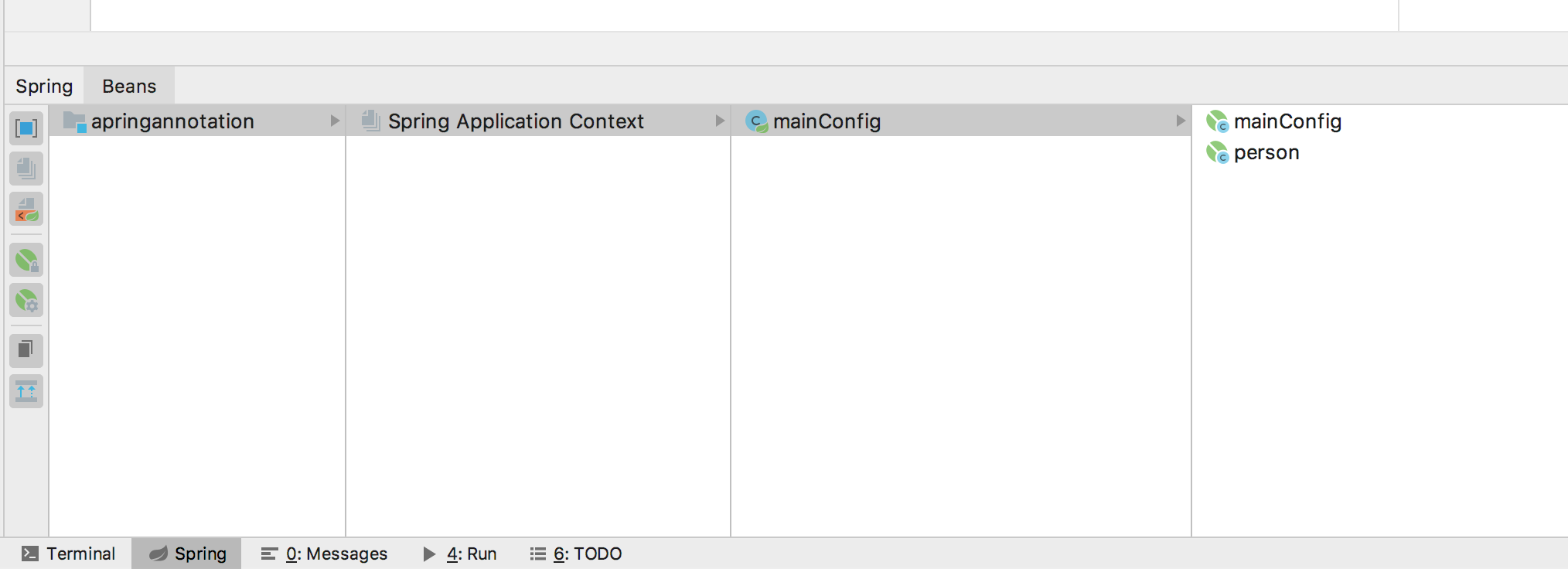
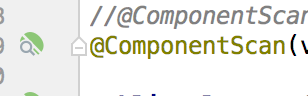
而且在配置生效的情况下@Component注解旁边会多一个符号,点击该符号可以跳转到扫描的包。
改变默认单例
Spring中的Bean默认是单例,且在容器加载的时候就被初始化。使用@Scope改变为多实例,对应的Bean在每次getBean的时候都会初始化一次,所以Bean在容器启动的时候不会初始化。背后的逻辑是单例模式是Spring容器维护了一个缓存HashMap,而多实例下并没有这个缓存。既然没有缓存那么在多实例情况下就无法存储初始化之后的Bean。
    @Bean("person")

    @Scope("prototype")

    public Person person01(){

        Person person = new Person();

        person.setId(1);

        person.setName("aa");

        return person;
懒加载
针对单实例情况下容器创建时Bean就会被创建,使用@Lazy可以实现对单实例Bean在getBean的时候才加载。
按照条件注册Bean
默认情况下被标注了@Configuration的类下所有标注@Bean的方法返回对象都会被加入Spring容器中,使用@Conditional注解可以自定义规则来只把某些Bean加入Spring容器中。
实现Condition接口中的matches方法。conditionContext包含了一个Bean所有的信息
- beanFactory,创建该Bean的工程
- classLoader,该Bean的类加载器
- enviroment,该Bean所处的环境,主要指的是OS的环境
- register,该Bean所处的容器
下面的代码实现两个功能:1、打印该Bean所处容器内所有的Bean 2、判断该Bean所处OS的类型,如果是Win就返回true即把Bean注入到容器中
public class WinCondition implements Condition {

    /**

     *

     * @param conditionContext 环境上下文

     * @param annotatedTypeMetadata 注释信息

     * @return

     */

    public boolean matches(ConditionContext conditionContext, AnnotatedTypeMetadata annotatedTypeMetadata) {

        ConfigurableListableBeanFactory beanFactory = conditionContext.getBeanFactory();

        ClassLoader classLoader = conditionContext.getClassLoader();

        Environment environment = conditionContext.getEnvironment();

        //获得容器对象,进而判断容器中Bean的注册情况

        BeanDefinitionRegistry registry = conditionContext.getRegistry();

        String[] names = registry.getBeanDefinitionNames();

        System.out.println("====");

        for (String name :

                names) {

            System.out.println(name);

        }

        String osName = environment.getProperty("os.name");

        if (osName.contains("Win")){

            return true;

        }

        return false;

    }

}
最后要把注解标注在方法或者配置类上。因为我的系统不是Win系统所以容器里没有zhangsan这个Bean。
 @Conditional({WinCondition.class})

    @Bean("zhangsan")

    public Person person_01(){

        return new Person("zhangsan",12);

    }
Import
在配置类上方标注@Import注解并声明要导入的类,会自动加到Spring中。
@Import({otherPojo.class, otherPojo2.class})

public class mainConfig {
ImportSelector
使用上和Import类似,通过实现ImportSelector接口可以按照条件批量注册Bean,其中return的String数组中的Bean会被注册到Spring中。
public class importSelect implements ImportSelector {

    /**

     * @param annotationMetadata 当前标注Import类的全部注解信息,不仅仅是Import

     * @return 要导入容器的类的全类名

     */

    public String[] selectImports(AnnotationMetadata annotationMetadata) {

        return new String[]{"pojo.otherPojo2"};

    }

}
@Import(importSelect.class)

public class mainConfig
Import注解是标注着配置类上的,ImportSelector中的AnnotationMetadata包含配置类所有注解的信息,通过打断点可以看到如下的结果。
FactoryBean
实现FactoryBean接口重写getObject方法,并用@Bean方式加入Configuration中,则getObject返回的对象会加入Spring容器中
spring注解驱动--组件注册的更多相关文章
- Spring注解驱动——组件注册系列
1.@Configuration 从Spring3.0,@Configuration用于定义配置类,可替换xml配置文件,被注解的类内部包含有一个或多个被@Bean注解的方法,这些方法将会被Annot ...
- spring注解扫描组件注册
最近对单点系统进行微服务拆分,被各个springboot的组件注册搞得云里雾里的.(有的是通过springboot的自动配置进IOC容器的,有的是自己添加构造方法添加进IOC容器.)决定抽时间将spr ...
- 【spring 注解驱动开发】spring组件注册
尚学堂spring 注解驱动开发学习笔记之 - 组件注册 组件注册 1.@Configuration&@Bean给容器中注册组件 2.@ComponentScan-自动扫描组件&指定扫 ...
- 【Spring注解驱动开发】组件注册-@ComponentScan-自动扫描组件&指定扫描规则
写在前面 在实际项目中,我们更多的是使用Spring的包扫描功能对项目中的包进行扫描,凡是在指定的包或子包中的类上标注了@Repository.@Service.@Controller.@Compon ...
- 【Spring注解驱动开发】使用@Scope注解设置组件的作用域
写在前面 Spring容器中的组件默认是单例的,在Spring启动时就会实例化并初始化这些对象,将其放到Spring容器中,之后,每次获取对象时,直接从Spring容器中获取,而不再创建对象.如果每次 ...
- 【Spring注解驱动开发】使用@Import注解给容器中快速导入一个组件
写在前面 我们可以将一些bean组件交由Spring管理,并且Spring支持单实例bean和多实例bean.我们自己写的类,可以通过包扫描+标注注解(@Controller.@Servcie.@Re ...
- 【Spring注解驱动开发】在@Import注解中使用ImportBeanDefinitionRegistrar向容器中注册bean
写在前面 在前面的文章中,我们学习了如何使用@Import注解向Spring容器中导入bean,可以使用@Import注解快速向容器中导入bean,小伙伴们可以参见<[Spring注解驱动开发] ...
- Spring 注解驱动(一)基本使用规则
Spring 注解驱动(一)基本使用规则 Spring 系列目录(https://www.cnblogs.com/binarylei/p/10198698.html) 一.基本使用 @Configur ...
- 0、Spring 注解驱动开发
0.Spring注解驱动开发 0.1 简介 <Spring注解驱动开发>是一套帮助我们深入了解Spring原理机制的教程: 现今SpringBoot.SpringCloud技术非常火热,作 ...
随机推荐
- 用PMML实现机器学习模型的跨平台上线
在机器学习用于产品的时候,我们经常会遇到跨平台的问题.比如我们用Python基于一系列的机器学习库训练了一个模型,但是有时候其他的产品和项目想把这个模型集成进去,但是这些产品很多只支持某些特定的生产环 ...
- HBase学习——4.HBase过滤器
1.过滤器 基础API中的查询操作在面对大量数据的时候是非常苍白的,这里Hbase提供了高级的查询方法:Filter.Filter可以根据簇.列.版本等更多的条件来对数据进行过滤,基于Hbase本身提 ...
- Java开发知识之JavaIO操作缓存操作
目录 带缓存的输入/输出流 一丶简介 二丶BufferedInputStream 与 BufferedOutputString类. 2.BufferOutputStream类. 三丶BufferedR ...
- 线程组ThreadGroup分析详解 多线程中篇(三)
线程组,顾名思义,就是线程的组,逻辑类似项目组,用于管理项目成员,线程组就是用来管理线程. 每个线程都会有一个线程组,如果没有设置将会有些默认的初始化设置 而在java中线程组则是使用类ThreadG ...
- Mac homebrew-1.5以后安装php扩展的方法
一.以前Mac安装php及php扩展的方式 用Mac的童鞋都知道,我们以前都是用brew install php70,brew install php71 这样来安装php的,用brew instal ...
- Lily_music 网页音乐播放器 -可搜索(附歌词联动播放效果解说)
博客地址:https://ainyi.com/59 写在前面 这是我今年(2018)年初的小项目,当时也是手贱,不想用别的播放器,想着做一个自己的网页播放器,有个歌曲列表.可关键词搜索.歌词滚动播放的 ...
- 【Unity】微软的一款依赖注入组件
前言 前面学习了autofac这个依赖注入组件,本来是打算写在一起的,因为这个组件没打算像autofac一样详细的写,只是写下以前自己鼓捣玩搭建框架然后使用的一个依赖注入组件,并且也是进行了封装使用. ...
- 好用的开源库(一)——MaterialEditText
GIthub地址:https://github.com/rengwuxian/MaterialEditText#features 使用文档: 在android新推出的Material Design中对 ...
- #WEB安全基础 : HTML/CSS | 0x5a标签拓展和class、id属性的使用
a标签不只是能链接到其他网页,也能链接到网页中的元素 class属性让你用CSS对特定的元素进行修饰 这些是一个网页设计者的有力武器 这节课还是一个index.html文件 以下是代码 <h ...
- arcgis api 3.x for js 入门开发系列六地图分屏对比(附源码下载)
前言 关于本篇功能实现用到的 api 涉及类看不懂的,请参照 esri 官网的 arcgis api 3.x for js:esri 官网 api,里面详细的介绍 arcgis api 3.x 各个类 ...