
【应用程序见解 Application Insights】在Application Insights中通过自定义查询结果定义指标并显示在Dashboard中
问题情形
通过Application Insights收集到指标数据后,如Request,Trace,Exception。但是默认的Insights图表不能满足业务的需求,需要自定义相应的类SQL语句并制作图表以便直观的显示,避免每次都需要重新查询数据并转换为图表。
类SQL的查询语句在Applicaiton Insights示例为:
// Response time trend

// Chart request duration over the last 12 hours.

requests

| where timestamp > ago(12h)

| summarize avgRequestDuration=avg(duration) by bin(timestamp, 10m) // use a time grain of 10 minutes

| render timechart

// Operations performance

// Calculate request count and duration by operations.

requests

| summarize RequestsCount=sum(itemCount), AverageDuration=avg(duration), percentiles(duration, 50, 95, 99) by operation_Name // you can replace 'operation_Name' with another value to segment by a different property

| order by RequestsCount desc // order from highest to lower (descending)

// Top 10 countries by traffic

// Chart the amount of requests from the top 10 countries.

requests

| summarize CountByCountry=count() by client_CountryOrRegion

| top 10 by CountByCountry

| render piechart

// Top 3 browser exceptions

// What were the highest reported exceptions today?

exceptions

| where notempty(client_Browser) and client_Type == 'Browser'

| summarize total_exceptions = sum(itemCount) by problemId

| top 3 by total_exceptions desc

// Failed requests – top 10

// What are the 3 slowest pages, and how slow are they?

requests

| where success == false

| summarize failedCount=sum(itemCount) by name

| top 10 by failedCount desc

| render barchart

// Failed operations

// Calculate how many times operations failed, and how many users were impacted.

requests

| where success == false

| summarize failedCount=sum(itemCount), impactedUsers=dcount(user_Id) by operation_Name

| order by failedCount desc
操作步骤
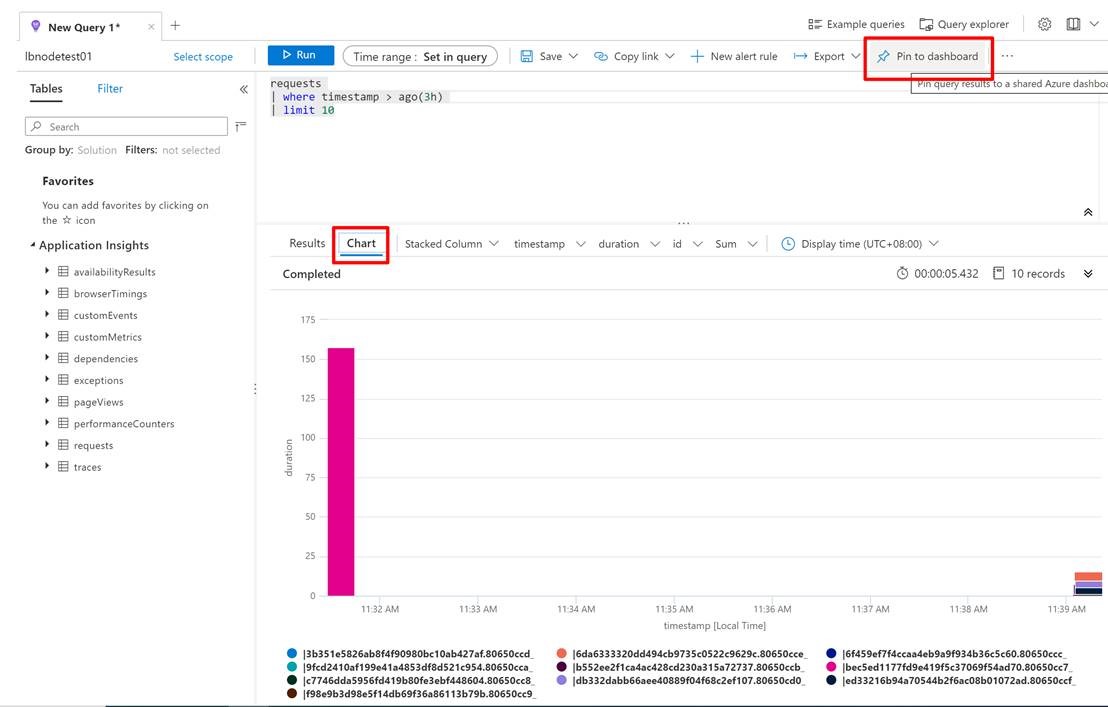
Application Insights提供了非常简单的办法来完成制作图表的步骤,只需要在Logs页面中,按照上面的类SQL语句写好后,点击右上角的固定到仪表盘(Pin To Dashboard)即可。
参考资料:
创建诊断设置以在 Azure 中收集资源日志和指标:https://docs.azure.cn/zh-cn/azure-monitor/platform/diagnostic-settings
【应用程序见解 Application Insights】在Application Insights中通过自定义查询结果定义指标并显示在Dashboard中的更多相关文章
- Java连接MySQL数据库。编写一个应用程序,在主类Test_4类中,通过JDBC访问stu数据库,显示t_student表中的内容(表结构见表1),显示效果自己设计。
题目2:编写一个应用程序,在主类Test_4类中,通过JDBC访问stu数据库,显示t_student表中的内容(表结构见表1),显示效果自己设计.之后,可根据显示的内容进行某条记录的删除(以id为条 ...
- 【应用程序见解 Application Insights】Application Insights 使用 Application Maps 构建请求链路视图
Applicaotn Insigths 使用 Application Maps 构建请求链路视图 构建系统时,请求的逻辑操作大多数情况下都需要在不同的服务,或接口中完成整个请求链路.一个请求可以经历 ...
- 【Azure 应用程序见解】Application Insights Java Agent 3.1.0的使用实验,通过修改单个URL的采样率来减少请求及依赖项的数据采集
问题描述 近日好消息,如果是一个Java Spring Cloud的项目,想使用Azure Applicaiton Insights来收集日志及一些应用程序见解.但是有不愿意集成SDK来修改代码或者配 ...
- 【转】VS2012编译出来的程序,在XP上运行,出现“.exe 不是有效的 win32 应用程序” “not a valid win32 application”
原文网址:http://www.cnblogs.com/Dageking/archive/2013/05/15/3079394.html VS2012编译出来的程序,在XP上运行,出现“.exe 不是 ...
- Android清单文件具体解释(三)----应用程序的根节点<application>
<application>节点是AndroidManifest.xml文件里必须持有的一个节点,它包括在<manifest>节点下.通过<application>节 ...
- 【IOS6.0 自学瞎折腾】(五)应用程序的启动过程和Application生命周期
一 :main函数入口 看下项目资源结构,其实程序的入口也是在main.m里面. #import <UIKit/UIKit.h> #import "BvinAppDelegate ...
- ios 程序发布使用xcode工具Application Loader 正在通过ITUNES STORE进行鉴定错误
ios 程序发布使用xcode工具Application Loader 正在通过ITUNES STORE进行鉴定错误 一:此错误会导致上传程序,一直停留在验证阶段,而没有一点上传进度:结果会苦等半天, ...
- 错误: 在类 Main 中找不到 main 方法, 请将 main 方法定义为: public static void main(String[] args) 否则 JavaFX 应用程序类必须扩展javafx.application.Application
错误: 在类 Main 中找不到 main 方法, 请将 main 方法定义为: public static void main(String[] args)否则 JavaFX 应用程序类必须扩展ja ...
- 关于C++程序运行程序是出现的this application has requested the runtime to terminate it in an unusual way. 异常分析
今天运行程序是出现了this application has requested the runtime to terminate it in an unusual way. 的异常报告,以前也经常 ...
随机推荐
- spring boot 源码之SpringApplication
run方法 run方法主要创建和初始化ConfigurableApplicationContext,在各个节点调用SpringApplicationRunListener的回调函数,在发送异常时调用用 ...
- java Synchronized集合
在Collections存在相关"Synchronized"支持同步的集合, 在java1.0 也存在"Vector"; 为什么会选择放弃"Vecto ...
- 2.BlockingQueue-阻塞式队列
- .netcore+vue 实现压缩文件下载
一.前言 目前接触的项目中,给定的需求是将系统内所有用户的数据整理好,并保存到文件夹内,目的主要是防止用户在实施人员已配置好的基础上由于不熟悉系统,导致的误删或者误操作.减少实施人员的配置工作.我首先 ...
- Oracle学习(十五)PLSQL安装
PS:由于原来一直用的旧版本的PLSQL客户端,查看执行计划有些数据无法展示,所以今天换一波新版本的使用,记录下安装和使用流程. PLSQL(oracle数据可视化工具) 一.下载 我用的13的版本, ...
- brew清华镜像
https://mirror.tuna.tsinghua.edu.cn/help/homebrew/
- 解决pycharm py文件运行后停止按钮变成了灰色的问题
- Spring Cloud系列(二):Eureka应用详解
一.注册中心 1.注册中心演变过程 2.注册中心必备功能 ① 服务的上线 ② 服务的下线 ③ 服务的剔除 ④ 服务的查询 ⑤ 注册中心HA ⑥ 注册中心节点数据同步 ⑦ 服务信息的存储,比如mysql ...
- Python练习题 021:递归方法求阶乘
[Python练习题 021] 利用递归方法求5!. ---------------------------------------------- 首先得弄清楚:5! 指的是"5的阶乘&qu ...
- Layman H5+Webapp+MUI App 页面滑至到底部自动加载新的内容
要点:使用jquery的scroll()方法实现,当用户滚动指定的元素时,会发生 scroll 事件 scroll 事件适用于所有可滚动的元素和 window 对象(浏览器窗口) scroll() 方 ...