
MariaDB二进制安装
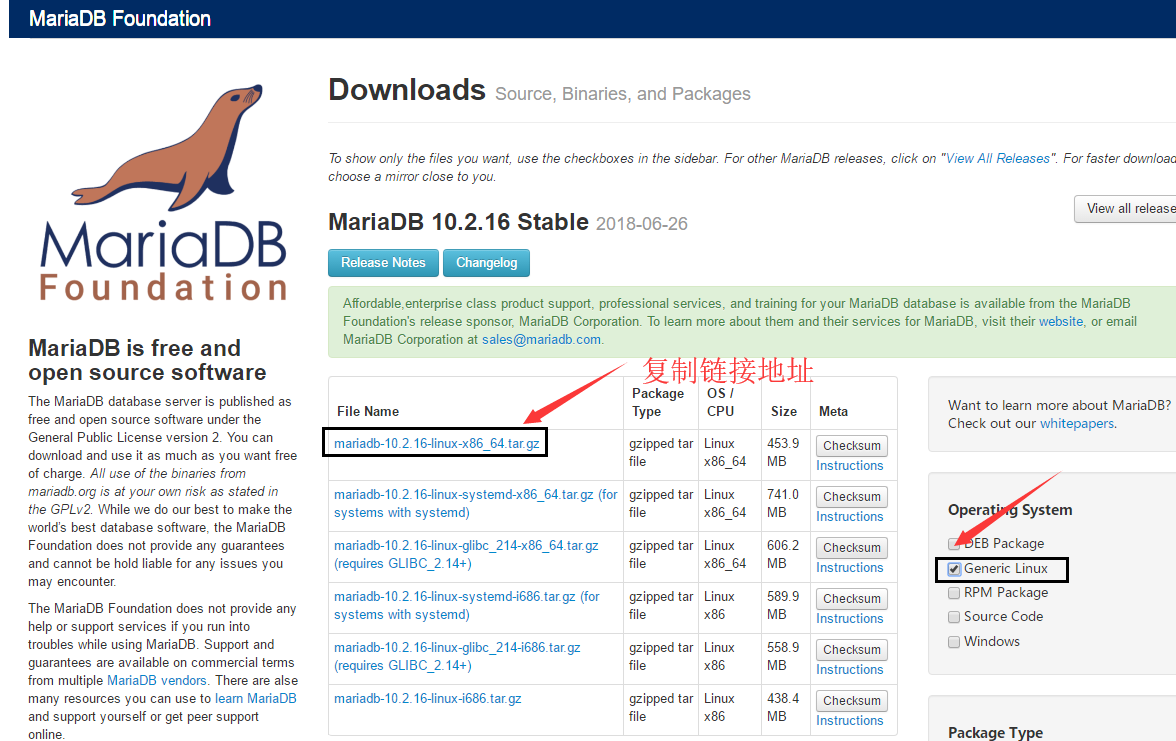
下载二进制的MariaDB
https://downloads.mariadb.org/mariadb/10.2.16/
安装过程
下载&解压
下载到/tools安装到/application
[root@yl tools]# wget http://ftp.hosteurope.de/mirror/archive.mariadb.org//mariadb-10.2.16/bintar-linux-x86_64/mariadb-10.2.16-linux-x86_64.tar.gz

[root@yl application]# tar -zxvf mariadb-10.2.-linux-x86_64.tar.gz
做软连接
[root@yl application]#ln -s mariadb-10.2.-linux-x86_64 mysql
创建MySQL用户
[root@yl application]#useradd -s /sbin/nologin -M mysql
对data目录进行授权
[root@yl application]#chown -R mysql.mysql /application/mysql/data/

[root@yl application]#ll /application/mysql/data/ -d

drwxr-xr-x  mysql mysql  Oct  : /application/mysql/data/
进入到主目录执行初始化完成安装
[root@yl application]#/application/mysql/scripts/mysql_install_db --user=mysql --basedir=/application/mysql --datadir=/application/mysql/data
检查安装
1、echo $?               ---返回0
2、确认输出中有两个ok
3、确认data目录下生成数据库文件
设置服务启动文件mysqld
# cp /application/mysql/support-files/mysql.server /etc/init.d/mysqld
设置开机启动
[root@yl mysql]# chkconfig --add mysqld

[root@yl mysql]# chkconfig mysqld on
修改启动服务脚本内容--更改软件的存放目录
sed -i 's#/usr/local/mysql#/application/mysql#g' /application/mysql/bin/mysqld_safe /etc/init.d/mysqld /application/mysql/bin/mysql_secure_installation
注意: 同时修改三个文件
复制配置文件并修改
#cp /application/mysql/support-files/my-huge.cnf /etc/my.cnf


添加

[mysqld]

datadir = /application/mysql/data
添加命令到环境变量两种方法:
1)
#echo 'export PATH=/application/mysql/bin:$PATH' >>/etc/profile

source /etc/profile

which mysql
2)
# vim /etc/profile.d/mysql.sh
PATH=/application/mysql/bin:$PATH

让配置生效
# . /etc/profile.d/mysql.sh
启动&验证
启动
[root@yl mysql] # service mysqld restart

[root@yl mysql]# netstat -lntup |grep 3306

设置密码
运行mysql_secure_installation
[root@yl ~]# mysql_secure_installation

NOTE: RUNNING ALL PARTS OF THIS SCRIPT IS RECOMMENDED FOR ALL MariaDB

SERVERS IN PRODUCTION USE! PLEASE READ EACH STEP CAREFULLY!

In order to log into MariaDB to secure it, we'll need the current

password for the root user. If you've just installed MariaDB, and

you haven't set the root password yet, the password will be blank,

so you should just press enter here.

Set root password? [Y/n] y

New password:

Re-enter new password:

Password updated successfully!

Reloading privilege tables..

... Success!

By default, a MariaDB installation has an anonymous user, allowing anyone

to log into MariaDB without having to have a user account created for

them. This is intended only for testing, and to make the installation

go a bit smoother. You should remove them before moving into a

production environment.

Remove anonymous users? [Y/n] y

... Success!

Normally, root should only be allowed to connect from 'localhost'. This

ensures that someone cannot guess at the root password from the network.

Disallow root login remotely? [Y/n] y

... Success!

By default, MariaDB comes with a database named 'test' that anyone can

access. This is also intended only for testing, and should be removed

before moving into a production environment.

Remove test database and access to it? [Y/n] n

... skipping.

Reloading the privilege tables will ensure that all changes made so far

will take effect immediately.

Reload privilege tables now? [Y/n] y

... Success!

Cleaning up...

All done! If you've completed all of the above steps, your MariaDB

installation should now be secure.

Thanks for using MariaDB!
MariaDB二进制安装的更多相关文章
- MySQL/MariaDB二进制安装
本文说明MySQL/MariaDB二进制安装的过程 mysql和mariadb的安装方式基本一致,唯一初始化方式有点不一样 1.规划: 数据文件存储位置 /data/my ...
- 二进制安装 mariadb
默认路径安装MySQL,Mariadb 非常简单,解压,配置权限,修改配置文件基本即可使用:自定义安装稍微有点麻烦,需要修改的地方稍微多点: 下面详细介绍自定义目录,二进制安装mariadb, 使用传 ...
- Linux安装mariadb二进制版本
上一篇说了mariadb编译安装过程,但在生产环境中一般使用发布好的二进制版本,由于安装过程和之前一样,不再详细叙述,只是简单概括一下安装过程: 1. 下载 地址为:https://downloads ...
- Mysql的二进制安装和基础入门操作
前言:Mysql数据库,知识非常的多,要想学精学通这块知识,估计也要花费和学linux一样的精力和时间.小编也是只会些毛皮,给大家分享一下~ 一.MySQL安装 (1)安装方式: 1 .程序包yum安 ...
- centos 7.3二进制安装mariadb10.2.8完美步骤
(1)在centos7系统上,yum info mariadb可以找到提供mariadb包的官方网站,在到官方网站下载最新的mariadb包,然后rz到linux系统上去 (2)准备用户 1.user ...
- Mysql数据库的二进制安装和基础入门操作
前言:Mysql数据库,知识非常的多,要想学精学通这块知识,估计也要花费和学linux一样的精力和时间.小编也是只会些毛皮,给大家分享一下~ 一.MySQL安装 (1)安装方式: 1 .程序包yum安 ...
- (0.2.3)Mysql安装——二进制安装
Linux平台下二进制方式安装卸载mysql 本章节:二进制安装mysql 目录: 1.基于Linux平台的Mysql项目场景介绍 2.mysql数据库运行环境准备-最优配置 3.如何下载mysql数 ...
- mysql二进制安装,升级,多实例部署
目标 理解线上部署考虑的因素 学会编译安装以及二进制安装mysql 学会升级mysql 学会多实例部署mysql数据库 学会合理部署mysql线上库 考虑因素: 版本选择,5.1,5.5还是5.6 ...
- centos 7 MysSQL 5.7.23 二进制安装
MySQL 5.7.23 二进制安装 CentOS 7 将默认数据库MySQL替换成了Mariadb. 这里会从系统的环境准备开始一步一步安装. 环境准备 系统版本 内核版本 IP地址 Centos ...
随机推荐
- 并发系列(二)——FutureTask类源码简析
背景 本文基于JDK 11,主要介绍FutureTask类中的run().get()和cancel() 方法,没有过多解析相应interface中的注释,但阅读源码时建议先阅读注释,明白方法的主要的功 ...
- Android实现EditText插入表情、超链接等格式
参考:https://www.jianshu.com/p/84067ad289d2 参考:https://www.jianshu.com/p/d82ac2edc7e8
- ken桑带你读源码之scrapy downloadermiddlewares
downloadermiddlewares 文件夹是下载中间件 其中 process_request 还没请求时的处理函数 process_response 请求之后的处理函数 chunke ...
- 安装 kreas 2.2.4 版本问题
python 版本 3.6 不要使用 3.7 和 3.8 否则导致安装失败 tensorflow 使用 1.12.0 keras 使用 2.2.4 版本 pip install 包名 -i http: ...
- go项目dockerfile最佳实践
1. 前言 2. 不需要cgo情况下的最佳实践 3. 依赖cgo情况下的最佳实践 1. 前言 这几天在构建golang编写的web项目中,关于dockerfile编写的一些总结 可能是单纯我比较菜(大 ...
- PHP timezone_location_get() 函数
------------恢复内容开始------------ 实例 返回指定时区的位置信息: <?php$tz=timezone_open("Asia/Taipei");ec ...
- 使用pdf.js实现前端页面预览pdf文档,解决了跨域请求
pdf.js主要包含两个库文件,一个pdf.js和一个pdf.worker.js,,一个负责API解析,一个负责核心解析 官网地址:http://mozilla.github.io/pdf.js/ 下 ...
- 2020牛客暑期多校训练营 第二场 A All with Pairs 字符串hash KMP
LINK:All with Pairs 那天下午打这个东西的时候状态极差 推这个东西都推了1个多小时 (比赛是中午考试的我很困 没睡觉直接开肝果然不爽 一开始看错匹配的位置了 以为是\(1-l\)和\ ...
- 实战:docker搭建FastDFS文件系统并集成SpringBoot
实战:docker搭建FastDFS文件系统并集成SpringBoot 前言 15年的时候,那时候云存储还远远没有现在使用的这么广泛,归根结底就是成本和安全问题,记得那时候我待的公司是做建站开发的,前 ...
- Error: Cannot perform an interactive login from a non TTY device
zhangjiawen@zhangjiawen-PC MINGW64 /d/Docker Toolbox$ docker login --username=绝世随机变量 registry.cn-han ...