
PL/SQL FAQ in installation "make sure you have the 32 bits Oracle client installed" and "Database character set(AL32UTF8) and Client character set (GBK) are different"
requirement :
connecting to remote oracle server . now I know the connectionURL :connectionUrl :jdbc:oracle:thin:LUXPRODUCTION/LUXPRODUCTION@//10.8.0.50:1521/PLM16D
I don't have to install oracle server in local environment.
I need to install plsql tools
after I install plsql tools
it couldn't work, at the logon dialog, the database is invalid for inputing, as well as the "Connect as" properties disappeared. of course , the following dialog is normal because I finally configure it successfully.
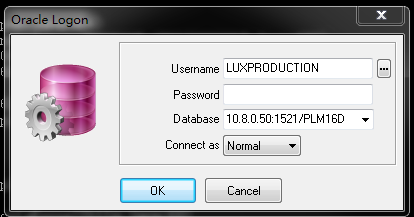
the reason for that, I didn't know now, but regarding material from internet, it told me I should install Oracle client for plsql.
yes , I install it.
because my OS is based on 64 bits. so I chose the version of it with x64.
after installation, oracle client finally prompt me to configure tnsnames.ora setting file.
but when I confirm the prompt dialog. it tips me path is invalid.
why?
because I used the normal user previlige when I run the setup program. then I reinstall the setup with administive previlege. it was ok eventually.
tnsnames.ora was set up rightly.
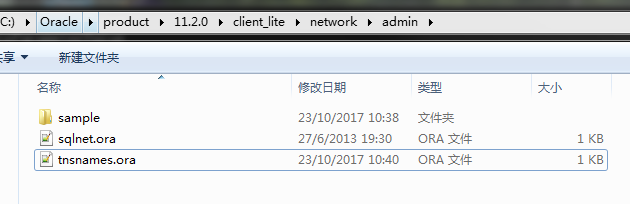
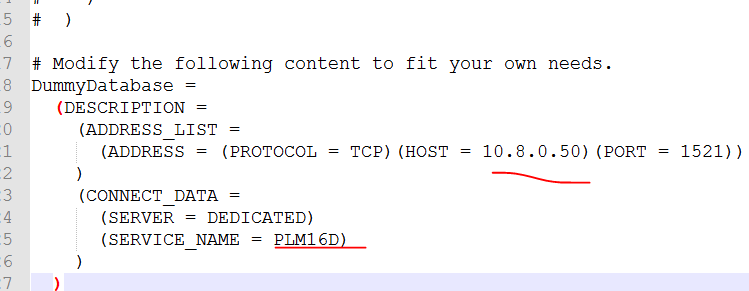
then I need to set the windows environmental variable
TNS_ADMIN = {installation path}\network\admin
then I open the plsql which I have already installed
Tools -> preferences ,then to set the Oracle Home and OCI library path.
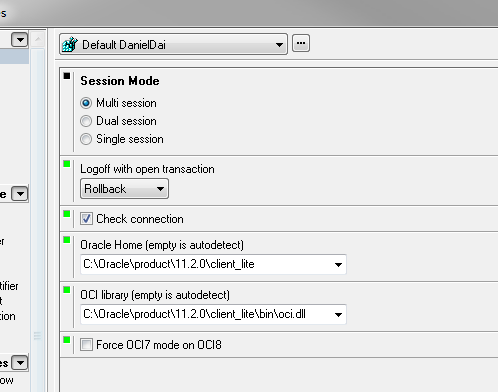
then restart the plsql.
then, the logon dialog would became as following.
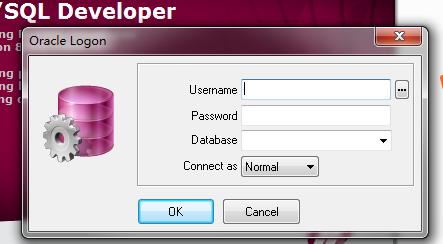
we need to input valid username and password. and database.
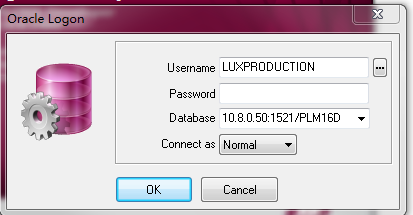
after that . OK.
you might meet a problem, the plsql perhaps notice you "Initialization error could not initialize ....\oci,dll, make sure you have the 32 bits Oracle client installed"
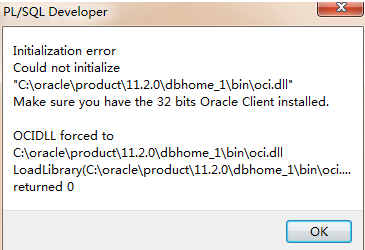
I didn't know why it happened. but , I tried to download another oracle client with 32bit version, and installed it replacing the previous one.
the issue was settled.
but then I met another problem.
the PLSql prompt me character set was different.
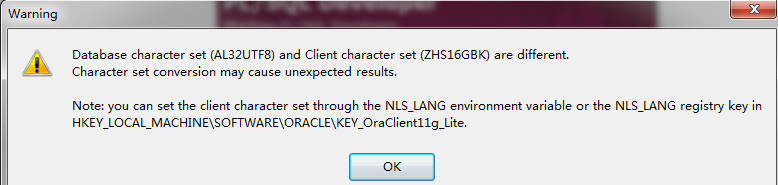
then .I added an environmental variable in windows. the issue was resolved.
NLS_LANG = SIMPLIFIED CHINESE_CHINA.AL32UTF8
I didn't know if other parameter value are applicable for the issue. I didn't try.
PL/SQL FAQ in installation "make sure you have the 32 bits Oracle client installed" and "Database character set(AL32UTF8) and Client character set (GBK) are different"的更多相关文章
- PL/SQL错误提示 database character set(AL32UTF8) and Client character set(ZHS16GBK) are different
PL/SQL database character set(AL32UTF8) and Client character set(ZHS16GBK) are different 这是由于安装oracl ...
- PL/SQL database character set(AL32UTF8) and Client character set(ZHS16GBK) are different 2012-04-11 13:01
启动PL/SQL Developer 报字符编码不一致错误 Database character set (AL32UTF8) and Client character set (ZHS16GBK) ...
- PL/SQL database character set(AL32UTF8) and Client character set(ZHS16GBK) are different
启动PL/SQL Developer 报字符编码不一致错误 Database character set (AL32UTF8) and Client character set (ZHS16GBK) ...
- [转]解决win7 64位操作系统下安装PL/SQL后连接报错问题: make sure you have the 32 bits oracle client installed
1. 在Oracle官网(http://www.oracle.com/technetwork/topics/winsoft-085727.html)下载文件: instantclient-basic- ...
- 解决win7 64位操作系统下安装PL/SQL后连接报错问题: make sure you have the 32 bits oracle client installed
1. 在Oracle官网(http://www.oracle.com/technetwork/topics/winsoft-085727.html)下载文件: instantclient-basic- ...
- 解决X64操作系统PL/SQL连接报错问题 make sure you have the 32 bits oracle client installed
Windows 64位下装Oracle 11g 64位,PLSQL Developer使用出现以下问题: 1.Database下拉框为空: 2.强制输入用户名.密码及Database,登录弹出: In ...
- [oracle] 解决X64操作系统PL/SQL连接报错问题 make sure you have the 32 bits oracle client installed
Windows 64位下装Oracle 11g 64位,PLSQL Developer使用出现以下问题: 1.Database下拉框为空: 2.强制输入用户名.密码及Database,登录弹出: In ...
- 启动PL/SQL Developer 报字符编码不一致错误 Database character set (AL32UTF8) and Client character set (ZHS16GBK) are different. Character set conversion may cause unexpected results. Note: you can set the client
今天写hibernate时候遇到一些异常 代码: 出现异常情况: 出现以上原因是Session关闭 如果不是使用的SessionFactory.getSession()来获得Session. 而是使用 ...
- Using PL/SQL APIs as Web Services
Overview Oracle E-Business Suite Integrated SOA Gateway allows you to use PL/SQL application program ...
随机推荐
- css3实现梯形三角
近期移动端项目中,图片很多 移动端尽量少图片,以便提升加载速度!这时候css3可以大放光芒比如梯形的背景图 --------------------------------- ------------ ...
- python之list
1.python列表 序列是Python中最基本的数据结构.序列中的每个元素都分配一个数字 - 它的位置,或索引,第一个索引是0,第二个索引是1,依此类推 序列都可以进行的操作包括索引,切片,加,乘, ...
- BIOS 品牌快捷键
主板品牌 启动按键 笔记本品牌 启动按键 台式机品牌 启动按键 华硕主板 F8 联想笔记本 F12 联想台式机 F12 技嘉主板 F12 宏基笔记本 F12 惠普台式机 F12 微星主板 F11 华硕 ...
- 简易 bokeh 图像散景效果算法实现
bokeh百度百科的解释 摄影镜头光圈大小和拍摄距离决定了拍摄时的景深,相对于焦点位置,焦点前与焦点后的被拍摄物体会显得模糊,这个模糊区域被称为焦外.焦外具体的模糊程度还受到镜头中镜片单体和组合的物理 ...
- 5.For loops
for 循环语句 在需要重复执行代码的时候,for循环常常被用到.我们可以让一行代码执行10次: for i in range(1,11): print(i) 最后一个数字11是不包含在内 ...
- js最常用正则表达式集合
常用正则表达式合集:验证数字:^[0-9]*$验证n位的数字:^\d{n}$验证至少n位数字:^\d{n,}$验证m-n位的数字:^\d{m,n}$验证零和非零开头的数字:^(0|[1-9][0-9] ...
- Yii2基本概念之——属性(property)
学习任何一门学问,往往都是从起基本的概念学起.万丈高楼平地起,这些基本概念就是高楼的基石,必须做详尽的分析.我们知道,Yii2是一款脉络清晰的框架,理顺了基础的概念和基本功能,学习更高级和复杂的功能就 ...
- TLD算法概述--学习理解之(一)
liuyihai@126.com http://www.cnblogs.com/liuyihai/ TLD(Tracking-Learning-Detection)是英国萨里大学的一个捷克籍博士生Zd ...
- 【ASP.NET MVC系列】浅谈表单和HTML辅助方法
[01]浅谈Google Chrome浏览器(理论篇) [02]浅谈Google Chrome浏览器(操作篇)(上) [03]浅谈Google Chrome浏览器(操作篇)(下) [04]浅谈ASP. ...
- Javascript闭包的几种用法
一.什么是闭包和闭包的几种写法和用法 1.什么是闭包 闭包,官方对闭包的解释是:一个拥有许多变量和绑定了这些变量的环境的表达式(通常是一个函数),因而这些变量也是该表达式的一部分.闭包的特点: 1. ...