
【JavaFx教程】第六部分:统计图
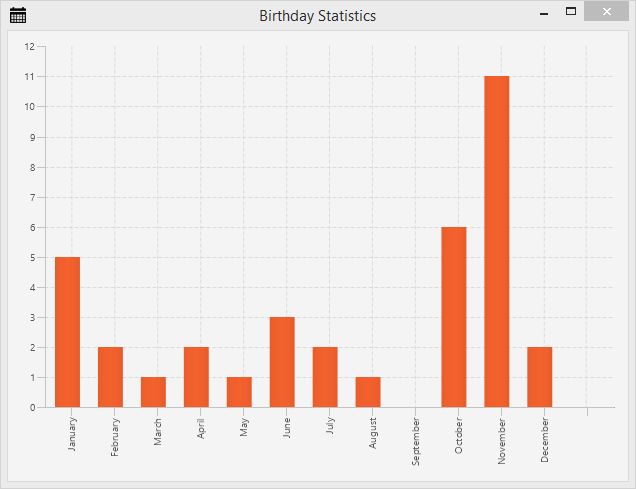
第6部分的主题
- 创建一个统计图显示生日的分布。
生日统计
在AddressApp中所有人员都有生日。当我们人员庆祝他们生日的时候,如果有一些生日的统计不是会更好。
我们使用柱状图,包含每个月的一个条形。每个条形显示在指定月份中有多少人需要过生日。
统计FXML视图
在
ch.makery.address.view包中我们开始创建一个BirthdayStatistics.fxml(*右击包|New|other..|New FXML Document*)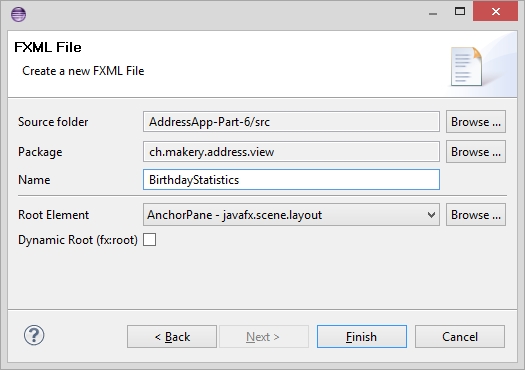
在Scene Builder中打开
BirthdayStatistics.fxml文件。选择根节点
AnchorPane。在*Layout*组中设置*Pref Width*为620,*Pref Height*为450。添加
BarChart到AnchorPane中。右击
BarChart并且选择*Fit to Parent*。保存fxml文件,进入到Eclipse中,F5刷新项目。
在我们返回到Scene Builder之前,我们首先创建控制器,并且在我们的MainApp中准备好一切。
统计控制器
在view包 ch.makery.address.view中创建一个Java类,称为BirthdayStatisticsController.java。
在开始解释之前,让我们看下整个控制器类。
BirthdayStatisticsController.java
package ch.makery.address.view;

import java.text.DateFormatSymbols;

import java.util.Arrays;

import java.util.List;

import java.util.Locale;

import javafx.collections.FXCollections;

import javafx.collections.ObservableList;

import javafx.fxml.FXML;

import javafx.scene.chart.BarChart;

import javafx.scene.chart.CategoryAxis;

import javafx.scene.chart.XYChart;

import ch.makery.address.model.Person;

/**

 * The controller for the birthday statistics view.

 *

 * @author Marco Jakob

 */

public class BirthdayStatisticsController {

    @FXML

    private BarChart<String, Integer> barChart;

    @FXML

    private CategoryAxis xAxis;

    private ObservableList<String> monthNames = FXCollections.observableArrayList();

    /**

     * Initializes the controller class. This method is automatically called

     * after the fxml file has been loaded.

     */

    @FXML

    private void initialize() {

        // Get an array with the English month names.

        String[] months = DateFormatSymbols.getInstance(Locale.ENGLISH).getMonths();

        // Convert it to a list and add it to our ObservableList of months.

        monthNames.addAll(Arrays.asList(months));

        // Assign the month names as categories for the horizontal axis.

        xAxis.setCategories(monthNames);

    }

    /**

     * Sets the persons to show the statistics for.

     *

     * @param persons

     */

    public void setPersonData(List<Person> persons) {

        // Count the number of people having their birthday in a specific month.

        int[] monthCounter = new int[12];

        for (Person p : persons) {

            int month = p.getBirthday().getMonthValue() - 1;

            monthCounter[month]++;

        }

        XYChart.Series<String, Integer> series = new XYChart.Series<>();

        // Create a XYChart.Data object for each month. Add it to the series.

        for (int i = 0; i < monthCounter.length; i++) {

            series.getData().add(new XYChart.Data<>(monthNames.get(i), monthCounter[i]));

        }

        barChart.getData().add(series);

    }

}
控制器如何工作
控制器需要从FXML文件中访问两个元素:
barChar:它有String和Integer类型。String用于x轴上的月份,Integer用于指定月份中人员的数量。xAxis:我们使用它添加月字符串
initialize()方法使用所有月的列表填充x-axis。setPersonData(…)方法将由MainApp访问,设置人员数据。它遍历所有人员,统计出每个月生日的人数。然后它为每个月添加XYChart.Data到数据序列中。每个XYChart.Data对象在图表中表示一个条形。
连接视图和控制器
在Scene Builder中打开
BirthdayStatistics.fxml。在Controller组中设置
BirthdayStatisticsController为控制器。选择
BarChart,并且选择barChar作为fx:id属性(在*Code*组中)选择
CategoryAxis,并且选择xAxis作为fx:id属性。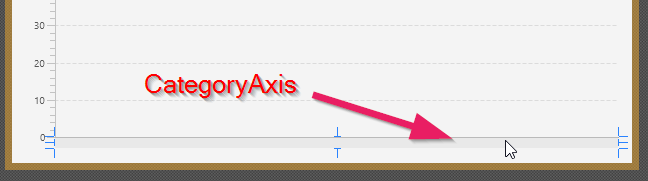
你可以添加一个标题给
BarChar(在*Properties*组中)进一步修饰。
连接View/Controller和MainApp
我们为*生日统计*使用与*编辑人员对话框*相同的机制,一个简单的弹出对话框。
添加下面的方法到MainApp类中
/**

 * Opens a dialog to show birthday statistics.

 */

public void showBirthdayStatistics() {

    try {

        // Load the fxml file and create a new stage for the popup.

        FXMLLoader loader = new FXMLLoader();

        loader.setLocation(MainApp.class.getResource("view/BirthdayStatistics.fxml"));

        AnchorPane page = (AnchorPane) loader.load();

        Stage dialogStage = new Stage();

        dialogStage.setTitle("Birthday Statistics");

        dialogStage.initModality(Modality.WINDOW_MODAL);

        dialogStage.initOwner(primaryStage);

        Scene scene = new Scene(page);

        dialogStage.setScene(scene);

        // Set the persons into the controller.

        BirthdayStatisticsController controller = loader.getController();

        controller.setPersonData(personData);

        dialogStage.show();

    } catch (IOException e) {

        e.printStackTrace();

    }

}
一切设置完毕,但是我们没有任何东西实际上调用新的showBirthdayStatistics()方法。幸运的是我们已经在RootLayout.fxml中有一个菜单,它可以用于这个目的。
显示生日统计菜单
在RootLayoutController中添加下面的方法,它将处理*显示生日统计*菜单项的用户点击。
/**

 * Opens the birthday statistics.

 */

@FXML

private void handleShowBirthdayStatistics() {

  mainApp.showBirthdayStatistics();

}
现在,使用Scene Builder打开RootLayout.fxml文件。创建Staticstic 菜单,带有一个Show Statistcs MenuItem:
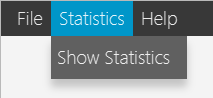
选择Show Statistics MenuItem,并且选择handleShowBirthdayStatistics作为On Action(在*Code*组中)。

进入到Eclipse,刷新项目,测试它。
JavaFX Chart的更多信息
更多信息的一个好地方是官方Oracle教程,使用JavaFX Chart.
下一步做什么?
在最后的教程第7部分 中,我们将最后部署我们的应用(例如:打包并且发布应用到我们的用户)
--------------------- 本文来自 jobbible 的CSDN 博客 ,全文地址请点击:https://blog.csdn.net/moshenglv/article/details/82877735?utm_source=copy
【JavaFx教程】第六部分:统计图的更多相关文章
- Senparc.Weixin.MP SDK 微信公众平台开发教程(六):了解MessageHandler
上一篇<Senparc.Weixin.MP SDK 微信公众平台开发教程(五):使用Senparc.Weixin.MP SDK>我们讲述了如何使用Senparc.Weixin.MP SDK ...
- Docker入门教程(六)另外的15个Docker命令
Docker入门教程(六)另外的15个Docker命令 [编者的话]DockerOne组织翻译了Flux7的Docker入门教程,本文是系列入门教程的第六篇,继续介绍Docker命令.之前的第二篇文章 ...
- 无废话ExtJs 入门教程十六[页面布局:Layout]
无废话ExtJs 入门教程十六[页面布局:Layout] extjs技术交流,欢迎加群(201926085) 首先解释什么是布局: 来自百度词典的官方解释:◎ 布局 bùjú: [distributi ...
- HMM 自学教程(六)维特比算法
本系列文章摘自 52nlp(我爱自然语言处理: http://www.52nlp.cn/),原文链接在 HMM 学习最佳范例,这是针对 国外网站上一个 HMM 教程 的翻译,作者功底很深,翻译得很精彩 ...
- Ocelot简易教程(六)之重写配置文件存储方式并优化响应数据
本来这篇文章在昨天晚上就能发布的,悲剧的是写了两三千字的文章居然没保存,结果我懵逼了.今天重新来写这篇文章.今天我们就一起来探讨下如何重写Ocelot配置文件的存储方式以及获取方式. 作者:依乐祝 原 ...
- [转]PostgreSQL教程(十六):系统视图详解
这篇文章主要介绍了PostgreSQL教程(十六):系统视图详解,本文讲解了pg_tables.pg_indexes.pg_views.pg_user.pg_roles.pg_rules.pg_set ...
- iOS 11开发教程(六)iOS11Main.storyboard文件编辑界面
iOS 11开发教程(六)iOS11Main.storyboard文件编辑界面 在1.2.2小节中提到过编辑界面(Interface builder),编辑界面是用来设计用户界面的,单击打开Main. ...
- Netty4.x中文教程系列(六) 从头开始Bootstrap
Netty4.x中文教程系列(六) 从头开始Bootstrap 其实自从中文教程系列(五)一直不知道自己到底想些什么.加上忙着工作上出现了一些问题.本来想就这么放弃维护了.没想到有朋友和我说百度搜索推 ...
- Photoshop入门教程(六):通道
学习心得:当大部分人听到通道.心里可能会有一种很害怕的感觉,因为“通道”并不像“图层”这样易于理解,望而生畏.”通道“的本质其实是存储图片的信息,把一张图片比作一个为网站,那么通道就是网站的后台,存储 ...
- 2017.3.31 spring mvc教程(六)转发、重定向、ajax请求
学习的博客:http://elf8848.iteye.com/blog/875830/ 我项目中所用的版本:4.2.0.博客的时间比较早,11年的,学习的是Spring3 MVC.不知道版本上有没有变 ...
随机推荐
- 开源 PetaPoco 扩展~一个小型轻巧的ORM~
PetaPoco http://www.toptensoftware.com/petapoco/ |PetaPoco is a tiny, fast, single-file micro-ORM fo ...
- 常用Java集合类总结
此文已由作者赵计刚授权网易云社区发布. 欢迎访问网易云社区,了解更多网易技术产品运营经验. 7.1.List(允许重复元素) ArrayList: 底层数据结构:Object[] 在查询(get).遍 ...
- 企业项目开发--cookie(3)
此文已由作者赵计刚授权网易云社区发布. 欢迎访问网易云社区,了解更多网易技术产品运营经验. 2.2.3.AdminController 1 package com.xxx.web.admin; ...
- Bs4 BeautifulSoup取值
原文网址:https://blog.csdn.net/u010244522/article/details/79627073 从网页获取HTML数据后,获取对应标签.属性的值 取值方法主要有以下几种: ...
- harbor镜像仓库-01-搭建部署
harbor镜像仓库-01-搭建部署 dockerregistryharbor安装部署docker-compose harbor的https配置参考另一章节harbor镜像仓库-02-https访问配 ...
- Ubuntu 14.04TLS Nginx搭建静态文件服务器
Nginx搭建静态文件服务器 [官方教程]https://www.nginx.com/resources/admin-guide/serving-static-content/ 打开Nginx的配置文 ...
- odoo开发笔记:抛出警告的方式
上边rase 加3种写法,都能实现,跑出警告的功能.
- (转)每天一个linux命令(21):find命令之xargs
原文:http://www.cnblogs.com/peida/archive/2012/11/15/2770888.html https://blog.csdn.net/ly1358152944/a ...
- vue插件ele使用小坑
1.ele-table组件中selection如何默认选中 使用官网提供的api-->>Table Methods中的toggleRowSelection,关于这个api基本介绍就不说了. ...
- css - bootstrap3下拉菜单点击之后怎么改变背景颜色?
css添加 .navbar-default .navbar-nav>.open>a, .navbar-default .navbar-nav>.open>a:focus, .n ...