
ReportMachine OCX 的使用方法
http://rmachine.haotui.com/thread-55-1-1.html
RMReport.ocx
RMEngine.Init(1); // 初始化

RMEngine.LoadFromFile('c:\1.rmf'); // 读入报表模版

RMEngine.AddDataSet(DataModule2.Customers, 'CustomersDS'); // 增加一个数据表

RMEngine.DesignReport; // 设计报表

RMReport.ShowReport; // 预览报表
c#调用

this.dataSet1 = new System.Data.DataSet();

this.dataView1 = new System.Data.DataView();

this.rmReport1 = new RMReportEngine.RMReport();

this.dataSet1.Reset();

            this.oleDbDataAdapter1.SelectCommand.CommandText = "select * from Customer";

            this.oleDbDataAdapter1.Fill(this.dataSet1, "Customer");

            this.dataView1.Table = this.dataSet1.Tables["Customer"];

            this.dataView1.RowFilter = "CustNo >= 3000";

            //this.dataGrid1.DataSource = this.dataView1;

            rmReport1.ModifyPrepared = false;

            rmReport1.Init(this, TxRMReportType.rmrtReport);

            //rmReport1.PreviewOptions.BtnDesignVisible = true;

            //rmReport1.AddDataSet(this.dataSet1.Tables["Customer"], "db1");

            rmReport1.AddDataSet(this.dataView1, "db1");

            rmReport1.LoadFromFile(MainPath + "reports\\SimpleList.rmf"); //SimpleList.rmf

            rmReport1.AddVariable("公司名称", "我的公司名称", true);

            rmReport1.AddVariable("公司简称", "我的公司简称", true);

            rmReport1.AddVariable("公司电话", "我的公司电话", true);

            if (radioButton1.Checked)

            {

                    rmReport1.ShowReport();

            }

            else

            {

                rmReport1.DesignReport();

            }
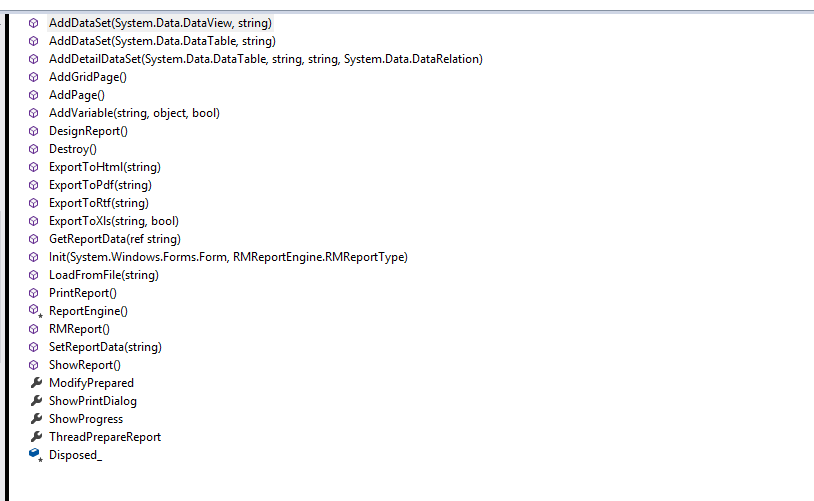
public void AddDataSet(System.Data.DataView aDataView, string aDatasetName)
public void AddDataSet(System.Data.DataTable aDataTable, string aDatasetName)
public void AddDetailDataSet(System.Data.DataTable aDataTable, string aDatasetName, string aMasterName, System.Data.DataRelation aDataRelation)
public void AddVariable(string aVarName, object aVarValue, bool aIsString)
public void GetReportData(ref string aReportData)
public void Init(System.Windows.Forms.Form aOwner, RMReportEngine.RMReportType aReportType)
web版 RMViewer.ocx
http://rmachine.haotui.com/thread-56-1-1.html
编译client_ActiveForm目录中的项目就会生成RMViewer.ocx
com版本
COM控件(ocx)可以在VB、.Net、VC、Delphi等支持ADO的开发工具中使用
ocx版本
Dim conn

    Dim rs

    Dim sql

    Dim rq

    Dim Engine

    Set conn = OpenDBConnection

    Set rs = Server.CreateObject ("ADODB.recordset")

    sql = "SELECT * from customer"

    rs.Open sql, conn, 1, 1

    Set Engine = Server.CreateObject("RMEngine.Engine")

    Engine.Init

    Engine.AddDataSet "db1", rs

    Engine.SetReportFile RootPath & "SimpleList.rmf"

    Engine.ViewerVersion = ViewerVersion

    Engine.ViewerFileName = ViewerFileName

    Engine.SaveReportURL = "asp/DesignReportSave.asp?Report=" & "SimpleList.rmf"

    Engine.AddVariable "NowTime", Now, false

    Engine.ShowProgress = True

    Set rs = nothing

    conn.Close

    Set conn = nothing
ReportMachine OCX 的使用方法的更多相关文章
- FAQ:win7和win8 64位注册ocx控件方法
win7/win8 问题所在: 64位的系统一般都是可以安装32位程序的, 执行 C:\Windows\SysWOW64\regsvr32.exe 而不是 C:\Windows\Sys ...
- 窗体调用 OCX 的使用方法(MFC,WINFORM)
在上一篇中,我们做了一个OCX控件,叫mfcActive.ocx,在这一篇我们要做的就是使用这个ocx控件.第一步:创建一个MFC的对话框工程(其实winform 也是一样的) 第二步:在工具箱中常规 ...
- ReportMachine OCX
http://rmachine.haotui.com/thread-55-1-1.html 偏高偏低提示 [IF( [RMDBDataSet1."abnormalIndicator" ...
- VB 6.0不能加载MSCOMCTL.OCX的解决方法
问题场景:打开 VB 6项目时报错,不能加载 'C:\WINDOWS\system32\MSCOMCTL.OCX'--继续加载工程吗? 解决方法: 1.新建一个VB工程,然后按CTRL + T,选中 ...
- jacob访问ocx控件方法和遇到的问题
最近在进行摄像机的二次开发,摄像机厂商提供了使用C++开发的ocx控件:所以尝试使用jacob来进行访问. 操作步骤如下: 1, 从官网(http://sourceforge.net/projects ...
- Windows系统下运行某些程序时缺少“Msflxgrd.ocx”的解决方法
出现这样的错误就是系统缺少相应的库文件,我们安装即可. 下载Msflxgrd.ocx,这里提供一个下载网址:https://www.ocxme.com/files/msflxgrd_ocx 64位系统 ...
- Html页中使用OCX控件
原文:http://blog.csdn.net/mouse8166/article/details/5515657 最近准备开发一个b/s架构的应用程序需要用到activeX控件,web服务器尚未进入 ...
- JAVASCRIPT 调用 其他应用程序的方法
在上一篇中就已经提供了一种方法,就是通过自己写OCX 给OCX 传入路径,通过OCX 启动应用程序.当然这种方法可扩展性很多,不一定是启动应用程序了.今天提供另一种比较简单的可以启动应用程序的方法,不 ...
- 根据不同浏览器判断OCX插件是否安装
最近项目进入到了验收阶段,需要兼容不同的浏览器,海康的Demo写了一个判断插件是否成功安装的函数,但是经过测试,只在IE浏览器下有效果,在其他的浏览器下面会出现Bug,现在需要写一个通用的方法,在不同 ...
随机推荐
- HDU 5988.Coding Contest 最小费用最大流
Coding Contest Time Limit: 2000/1000 MS (Java/Others) Memory Limit: 65536/65536 K (Java/Others)To ...
- ArrayList、Vector、LinkedList的特点和区别
ArrayList.Vector.LinkedList类均在java.util包中,均为可伸缩数组. 1)ArrayList和Vector都是基于存储元素的Object[] array来实现的,它们会 ...
- [Selenium Grid] 搭建Hub和Node环境
Note : 先在Hub和Node的机器上安装好JDK, IE浏览器,Chrome浏览器,Firefox浏览器 准备好红色框标示的东西: Hub.bat :启动Hub AllNodes.bat : ...
- @PostConstruct和@PostConstruct 注解 及ehcache 缓存 执行过程 小记
@PostConstruct 和@PostConstruct 注解 从Java EE 5规范开始,Servlet中增加了两个影响Servlet生命周期的注解(Annotion):@PostConstr ...
- RunAsPolicy Exit Code 1替代
<Policies> <RunAsPolicy CodePackageRef="Code" UserRef="SetupLocalSystem&quo ...
- so文件相关
2018-08-31 今天尝试了一下编译so文件. 最开始是按照这个博主来操作的https://blog.csdn.net/tianshuai4317618/article/details/79073 ...
- docker下安装tomcat
一,查看tomcat镜像 [root@icompany ~]# docker search tomcat INDEX NAME DESCRIPTION STARS OFFICIAL AUTOMATED ...
- docker下安装tensorflow
一,查找镜像 root@xushi:~# docker search tensorflow NAME DESCRIPTION STARS OFFICIAL AUTOMATED tensorflow/t ...
- python包与模块导入
一 .module 通常模块为一个文件,直接使用import来导入就好了.可以作为module的文件类型有".py".".pyo".".pyc&quo ...
- 一个简单的NodeJs静态页面的web服务器
主要功能 1 显示www文件夹下静态html或文本类型的文件. 2 缺省访问文件功能. 通过config.js的defaultfile属性设置 3 如果文件夹下没有缺省文件,显示文件夹下文件列表 4 ...