
学习《Unix/Linux编程实践教程》(2):实现 more
0.目录
1.more 能做什么?
2.more 是如何实现的?
3.实现 more
1.more 能做什么?
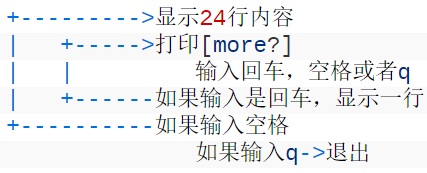
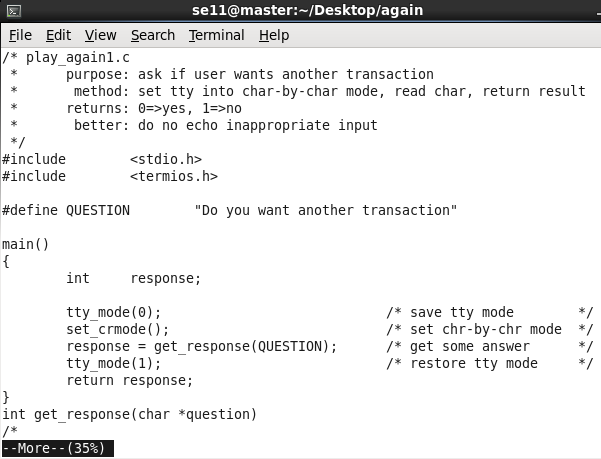
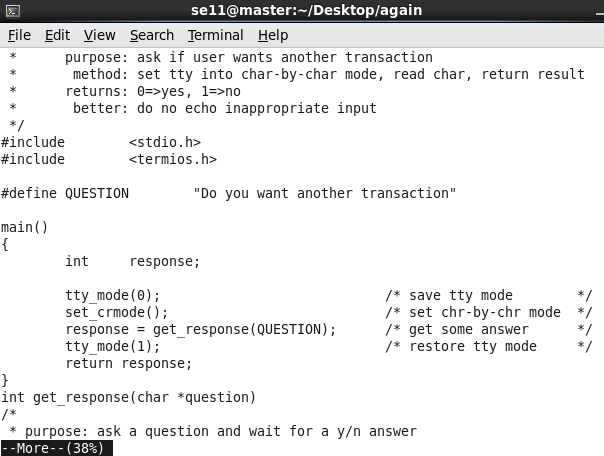
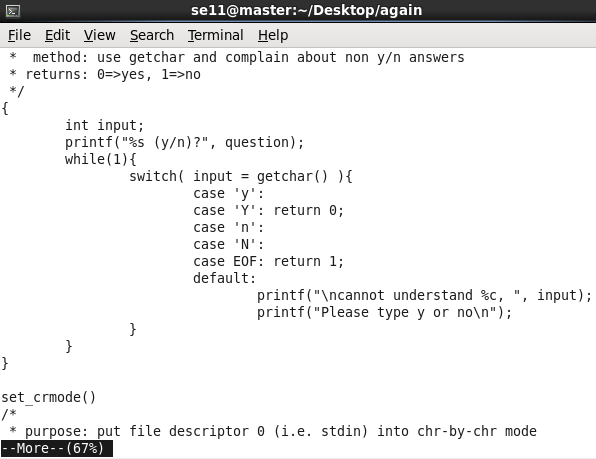
more 可以分页显示文件的内容。正常运行后 more 会显示文件第一屏的内容,在屏幕的底部,more 用反白字体显示文件的百分比,这时如果按空格键,文件的下一屏内容会显示出来,如果按回车键,显示的则是下一行,如果输入“q”,结束显示,如果输入“h”,显示出来的是 more 的联机帮助。
more 有三种用法:
more filename
显示文件filename的内容。
command | more
more 将 command 命令的输出分页显示。
more < filename
从标准输入获取要分页显示的内容,而这时 more 的标准输入被重定向到文件 filename。
2.more 是如何实现的?
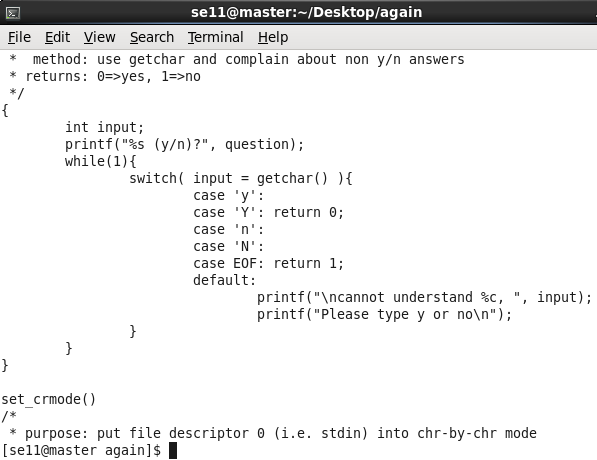
书中的流程图:
more 命令展示:
执行命令more test.c:
按回车:
按空格:
按q:
3.实现 more
3.1 more01.c
/* more01.c - version 0.1 of more
 * read and print 24 lines then pause for a few special commands
 */

#include <stdio.h>
#include <stdlib.h>

#define PAGELEN 24
#define LINELEN 512

void do_more(FILE *);
int see_more();

int main( int ac, char *av[] )
{
    FILE *fp;

    if ( ac == 1 )
        do_more( stdin );
    else
        while ( --ac )
            if ( (fp = fopen( *++av, "r" )) != NULL )
            {
                do_more( fp );
                fclose( fp );
            }
            else
                exit(1);
    return 0;
}

void do_more( FILE *fp )
/*
 * read PAGELEN lines, then call see_more() for further instructions
 */
{
    char line[LINELEN];
    int num_of_lines = 0;
    int see_more(), reply;

    while ( fgets( line, LINELEN, fp ) ) {     /* more input */
        if ( num_of_lines == PAGELEN ) {       /* full screen? */
            reply = see_more();                /* y: ask user */
            if ( reply == 0 )                  /* n: done */
                break;
            num_of_lines -= reply;             /* reset count */
        }
        if ( fputs( line, stdout ) == EOF )    /* show line */
            exit(1);                           /* or die */
        num_of_lines++;                        /* count it */
    }
}

int see_more()
/*
 * print message, wait for response, return # of lines to advance
 * q means no, space means yes, CR means one line
 */
{
    int c;

    printf("\033[7m more? \033[m");            /* reverse on a vt100 */
    while( (c=getchar()) != EOF )              /* get response */
    {
        if ( c == 'q' )                        /* q -> N */
            return 0;
        if ( c == ' ' )                        /* ' ' => next page */
            return PAGELEN;                    /* how many to show */
        if ( c == '\n' )                       /* Enter key => 1 line */
            return 1;
    }
    return 0;
}
测试运行:
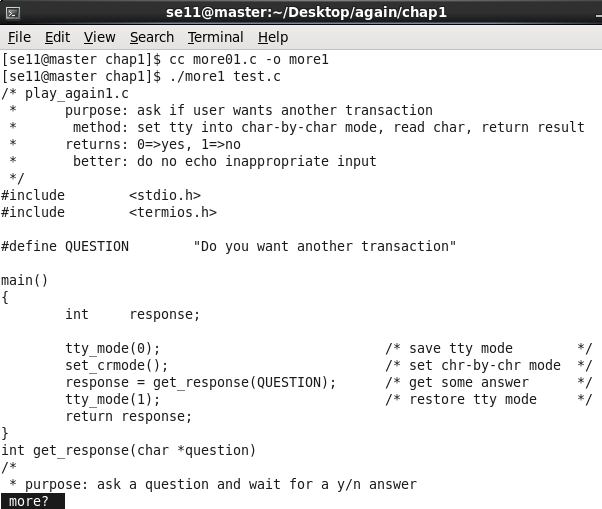
按两下回车:
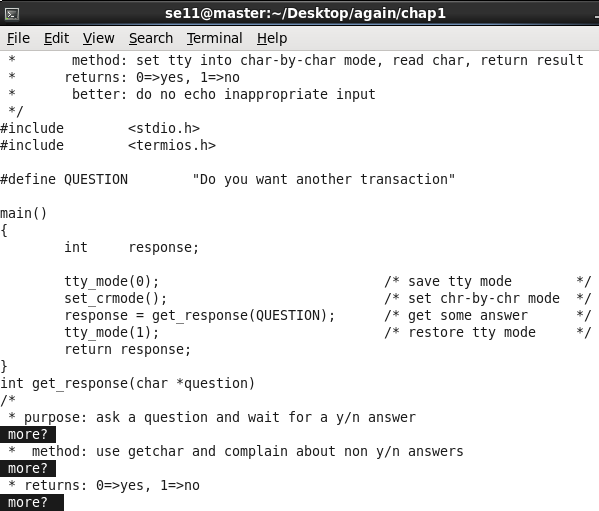
按空格 + 回车:
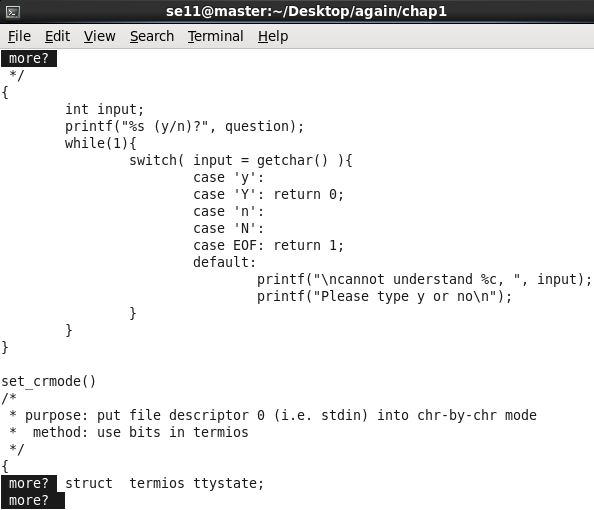
按q + 回车:
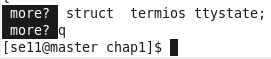
代码分析:
这段代码有 3 个函数,在主函数中判断应该从文件还是标准输人中获取数据,并打开相应的数据源,然后调用 do_more 函数,do_more 将数据显示在显示器上,满一屏后,调用 see_more 函数接收用户的输入,以决定下一步的动作。
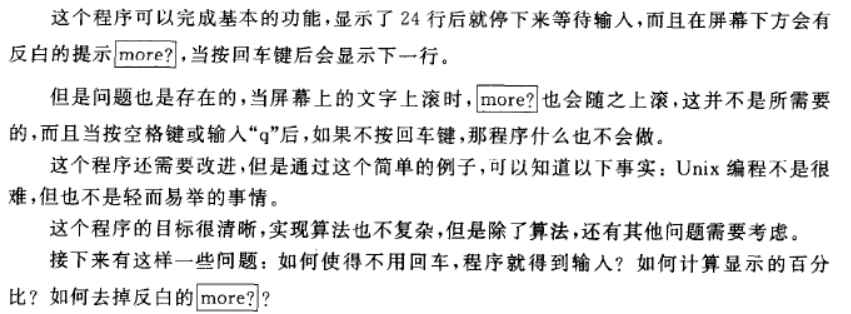
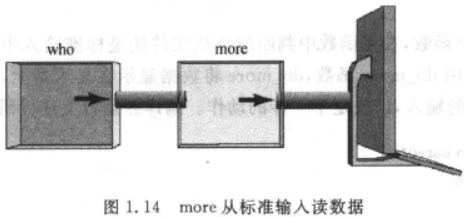
先来看对数据源的处理,在 main 函数中检查命令参数的个数,如果没有参数,那就从标准输入读取数据,这样一来 more 就可以通过管道重定向来得到数据,如:
who | more
who 命令列出当前系统中活动的用户,管道命令“|”将 who 的输出重定向到 more 的输入,结果是每次显示 24 个用户后暂停,在有很多用户的情况下,用 more 来对 who 的输出进行分页就会很有必要。
接下来是输入重定向的问题,看以下例子:
ls /bin | more01
期望的结果是将 /bin 目录下的文件分页,显示 24 行以后暂停。
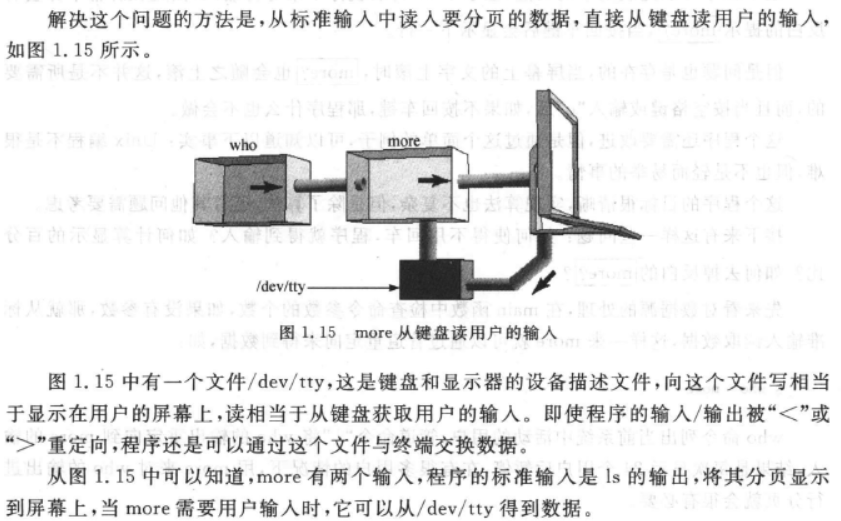
然而实际的运行结果并不是这样的,24 行以后并没有暂停而是继续输出,问题在哪里呢?

已经将 more01 的标准输入重定向到 ls 的标准输出,这样 more01 将从同一个数据流中读用户的输入,这显然有问题。
程序缺陷:
- more01.c 只实现了查看一个文件( more filename ),当标准输入输出被重定向到其他管道时,程序无法正常接受来自键盘的信息(无法使用管道命令「|」、重定向「<」「>」)。
- 无法输入立即响应,需要按回车。
3.2 more02.c
如何改进?
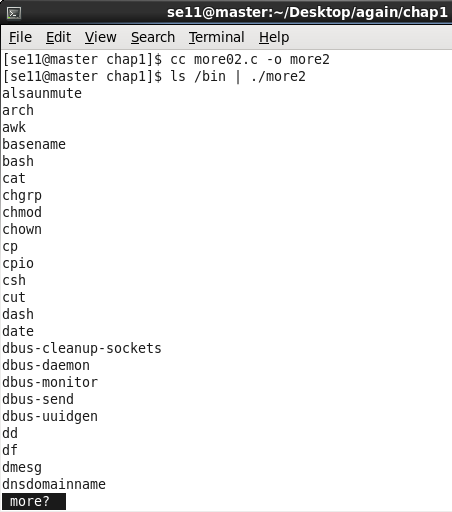
/dev/tty是键盘和显示器的设备描述文件,程序可以从/dev/tty得到键盘数据,避免因为重定向管道造成无法正常接收键盘数据。- getchar() 相当于 getc(stdin)
/* more02.c - version 0.2 of more
 * read and print 24 lines then pause for a few special commands
 * feature of version 0.2: reads from /dev/tty for commands
 */
#include <stdio.h>
#include <stdlib.h>

#define PAGELEN 24
#define LINELEN 512

void do_more(FILE *);
int see_more(FILE *);

int main( int ac, char *av[] )
{
    FILE *fp;

    if ( ac == 1 )
        do_more( stdin );
    else
        while ( --ac )
            if ( (fp = fopen( *++av, "r" )) != NULL )
            {
                do_more( fp );
                fclose( fp );
            }
            else
                exit(1);
    return 0;
}

void do_more( FILE *fp )
/*
 * read PAGELEN lines, then call see_more() for further instructions
 */
{
    char line[LINELEN];
    int num_of_lines = 0;
    int see_more(FILE *), reply;
    FILE *fp_tty;

    fp_tty = fopen( "/dev/tty", "r" );          /* NEW: cmd stream */
    if ( fp_tty == NULL )                       /* if open fails */
        exit(1);                                /* no use in running */

    while ( fgets( line, LINELEN, fp ) ) {      /* more input */
        if ( num_of_lines == PAGELEN ) {        /* full screen? */
            reply = see_more( fp_tty );         /* NEW: pass FILE * */
            if ( reply == 0 )                   /* n: done */
                break;
            num_of_lines -= reply;              /* reset count */
        }
        if ( fputs( line, stdout ) == EOF )     /* show line */
            exit(1);                            /* or die */
        num_of_lines++;                         /* count it */
    }
}

int see_more(FILE *cmd)                         /* NEW: accepts arg */
/*
 * print message, wait for response, return # of lines to advance
 * q means no, space means yes, CR means one line
 */
{
    int c;

    printf("\033[7m more? \033[m");             /* reverse on a vt100 */
    while( (c=getc(cmd)) != EOF )               /* NEW: reads from tty */
    {
        if ( c == 'q' )                         /* q -> N */
            return 0;
        if ( c == ' ' )                         /* ' ' => next page */
            return PAGELEN;                     /* how many to show */
        if ( c == '\n' )                        /* Enter key => 1 line */
            return 1;
    }
    return 0;
}
测试运行:
3.3 more03.c
改进:不需要回车,直接立即响应输入的字符。
/* more03.c - version 0.3 of more
 * read and print 24 lines then pause for a few special commands
 * feature of version 0.3: no need to press return
 */
#include <stdio.h>
#include <stdlib.h>
#include <termios.h>

#define PAGELEN 24
#define LINELEN 512

void do_more(FILE *);
int see_more(FILE *);
void set_crmode();
tty_mode(int how);

int main( int ac, char *av[] )
{
    FILE *fp;

    tty_mode(0);                                /* save tty mode */
    set_crmode();                               /* set chr-by-chr mode */

    if ( ac == 1 )
        do_more( stdin );
    else
        while ( --ac )
            if ( (fp = fopen( *++av, "r" )) != NULL )
            {
                do_more( fp );
                fclose( fp );
            }
            else
                exit(1);

    tty_mode(1);                                /* restore tty mode */
    return 0;
}

void do_more( FILE *fp )
/*
 * read PAGELEN lines, then call see_more() for further instructions
 */
{
    char line[LINELEN];
    int num_of_lines = 0;
    int see_more(FILE *), reply;
    FILE *fp_tty;

    fp_tty = fopen( "/dev/tty", "r" );          /* NEW: cmd stream */
    if ( fp_tty == NULL )                       /* if open fails */
        exit(1);                                /* no use in running */

    while ( fgets( line, LINELEN, fp ) ) {      /* more input */
        if ( num_of_lines == PAGELEN ) {        /* full screen? */
            reply = see_more( fp_tty );         /* NEW: pass FILE * */
            if ( reply == 0 )                   /* n: done */
                break;
            num_of_lines -= reply;              /* reset count */
        }
        if ( fputs( line, stdout ) == EOF )     /* show line */
            exit(1);                            /* or die */
        num_of_lines++;                         /* count it */
    }
}

int see_more(FILE *cmd)                         /* NEW: accepts arg */
/*
 * print message, wait for response, return # of lines to advance
 * q means no, space means yes, CR means one line
 */
{
    int c;

    printf("\033[7m more? \033[m");             /* reverse on a vt100 */
    while( (c=getc(cmd)) != EOF )               /* NEW: reads from tty */
    {
        if ( c == 'q' )                         /* q -> N */
            return 0;
        if ( c == ' ' )                         /* ' ' => next page */
            return PAGELEN;                     /* how many to show */
        if ( c == '\n' )                        /* Enter key => 1 line */
            return 1;
    }
    return 0;
}

void set_crmode()
/*
 * purpose: put file descriptor 0 (i.e. stdin) into chr-by-chr mode
 * method: use bits in termios
 */
{
    struct termios ttystate;

    tcgetattr( 0, &ttystate);                   /* read curr. setting */
    ttystate.c_lflag    &= ~ICANON;             /* no buffering */
    ttystate.c_cc[VMIN] = 1;                    /* get 1 char at a time */
    tcsetattr( 0, TCSANOW, &ttystate);          /* install settings */
}

/* how == 0 => save current mode; how == 1 => restore mode */
tty_mode(int how)
{
    static struct termios original_mode;
    if ( how == 0 )
        tcgetattr(0, &original_mode);
    else
        return tcsetattr(0, TCSANOW, &original_mode);
}
测试运行:
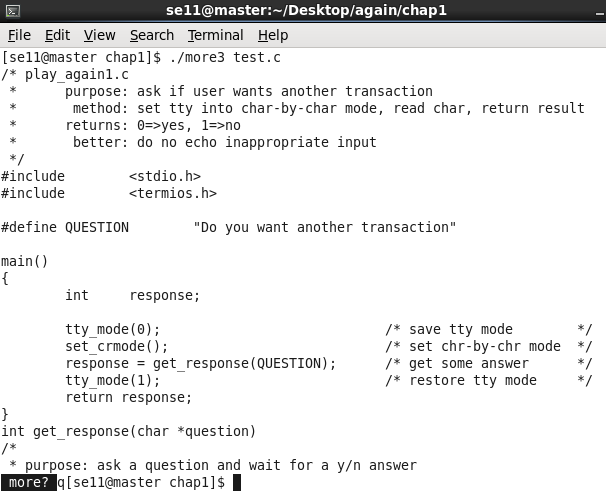
可以看到,输入 “q” 后直接退出,不需要按回车。
学习《Unix/Linux编程实践教程》(2):实现 more的更多相关文章
- 学习《Unix/Linux编程实践教程》(1):Unix 系统编程概述
0.目录 1.概念 2.系统资源 3.学习方法 4.从用户的角度来理解 Unix 4.1 登录--运行程序--注销 4.2 目录操作 4.3 文件操作 5.从系统的角度来理解 Unix 5.1 网络桥 ...
- Unix/Linux编程实践教程(0:文件、终端、信号)
本来只打算读这本书socket等相关内容,但书写得实在好,还是决定把其余的内容都读一下. 阅读联机帮助的一个示例: open系统调用: read系统调用: Unix的time: 上面的printf可以 ...
- Unix/Linux编程实践教程(二:socket、多线程、进程间通信)
同一接口不同的数据源: 协同进程: fdopen以文件描述符为参数: fopen和popen: 为了实现popen,必须在子进程中调用sh,因为只有shell本身即/bin/sh可以运行任意shell ...
- Unix/Linux编程实践教程(一:进程、管道)
execvp在程序中启动新程序: 用fork创建新进程: forkdemo2代码: 测试fork的时候参考<Linux权威指南>阅读笔记(3) 使用了patch: [root@local ...
- Unix/Linux编程实践教程(三:代码、测试)
测试logfilec.c的时候,有个sendto(sock,msg,strlen(msg),0,&addr,addrlen),编译时提示: logfilec.c:30: warning: pa ...
- 我的学习经历——Linux系统入门教程
我想把最近学习Linux的经验和过程分析出来,当时是在上大三,是学生一枚,以前对开源也没有什么特殊的认识,只觉得很高深,不明觉厉的东西,在当时因为学校要参加职业技能大赛,其中有一团体性质的比赛,几个同 ...
- Unix Linux 编程书籍
UNIX环境高级编程(第3版) Advanced Programming in the UNIX Environment Linux/UNIX系统编程手册 Linux/UNIX系统编程手册 (豆瓣) ...
- Linux下more命令C语言实现实践 (Unix-Linux编程实践教程)
1. more第一版 实现基础功能,显示每一页固定24行文本,“q Enter”退出, “Enter” 下一行, “space Enter”下一页. #include<stdio.h> # ...
- linux编程实践:实现pwd命令
内核为每个目录都设置了一个指向自己的i节点入口,即".",还有一个指向其父目录i节点的入口,即"..",我们首先获取当前目录的i节点编号,但是并不能知道当前目录 ...
随机推荐
- DB-Engines Ranking
DB-Engines Ranking trend chart The DB-Engines Ranking ranks database management systems according to ...
- 腾讯笔试题 构造回文(LCS问题)
给定一个字符串s,你可以从中删除一些字符,使得剩下的串是一个回文串.如何删除才能使得回文串最长呢? 输出需要删除的字符个数. 输入描述: 输入数据有多组,每组包含一个字符串s,且保证:1<=s. ...
- bat输出重定向
重定向符号主要有:>,>>,<,>&,<&和|,而本文只讨论前五个. 第一节 首先从一个经典问题开始,“1>nul 2>nul”的意思是 ...
- 网络运营商名称显示&SIM名称显示
一 网络名称显示这部分比較复杂.Spec对这也有明白的规定,依据其优先级由高往低介绍(其优先级參考TS 22.101), 1. Enhanced Operator Name String. ...
- 20155302《网络对抗》Exp5 MSF基础应用
20155302<网络对抗>Exp5 MSF基础应用 实验内容 本实践目标是掌握metasploit的基本应用方式,重点常用的三种攻击方式的思路.具体需要完成: 1.1一个主动攻击实践,如 ...
- Java通过pinyin4j实现汉字转拼音
碰到个需求,需要按用户名字的首字母来排序.这就需要获取汉字对应的拼音了,突然就想起了pinyin4j这个jar包,于是就开始写了个汉字转拼音的工具类.在此记录一下,方便后续查阅 一.Pom依赖 ...
- mysql存储blob限制
一.Mysql存储类型分类: 1.blob:二进制大对象(字节流),可以用来存储图片.视频等,没有字符集的说法 2.text:文本大对象(字符流),存储大型字串,有字符集的说法 3.二者使用时不能指定 ...
- 原创zynq文章整理(MiZ702教程+例程)
MiZ702教程+例程 网盘链接: http://pan.baidu.com/s/1sj23yxv 不时会跟新版本,增加勘误之类的,请关注--
- java 自定义异常输出信息(使用构造器)
throw new Exception("上传的脚本类型不匹配,当前只支持类unix系列的远程扫描,请上传后缀名为 .sh .pl 的脚本文件"); 这样就可以了,结合配置的异常信 ...
- Markdown打造高逼格博客
这里首先假设读者你已经掌握了Markdown与GitHub的基本用法 如果不会, 请先自行百度或Google, 我目前还没写Markdown与GitHub的教程 看云只是一个推荐, 可以认为协助生成格 ...