
python 代码混淆工具汇总
pyminifier
Pyminifier is a Python code minifier, obfuscator, and compressor.
Note
- For the latest, complete documentation: http://liftoff.github.io/pyminifier/
- For the latest code: https://github.com/liftoff/pyminifier
Overview
When you install pyminifier it should automatically add a 'pyminifier' executable to your $PATH. This executable has a number of command line arguments:
$ pyminifier --help

Usage: pyminifier [options] "<input file>"

Options:

--version             show program's version number and exit

-h, --help            show this help message and exit

-o <file path>, --outfile=<file path>

                      Save output to the given file.

-d <file path>, --destdir=<file path>

                      Save output to the given directory. This option is

                        required when handling multiple files. Defaults to

                        './minified' and will be created if not present.

--nominify            Don't bother minifying (only used with --pyz).

--use-tabs            Use tabs for indentation instead of spaces.

--bzip2               bzip2-compress the result into a self-executing python

                        script.  Only works on stand-alone scripts without

                        implicit imports.

--gzip                gzip-compress the result into a self-executing python

                        script.  Only works on stand-alone scripts without

                        implicit imports.

--lzma                lzma-compress the result into a self-executing python

                        script.  Only works on stand-alone scripts without

                        implicit imports.

--pyz=<name of archive>.pyz

                      zip-compress the result into a self-executing python

                        script. This will create a new file that includes any

                        necessary implicit (local to the script) modules.

                        Will include/process all files given as arguments to

                        pyminifier.py on the command line.

-O, --obfuscate       Obfuscate all function/method names, variables, and

                        classes.  Default is to NOT obfuscate.

--obfuscate-classes   Obfuscate class names.

--obfuscate-functions

                      Obfuscate function and method names.

--obfuscate-variables

                      Obfuscate variable names.

--obfuscate-import-methods

                      Obfuscate globally-imported mouled methods (e.g.

                        'Ag=re.compile').

--obfuscate-builtins  Obfuscate built-ins (i.e. True, False, object,

                        Exception, etc).

--replacement-length=1

                      The length of the random names that will be used when

                        obfuscating identifiers.

--nonlatin            Use non-latin (unicode) characters in obfuscation

                        (Python 3 only).  WARNING: This results in some

                        SERIOUSLY hard-to-read code.

--prepend=<file path>

                      Prepend the text in this file to the top of our

                        output.  e.g. A copyright notice.

另外就是:
Opy 1.1.7
OPY - Obfuscator for Python, string obfuscation added
Latest Version: 1.1.28
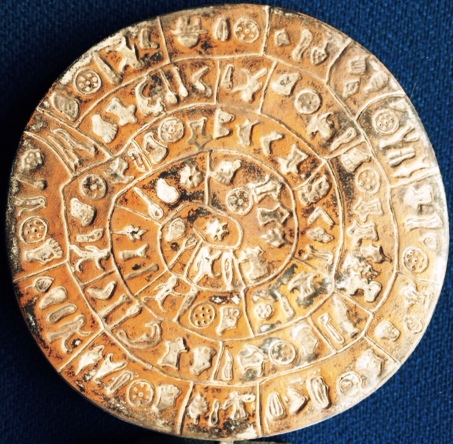
The famous Phaistos Disc from Crete, obfuscation unbroken after thousands of years.
Opy will obfuscate your extensive, real world, multi module Python source code for free!
And YOU choose per project what to obfuscate and what not, by editting the config file:
- You can recursively exclude all identifiers from certain modules from obfuscation.
- You can exclude human readable configuration files containing Python code.
- You can use getattr, setattr, exec and eval by excluding the identifiers they use.
- You can even obfuscate module file names and string literals.
- You can run your obfuscated code from any platform.
What’s new:
- Shebang and encoding lines are handled properly
- Unicode and raw strings are handled properly
- Underscore at the start of a name will be preserved in obfuscation
- Names are obfuscated as hard to read sequences of 1’s and l’s
- String literals can be obfuscated, this is reversible but poses an extra barrier
- Comments and string literals can be exempted from obfuscation by inserting a special marker
- Several bug fixes
- Name changed from Pyo to Opy
Bug reports and feature requests are most welcome and will be taken under serious consideration on a non-committal basis
Installation:
- Download and unzip Opy into an arbitrary directory of your computer.
- You only need the files opy.py and py_config.txt. They are in the opy subdirectory of your unzipped Opy version.
- Put opy.py or a script to launch it in the path of your OS, or simply copy opy.py to the topdirectory of your project.
Use:
- For safety, backup your sourcecode and valuable data to an off-line medium.
- Put a copy of opy_config.txt in the top directory of your project.
- Adapt it to your needs according to the remarks in opy_config.txt.
- This file only contains plain Python and is exec’ed, so you can do anything clever in it.
- Open a command window, go to the top directory of your project and run opy.py from there.
- If the topdirectory of your project is e.g. ../work/project1 then the obfuscation result wil be in ../work/project1_opy.
- Further adapt opy_config.txt until you’re satisfied with the result.
- Type ‘opy ?’ or ‘python opy.py ?’ (without the quotes) on the command line to display a help text and the licence.
Important remark:
- Obfuscate your Python code only when stricktly needed. Freedom is
one of the main benefits of the Python community. In line with this the
source of Opy is not obfuscated.
Example of obfuscated code:
import Tkinter as l1111lll1
import tkFileDialog
import os from util import * from l1l111l import *
from l1llll1 import * l1l1lll1l1l1 = 35
l1l11l1ll1 = 16 class l111l1l111l (l1111lll1.Frame, l1lll11ll1):
def __init__ (self, parent):
l1111lll1.Frame.__init__ (self, parent)
l1lll11ll1.__init__ (self) self.l1l1ll11llll = [] self.l1l1ll11llll.append (l1111lll1.Frame (self, width = l1l1llll1111, height = l1l11l111l))
self.l1l1ll11llll [-1] .pack (side = l1llll (u'ࡶࡲࡴࠬ')) self.l1l1ll1ll11l = l1111lll1.LabelFrame (self, text = l1llll (u'ࡒࡦࡵࡤࡱࡵࡲࡩࡩ࠸'), padx = 5)
self.l1l1ll1ll11l.pack (side = l1llll (u'ࡺࡱࠢ'), fill = l1llll (u'ࡦࡴࡺࡨࠧ'), expand = True)
Known limitations:
- A comment after a string literal should be preceded by whitespace.
- A ‘ or ” inside a string literal should be escaped with \ rather then doubled.
- A # in a string literal can only be used at the start, so use ‘p”#”r’ rather than ‘p#r’.
- Obfuscation of string literals is unsuitable for sensitive information since it can be trivially broken
还有:
Using pyobfuscate
One is obfuscation. I like a package called pyobfuscate. It transforms your normal and clearly written (right?) Python source code into new source code that is hard to read, by making changes to whitespace and names, stripping comments, removing functions, etc.
The package doesn’t seem to be on PyPI, but you can install it from the Github repo:
cd pyobfuscate/
python setup.py install
|
1
2
3
|
Let’s try it out. Save the following code in example.py :
if n == 0: return 0
if n == 1: return 1
return fibonacci(n-1) + fibonacci(n-2)
def main():
for i in range(10):
result = fibonacci(1)
if __name__ == "__main__":
main()
|
1
2
3
4
5
6
7
8
9
10
11
12
|
def fibonacci(n):
if n == 0: return 0
if n == 1: return 1
return fibonacci(n-1) + fibonacci(n-2)
def main():
for i in range(10):
result = fibonacci(1)
if __name__ == "__main__":
main()
|
Obfuscate it using the pyobfuscate command, which should be on your path now that you have installed the package:
|
1
|
pyobfuscate example.py
|
Thee obfuscated code will be printed to the console:
if n == 0 : return 0
if n == 1 : return 1
return oo000 ( n - 1 ) + oo000 ( n - 2 )
if 9 - 9: Ii . o0o00Oo0O - iI11I1II1I1I
if 71 - 71: ii
def iIIii1IIi ( ) :
for o0OO00 in range ( 10 ) :
oo = oo000 ( 1 )
if 27 - 27: oO0OooOoO * o0Oo
if __name__ == "__main__" :
iIIii1IIi ( )
|
1
2
3
4
5
6
7
8
9
10
11
12
|
def oo000 ( n ) :
if n == 0 : return 0
if n == 1 : return 1
return oo000 ( n - 1 ) + oo000 ( n - 2 )
if 9 - 9: Ii . o0o00Oo0O - iI11I1II1I1I
if 71 - 71: ii
def iIIii1IIi ( ) :
for o0OO00 in range ( 10 ) :
oo = oo000 ( 1 )
if 27 - 27: oO0OooOoO * o0Oo
if __name__ == "__main__" :
iIIii1IIi ( )
|
That’s pretty illegible!
Unfortunately pyobfuscate only works on one source file at a time, so it’s not really suitable for large projects. It also appears to only work with Python 2 at the moment.
Distributing bytecode
Another, arguably easier, method is to just distribute the .pyc files. The Python standard library includes a compileall module that can scan your source directory and compile all of your files into Python bytecode. Then you can distribute them without the source files. The .pyc files can still be decompiled into source code, but the code will not be as readable as it was before.
One problem with this method is that the initial .py script that you run cannot be compiled in this way. You can solve this problem by making a simple wrapper script that gives away no information about your program.
if __name__ == "__main__":
main()
|
1
2
3
4
|
from mymodule import main
if __name__ == "__main__":
main()
|
These two methods are really just a deterrent, not a secure way of hiding the code.
If you want something a bit more robust, you should take a look at Nuitka, which compiles Python code to C++, so you can compile that and just distribute the executable. It seems to be broadly compatible with different libraries and different versions of Python.
compileall – Byte-compile Source Files
| Purpose: | Convert source files to byte-compiled version. |
|---|---|
| Available In: | 1.4 |
The compileall module finds Python source files and compiles them to the byte-code representation, saving the results in .pyc or .pyo files.
Compiling One Directory
compile_dir() is used to recursively scan a directory and byte-compile the files within it.
import compileall

compileall.compile_dir('examples')
By default, all of the subdirectories are scanned to a depth of 10. When using a version control system such as subversion, this can lead to unnecessary scanning, as seen here:
$ python compileall_compile_dir.py

Listing examples ...

Listing examples/.svn ...

Listing examples/.svn/prop-base ...

Listing examples/.svn/text-base ...

Compiling examples/a.py ...

Listing examples/subdir ...

Listing examples/subdir/.svn ...

Listing examples/subdir/.svn/prop-base ...

Listing examples/subdir/.svn/text-base ...

Compiling examples/subdir/b.py ...
To filter directories out, use the rx argument to provide a regular expression to match the names to exclude.
import compileall

import re

compileall.compile_dir('examples',

    rx=re.compile(r'/\.svn'))
$ python compileall_exclude_dirs.py

Listing examples ...

Listing examples/.svn ...

Listing examples/.svn/prop-base ...

Listing examples/.svn/text-base ...

Compiling examples/a.py ...

Listing examples/subdir ...

Listing examples/subdir/.svn ...

Listing examples/subdir/.svn/prop-base ...

Listing examples/subdir/.svn/text-base ...

Compiling examples/subdir/b.py ...
The maxlevels argument controls the depth of recursion. For example, to avoid recursion entirely pass 0.
import compileall

import re

compileall.compile_dir('examples',

    maxlevels=0,

    rx=re.compile(r'/\.svn'))
$ python compileall_recursion_depth.py

Listing examples ...

Compiling examples/a.py ...
python 代码混淆工具汇总的更多相关文章
- Java代码混淆工具ProGuard
目录 Java代码混淆工具ProGuard 简介 描述 作用的环境 功能 工作原理 下载 使用时注意事项 版本问题 JDK位数问题 Java的字节码验证问题 关于使用类似于Hibernate的对象关系 ...
- Python代码统计工具
目录 Python代码统计工具 声明 一. 问题提出 二. 代码实现 三. 效果验证 Python代码统计工具 标签: Python 代码统计 声明 本文将对<Python实现C代码统计工具(一 ...
- Python代码分析工具
Python代码分析工具:PyChecker.Pylint - CSDN博客 https://blog.csdn.net/permike/article/details/51026156
- python代码检查工具pylint 让你的python更规范
1.pylint是什么? Pylint 是一个 Python 代码分析工具,它分析 Python 代码中的错误,查找不符合代码风格标准(Pylint 默认使用的代码风格是 PEP 8,具体信息,请参阅 ...
- Python 代码混淆和加密技术
动机 Python进行商业开发时, 需要有一定的安全意识, 为了不被轻易的逆向. 混淆和加密就有所必要了. 混淆 为了增加代码阅读的难度, 源代码的混淆非常必要, 一个在线的Python代码混淆网站. ...
- .NET代码混淆工具NET Reactor - 初学者系列-学习者系列文章
这几天无事,除了看书,然后就倒腾原来的代码.想起.NET的代码混淆工具软件,所以今天就讲讲这个.NET代码混淆工具. .NET代码混淆工具软件,以前有了解和找过,但是当时需求不大,所以找了下就搁置了. ...
- Python代码混淆和加密技术
Python进行商业开发时, 需要有一定的安全意识, 为了不被轻易的逆向. 混淆和加密就有所必要了. 为了增加代码阅读的难度, 源代码的混淆非常必要, 一个在线的Python代码混淆网站. http: ...
- python 代码检测工具
对于我这种习惯了 Java 这种编译型语言,在使用 Python 这种动态语言的时候,发现错误经常只能在执行的时候发现,总感觉有点不放心. 而且有一些错误由于隐藏的比较深,只有特定逻辑才会触发,往往导 ...
- 代码混淆工具——Virbox Protector Standalone
VirboxProtector Standalone 加壳工具可对代码加密的技术有:代码混淆.代码虚拟化.代码加密. 代码混淆:利用花指令和代码非等价变形等技术,将程序的代码,转换成一种功能上等价,但 ...
随机推荐
- awk,grep,sed文本格式化处理
一.awk取列 [root@web01 ~]# cat /etc/passwd|awk -F ':' '{print $1"\t\t"$7}' ###-F指定分隔符 root /b ...
- eclipse perl配置
先下载jdk,如果jdk装的是32位,eclipse也要下载32位的,64位也是一样.我用的是jdk7 64位. 下载eclipse,去官网上下载最新的http://www.eclipse.org/d ...
- LeetCode(46)Permutations
题目 Given a collection of numbers, return all possible permutations. For example, [1,2,3] have the fo ...
- 自动生成 serialVersionUID 的设置
1 把鼠标放在类名上,会出现小灯泡的形状 点击 Add ‘serialVersionUID’ field... 即可生成 如果鼠标放在类名上没有出现 Add ‘serialVersionUID’ fi ...
- CodeForces 159E
题目大意: 给定一堆带颜色和高度的魔方 用两种颜色的魔方,一种颜色接一种颜色向上拼接搭建成一个高塔,求高塔的最长高度,以及将拼接的过程中对应的编号顺序输出 多种情况成立输出任意一种即可 这里首先要对颜 ...
- 【区间dp+组合数+数学期望】Expression
https://www.bnuoj.com/v3/contest_show.php?cid=9148#problem/I [题意] 给定n个操作数和n-1个操作符,组成一个数学式子.每次可以选择两个相 ...
- android开发里跳过的坑——图片文件上传失败
使用的apache的httpclient的jar包,做的http图片上传,上传时,服务器总返文件格式不对.后来发现,是由于在创建FileBody时,使用了默认的ContentType引起的.所以服务器 ...
- 【SGU194&ZOJ2314】Reactor Cooling(有上下界的网络流)
题意: 给n个点,及m根pipe,每根pipe用来流躺液体的,单向的,每时每刻每根pipe流进来的物质要等于流出去的物质,要使得m条pipe组成一个循环体,里面流躺物质. 并且满足每根pipe一定的流 ...
- 【ZJOI2017 Round1练习&BZOJ5354】D7T3 room(DP)
题意: 思路: 写了两种版本 考场版本 ..,..]of longint; t:..,..]of longint; n,m,i,j,k,oo,ans,d1:longint; function min( ...
- [bzoj2179]FFT快速傅立叶_FFT
FFT快速傅立叶 bzoj-2179 题目大意:给出两个n位10进制整数x和y,你需要计算x*y. 注释:$1\le n\le 6\times 10^4$. 想法: $FFT$入门题. $FFT$实现 ...