
自定义封装 banner 组件
1. 效果图预览
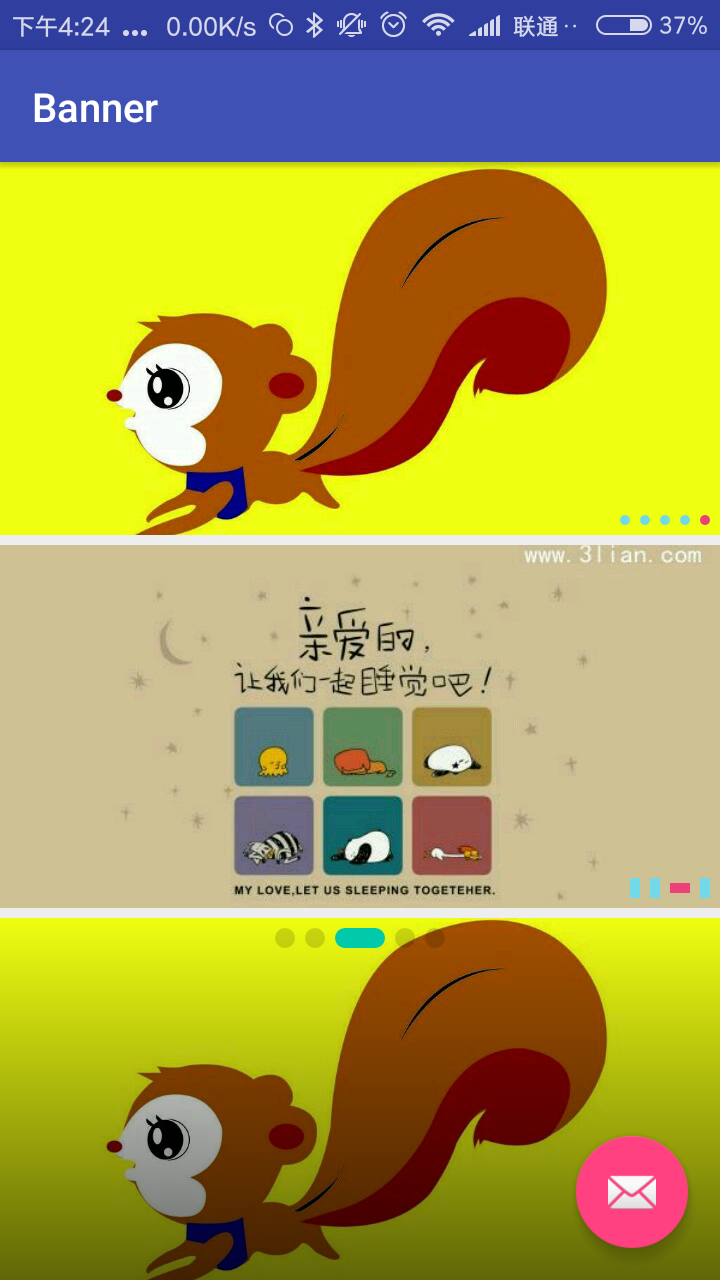
2.基本功能
一个简单方便的轮播图组件,基于viewpager 基础上进行的封装。
可设置 项目中图片,网络图片, View;
支持循环自动播放,手势滑动切换,item点击事件,可设置 点点的样式宽高、颜色、大小、位置  ,;
可设置蒙层;可设置 是否允许滑动;可设置 是否允许循环。
3.基本实现
1. 自定义属性
    <declare-styleable name="BannerLayoutStyle">

        <attr name="maskStartColor" format="color|reference" />

        <attr name="maskEndColor" format="color|reference" />

        <attr name="selectedIndicatorColor" format="color|reference" />

        <attr name="unSelectedIndicatorColor" format="color|reference" />

        <attr name="indicatorShape" format="enum">

            <enum name="rect" value="0" />

            <enum name="oval" value="1" />

        </attr>

        <attr name="selectedIndicatorHeight" format="dimension|reference" />

        <attr name="selectedIndicatorWidth" format="dimension|reference" />

        <attr name="unSelectedIndicatorHeight" format="dimension|reference" />

        <attr name="unSelectedIndicatorWidth" format="dimension|reference" />

        <attr name="indicatorPosition" format="enum">

            <enum name="centerBottom" value="0" />

            <enum name="rightBottom" value="1" />

            <enum name="leftBottom" value="2" />

            <enum name="centerTop" value="3" />

            <enum name="rightTop" value="4" />

            <enum name="leftTop" value="5" />

        </attr>

        <attr name="indicatorSpace" format="dimension|reference" />

        <attr name="indicatorMargin" format="dimension|reference" />

        <attr name="autoPlayDuration" format="integer|reference" />

        <attr name="scrollDuration" format="integer|reference" />

        <attr name="isAutoPlay" format="boolean" />

        <attr name="defaultImage" format="integer|reference" />

        <attr name="isIndicatorVisible" format="boolean" />

        <attr name="cornerRadii" format="dimension|reference" />

    </declare-styleable>
2.基本方法
    //添加本地图片路径

    public void setViewRes(List<Integer> viewRes) {。。。}

   //添加网络图片路径

    public void setViewUrls(List<String> urls) {。。。}

    //添加任意View视图

    private void setViews2(final List<View> views) {。。。}
    // 设置是否允许 循环

    public void setLoop(boolean loop) {

    }

    // 设置是否可以滑动

    public void setSlideable(boolean slideable) {

    }
更多用法 详见代码,这里就不全部粘贴了。
3.使用示例:
<com.dzq.widget.CustomBannerView

        android:id="@+id/banner"

        android:layout_width="match_parent"

        android:layout_height="wrap_content"

        android:layout_weight="1"

        app:autoPlayDuration="2000"

        app:defaultImage="@drawable/bg_banner"

        app:indicatorMargin="@dimen/indicatorMargin"

        app:indicatorPosition="rightBottom"

        app:indicatorShape="oval"

        app:indicatorSpace="@dimen/indicatorSpace"

        app:isAutoPlay="true"

        app:isIndicatorVisible="true"

        app:scrollDuration="1000"

        app:selectedIndicatorColor="@color/color_ec407a"

        app:selectedIndicatorHeight="5dp"

        app:selectedIndicatorWidth="5dp"

        app:unSelectedIndicatorColor="@color/color_71d9e7"

        app:unSelectedIndicatorHeight="5dp"

        app:unSelectedIndicatorWidth="5dp"

        />

    <com.dzq.widget.CustomBannerView

        android:id="@+id/banner2"

        android:layout_width="match_parent"

        android:layout_height="wrap_content"

        android:layout_marginTop="5dp"

        android:layout_weight="1"

        app:autoPlayDuration="2000"

        app:defaultImage="@drawable/bg_banner"

        app:indicatorMargin="@dimen/indicatorMargin"

        app:indicatorPosition="rightBottom"

        app:indicatorShape="rect"

        app:indicatorSpace="@dimen/indicatorSpace"

        app:isAutoPlay="false"

        app:isIndicatorVisible="true"

        app:scrollDuration="1000"

        app:selectedIndicatorColor="@color/color_ec407a"

        app:selectedIndicatorHeight="5dp"

        app:selectedIndicatorWidth="10dp"

        app:unSelectedIndicatorColor="@color/color_71d9e7"

        app:unSelectedIndicatorHeight="10dp"

        app:unSelectedIndicatorWidth="5dp"

        />

    <com.dzq.widget.CustomBannerView

        android:id="@+id/banner3"

        android:layout_width="match_parent"

        android:layout_height="wrap_content"

        android:layout_marginTop="5dp"

        android:layout_weight="1"

        app:cornerRadii="5dp"

        app:indicatorMargin="@dimen/indicatorMargin"

        app:indicatorPosition="centerTop"

        app:indicatorShape="rect"

        app:indicatorSpace="@dimen/indicatorSpace"

        app:isAutoPlay="false"

        app:isIndicatorVisible="true"

        app:maskEndColor="#00000000"

        app:maskStartColor="#99000000"

        app:scrollDuration="1000"

        app:selectedIndicatorColor="#00CAA9"

        app:selectedIndicatorHeight="10dp"

        app:selectedIndicatorWidth="25dp"

        app:unSelectedIndicatorColor="#26000000"

        app:unSelectedIndicatorHeight="10dp"

        app:unSelectedIndicatorWidth="10dp" />
导入自己项目
How to
To get a Git project into your build:
Step 1. Add the JitPack repository to your build file
Add it in your root build.gradle at the end of repositories:
    allprojects {

        repositories {

            ...

            maven { url 'https://jitpack.io' }

        }

    }
Step 2. Add the dependency
    dependencies {

            compile 'com.github.dingzuoqiang:CustomBannerView:v1.0'

    }
自定义封装 banner 组件的更多相关文章
- iOS开发之自定义表情键盘(组件封装与自动布局)
下面的东西是编写自定义的表情键盘,话不多说,开门见山吧!下面主要用到的知识有MVC, iOS开发中的自动布局,自定义组件的封装与使用,Block回调,CoreData的使用.有的小伙伴可能会问写一个自 ...
- 自定义组件开发:使用v-model封装el-pagination组件
1.前言 通过封装el-pagination组件开发自定义分页组件的类似文章网上已经有很多了,但看了一圈,总是不如意,于是决定还是自己动手搞一个. 2.背景 2.1.常规分页处理方法 利用el-pag ...
- jQuery自定义插件--banner图滚动
前言 jQuery是一个功能强大的库,提供了开发JavaScript项目所需的所有核心函数.很多时候我们使用jQuery的原因就是因为其使用插件的功能,然而,有时候我们还是需要使用自定义代码来扩展这些 ...
- 使用shadow dom封装web组件
什么是shadow dom? 首先我们先来看看它长什么样子.在HTML5中,我们只用写如下简单的两行代码,就可以通过 <video> 标签来创建一个浏览器自带的视频播放器控件. <v ...
- 封装bootstrap-treegrid组件
封装bootstrap-treegrid组件 阅读目录 一.开源的treegrid 1.组件效果预览 2.组件开源地址 二.封装treegrid 1.组件封装的必要性 2.组件封装代码示例 3.封 ...
- react初探(二)之父子组件通信、封装公共组件
一.前言 在组件方面react和Vue一样的,核心思想玩的就是组件,下面举两个组件常用的情景. 场景一:假如我们现在有一个页面包含表格以及多个弹框,这种时候如果将这个页面的业务代码写在一个组件中,那么 ...
- React Native实战系列教程之自定义原生UI组件和VideoView视频播放器开发
React Native实战系列教程之自定义原生UI组件和VideoView视频播放器开发 2016/09/23 | React Native技术文章 | Sky丶清| 4 条评论 | 1 ...
- 如何发布自定义的UI 组件库到 npmjs.com 并且编写 UI组件说明文档
记录基于 antd 封装业务组件并发布到npm 上的过程:(TS + React + Sass) 初始化项目: 1.yarn create react-app winyhui --typescript ...
- 封装Vue组件的一些技巧
封装Vue组件的一些技巧 本文同步在个人博客shymean.com上,欢迎关注 写Vue有很长一段时间了,除了常规的业务开发之外,也应该思考和反思一下封装组件的正确方式.以弹窗组件为例,一种实现是在需 ...
随机推荐
- IE網址欄快速輸入網址,“Ctrl+Enter”補齊“.com”
繁體中文Windows,預設 IE 在網址列輸入 abc,然後按 Ctrl+Enter ,會跳到www.abc.com.tw, 但較常用的連結是www.abc.com,如何修改这一設定呢? 可以透過修 ...
- CNN卷积神经网络的改进(15年最新paper)
回归正题,今天要跟大家分享的是一些 Convolutional Neural Networks(CNN)的工作. 大家都知道,CNN 最早提出时,是以一定的人眼生理结构为基础,然后逐渐定下来了一些经典 ...
- C#高级编程五十二天----有序列表
有序列表 假设须要基于对全部集合排序,就能够使用SortedList<TKey,TValue>类.这个类依照键给元素排序.这个集合中的值和键都能够使用随意类型. 以下的样例创建了一个有序列 ...
- chmod a+w . 权限控制 su、sudo 修改文件所有者和文件所在组
对当前目录对所有用户开放读写权限 chmod a+r . $ sudo chmod -R a+w /usr/lib/python2.7 所有用户添加文件的写权限 [linux]su.sudo.sudo ...
- document.body.className = document.body.className.replace("siteorigin-panels-before-js","");
document.body.className = document.body.className.replace("siteorigin-panels-before-js",&q ...
- mysql default null empty string concat varchar text
text不可设置默认值 null empty string 前者update 初始值时 我响应,但不报错
- C语言8大经典排序算法(2)
二.插入类排序 插入排序(Insertion Sort)的基本思想是:每次将一个待排序的记录,按其关键字大小插入到前面已经排好序的子文件中的适当位置,直到全部记录插入完成为止. 插入排序一般意义上有两 ...
- YTU 2640: 编程题:运算符重载---矩阵求和
2640: 编程题:运算符重载---矩阵求和 时间限制: 1 Sec 内存限制: 128 MB 提交: 484 解决: 190 题目描述 /* 有两个矩阵a和b,均为2行3列.求两个矩阵之和. 重 ...
- python库学习笔记——re库:正则表达式入门(一)
什么是正则表达式? 我们在处理文本文件的时候,会按照某种规则查找某些特定的字符串.比方我们希望从一堆电子档案中找到人员的电话号码整理成通讯录.于是,我们可以利用特定字符串的规律编程获得我们想要的信息. ...
- Java 基础 —— enum
枚举的遍历: enum Suit { CLUB, DIAMOND, HEART, SPADE } Collection<Suit> suitTypes = Arrays.asList(Su ...