
自定义封装 banner 组件
1. 效果图预览
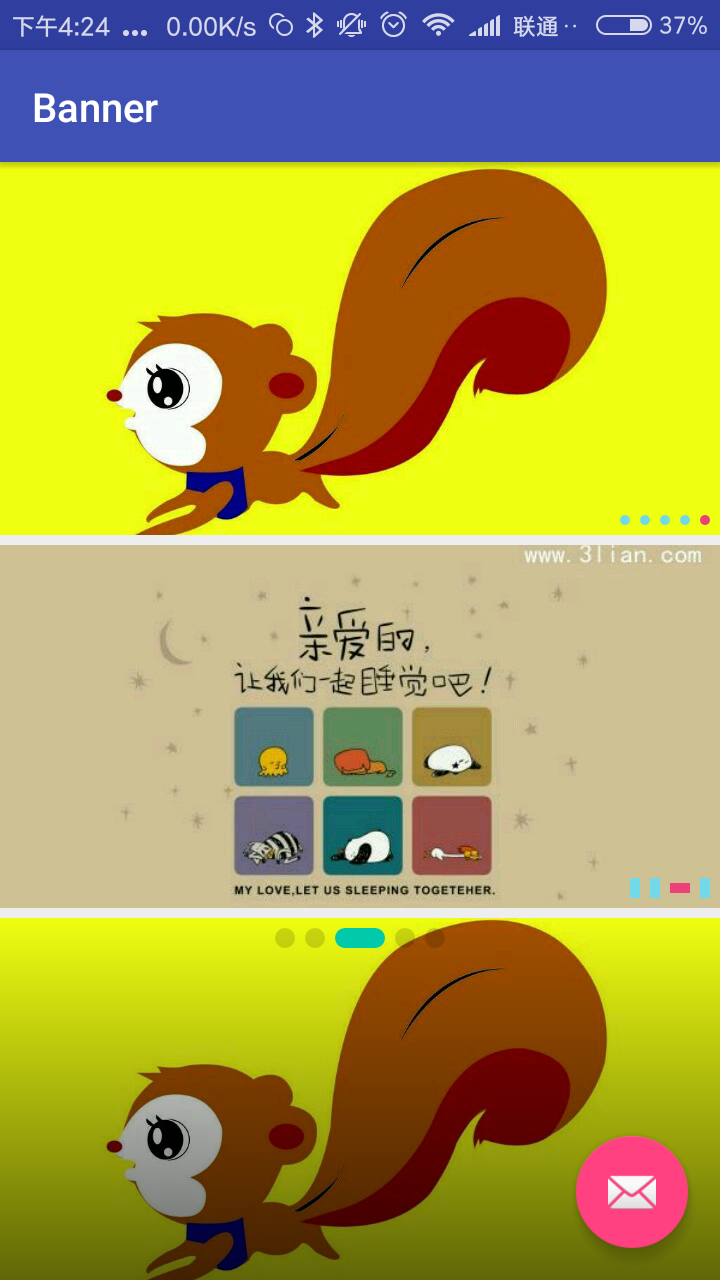
2.基本功能
一个简单方便的轮播图组件,基于viewpager 基础上进行的封装。
可设置 项目中图片,网络图片, View;
支持循环自动播放,手势滑动切换,item点击事件,可设置 点点的样式宽高、颜色、大小、位置  ,;
可设置蒙层;可设置 是否允许滑动;可设置 是否允许循环。
3.基本实现
1. 自定义属性
    <declare-styleable name="BannerLayoutStyle">

        <attr name="maskStartColor" format="color|reference" />

        <attr name="maskEndColor" format="color|reference" />

        <attr name="selectedIndicatorColor" format="color|reference" />

        <attr name="unSelectedIndicatorColor" format="color|reference" />

        <attr name="indicatorShape" format="enum">

            <enum name="rect" value="0" />

            <enum name="oval" value="1" />

        </attr>

        <attr name="selectedIndicatorHeight" format="dimension|reference" />

        <attr name="selectedIndicatorWidth" format="dimension|reference" />

        <attr name="unSelectedIndicatorHeight" format="dimension|reference" />

        <attr name="unSelectedIndicatorWidth" format="dimension|reference" />

        <attr name="indicatorPosition" format="enum">

            <enum name="centerBottom" value="0" />

            <enum name="rightBottom" value="1" />

            <enum name="leftBottom" value="2" />

            <enum name="centerTop" value="3" />

            <enum name="rightTop" value="4" />

            <enum name="leftTop" value="5" />

        </attr>

        <attr name="indicatorSpace" format="dimension|reference" />

        <attr name="indicatorMargin" format="dimension|reference" />

        <attr name="autoPlayDuration" format="integer|reference" />

        <attr name="scrollDuration" format="integer|reference" />

        <attr name="isAutoPlay" format="boolean" />

        <attr name="defaultImage" format="integer|reference" />

        <attr name="isIndicatorVisible" format="boolean" />

        <attr name="cornerRadii" format="dimension|reference" />

    </declare-styleable>
2.基本方法
    //添加本地图片路径

    public void setViewRes(List<Integer> viewRes) {。。。}

   //添加网络图片路径

    public void setViewUrls(List<String> urls) {。。。}

    //添加任意View视图

    private void setViews2(final List<View> views) {。。。}
    // 设置是否允许 循环

    public void setLoop(boolean loop) {

    }

    // 设置是否可以滑动

    public void setSlideable(boolean slideable) {

    }
更多用法 详见代码,这里就不全部粘贴了。
3.使用示例:
<com.dzq.widget.CustomBannerView

        android:id="@+id/banner"

        android:layout_width="match_parent"

        android:layout_height="wrap_content"

        android:layout_weight="1"

        app:autoPlayDuration="2000"

        app:defaultImage="@drawable/bg_banner"

        app:indicatorMargin="@dimen/indicatorMargin"

        app:indicatorPosition="rightBottom"

        app:indicatorShape="oval"

        app:indicatorSpace="@dimen/indicatorSpace"

        app:isAutoPlay="true"

        app:isIndicatorVisible="true"

        app:scrollDuration="1000"

        app:selectedIndicatorColor="@color/color_ec407a"

        app:selectedIndicatorHeight="5dp"

        app:selectedIndicatorWidth="5dp"

        app:unSelectedIndicatorColor="@color/color_71d9e7"

        app:unSelectedIndicatorHeight="5dp"

        app:unSelectedIndicatorWidth="5dp"

        />

    <com.dzq.widget.CustomBannerView

        android:id="@+id/banner2"

        android:layout_width="match_parent"

        android:layout_height="wrap_content"

        android:layout_marginTop="5dp"

        android:layout_weight="1"

        app:autoPlayDuration="2000"

        app:defaultImage="@drawable/bg_banner"

        app:indicatorMargin="@dimen/indicatorMargin"

        app:indicatorPosition="rightBottom"

        app:indicatorShape="rect"

        app:indicatorSpace="@dimen/indicatorSpace"

        app:isAutoPlay="false"

        app:isIndicatorVisible="true"

        app:scrollDuration="1000"

        app:selectedIndicatorColor="@color/color_ec407a"

        app:selectedIndicatorHeight="5dp"

        app:selectedIndicatorWidth="10dp"

        app:unSelectedIndicatorColor="@color/color_71d9e7"

        app:unSelectedIndicatorHeight="10dp"

        app:unSelectedIndicatorWidth="5dp"

        />

    <com.dzq.widget.CustomBannerView

        android:id="@+id/banner3"

        android:layout_width="match_parent"

        android:layout_height="wrap_content"

        android:layout_marginTop="5dp"

        android:layout_weight="1"

        app:cornerRadii="5dp"

        app:indicatorMargin="@dimen/indicatorMargin"

        app:indicatorPosition="centerTop"

        app:indicatorShape="rect"

        app:indicatorSpace="@dimen/indicatorSpace"

        app:isAutoPlay="false"

        app:isIndicatorVisible="true"

        app:maskEndColor="#00000000"

        app:maskStartColor="#99000000"

        app:scrollDuration="1000"

        app:selectedIndicatorColor="#00CAA9"

        app:selectedIndicatorHeight="10dp"

        app:selectedIndicatorWidth="25dp"

        app:unSelectedIndicatorColor="#26000000"

        app:unSelectedIndicatorHeight="10dp"

        app:unSelectedIndicatorWidth="10dp" />
导入自己项目
How to
To get a Git project into your build:
Step 1. Add the JitPack repository to your build file
Add it in your root build.gradle at the end of repositories:
    allprojects {

        repositories {

            ...

            maven { url 'https://jitpack.io' }

        }

    }
Step 2. Add the dependency
    dependencies {

            compile 'com.github.dingzuoqiang:CustomBannerView:v1.0'

    }
自定义封装 banner 组件的更多相关文章
- iOS开发之自定义表情键盘(组件封装与自动布局)
下面的东西是编写自定义的表情键盘,话不多说,开门见山吧!下面主要用到的知识有MVC, iOS开发中的自动布局,自定义组件的封装与使用,Block回调,CoreData的使用.有的小伙伴可能会问写一个自 ...
- 自定义组件开发:使用v-model封装el-pagination组件
1.前言 通过封装el-pagination组件开发自定义分页组件的类似文章网上已经有很多了,但看了一圈,总是不如意,于是决定还是自己动手搞一个. 2.背景 2.1.常规分页处理方法 利用el-pag ...
- jQuery自定义插件--banner图滚动
前言 jQuery是一个功能强大的库,提供了开发JavaScript项目所需的所有核心函数.很多时候我们使用jQuery的原因就是因为其使用插件的功能,然而,有时候我们还是需要使用自定义代码来扩展这些 ...
- 使用shadow dom封装web组件
什么是shadow dom? 首先我们先来看看它长什么样子.在HTML5中,我们只用写如下简单的两行代码,就可以通过 <video> 标签来创建一个浏览器自带的视频播放器控件. <v ...
- 封装bootstrap-treegrid组件
封装bootstrap-treegrid组件 阅读目录 一.开源的treegrid 1.组件效果预览 2.组件开源地址 二.封装treegrid 1.组件封装的必要性 2.组件封装代码示例 3.封 ...
- react初探(二)之父子组件通信、封装公共组件
一.前言 在组件方面react和Vue一样的,核心思想玩的就是组件,下面举两个组件常用的情景. 场景一:假如我们现在有一个页面包含表格以及多个弹框,这种时候如果将这个页面的业务代码写在一个组件中,那么 ...
- React Native实战系列教程之自定义原生UI组件和VideoView视频播放器开发
React Native实战系列教程之自定义原生UI组件和VideoView视频播放器开发 2016/09/23 | React Native技术文章 | Sky丶清| 4 条评论 | 1 ...
- 如何发布自定义的UI 组件库到 npmjs.com 并且编写 UI组件说明文档
记录基于 antd 封装业务组件并发布到npm 上的过程:(TS + React + Sass) 初始化项目: 1.yarn create react-app winyhui --typescript ...
- 封装Vue组件的一些技巧
封装Vue组件的一些技巧 本文同步在个人博客shymean.com上,欢迎关注 写Vue有很长一段时间了,除了常规的业务开发之外,也应该思考和反思一下封装组件的正确方式.以弹窗组件为例,一种实现是在需 ...
随机推荐
- ibatis中isNotNull与isNotEmpty区别
isNotNull:参数不能为null,空的可以的 isNotEmpty:参数不能为null和空 那什么是空?比如String类型 String a = ""; a就是空
- redhat and centos 系统经常使用命令
查看cpu信息: more /proc/cpuinfo |grep "model name" 通常是至强系统 查看内存信息: grep MemTotal / ...
- Kafka单机Windows环境搭建
Kafka单机Windows环境搭建 1,安装jdk1.8:安装目录不能有中文空格: 2,下载zookeeper,https://mirrors.cnnic.cn/apache/zookeeper/z ...
- Java总结之网络
[网络基础概念] 什么是计算机网络: 把分布在不同地理区域的计算机与专门的外部设备用通信线路互连成一个规模大.功能强的网络系统,从而使众多的计算机能够方便的互相传递信息,共享硬件.软件.数据信息等资源 ...
- DES加密算法的C++实现
<信息安全技术>这门课又在讲 DES 加密算法了,以前用纯C写过一次,这次我用 C++ 重新写了一个,写篇文章以备后用.本文介绍了 DES 算法加密的大致步骤和整体流程. 一.DES算法原 ...
- Vue 实现原理
vue.js是数据驱动web界面的库.vue核心思想个:数据驱动.组件系统 vue实现数据驱动视图原理 数据驱动是vue最大特点,所谓的数据驱动就是:当数据发生变化的时候,界面会相应的变化,我们不需要 ...
- python 时区
Python中的时区处理 http://tech.glowing.com/cn/dealing-with-timezone-in-python/ Python时区设置方法与pytz查询时区教程_py ...
- 洛谷P2831 愤怒的小鸟——贪心?状压DP
题目:https://www.luogu.org/problemnew/show/P2831 一开始想 n^3 贪心来着: 先按 x 排个序,那么第一个不就一定要打了么? 在枚举后面某一个,和它形成一 ...
- bzoj1791
1791: [Ioi2008]Island 岛屿 Time Limit: 20 Sec Memory Limit: 162 MBSubmit: 1680 Solved: 369[Submit][S ...
- Vsftpd软件包的获取与安装
11.2 Vsftpd简介 Vsftpd是一种在GPL许可下开放源代码的FTP服务器,用于多种UNIX系统和Linux系统.Vsftpd也称为Very Secure FTP Daemon,它是一种安 ...