
两种方法实现TAB菜单及文件操作
1,自定义属性的方法实现----TAB菜单操作
cursor:pointer; 鼠标的小手
<!DOCTYPE html>

<html lang="en">

<head>

    <meta charset="UTF-8">

    <title>Title</title>

    <style>

        .hide{

            display:none;

        }

        .menu{

            height:38px;

            background-color:#eeeeee;

            line-height:38px;

        }

        .active{

            background-color:brown;

        }

        .menu .menu-item{

            float:left;

            border-right:1px solid red;

            padding:0 5px;

            cursor:pointer;

        }

        .content{

            min-height:100px;

            border:1px solid black;

        }

    </style>

</head>

<body>

    <div style="width:700px;margin:0 auto;">

        <div class="menu">

            <div class="menu-item active" a="1">菜单一</div>

            <div class="menu-item" a="2">菜单二</div>

            <div class="menu-item" a="3">菜单三</div>

        </div>

        <div class="content">

            <div b="1">内容一</div>

            <div class="hide" b="2">内容二</div>

            <div class="hide" b="3">内容三</div>

        </div>

    </div>

    <script src="jquery-1.12.4.js"></script>

    <script>

        $('.menu-item').click(function(){

            $(this).addClass('active').siblings().removeClass('active');

            var target=$(this).attr('a');

            $('.content').children("[b='"+target+"']").removeClass('hide').siblings().addClass('hide');

        });

    </script>

</body>

</html>
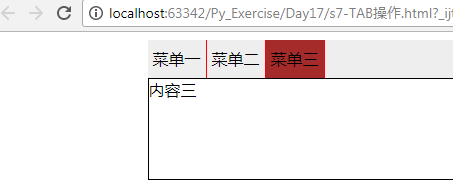
运行结果:
2,索引的方法实现----TAB菜单操作
index:获取索引位置
<!DOCTYPE html>

<html lang="en">

<head>

    <meta charset="UTF-8">

    <title>Title</title>

    <style>

        .hide{

            display:none;

        }

        .menu{

            height:38px;

            background-color:#eeeeee;

            line-height:38px;

        }

        .active{

            background-color:brown;

        }

        .menu .menu-item{

            float:left;

            border-right:1px solid red;

            padding:0 5px;

            cursor:pointer;

        }

        .content{

            min-height:100px;

            border:1px solid black;

        }

    </style>

</head>

<body>

    <div style="width:700px;margin:0 auto;">

        <div class="menu">

            <div class="menu-item active">菜单一</div>

            <div class="menu-item">菜单二</div>

            <div class="menu-item">菜单三</div>

        </div>

        <div class="content">

            <div b="1">内容一</div>

            <div class="hide">内容二</div>

            <div class="hide">内容三</div>

        </div>

    </div>

    <script src="jquery-1.12.4.js"></script>

    <script>

        $('.menu-item').click(function(){

            $(this).addClass('active').siblings().removeClass('active');

            //var v=$(this).index();

            $('.content').children().eq($(this).index()).removeClass('hide').siblings().addClass('hide');

        });

    </script>

</body>

</html>
3. 文件操作
文档处理:

	append

	prepend

	after

	before

	remove

	empty
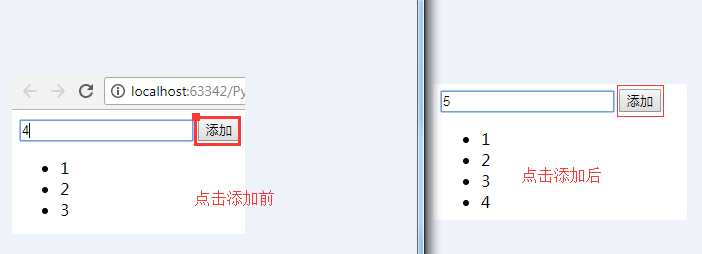
实例1,添加内容$('#u1').append(temp); 追加内容,往后面加,增加小儿子。
<!DOCTYPE html>

<html lang="en">

<head>

    <meta charset="UTF-8">

    <title>Title</title>

</head>

<body>

    <input id="t1" type="text"/>

    <input id="a1" type="button" value="添加"/>

    <ul id="u1">

        <li>1</li>

        <li>2</li>

        <li>3</li>

    </ul>

    <script src="jquery-1.12.4.js"></script>

    <script>

        $('#a1').click(function(){

            var v=$('#t1').val();

            var temp="<li>"+v+"</li>";

            $('#u1').append(temp);

        })

    </script>

</body>

</html>
运行结果:
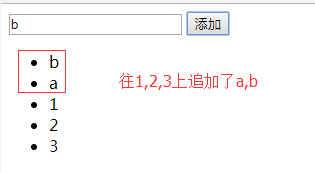
4. 往前面加内容。$('#u1').prepend(temp); 增加大儿子
<!DOCTYPE html>

<html lang="en">

<head>

    <meta charset="UTF-8">

    <title>Title</title>

</head>

<body>

    <input id="t1" type="text"/>

    <input id="a1" type="button" value="添加"/>

    <ul id="u1">

        <li>1</li>

        <li>2</li>

        <li>3</li>

    </ul>

    <script src="jquery-1.12.4.js"></script>

    <script>

        $('#a1').click(function(){

            var v=$('#t1').val();

            var temp="<li>"+v+"</li>";

            //$('#u1').append(temp);

            $('#u1').prepend(temp);

        })

    </script>

</body>

</html>
效果图:
5.追加它的哥哥和弟弟。$('#u1').before(temp); $('#u1').after(temp);
6.删除操作,让用户填索引号,通过索引号删除。
$('#u1 li').eq(index).empty();只是清空内容,标签还在.
$('#u1 li').eq(index).remove();移除标签,同时内容也就移除了。
<!DOCTYPE html>

<html lang="en">

<head>

    <meta charset="UTF-8">

    <title>Title</title>

</head>

<body>

    <input id="t1" type="text"/>

    <input id="a1" type="button" value="添加"/>

    <input id="a2" type="button" value="删除"/>

    <input id="a3" type="button" value="复制"/>

    <ul id="u1">

        <li>1</li>

        <li>2</li>

        <li>3</li>

    </ul>

    <script src="jquery-1.12.4.js"></script>

    <script>

        $('#a1').click(function(){

            var v=$('#t1').val();

            var temp="<li>"+v+"</li>";

            //$('#u1').append(temp);

            $('#u1').prepend(temp);

        })

        $('#a2').click(function(){

            var index=$('#t1').val();

            //$('#u1 li').eq(index).empty();只是清空内容,标签还在.

            $('#u1 li').eq(index).remove();

        $('#a3').click(function(){

            var index=$('#t1').val();

            var v=$('#u1 li').eq(index).clone();

            $('#u1 li').append(v);

        })

    </script>

</body>

</html>
两种方法实现TAB菜单及文件操作的更多相关文章
- SQL Server中灾难时备份结尾日志(Tail of log)的两种方法
转自:http://www.cnblogs.com/CareySon/archive/2012/02/23/2365006.html SQL Server中灾难时备份结尾日志(Tail of log) ...
- 怎么在CAD中测量图纸距离?来看看这两种方法
在CAD中设计图纸最重要的就是图纸的尺寸,俗话说也就是图纸间的距离.通过正确的数据设计出的图纸才能够准确,也能够避免施工时事不必要的误差.那怎么在CAD中测量图纸距离呢?具体要怎么来进行操作呢?下面我 ...
- 两种方法上传本地文件到github
https://www.jianshu.com/p/c70ca3a02087 自从使用github以来,一直都是在github网站在线上传文件到仓库中,但是有时因为网络或者电脑的原因上传失败.最重要的 ...
- 两种方法上传本地文件到github(转)
自从使用github以来,一直都是在github网站在线上传文件到仓库中,但是有时因为网络或者电脑的原因上传失败.最重要的原因是我习惯本地编辑,完成以后再一起上传github.看过了几个教程,总结出最 ...
- [转载]C#读写txt文件的两种方法介绍
C#读写txt文件的两种方法介绍 by 大龙哥 1.添加命名空间 System.IO; System.Text; 2.文件的读取 (1).使用FileStream类进行文件的读取,并将它转换成char ...
- .net中创建xml文件的两种方法
.net中创建xml文件的两种方法 方法1:根据xml结构一步一步构建xml文档,保存文件(动态方式) 方法2:直接加载xml结构,保存文件(固定方式) 方法1:动态创建xml文档 根据传递的值,构建 ...
- Maven使用第三方jar文件的两种方法
转于http://blog.csdn.net/youhaodeyi/article/details/1729116 主要用于回查与标记 在Maven中,使用第三方库一般是通过pom.xml文件中定义的 ...
- MySQL命令执行sql文件的两种方法
MySQL命令执行sql文件的两种方法 摘要:和其他数据库一样,MySQL也提供了命令执行sql脚本文件,方便地进行数据库.表以及数据等各种操作.下面笔者讲解MySQL执行sql文件命令的两种方法,希 ...
- C#读写txt文件的两种方法介绍
C#读写txt文件的两种方法介绍 1.添加命名空间 System.IO; System.Text; 2.文件的读取 (1).使用FileStream类进行文件的读取,并将它转换成char数组,然后输出 ...
随机推荐
- Yii2.0 高级模版编写使用自定义组件(component)
翻译自:http://www.yiiframework.com/wiki/760/yii-2-0-write-use-a-custom-component-in-yii2-0-advanced-tem ...
- Python小白学习之基础知识(个人笔记)
介绍while else的使用,这个不常用 格式化输出 while esle ,当循环内有break语句时,不执行else语句,当没有break语句时,执行完while循环,然后执行else下面的语句 ...
- python练习---小脚本
一.爬子域名 #!/usr/bin/python # -*- coding: utf-8 -*- import requests import re import sys def get(domain ...
- 人脸检测及识别python实现系列(5)——利用keras库训练人脸识别模型
人脸检测及识别python实现系列(5)——利用keras库训练人脸识别模型 经过前面稍显罗嗦的准备工作,现在,我们终于可以尝试训练我们自己的卷积神经网络模型了.CNN擅长图像处理,keras库的te ...
- Unity初级案例——贪吃蛇
using System.Collections; using System.Collections.Generic; using UnityEngine; using UnityEngine.UI; ...
- TW实习日记:第十天
今天任务很简单,就是出品项目的时间轴显示页面和动态路由设置.其实时间轴页面很快就做完了,在做完处理完数据之后,然而有很多细节需要打磨,这就又考验了我面向搜索引擎编程的能力,根据需求百度了很多css的样 ...
- Paper Reading - Attention Is All You Need ( NIPS 2017 ) ★
Link of the Paper: https://arxiv.org/abs/1706.03762 Motivation: The inherently sequential nature of ...
- C语言—单链表
单链表操作:读取,插入和删除 #include "stdafx.h" #include <string.h> #include <stdio.h> #inc ...
- <力荐>非常好的正则表达式的详解<力荐>
正则表达式(regular expression)描述了一种字符串匹配的模式,可以用来检查一个串是否含有某种子串.将匹配的子串做替换或者从某个串中取出符合某个条件的子串等. 列目录时, dir *.t ...
- C++ STL栈和队列
在C++标准库(STL)中,实现了栈和队列,方便使用,在这里我整理了一下笔记,作简要介绍. 1,栈(stack): 头文件 : #include<stack> 定义栈 :stack< ...