
Zabbix学习之路(一)之Zabbix安装
一、Zabbix环境准备
[root@linux-node1 ~]#  cat /etc/redhat-release

CentOS Linux release 7.4. (Core)

[root@linux-node1 ~]#  uname -r

3.10.-693.5..el7.x86_64

[root@linux-node1 ~]# getenforce

Disabled

[root@linux-node1 ~]#  systemctl stop firewalld

Failed to stop firewalld.service: Unit firewalld.service not loaded.

[root@linux-node1 ~]#  ifconfig eth0|awk -F '[ :]+' 'NR==2{print $3}'

192.168.56.11

[root@linux-node1 ~]# hostname

linux-node1

[root@linux-node1 ~]# yum install -y ntpdate

[root@linux-node1 ~]# ntpdate time1.aliyun.com

[root@linux-node1 ~]# crontab -e

*/ * * * * /usr/sbin/ntpdate time1.aliyun.com &>/dev/null
二、Zabbix安装
Zabbix存储配置包以及yum配置文件

[root@linux-node1 ~]# rpm -ivh http://mirrors.aliyun.com/zabbix/zabbix/3.0/rhel/7/x86_64/zabbix-release-3.0-1.el7.noarch.rpm

[root@linux-node1 ~]# yum list |grep zabbix

Zabbix程序包安装,以及MySQL、Zabbix-agent

[root@linux-node1 ~]# yum install -y zabbix-server-mysql zabbix-web-mysql mariadb-server zabbix-agent
三、初始化数据库
创建Zabbix数据库以及用户

[root@linux-node1 ~]# systemctl start mariadb

[root@linux-node1 ~]# mysql_secure_installation

NOTE: RUNNING ALL PARTS OF THIS SCRIPT IS RECOMMENDED FOR ALL MariaDB

      SERVERS IN PRODUCTION USE!  PLEASE READ EACH STEP CAREFULLY!

In order to log into MariaDB to secure it, we'll need the current

password for the root user.  If you've just installed MariaDB, and

you haven't set the root password yet, the password will be blank,

so you should just press enter here.

Enter current password for root (enter for none):

OK, successfully used password, moving on...

Setting the root password ensures that nobody can log into the MariaDB

root user without the proper authorisation.

Set root password? [Y/n] Y

New password:

Re-enter new password:

Password updated successfully!

Reloading privilege tables..

 ... Success!

[root@linux-node1 ~]# mysql -uroot -p

Enter password:

Welcome to the MariaDB monitor.  Commands end with ; or \g.

Your MariaDB connection id is

Server version: 10.1.-MariaDB MariaDB Server

Copyright (c) , , Oracle, MariaDB Corporation Ab and others.

Type 'help;' or '\h' for help. Type '\c' to clear the current input statement.

MariaDB [(none)]> create database zabbix character set utf8 collate utf8_bin;

Query OK,  row affected (0.00 sec)

MariaDB [(none)]> grant all privileges on zabbix.* to zabbix@localhost identified by 'zabbix';

Query OK,  rows affected (0.00 sec)

MariaDB [(none)]> flush privileges;

Query OK,  rows affected (0.00 sec)

MariaDB [(none)]> quit;

Bye

导入初始模式和数据:

[root@linux-node1 ~]# zcat /usr/share/doc/zabbix-server-mysql-3.0./create.sql.gz |mysql -uzabbix -p zabbix

Enter password: zabbix

[root@linux-node1 ~]# mysql -uroot -p123456 -e "use zabbix;show tables;"

+----------------------------+

| Tables_in_zabbix           |

+----------------------------+

| acknowledges               |

| actions                    |

| alerts                     |

| application_discovery      |

| application_prototype      |

| application_template       |

| applications               |

| auditlog                   |

| auditlog_details           |

| autoreg_host               |

| conditions                 |

| config                     |

|......                     |

+----------------------------+
四、Zabbix服务器进程启动
在Zabbix_server.conf编辑数据库配置

[root@linux-node1 ~]# grep ^[a-Z] /etc/zabbix/zabbix_server.conf

LogFile=/var/log/zabbix/zabbix_server.log

LogFileSize=

PidFile=/var/run/zabbix/zabbix_server.pid

DBHost=localhost

DBName=zabbix

DBUser=zabbix

DBPassword=zabbix

SNMPTrapperFile=/var/log/snmptrap/snmptrap.log

Timeout=

AlertScriptsPath=/usr/lib/zabbix/alertscripts

ExternalScripts=/usr/lib/zabbix/externalscripts

LogSlowQueries=

启动Zabbix服务器进程

[root@linux-node1 ~]# systemctl enable zabbix-server#默认端口为10051

[root@linux-node1 ~]# systemctl start zabbix-server
五、编辑Zabbix前端PHP配置
Apache的配置文件/etc/httpd/conf.d/zabbix.conf,取消注释,设置正确的时区:Asia/Shanghai

[root@linux-node1 ~]# vim /etc/httpd/conf.d/zabbix.conf

php_value max_execution_time

php_value memory_limit 128M

php_value post_max_size 16M

php_value upload_max_filesize 2M

php_value max_input_time

php_value always_populate_raw_post_data -

php_value date.timezone Asia/Shanghai

通过改变配置文件启动Apache Web服务器

[root@linux-node1 ~]# vim /etc/httpd/conf/httpd.conf

Severname 127.0.0.1:

[root@linux-node1 ~]# systemctl enable httpd.service

Created symlink from /etc/systemd/system/multi-user.target.wants/httpd.service to /usr/lib/systemd/system/httpd.service.

[root@linux-node1 ~]# systemctl start httpd.service

[root@linux-node1 ~]# netstat -lntp

Active Internet connections (only servers)

Proto Recv-Q Send-Q Local Address           Foreign Address         State       PID/Program name

tcp               0.0.0.0:              0.0.0.0:*               LISTEN      /sshd

tcp               127.0.0.1:            0.0.0.0:*               LISTEN      /master

tcp6              :::                   :::*                    LISTEN      /httpd

tcp6              :::                   :::*                    LISTEN      /sshd

tcp6              :::                  :::*                    LISTEN      /master

tcp6              :::                 :::*                    LISTEN      /mysqld
六、Zabbix的web安装
step1:
在浏览器中,打开Zabbix URL:http:// <server_ip_or_name> / zabbix

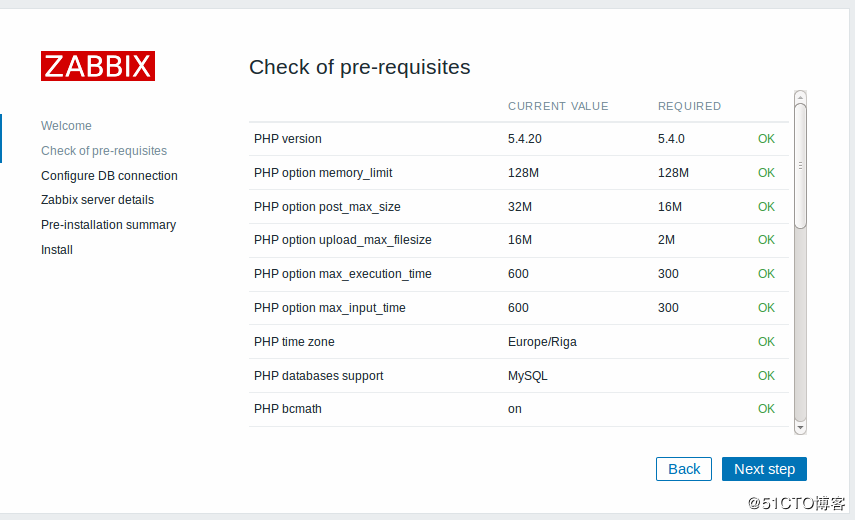
step2:
确保满足所有软件的先决条件。
step3:
输入连接到数据库的详细信息。Zabbix数据库必须已经创建。

step4:
输入Zabbix服务器的详细信息。

step5:
查看设置摘要。

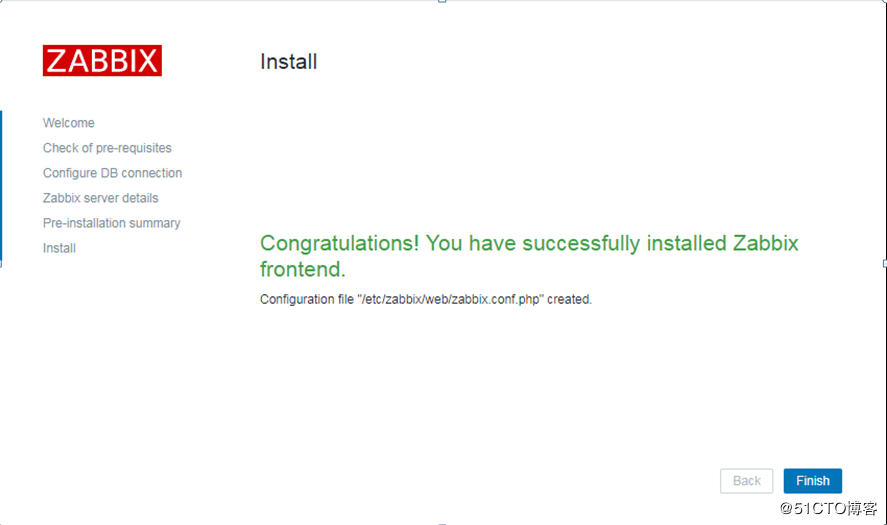
step6:
完成安装,会在/etc/zabbix/web/zabbix.conf.php生成配置文件
当数据库遇到瓶劲,在进行数据库拆分的时候,需要修改配置文件/etc/zabbix/web/zabbix.conf.php,指向新的数据库地址。

[root@linux-node1 ~]# vim /etc/zabbix/web/zabbix.conf.php

<?php

// Zabbix GUI configuration file.

global $DB;

$DB['TYPE']     = 'MYSQL';

$DB['SERVER']   = 'localhost';

$DB['PORT']     = '';

$DB['DATABASE'] = 'zabbix';

$DB['USER']     = 'zabbix';

$DB['PASSWORD'] = 'zabbix';

// Schema name. Used for IBM DB2 and PostgreSQL.

$DB['SCHEMA'] = '';

$ZBX_SERVER      = 'localhost';

$ZBX_SERVER_PORT = '';

$ZBX_SERVER_NAME = '';

$IMAGE_FORMAT_DEFAULT = IMAGE_FORMAT_PNG;
step7:
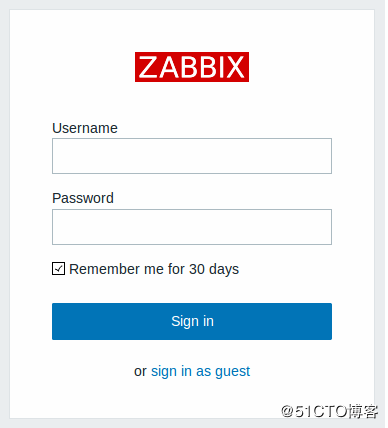
Zabbix前端准备就绪!默认的用户名是Admin,密码zabbix。
Zabbix学习之路(一)之Zabbix安装的更多相关文章
- 我的 Delphi 学习之路 —— Delphi 助手的安装
标题:我的 Delphi 学习之路 -- Delphi 助手的安装 作者:断桥烟雨旧人伤 Delphi 助手的安装 CnWizards 类似于 VS 中的番茄助手,在编写 Delphi 代码时帮助极大 ...
- [原创] zabbix学习之旅二:yum安装
对于允许连接公网的环境下,显然通过yum安装是最为简单方便的,也是官网推荐的安装方式.通过这种方式安装,会将php.apache.zabbix本身都一并安装,解决了烦人的依赖包问题. 本文将介绍如 ...
- [原创] zabbix学习之旅三:agent安装
部署完zabbix server后,自然要部署zabbix agent.在官方描述中,agent是部署在被监控的机器上,用于采集CPU.内存.磁盘等统计信息,并上报给server用于进一步处理.age ...
- Zabbix学习之路(十)之分布式监控zabbix_proxy及交换机监控
1.Zabbix分布式监控 zabbix proxy 可以代替 zabbix server 检索客户端的数据,然后把数据汇报给 zabbix server,并且在一定程度上分担了zabbix serv ...
- Zabbix学习之路(四)之Web监控
1.Zabbix监控web服务器访问性能 zabbix 对 web 性能的监控,通过它可以了解 web 站点的可用性以及性能.最终将各项指标绘制到图形中,这样我们可以了解到一个站点的下载速度.响应速度 ...
- Zabbix学习之路(九)之低级自动发现以及MySQL多实例
1.概述 Zabbix的网络发现是指zabbix server通过配置好的规则,自动添加host,group,template Zabbix的主动注册刚好和网络发现是相反的,功能基本一致.zabbix ...
- Git学习之路(2)-安装GIt和创建版本库
▓▓▓▓▓▓ 大致介绍 前面一片博客介绍了Git到底是什么东西,如果有不明白的可以移步 Git学习之路(1)-Git简介 ,这篇博客主要讲解在Windows上安装Git和创建一个版本库 ▓▓▓▓▓▓ ...
- Zabbix学习之路(七)之Nginx的状态监控
1.安装nginx [root@linux-node2 ~]# yum install -y nginx [root@linux-node2 ~]# mkdir /etc/zabbix/zabbix_ ...
- Zabbix学习之路(五)之MySQL监控
1.linux-node2节点安装数据库 [root@linux-node2 ~]# yum install -y mariadb-server [root@linux-node2 ~]# syste ...
随机推荐
- PHP-----TP框架----命名空间
TP框架----命名空间 命名空间,起什么作用??? [1]命名空间是一个虚拟的目录,这个文件有可能存在这个电脑里的任何一个地方,但是如果要把这个文件它的命名空间全部写成同一个那么这些文件就相当于在同 ...
- ajax几种请求几种类型
jquery向服务器发送一个ajax请求后,可以返回多种类型的数据格式,包括:html,xml,json,text等. 首先说一下jquery中ajax标准的格式. $.ajax({ url: &qu ...
- ethereumjs/ethereumjs-vm-1-简介
https://github.com/ethereumjs/ethereumjs-vm 其实这就是怎么自己使用该模块来生成一个类似geth客户端的以太坊虚拟机,然后进行各类区块链操作 SYNOPSIS ...
- Semtech 的 137-1050 MHz 超低功耗长距离收发器(SX1276 Long Range Transceiver)
SX1276 收发器采用 LoRa? 长距离调制解调器,可实现超长距离扩频通信和高抗干扰能力,并将电流消耗降至最低.凭借 Semtech 专利的 LoRa 调制技术,SX1276 使用低成本晶体和物料 ...
- java alibaba fastJson 遍历数组json
import java.util.*; import com.alibaba.fastjson.*; public class Test { public static void main(Strin ...
- 硬盘分区表知识——详解硬盘MBR
这片文章说得很详细,原文:http://hi.baidu.com/waybq/blog/item/3b8db64bef3dc7f583025c66.html --------------------- ...
- 浅谈OSI七层网络模型和TCP/IP四层模型
OSI七层网络模型 OSI(Open System Interconnection)开放系统互连参考模型是国际标准化组织(ISO)制定的一个用于计算机或通信系统间互联的标准体系. OSI七层模型 功能 ...
- linux、SMART、Shell的学习
Linux指令 useradd 添加用户 添加用户 -d 添加用户路径 -e 制定密码有效时间 -G -g 指定用户所属组 -c 指定一段用户描述 -s Shell文件指定用户的登录Shell -u ...
- 偏前端 - div+mui+vue.js 制作问卷调查单页 ——题目答案由后台随机给出10道
封装的ajax获取数据.代码可能有些是多余的,没做处理!!点击提交后有弹框,在这里我没有贴出来.第一次写博客,这些也是别人教我的,经理解后,贴出来于大家分享 ——html—— <script t ...
- doctrine 操作实例(转)
话说这篇文章真是在没有任何实例的情况下帮了大忙 另外附上我自己的一个完整demo:https://github.com/LearnForInterest/material 结合了ci框架的doctri ...