
前端基础(九):SweetAlert(弹出框)
简介
SweetAlert是一款很好用的弹出框框架
下载
导入
博主用的是bootstrap-sweetalert,所以要依赖bootstrap,导入前先导入原生jQuery以及bootstrap
    <link rel="stylesheet" href="/static/sweetalert/sweetalert.css">

    <link rel="stylesheet" href="/static/bootstrap/css/bootstrap.min.css">

    <script src="/static/js/jquery-3.2.1.min.js"></script>

    <script src="/static/bootstrap/js/bootstrap.min.js"></script>

    <script src="/static/sweetalert/sweetalert.min.js"></script>
基本样式
1、单条弹出框
swal("这是一条消息!");

2、删除警告框(取消时不提示)
swal({

            title:'你确定删除吗?',

            text:'一旦删除,将无法恢复!',

            type:'warning',

            showCancelButton:true,

            confirmButtonColor:'#DD6B55',

            confirmButtonText:'确定删除!',

            closeOnConfirm:false

         },

         function(){

            swal("删除","您的文件已经删除","success");

         }

         );

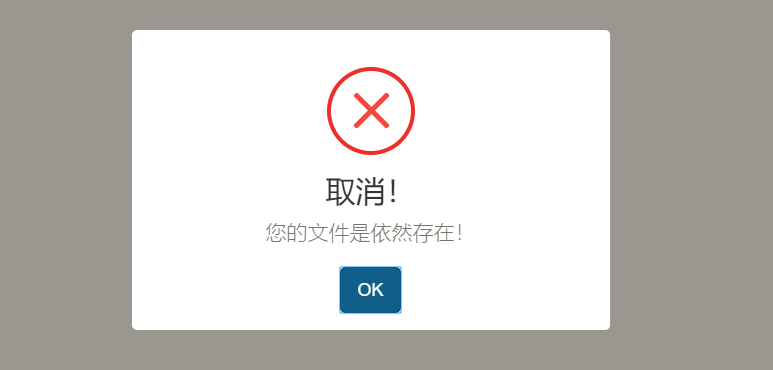
3、删除警告框(取消时提示)
swal({

            title:'你确定删除吗?',

            text:'一旦删除,将无法恢复!',

            type:'warning',

            showCancelButton:true,

            confirmButtonColor:'#DD6B55',

            confirmButtonText:'确定删除!',

            cancelButtonText:'取消操作!',

            closeOnConfirm:false,

            closeOnCancel:false

        },

        function(isConfirm){

            if(isConfirm){

                swal("删除!","您的文件已经被删除!",'success');

            }else{

                swal('取消!',"您的文件是依然存在!",'error');

            }

        }

        )
4、带图片的弹出框
swal({

            title:'Sweet!',

            text:'送你一张图片',

            imageUrl:'static/img/headpic/logo.png
' }); });

5、可插入html代码的弹出框
swal({

            title:"<h1 style='font-size:16px'>此处可以插入html</h1>",

            text:'我是<span style="color:#F8BB86">文字内容</span>',

            html:true

        })

6、自动关闭的弹出框
swal({

            title:'自动关闭弹窗',

            text:'设置弹窗在2秒后关闭',

            timer:2000,

            showConfirmButton:false

        });

7、带输入框的弹出框
swal({

            title:'获取输入框中的内容',

            text:'写入一些有趣的东西吧:',

            type:'input',

            showCancelButton:true,

            closeOnConfirm:false,

            confirmButtonText:'确定',

            cancelButtonText:'取消',

            animation:'slide-from-top',

            inputPlaceholder:'请输入一些内容'

        },

        function(inputValue){

           if(inputValue==false) return false;

           if(inputValue==''){

            swal.showInputError('你必须写入一些东西');

            return false;

           }

           swal('非常好','您输入的内容是:'+inputValue,'success');

        }

        );

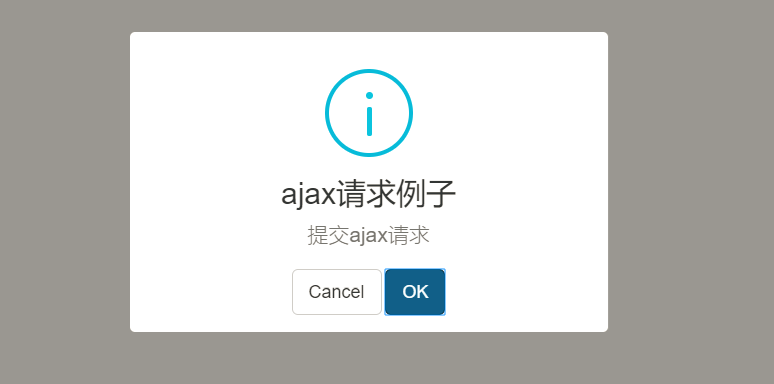
8、可以提交AJAX请求的弹出框
swal({

        title:'ajax请求例子',

        text:'提交ajax请求',

        type:'info',

        showCancelButton:true,

        closeOnConfirm:false,

        showLoaderOnConfirm:true

    },

    function(){

        setTimeout(function(){

            swal("ajax请求完成");

        },2000);

       }

    );
代码示例
<!DOCTYPE html>

<html lang="en">

<head>

    <meta charset="UTF-8">

    <title>Document</title>

    <link rel="stylesheet" href="/static/sweetalert/sweetalert.css">

    <link rel="stylesheet" href="/static/bootstrap/css/bootstrap.min.css">

    <script src="/static/js/jquery-3.2.1.min.js"></script>

    <script src="/static/bootstrap/js/bootstrap.min.js"></script>

    <script src="/static/sweetalert/sweetalert.min.js"></script>

    <style>

    </style>

</head>

<body>

    <button id="btn01">点我弹出</button>

    <button id="btn02">点我弹出</button>

    <button id="btn03">点我弹出</button>

    <button id="btn04">点我弹出</button>

    <button id="btn05">点我弹出</button>

    <button id="btn06">点我弹出</button>

    <button id="btn07">点我弹出</button>

    <button id="btn08">点我弹出</button>

    <script>

     $("#btn01").click(function(){

         swal("这是一条消息!");

     });

     $("#btn02").click(function(){

         swal({

            title:'你确定删除吗?',

            text:'一旦删除,将无法恢复!',

            type:'warning',

            showCancelButton:true,

            confirmButtonColor:'#DD6B55',

            confirmButtonText:'确定删除!',

            closeOnConfirm:false

         },

         function(){

            swal("删除","您的文件已经删除","success");

         }

         );

     });

     $("#btn03").click(function(){

        swal({

            title:'你确定删除吗?',

            text:'一旦删除,将无法恢复!',

            type:'warning',

            showCancelButton:true,

            confirmButtonColor:'#DD6B55',

            confirmButtonText:'确定删除!',

            cancelButtonText:'取消操作!',

            closeOnConfirm:false,

            closeOnCancel:false

        },

        function(isConfirm){

            if(isConfirm){

                swal("删除!","您的文件已经被删除!",'success');

            }else{

                swal('取消!',"您的文件是依然存在!",'error');

            }

        }

        )

     });

      $("#btn04").click(function(){

        swal({

            title:'Sweet!',

            text:'送你一张图片',

            imageUrl:'node_modules/sweetalert/example/images/thumbs-up.jpg'

        });

         });

      $("#btn05").click(function(){

        swal({

            title:"<h1 style='font-size:16px'>此处可以插入html</h1>",

            text:'我是<span style="color:#F8BB86">文字内容</span>',

            html:true

        })

      });

      $("#btn06").click(function(){

        swal({

            title:'自动关闭弹窗',

            text:'设置弹窗在2秒后关闭',

            timer:2000,

            showConfirmButton:false

        });

      });

      $("#btn07").click(function(){

        swal({

            title:'获取输入框中的内容',

            text:'写入一些有趣的东西吧:',

            type:'input',

            showCancelButton:true,

            closeOnConfirm:false,

            confirmButtonText:'确定',

            cancelButtonText:'取消',

            animation:'slide-from-top',

            inputPlaceholder:'请输入一些内容'

        },

        function(inputValue){

           if(inputValue==false) return false;

           if(inputValue==''){

            swal.showInputError('你必须写入一些东西');

            return false;

           }

           swal('非常好','您输入的内容是:'+inputValue,'success');

        }

        );

      });

      $("#btn08").click(function(){

        swal({

        title:'ajax请求例子',

        text:'提交ajax请求',

        type:'info',

        showCancelButton:true,

        closeOnConfirm:false,

        showLoaderOnConfirm:true

    },

    function(){

        setTimeout(function(){

            swal("ajax请求完成");

        },2000);

       }

    );

      });

    </script>

</body>

</html>
我的博客即将搬运同步至腾讯云+社区,邀请大家一同入驻:https://cloud.tencent.com/developer/support-plan
前端基础(九):SweetAlert(弹出框)的更多相关文章
- 自动化测试基础篇--Selenium弹出框alert
摘自https://www.cnblogs.com/sanzangTst/p/7685304.html 不是所有的弹出框都叫alert,在使用alert方法前,先要识别出到底是不是alert.先认 ...
- js基础 三种弹出框 数据类型
总结:js三个组成部分ES:语法DOM:对象模型 => 通过js代码与页面文档(出现在body中的所有可视化标签)进行交互BOM:对象模型 => 通过js代码与浏览器自带功能进行交互 引入 ...
- Selenium基础知识(七)弹出框处理
使用switch_to.alert方法来处理弹页面弹出的警告框 页面常见警告框种类:alert/confirm 确认框/prompt switch_to.alert().accept() switch ...
- SweetAlert弹出框
以前也用过,那个时候没有写过,突然看见了,就写上了. 网址:http://mishengqiang.com/sweetalert2/ swal({ title: '确定删除吗?', text: '你将 ...
- ajax结合sweetalert弹出框删除数据
思路:
- jsp + js + 前端弹出框
在项目中,前端页面我们时常需要各种各样的弹出框: 1.alert对话框:显示含有给定消息的"JavaScript Alert"对话框 代码: var a = "Hello ...
- 弹出框三 之 sweetalert
1下载sweetalert 2.引入到项目中 <link href="~/Content/sweetalert.css" rel="stylesheet" ...
- Bootstrap入门(二十九)JS插件6:弹出框
Bootstrap入门(二十九)JS插件6:弹出框 加入小覆盖的内容,像在iPad上,用于存放非主要信息 弹出框是依赖于工具提示插件的,那它也和工具提示是一样的,是需要初始化才能够使用的 首先我们引入 ...
- Python+Selenium笔记(九):操作警告和弹出框
#之前发的 driver.switch_to_alert() 这句虽然可以运行通过,但是会弹出警告信息(这种写法3.x不建议使用) 改成 driver.switch_to.alert就不会了. (一 ...
随机推荐
- TreeView如何实现选中的节点上移或下移 [问题点数:20分,结帖人nww2002]
在TreeView中,如何实现选中一节点,右键点击上移或下移 TTreeNode.MoveTo() 一.获得Tree上的结点var NowNode : TTreeNode;begin NowNode ...
- 反向代理远端 单台tomcat 使用ip+端口
.环境 nginx 10.1.1.161 公网:123.58.251.166 tomcat 10.1.1.103 .tomcat 配置 [root@host---- ~]# netstat -tnlp ...
- js的event详解
event代表事件的状态,例如触发event对象的元素.鼠标的位置及状态.按下的键等等.event对象只在事件发生的过程中才有效.event的某些属性只对特定的事件有意义.比如,fromElement ...
- redis常用命令及操作
说明 连接哨兵模式的redis时,我们连接的哨兵进程的ip和端口,这时很多命令不可用:此时,需要直接连接redis真实的服务器ip和端口:Sentinel模式下,连接真实的ip才可以使用config/ ...
- 【POJ - 1742】Coins (多重背包)
Coins 直接翻译了 Descriptions 给出硬币面额及每种硬币的个数,求从1到m能凑出面额的个数. Input 多组数据,每组数据前两个数字为n,m.n表示硬币种类数,m为最大面额,之后前 ...
- 修改阿里源为Ubuntu 18.04默认的源
步骤如下: Step1:备份/etc/apt/sources.list sudo cp /etc/apt/sources.list /etc/apt/sources.list.bak Step2:在/ ...
- 利用elasticsearch-dump实现es索引数据迁移附脚本
1.安装环境 CentOS Linux release 7.5.1804 (Core) 1 2.安装nodejs yum install -y nodejs 1 3.验证nodejs [root@lo ...
- C# lambda查询带返回值
问题来源: <深入理解C#(第3版)> 11页 具体如下: var lists=new List<string>{"111","222" ...
- TIME_WAIT和CLOSE_WAIT的区别
系统上线之后,通过如下语句查看服务器时,发现有不少TIME_WAIT和CLOSE_WAIT. netstat -n | awk '/^tcp/ {++S[$NF]} END {for(a in S) ...
- [转]mac升级Nodejs和Npm到最新版
第一步,先查看本机node.js版本: node -v 第二步,清除node.js的cache: sudo npm cache clean -f 第三步,安装 n 工具,这个工具是专门用来管理node ...