
.NET Core 创建Windows服务
.NET Core 创建Windows服务
写在前面
使用 TopShelf+Autofac+AutoMapper+Quartz+NLog 完成现有项目定时调度任务
1.相关NetGet包
- 依赖注入 Alexinea.Autofac.Extensions.DependencyInjection
- 对象映射 AutoMapper.Extensions.Microsoft.DependencyInjection
- 调度 Autofac.Extras.Quartz
- Topshelf注入 Topshelf.Autofac
- Topshelf日志 Topshelf.NLog/Topshelf.Log4Net
2.添加Autofac自动映射服务
- 引入 Alexinea.Autofac.Extensions.DependencyInjection
3.添加AutoMapper自动映射类
- 引入 AutoMapper.Extensions.Microsoft.DependencyInjection
- 添加测试类 User、UserDto
- 添加服务类 IUserRepository、UserRepository、IUserService、UserService,获取配置文件中的User信息并转换为业务模型UserDto
- 添加映射配置文件 MapperProfiles
- 添加Autofac扩展 AutoMapperExtensions
public static class AutoMapperExtensions

{

    public static ContainerBuilder ConfigureAutoMapper(this ContainerBuilder builder)

    {

        builder.RegisterAssemblyTypes(AppDomain.CurrentDomain.GetAssemblies())

            .AsClosedTypesOf(typeof(ITypeConverter<,>))

            .AsImplementedInterfaces();

        builder.RegisterAssemblyTypes(typeof(AutoMapperExtensions).Assembly)

            .AssignableTo<Profile>().As<Profile>();

        builder.Register(c => {

            var profiles = c.Resolve<IEnumerable<Profile>>();

            var context = c.Resolve<IComponentContext>();

            return new MapperConfiguration(x => {

                foreach (var profile in profiles) x.AddProfile(profile);

                x.ConstructServicesUsing(context.Resolve);

            });

        }).SingleInstance().AsSelf();

        builder.Register(c => {

            var context = c.Resolve<IComponentContext>();

            var config = context.Resolve<MapperConfiguration>();

            return config.CreateMapper();

        }).As<IMapper>();

        return builder;

    }

}
- 添加自定义服务扩展 ServicesExtensions
public static class ServicesExtensions

{

    public static ContainerBuilder ConfigureSelf(this ContainerBuilder builder)

    {

        var services = new ServiceCollection();

        // register appsettings.json

        services.Configure<User>("UserConfig", Settings.Instance.Configuration.GetSection("User"));

        builder.Populate(services);

        // register services repositories

        builder.RegisterAssemblyTypes(typeof(UserRepository).Assembly)

                .Where(t => t.Name.EndsWith("Repository"))

                .AsImplementedInterfaces();

        builder.RegisterAssemblyTypes(typeof(UserService).Assembly)

                .Where(t => t.Name.EndsWith("Service"))

                .AsImplementedInterfaces();

        return builder;

    }

}
4.添加Quartz调度任务
- 引入 Autofac.Extras.Quartz
- 添加调度任务类 MyJob1
- 添加Autofac扩展 QuartzExtensions
public static ContainerBuilder ConfigureQuartz(this ContainerBuilder builder)

{

    // 1) Register IScheduler

    builder.RegisterModule(new QuartzAutofacFactoryModule());

    // 2) Register jobs

    builder.RegisterModule(new QuartzAutofacJobsModule(typeof(MyJob1).Assembly));

    return builder;

}
5.添加日志
- 引入 NLog.Extensions.Logging
6.创建TopShelf服务
- 引入 Topshelf.NLog
- 引入 Topshelf.Autofac
7.发布并添加Windows服务
- 发布为独立文件
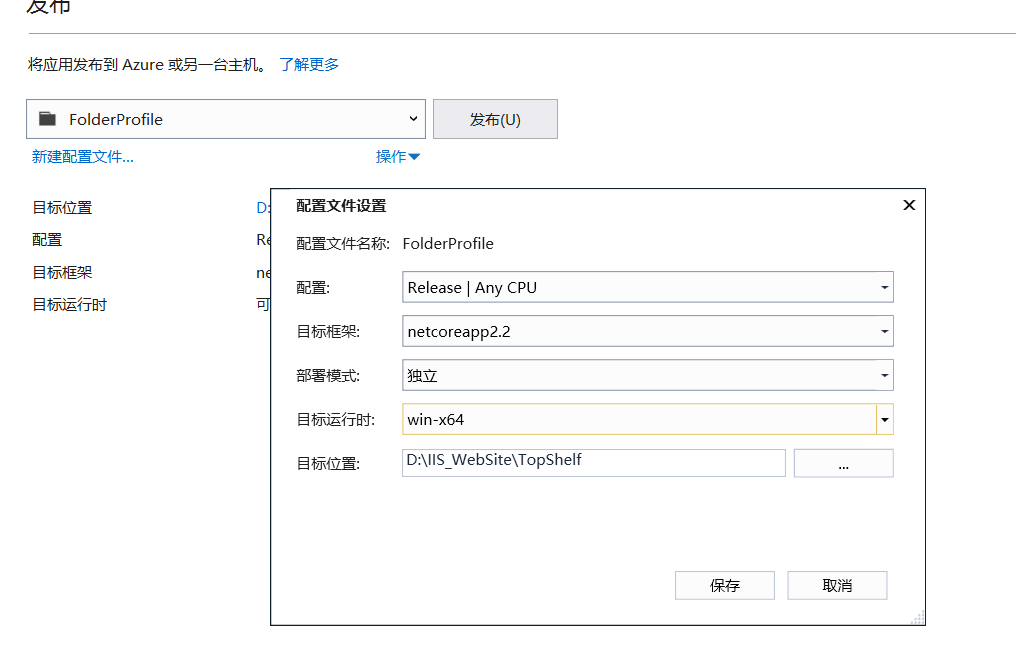
- 添加安装(install.bat)和卸载文件(uninstall.bat)
cd /d %~dp0

Sample.Topshelf.exe install

pause
cd /d %~dp0

Sample.Topshelf.exe uninstall

pause
源码
参考资料
.NET Core 创建Windows服务的更多相关文章
- 使用.NET Core创建Windows服务(二) - 使用Topshelf方式
原文:Creating Windows Services In .NET Core – Part 2 – The "Topshelf" Way 作者:Dotnet Core Tut ...
- 使用.NET Core创建Windows服务 - 使用.NET Core工作器方式
原文:Creating Windows Services In .NET Core – Part 3 – The ".NET Core Worker" Way 作者:Dotnet ...
- 使用.NET Core创建Windows服务(一) - 使用官方推荐方式
原文:使用.NET Core创建Windows服务(一) - 使用官方推荐方式 原文:Creating Windows Services In .NET Core – Part 1 – The &qu ...
- 使用.NET Core创建Windows服务详细步骤
目录 #创建步骤 1.使用Visual Studio创建 2.使用命令行创建 #项目结构说明 #将应用转换成Window服务 1.引入Microsoft.Extensions.Hosting.Wind ...
- 使用.NET Core中创建Windows服务(一) - 使用官方推荐方式
原文:Creating Windows Services In .NET Core – Part 1 – The "Microsoft" Way 作者:Dotnet Core Tu ...
- 使用.Net Core 2.2创建windows服务
使用.Net Core 2.2创建windows服务 我的环境 win 10 home Visual Studio 2019 v16.1.3 安装有.net core 2.2 创建项目 编辑项目文件 ...
- C#/.NET基于Topshelf创建Windows服务的守护程序作为服务启动的客户端桌面程序不显示UI界面的问题分析和解决方案
本文首发于:码友网--一个专注.NET/.NET Core开发的编程爱好者社区. 文章目录 C#/.NET基于Topshelf创建Windows服务的系列文章目录: C#/.NET基于Topshelf ...
- 用C#创建Windows服务(Windows Services)
用C#创建Windows服务(Windows Services) 学习: 第一步:创建服务框架 创建一个新的 Windows 服务项目,可以从Visual C# 工程中选取 Windows 服务(W ...
- 玩转Windows服务系列——创建Windows服务
创建Windows服务的项目 新建项目->C++语言->ATL->ATL项目->服务(EXE) 这样就创建了一个Windows服务项目. 生成的解决方案包含两个项目:Servi ...
随机推荐
- mysql —复制
MySQL的扩展 读写分离 复制:每个节点都有相同的数据集 向外扩展 二进制日志 单向 复制的功用: 数据分布 负载均衡读 备份 高可用和故障切换 MySQL升级测试 MySQL复制相关概念 主从复 ...
- SCRIPT438: 对象不支持“trim”属性或方法
关于ie9以下不支持trim()方法 可以在自己封装的框架中加入如下.或直接调用也行. if(!String.prototype.trim) { String.prototype.trim = fun ...
- Python 自学笔记(二)
3-1.条件判断 3-1.条件判断 3-1-1.单项判断 if 3-1-2.双向判断 if...else... 3-1-3.多向判断 if...elif...else 3-2.if嵌套 4.输入 4- ...
- web开发的三层架构
Web层 接收客户端发送过来的数据,然后需要将数据传递给service层 Service层 业务逻辑层:业务:比如检验用户名的是否存在,如果不存在则需要把用户的数据存储在数据库中,如果存在,给web返 ...
- ubuntu docker 环境安装
转载:https://www.cnblogs.com/blog-rui/p/9946382.html 1. 在Ubuntu中安装Docker 更新ubuntu的apt源索引 sudo apt-get ...
- Docker 实践备忘录
平时零散的接触docker,时间久了概念和命令都会忘了,所以集中记下: docker 目标是实现轻量级的操作系统虚拟化解决方案. Docker 的基础是 Linux 容器(LXC)等技术 docker ...
- Block的示例学习
@interface ViewController () @property (weak, nonatomic) IBOutlet UIButton *btn; - (IBAction)reset:( ...
- C#使用MPI进行高性能计算
MPI.NET是用于Microsoft.NET环境的高性能.易于使用的消息传递接口(MPI)实现.mpi是编写在分布式内存系统(如计算集群)上运行的并行程序的事实上的标准,并且得到了广泛的实现.大多数 ...
- OpenGL学习(4)——纹理(补)
完成章节后练习 练习 1. Make sure only the happy face looks in the other/reverse direction by changing the fra ...
- 《精通并发与Netty》学习笔记(10 - 详解NIO (一) Channel、Buffer )
一.Java NIO 概述 Java NIO 由以下几个核心部分组成:ChannelsBuffersSelectors虽然Java NIO 中除此之外还有很多类和组件,但在我看来,Channel,Bu ...