
C#+OpenGL+FreeType显示3D文字(3) - 用PointSprite绘制文字
C#+OpenGL+FreeType显示3D文字(3) - 用PointSprite绘制文字
上一篇实现了把文字绘制到OpenGL窗口,但实质上只是把含有文字的贴图贴到矩形模型上。本篇我们介绍用PointSprite绘制文字,这可以只用1个点绘制文字,并确保文字始终面相窗口。用PointSprite绘制的文字,其大小范围有限,本篇提供的Demo中,Max Row Width最大只有256。现在能够绘制少量的文字,为其指定的位置的过程与为一个点指定位置的过程是相同的,所以此方式的应用范围还是比较广的。
基本流程
与前文相同的是仍然用GLSL+VBO+贴图来绘制。PointSprite只是Enable了一些OpenGL开关,然后把贴图贴到一个Point图元上。
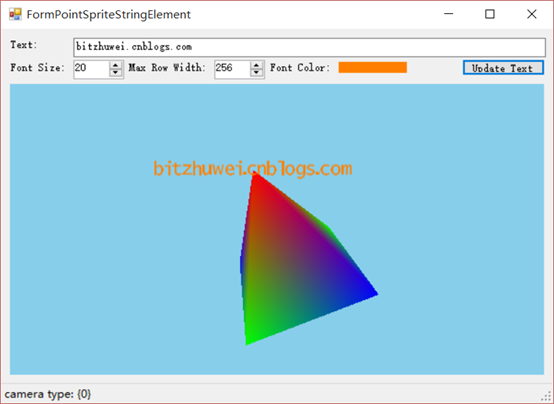
您可以在此下载查看上图所示的demo。为节省空间,此demo只能显示ASCII范围内的字符。实际上它具有显示所有Unicode字符的能力。
编辑GLSL
我们只需vertex shader和fragment shader。
Vertex shader只是进行最基本的变换操作,并负责传递纹理大小。
 #version  core

 in vec3 in_Position;

 uniform mat4 MVP;

 uniform float pointSize;

 void main(void) {

     gl_Position = MVP * vec4(in_Position, 1.0);

     gl_PointSize = pointSize;

 }
Fragment shader根据纹理坐标所在位置的纹理颜色决定此位置是否显示(透明与否)。这就绘制出了一个字形。还可以顺便用一个uniform vec3 textColor指定文字颜色。
 #version  core

 out vec4 out_Color;

 uniform sampler2D tex;

 uniform vec3 textColor;

 void main(void) {

     float transparency = texture2D(tex, gl_PointCoord).r;

     if (transparency == 0.0f)

     {

         discard;

     }

     else

     {

         out_Color = vec4(, , , transparency) * vec4(textColor, 1.0f);

     }

 }
设定VAO
模型只需一个Point。
         private void InitVAO()

         {

             GL.GenVertexArrays(, vao);

             GL.BindVertexArray(vao[]);

             //  Create a vertex buffer for the vertex data.

             {

                 UnmanagedArray<vec3> in_Position = new UnmanagedArray<vec3>();

                 in_Position[] = this.position;

                 uint[] ids = new uint[];

                 GL.GenBuffers(, ids);

                 GL.BindBuffer(BufferTarget.ArrayBuffer, ids[]);

                 GL.BufferData(BufferTarget.ArrayBuffer, in_Position, BufferUsage.StaticDraw);

                 GL.VertexAttribPointer(attributeIndexPosition, , GL.GL_FLOAT, false, , IntPtr.Zero);

                 GL.EnableVertexAttribArray(attributeIndexPosition);

             }

             //  Unbind the vertex array, we've finished specifying data for it.

             GL.BindVertexArray();

         }
程序生成文字贴图
要想显示任意的字符串,必须借助前文的贴图来一个字符一个字符地拼接出需要的字符串贴图并用之生成Texture。
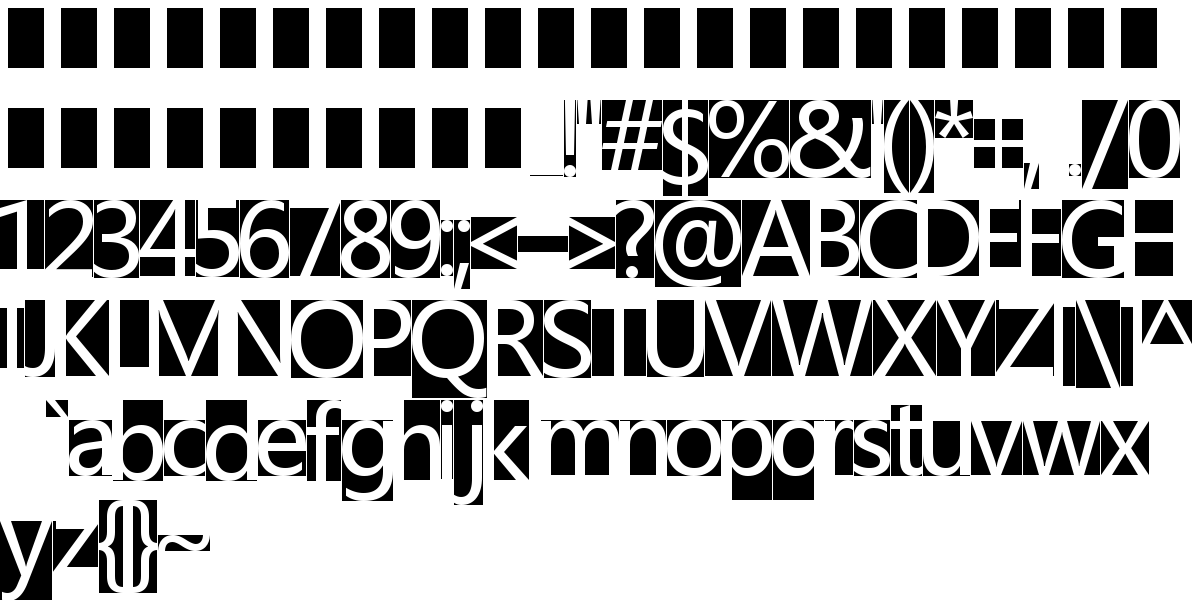
这是从上面的图片中计算出的"bithuwei.cnblogs.com"的贴图。

由于PointSprite支持的贴图大小有限(最大256),所以计算字符串贴图的程序有点繁琐。
         /// <summary>

         /// 为指定的字符串生成贴图。

         /// </summary>

         /// <param name="fontResource"></param>

         /// <param name="content"></param>

         /// <param name="fontSize"></param>

         /// <param name="maxRowWidth"></param>

         /// <returns></returns>

         public static System.Drawing.Bitmap GenerateBitmapForString(this FontResource fontResource,

             string content, int fontSize, int maxRowWidth)

         {

             // step 1: get totalLength

             int totalLength = ;

             {

                 int glyphsLength = ;

                 for (int i = ; i < content.Length; i++)

                 {

                     char c = content[i];

                     CharacterInfo cInfo;

                     if (fontResource.CharInfoDict.TryGetValue(c, out cInfo))

                     {

                         int glyphWidth = cInfo.width;

                         glyphsLength += glyphWidth;

                     }

                     //else

                     //{ throw new Exception(string.Format("Not support for display the char [{0}]", c)); }

                 }

                 //glyphsLength = (glyphsLength * this.fontSize / FontResource.Instance.FontHeight);

                 int interval = fontResource.FontHeight / ; if (interval < ) { interval = ; }

                 totalLength = glyphsLength + interval * (content.Length - );

             }

             // step 2: setup contentBitmap

             System.Drawing.Bitmap contentBitmap = null;

             {

                 int interval = fontResource.FontHeight / ; if (interval < ) { interval = ; }

                 //int totalLength = glyphsLength + interval * (content.Length - 1);

                 int currentTextureWidth = ;

                 int currentWidthPos = ;

                 int currentHeightPos = ;

                 if (totalLength * fontSize > maxRowWidth * fontResource.FontHeight)// 超过1行能显示的内容

                 {

                     currentTextureWidth = maxRowWidth * fontResource.FontHeight / fontSize;

                     int lineCount = (totalLength - ) / currentTextureWidth + ;

                     // 确保整篇文字的高度在贴图中间。

                     currentHeightPos = (currentTextureWidth - fontResource.FontHeight * lineCount) / ;

                     //- FontResource.Instance.FontHeight / 2;

                 }

                 else//只在一行内即可显示所有字符

                 {

                     if (totalLength >= fontResource.FontHeight)

                     {

                         currentTextureWidth = totalLength;

                         // 确保整篇文字的高度在贴图中间。

                         currentHeightPos = (currentTextureWidth - fontResource.FontHeight) / ;

                         //- FontResource.Instance.FontHeight / 2;

                     }

                     else

                     {

                         currentTextureWidth = fontResource.FontHeight;

                         currentWidthPos = (currentTextureWidth - totalLength) / ;

                         //glyphsLength = fontResource.FontHeight;

                     }

                 }

                 //this.textureWidth = textureWidth * this.fontSize / FontResource.Instance.FontHeight;

                 //currentWidthPosition = currentWidthPosition * this.fontSize / FontResource.Instance.FontHeight;

                 //currentHeightPosition = currentHeightPosition * this.fontSize / FontResource.Instance.FontHeight;

                 contentBitmap = new Bitmap(currentTextureWidth, currentTextureWidth);

                 Graphics gContentBitmap = Graphics.FromImage(contentBitmap);

                 Bitmap bigBitmap = fontResource.FontBitmap;

                 for (int i = ; i < content.Length; i++)

                 {

                     char c = content[i];

                     CharacterInfo cInfo;

                     if (fontResource.CharInfoDict.TryGetValue(c, out cInfo))

                     {

                         if (currentWidthPos + cInfo.width > contentBitmap.Width)

                         {

                             currentWidthPos = ;

                             currentHeightPos += fontResource.FontHeight;

                         }

                         gContentBitmap.DrawImage(bigBitmap,

                             new Rectangle(currentWidthPos, currentHeightPos, cInfo.width, fontResource.FontHeight),

                             new Rectangle(cInfo.xoffset, cInfo.yoffset, cInfo.width, fontResource.FontHeight),

                             GraphicsUnit.Pixel);

                         currentWidthPos += cInfo.width + interval;

                     }

                 }

                 gContentBitmap.Dispose();

                 //contentBitmap.Save("PointSpriteStringElement-contentBitmap.png");

                 System.Drawing.Bitmap bmp = null;

                 if (totalLength * fontSize > maxRowWidth * fontResource.FontHeight)// 超过1行能显示的内容

                 {

                     bmp = (System.Drawing.Bitmap)contentBitmap.GetThumbnailImage(

                         maxRowWidth, maxRowWidth, null, IntPtr.Zero);

                 }

                 else//只在一行内即可显示所有字符

                 {

                     if (totalLength >= fontResource.FontHeight)

                     {

                         bmp = (System.Drawing.Bitmap)contentBitmap.GetThumbnailImage(

                             totalLength * fontSize / fontResource.FontHeight,

                             totalLength * fontSize / fontResource.FontHeight,

                             null, IntPtr.Zero);

                     }

                     else

                     {

                         bmp = (System.Drawing.Bitmap)contentBitmap.GetThumbnailImage(

                             fontSize, fontSize, null, IntPtr.Zero);

                     }

                 }

                 contentBitmap.Dispose();

                 contentBitmap = bmp;

                 //contentBitmap.Save("PointSpriteStringElement-contentBitmap-scaled.png");

             }

             return contentBitmap;

         }
计算字符串贴图
缺陷
用PointSprite绘制的文字,其大小范围有限,本篇提供的Demo中,Max Row Width最大只有256。
总结
现在能够绘制少量的文字,为其指定的位置的过程与为一个点指定位置的过程是相同的,所以此方式的应用范围还是比较广的。
C#+OpenGL+FreeType显示3D文字(3) - 用PointSprite绘制文字的更多相关文章
- C#+OpenGL+FreeType显示3D文字(1) - 从TTF文件导出字形贴图
C#+OpenGL+FreeType显示3D文字(1) - 从TTF文件导出字形贴图 +BIT祝威+悄悄在此留下版了个权的信息说: 最近需要用OpenGL绘制文字,这是个很费时费力的事.一般的思路就是 ...
- C#+OpenGL+FreeType显示3D文字(2) - 用GLSL+VBO绘制文字
C#+OpenGL+FreeType显示3D文字(2) - 用GLSL+VBO绘制文字 +BIT祝威+悄悄在此留下版了个权的信息说: 上一篇得到了字形贴图及其位置字典(可导出为XML).本篇就利用此贴 ...
- Android 使用Canvas在图片上绘制文字
一个小应用,在图片上绘制文字,以下是绘制文字的方法,并且能够实现自动换行,字体自动适配屏幕大小 private void drawNewBitmap(ImageView imageView, Stri ...
- [OpenGL ES 03]3D变换:模型,视图,投影与Viewport
[OpenGL ES 03]3D变换:模型,视图,投影与Viewport 罗朝辉 (http://blog.csdn.net/kesalin) 本文遵循“署名-非商业用途-保持一致”创作公用协议 系列 ...
- OPENGL绘制文字
OPENGL没有提供直接绘制文字的功能,需要借助于操作系统. 用OPENGL绘制文字比较常见的方法是利用显示列表.创建一系列显示列表,每个字符对应一个列表编号.例如,'A'对应列表编号1000+'A' ...
- [iTyran原创]iPhone中OpenGL ES显示3DS MAX模型之二:lib3ds加载模型
[iTyran原创]iPhone中OpenGL ES显示3DS MAX模型之二:lib3ds加载模型 作者:u0u0 - iTyran 在上一节中,我们分析了OBJ格式.OBJ格式优点是文本形式,可读 ...
- [iTyran原创]iPhone中OpenGL ES显示3DS MAX模型之一:OBJ格式分析
[iTyran原创]iPhone中OpenGL ES显示3DS MAX模型之一:OBJ文件格式分析作者:yuezang - iTyran 在iOS的3D开发中常常需要导入通过3DS MAX之类 ...
- Windows MFC 两个OpenGL窗口显示与线程RC问题
问题为:背景界面是一个OpenGL窗口(对话框),在其上弹出一个OpenGL窗口(模态对话框)时, 1.上方的OpenGL窗口能响应鼠标操作等并刷新: 2.当移动或放大缩小上方的OpenGL窗口时,其 ...
- Flash Stage3D 在2D UI 界面上显示3D模型问题完美解决
一直以来很多Stage3D开发者都在为3D模型在2DUI上显示的问题头疼.Stage3D一直是在 Stage2D下面.为了做到3D模型在2DUI上显示通常大家有几种实现方式,下面来说说这几种实现方式吧 ...
随机推荐
- ExtJS 中类的继承
ExtJS 允许对现有的类进行扩展,其扩展可以通过继承来实现.接下来我们就对刚刚使用ExtJS定义的Person类进行继承,定义一个Developer类,它继承自Person,同时还拥有Coding方 ...
- (UWP开发)更为合理的一种ListView下拉刷新(PullToRefresh)实现方法
最近在做的一个项目需要用到下拉刷新,但是参考了现在网络上比较普遍的方法,觉得都不太好,因为要在外部套上一个SrollViewer,容易出现滚动错误.于是刚开始的时候就把思路定到了ListView内部的 ...
- [算法总结]partition (quicksort)
private int partition(int[] nums, int lo, int hi) { if (lo >= hi) { return lo; } int i = lo; int ...
- D3中数据与DOM element绑定之data() enter() exit()浅析
几个非常有用的links: [1] three little circles. http://bost.ocks.org/mike/circles/ [2] How selection works. ...
- Github fork同步
做到以下几个步骤: 添加远程上游工程repository. git remote add upstream git@github.com:*.git git remote -v 将上游工程代码合并到本 ...
- SOAPUI使用教程-REST请求工作
双击一个REST请求在导航打开的REST请求编辑器窗口: 就像相应的SOAP请求编辑器,这个窗口有以下几部分组成: 工具栏在顶部有标准动作的和端口的下拉菜单轻松修改服务端口 请求编辑器左侧有相应编辑视 ...
- JavaScript对象状态
有限状态机(Finite-state machine)是一个非常有用的模型,可以模拟世界上大部分事物. 简单说,它有三个特征: * 状态总数(state)是有限的. * 任一时刻,只处在一种状态之中. ...
- 如何使CEF支持Flash
方法一:复制Chrome浏览器下的pepperFlash,通过cef命令行参数设置路径. public Form1() { InitializeComponent(); InitializeChrom ...
- XML的简介及其与HTML的区别及联系
XML: Extensible Markup Language(可扩展标记语言) HTML:HyperText Markup Language(超文本标记语言) 两者都是由万维网联盟(W3C)推出的S ...
- MAC帧和IP数据报