
C#+OpenGL+FreeType显示3D文字(2) - 用GLSL+VBO绘制文字
C#+OpenGL+FreeType显示3D文字(2) - 用GLSL+VBO绘制文字
上一篇得到了字形贴图及其位置字典(可导出为XML)。本篇就利用此贴图和位置字典,把文字绘制到OpenGL窗口。
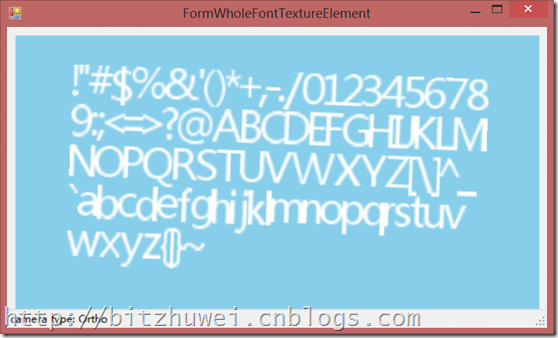
基本流程
有了贴图,绘制文字和绘制普通纹理的过程是一样的。我们需要用glTexImage2D设定纹理,然后用GLSL+VBO设置一个长方形,把纹理的某个字形所占据的位置贴到长方形上,就可以绘制一个字符。连续设置多个长方形,就可以显示字符串了。
当然,用legacy opengl里的glVertex和glTexCoord来设置长方形和贴图也可以,不过本文推荐用modern opengl的GLSL+VBO的方式来实现。

您可以在此下载查看上图所示的demo。为节省空间,此demo只能显示ASCII范围内的字符。实际上它具有显示所有Unicode字符的能力。
编辑GLSL
我们只需vertex shader和fragment shader。
Vertex shader只是进行最基本的变换操作,并负责传递纹理坐标。
 #version

 attribute vec3 in_Position;

 attribute vec2 in_TexCoord;

 varying vec2 texcoord;

 uniform mat4 projectionMatrix;

 uniform mat4 viewMatrix;

 uniform mat4 modelMatrix;

 void main(void) {

   gl_Position = projectionMatrix * viewMatrix * modelMatrix * vec4(in_Position, );

   texcoord = in_TexCoord;

 }
Fragment shader根据纹理坐标所在位置的纹理颜色决定此位置是否显示(透明与否)。这就绘制出了一个字形。
 #version

 varying vec2 texcoord;

 uniform sampler2D tex;

 uniform vec4 color;

 void main(void) {

   gl_FragColor = vec4(, , , texture2D(tex, texcoord).r) * color;

 }
设定VAO
每个字符的宽度是不同的,所以每个长方形都要据此调整宽度。下面是根据字符串生成VAO/VBO的片段。
         private void InitVAO(string value)

         {

             if (value == null) { value = string.Empty; }

             this.mode = PrimitiveModes.Quads;

             this.vertexCount =  * value.Length;

             //  Create a vertex buffer for the vertex data.

             UnmanagedArray<vec3> in_Position = new UnmanagedArray<vec3>(this.vertexCount);

             UnmanagedArray<vec2> in_TexCoord = new UnmanagedArray<vec2>(this.vertexCount);

             Bitmap bigBitmap = this.ttfTexture.BigBitmap;

             vec3[] tmpPositions = new vec3[this.vertexCount];

             float totalLength = ;

             for (int i = ; i < value.Length; i++)

             {

                 char c = value[i];

                 CharacterInfo cInfo;

                 if (this.ttfTexture.CharInfoDict.TryGetValue(c, out cInfo))

                 {

                     float glyphWidth = (float)cInfo.width / (float)this.ttfTexture.FontHeight;

                     if (i == )

                     {

                         tmpPositions[i *  + ] = new vec3(, , );

                         tmpPositions[i *  + ] = new vec3(glyphWidth, , );

                         tmpPositions[i *  + ] = new vec3(glyphWidth, , );

                         tmpPositions[i *  + ] = new vec3(, , );

                     }

                     else

                     {

                         tmpPositions[i *  + ] = tmpPositions[i *  +  -  + ];

                         tmpPositions[i *  + ] = tmpPositions[i *  + ] + new vec3(glyphWidth, , );

                         tmpPositions[i *  + ] = tmpPositions[i *  +  -  - ];

                         tmpPositions[i *  + ] = tmpPositions[i *  + ] + new vec3(glyphWidth, , );

                     }

                     totalLength += glyphWidth;

                 }

             }

             for (int i = ; i < value.Length; i++)

             {

                 char c = value[i];

                 CharacterInfo cInfo;

                 float x1 = ;

                 float x2 = ;

                 float y1 = ;

                 float y2 = ;

                 if (this.ttfTexture.CharInfoDict.TryGetValue(c, out cInfo))

                 {

                     x1 = (float)cInfo.xoffset / (float)bigBitmap.Width;

                     x2 = (float)(cInfo.xoffset + cInfo.width) / (float)bigBitmap.Width;

                     y1 = (float)cInfo.yoffset / (float)bigBitmap.Height;

                     y2 = (float)(cInfo.yoffset + this.ttfTexture.FontHeight) / (float)bigBitmap.Height;

                 }

                 in_Position[i *  + ] = tmpPositions[i *  + ] - new vec3(totalLength / , , );

                 in_Position[i *  + ] = tmpPositions[i *  + ] - new vec3(totalLength / , , );

                 in_Position[i *  + ] = tmpPositions[i *  + ] - new vec3(totalLength / , , );

                 in_Position[i *  + ] = tmpPositions[i *  + ] - new vec3(totalLength / , , );

                 in_TexCoord[i *  + ] = new vec2(x1, y2);

                 in_TexCoord[i *  + ] = new vec2(x2, y2);

                 in_TexCoord[i *  + ] = new vec2(x2, y1);

                 in_TexCoord[i *  + ] = new vec2(x1, y1);

             }

             GL.GenVertexArrays(, vao);

             GL.BindVertexArray(vao[]);

             GL.GenBuffers(, vbo);

             uint in_PositionLocation = shaderProgram.GetAttributeLocation(strin_Position);

             GL.BindBuffer(BufferTarget.ArrayBuffer, vbo[]);

             GL.BufferData(BufferTarget.ArrayBuffer, in_Position, BufferUsage.StaticDraw);

             GL.VertexAttribPointer(in_PositionLocation, , GL.GL_FLOAT, false, , IntPtr.Zero);

             GL.EnableVertexAttribArray(in_PositionLocation);

             uint in_TexCoordLocation = shaderProgram.GetAttributeLocation(strin_TexCoord);

             GL.BindBuffer(BufferTarget.ArrayBuffer, vbo[]);

             GL.BufferData(BufferTarget.ArrayBuffer, in_TexCoord, BufferUsage.StaticDraw);

             GL.VertexAttribPointer(in_TexCoordLocation, , GL.GL_FLOAT, false, , IntPtr.Zero);

             GL.EnableVertexAttribArray(in_TexCoordLocation);

             GL.BindVertexArray();

             in_Position.Dispose();

             in_TexCoord.Dispose();

         }
根据字符串生成VAO/VBO
其它
在上一篇,我们通过TTF文件得到了贴图文件及其位置信息(XML文件)。此时其实不再需要借助freetype就可以直接使用这些贴图了。
另外,本文所给的demo已经包含了perspective和ortho两种透视的camera功能,固定在窗口左下角显示坐标系的功能,感兴趣的话通过反编译即可得到。
总结
现在能够绘制文字了,但是换行之类的高级功能还没有实现。这已经不熟悉opengl的研究范围,而是更高层的功能了,所以暂时不再深入考虑。
C#+OpenGL+FreeType显示3D文字(2) - 用GLSL+VBO绘制文字的更多相关文章
- C#+OpenGL+FreeType显示3D文字(1) - 从TTF文件导出字形贴图
C#+OpenGL+FreeType显示3D文字(1) - 从TTF文件导出字形贴图 +BIT祝威+悄悄在此留下版了个权的信息说: 最近需要用OpenGL绘制文字,这是个很费时费力的事.一般的思路就是 ...
- C#+OpenGL+FreeType显示3D文字(3) - 用PointSprite绘制文字
C#+OpenGL+FreeType显示3D文字(3) - 用PointSprite绘制文字 上一篇实现了把文字绘制到OpenGL窗口,但实质上只是把含有文字的贴图贴到矩形模型上.本篇我们介绍用Poi ...
- [OpenGL ES 03]3D变换:模型,视图,投影与Viewport
[OpenGL ES 03]3D变换:模型,视图,投影与Viewport 罗朝辉 (http://blog.csdn.net/kesalin) 本文遵循“署名-非商业用途-保持一致”创作公用协议 系列 ...
- OPENGL绘制文字
OPENGL没有提供直接绘制文字的功能,需要借助于操作系统. 用OPENGL绘制文字比较常见的方法是利用显示列表.创建一系列显示列表,每个字符对应一个列表编号.例如,'A'对应列表编号1000+'A' ...
- [iTyran原创]iPhone中OpenGL ES显示3DS MAX模型之二:lib3ds加载模型
[iTyran原创]iPhone中OpenGL ES显示3DS MAX模型之二:lib3ds加载模型 作者:u0u0 - iTyran 在上一节中,我们分析了OBJ格式.OBJ格式优点是文本形式,可读 ...
- [iTyran原创]iPhone中OpenGL ES显示3DS MAX模型之一:OBJ格式分析
[iTyran原创]iPhone中OpenGL ES显示3DS MAX模型之一:OBJ文件格式分析作者:yuezang - iTyran 在iOS的3D开发中常常需要导入通过3DS MAX之类 ...
- Windows MFC 两个OpenGL窗口显示与线程RC问题
问题为:背景界面是一个OpenGL窗口(对话框),在其上弹出一个OpenGL窗口(模态对话框)时, 1.上方的OpenGL窗口能响应鼠标操作等并刷新: 2.当移动或放大缩小上方的OpenGL窗口时,其 ...
- Flash Stage3D 在2D UI 界面上显示3D模型问题完美解决
一直以来很多Stage3D开发者都在为3D模型在2DUI上显示的问题头疼.Stage3D一直是在 Stage2D下面.为了做到3D模型在2DUI上显示通常大家有几种实现方式,下面来说说这几种实现方式吧 ...
- ArcGIS API for JavaScript 4.2学习笔记[2] 显示3D地图
3D地图又叫场景. 由上一篇可知, require入口函数的第一个参数是字符串数组 ["esri/Map", "esri/views/MapView", &qu ...
随机推荐
- Puppet自动化运维-资源介绍篇(4)
1.什么是资源? 资源是Puppet最基础的元素,每个资源的定义都具有标题,类型,以及一系列的属性. 资源定义有如下的特性: (1) Puppet使用title在编译时区分每个资源,使用命名变量在 ...
- windows下mysql客户端输入中文显示??解决方法
>>>>>>>>>>>>>>>>>>>> 1.检查并修改mysql的my.ini ...
- VirusAnti_didiwei使用说明
前言 前段时间说要写的一个专杀框架敌敌畏,后改为强撸敌敌畏,以彰显样本查杀时的气势,现在第一版已经完成了,如下图所示,使用的时候强烈建议控制台使用放大模式,这样就可以看见我花了半天才画好了logo , ...
- From cls答辩
我没有想过有一天会因为wjmzbmr而开一篇. 因为看到了cls答辩的链接而震撼或是感动. 可能也跟最近身心比较疲惫有关...容易产生这样那样的感触... cls可能已不是我们这代OIER所能膜到的了 ...
- win10 下oracle tns通过IP无法访问的解决办法
在Oracle安装目录下\app\Administrator\product\11.2.0\dbhome_1\NETWORK\ADMIN下找到listener.ora文件,编辑对应项为: LISTE ...
- 【转】npm publish 发布
<h3 class="catListTitle">一.npm包结构(编写)</h3> npm包实际是一个存档文件,即一个目录直接打包为.zip或tar.gz ...
- ACM :漫漫上学路 -DP -水题
CSU 1772 漫漫上学路 Time Limit: 1000MS Memory Limit: 131072KB 64bit IO Format: %lld & %llu Submit ...
- PS特效精粹
冲击有力的广告效果 神奇画笔功能 + 强大的图层样式 Photoshop中的三维特效
- mysql中生产表格多列统计问题
for Example: select date_format(date,'%Y-%m-%d') as day, count(case when xinghao='a' then 1 end) as ...
- 微信公众平台API接口
简介 微信公众平台消息接口为开发者提供了一种新的消息处理方式.微信公众平台消息接口为开发者提供与用户进行消息交互的能力.对于成功接入消息接口的微信公众账号,当用户发消息给公众号,微信公众平台服务器会使 ...