
Android商城开发系列(五)—— 商城首页回到顶部和搜索框布局实现
今天我们来开发商城的首页【输入搜索框】布局和点击右下角图片回到顶部的效果
搜索功能在App中很常见,尤其是在商城类的项目当中,一般都会提供很强大的搜索功能,App的搜索布局一般都是在App的顶部,如下图所示:
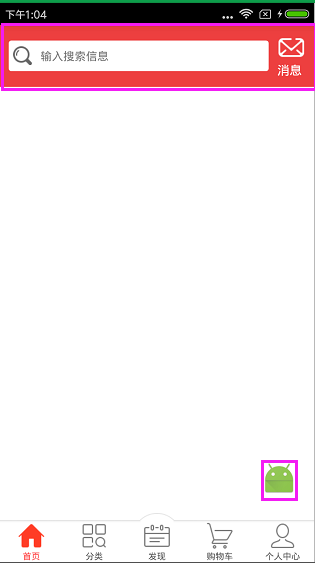
下面我们来看看如何实现这个布局效果:
先来看看HomeFragment类,代码如下所示:
 package com.nyl.shoppingmall.home.fragment;

 import android.support.v7.widget.RecyclerView;

 import android.util.Log;

 import android.view.View;

 import android.widget.ImageView;

 import android.widget.TextView;

 import android.widget.Toast;

 import com.nyl.shoppingmall.R;

 import com.nyl.shoppingmall.base.BaseFragment;

 /**

  * 首页Fragment

  */

 public class HomeFragment extends BaseFragment implements View.OnClickListener {

     private final static String TAG = HomeFragment.class.getSimpleName();

     private TextView tv_search_home;

     private TextView tv_message_home;

     private RecyclerView rv_home;

     private ImageView ib_top;

     @Override

     public View initView() {

         Log.e(TAG,"主页面的Fragment的UI被初始化了");

         View view = View.inflate(mContext,R.layout.fragment_home,null);

         //初始化布局控件

         tv_search_home = (TextView) view.findViewById(R.id.tv_search_home);

         tv_message_home = (TextView) view.findViewById(R.id.tv_message_home);

         rv_home = (RecyclerView) view.findViewById(R.id.rv_home);

         ib_top = (ImageView) view.findViewById(R.id.ib_top);

         //设置点击事件

         ib_top.setOnClickListener(this);

         tv_search_home.setOnClickListener(this);

         tv_message_home.setOnClickListener(this);

         return view;

     }

     @Override

     public void initData() {

         super.initData();

         Log.e(TAG,"主页面的Fragment的数据被初始化了");

     }

     @Override

     public void onClick(View view) {

         switch (view.getId()){

             case R.id.ib_top: //置顶的监听

                 rv_home.scrollToPosition(0);

                 break;

             case R.id.tv_search_home:  //搜索的监听

                 Toast.makeText(mContext,"搜索",Toast.LENGTH_SHORT).show();

                 break;

             case R.id.tv_message_home: //消息监听

                 Toast.makeText(mContext,"进入消息中心",Toast.LENGTH_SHORT).show();

                 break;

         }

     }

 }
HomeFragment类加载的是fragment_home.xml的布局,代码如下所示:
 <?xml version="1.0" encoding="utf-8"?>

 <RelativeLayout

     xmlns:android="http://schemas.android.com/apk/res/android"

     android:layout_width="match_parent"

     android:layout_height="match_parent">

     <include

         android:id="@+id/titlebar"

         layout="@layout/titlebar"/>

     <android.support.v7.widget.RecyclerView

         android:id="@+id/rv_home"

         android:layout_width="match_parent"

         android:layout_height="match_parent"

         android:layout_below="@id/titlebar" />

     <ImageButton

         android:id="@+id/ib_top"

         android:layout_width="40dp"

         android:layout_height="40dp"

         android:layout_alignParentBottom="true"

         android:layout_alignParentRight="true"

         android:layout_marginBottom="20dp"

         android:layout_marginRight="20dp"

         android:background="@mipmap/ic_launcher"

         android:visibility="visible" />

 </RelativeLayout>
最外层是相对布局:顶部是线性布局,里面有两个TextView; 中间是使用分类型的 RecyclerView 当滑动底部的时候显示跳转到顶部的按钮,两个TextView是使用<include layout="@layout/titlebar"/>把布局包进来的,titlebar布局的代码如下所示:
 <?xml version="1.0" encoding="utf-8"?>

 <LinearLayout

     xmlns:android="http://schemas.android.com/apk/res/android"

     android:orientation="horizontal"

     android:layout_width="match_parent"

     android:layout_height="wrap_content"

     android:background="#ed3f3f">

     <TextView

         android:id="@+id/tv_search_home"

         android:layout_width="wrap_content"

         android:layout_height="35dp"

         android:layout_gravity="center_vertical"

         android:layout_marginLeft="10dp"

         android:layout_weight="1"

         android:background="@drawable/search_home_shape"

         android:drawableLeft="@mipmap/home_search_icon"

         android:drawablePadding="10dp"

         android:gravity="center_vertical"

         android:padding="5dp"

         android:text="输入搜索信息"

         android:textSize="13sp" />

     <TextView

         android:id="@+id/tv_message_home"

         android:layout_width="wrap_content"

         android:layout_height="wrap_content"

         android:layout_margin="10dp"

         android:drawableTop="@mipmap/new_message_icon"

         android:text="消息"

         android:textColor="#fff"/>

 </LinearLayout>
输入搜索信息框的背景颜色在drawable下实现,代码如下所示:
<?xml version="1.0" encoding="utf-8"?>

<shape xmlns:android="http://schemas.android.com/apk/res/android"

    android:shape="rectangle">

    <solid android:color="#fff" />

    <corners android:radius="3dp" />

</shape>
这样就完成了吗?当去运行程序会报错,我们还少了最重要一步,别忘了我们在fragment_home.xml的布局中用到了RecyclerView,要把RecyclerView的包加载进来,如下图所示:
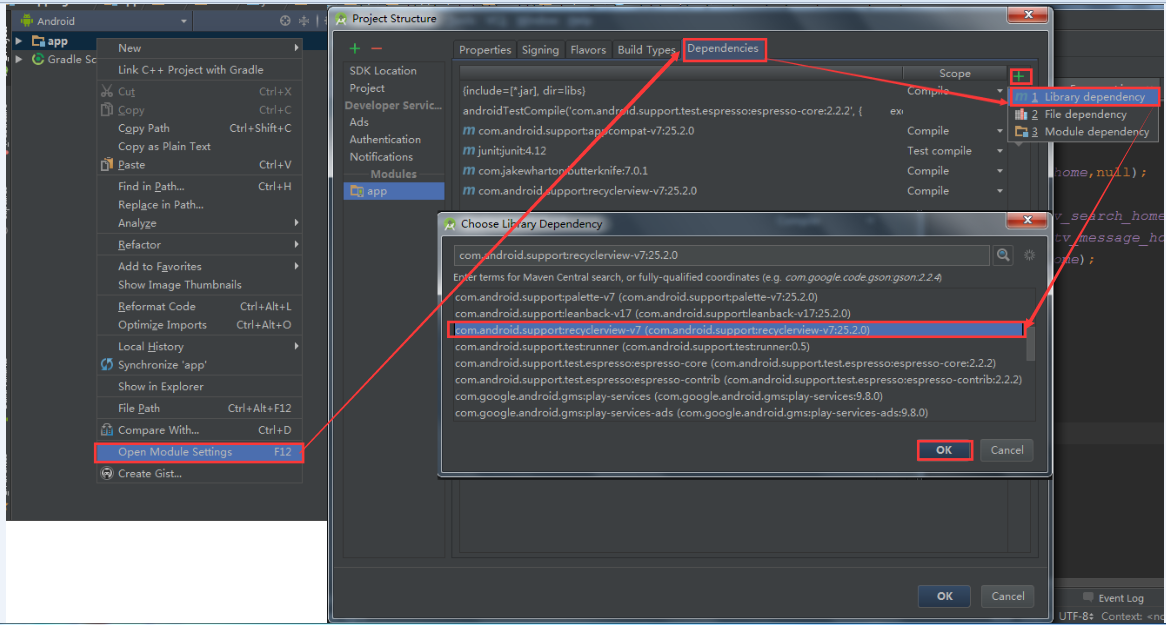
最后一步要检查RecyclerView的包加载进来是否成功,打开Module:app,如下图所示:

    上面都是讲关于搜索框布局的实现,还有一个地方没有讲到,就是点击右下角图片回到顶部的效果,那么这个功能是怎么实现的呢?

    HomeFragment类中的onclick方法中rv_home.scrollToPosition(0);如下图所示:
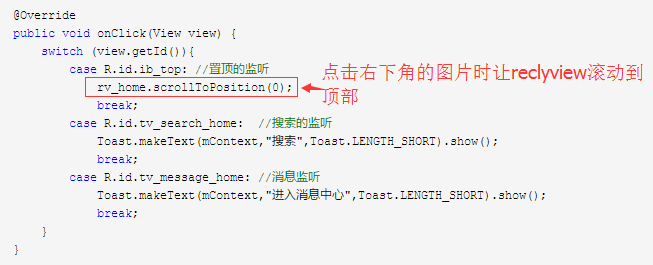
其实就是这一句代码就可以实现回到顶部的效果了。
好了,我们这节先完善到这里,下节继续。
Android商城开发系列(五)—— 商城首页回到顶部和搜索框布局实现的更多相关文章
- Android商城开发系列(七)—— 使用RecyclerView展示首页数据
前面我们讲到了使用OkHttp请求网络和FastJson解析数据了,接下来我们就开始把获取到的数据通过数据适配器展示在页面上了.Adapter是用来帮助填充数据的中间桥梁,简单点说就是:将各种数据以合 ...
- Android商城开发系列(四)——butterknife的使用
在上一篇博客:Android商城开发系列(三)——使用Fragment+RadioButton实现商城底部导航栏实现商城的底部导航栏时,里面用到了butterknife,今天来讲解一下的butterk ...
- Android 快速开发系列 打造万能的ListView GridView 适配器
转载请标明出处:http://blog.csdn.net/lmj623565791/article/details/38902805 ,本文出自[张鸿洋的博客] 1.概述 相信做Android开发的写 ...
- Android Camera开发系列(下)——自定义Camera实现拍照查看图片等功能
Android Camera开发系列(下)--自定义Camera实现拍照查看图片等功能 Android Camera开发系列(上)--Camera的基本调用与实现拍照功能以及获取拍照图片加载大图片 上 ...
- Android Camera开发系列(上)——Camera的基本调用与实现拍照功能以及获取拍照图片加载大图片
Android Camera开发系列(上)--Camera的基本调用与实现拍照功能以及获取拍照图片加载大图片 最近也是在搞个破相机,兼容性那叫一个不忍直视啊,于是自己翻阅了一些基本的资料,自己实现了一 ...
- Android GIS开发系列-- 入门季(14)FeatureLayer之范围查询
Android GIS开发系列-- 入门季(5),这篇文章中,我们知道如何去查找要素.现在有一个需求,查找某点5000米范围的要素,那如何来做呢?首先我们需要在地图上画个5000米半径的圆,然后根据Q ...
- Android商城开发系列(一)——开篇
最近在看尚硅谷的硅谷商城视频,想系统学习一下Android的商城开发流程,打算跟着视频的一步步做出一个商城,然后写博客总结记录一下整个商城的开发过程以及使用到的技术知识点,这个商城的最终效果如下图所示 ...
- Android商城开发系列(三)——使用Fragment+RadioButton实现商城底部导航栏
在商城第一篇的开篇当中,我们看到商城的效果图里面有一个底部导航栏效果,如下图所示: 今天我们就来实现商城底部导航栏,最终效果图如下所示: 那么这种效果是如何实现,实现的方式有很多种,最常见的就是使 ...
- 【Qt编程】基于Qt的词典开发系列<五>--无边框窗口的拖动
在上一篇文章中,我们讲述了如何进行无边框窗口的缩放与拖动,而在一些情况下,我们的窗口只需要进行拖动也不需要改变其大小,比如:QQ的登录窗口.本来在上一篇文章中已经讲述了如何进行窗口的拖动,但是却与窗口 ...
随机推荐
- 【237】◀▶IEW-Unit02
Unit 2 Sport I.状语从句在雅思写作中的运用 公式: 主句+状语从句连接词+从句 =状语从句连接词+从句,主句 1. 时间状语从句 I. when, while, as 1. When+A ...
- asp.net mvc cookie超时返回登录页面问题
filterContext.HttpContext.Response.Write("<script>top.location.href = '/Login/Index';< ...
- bootstrap下拉框式标签页
<ul id="myTab" class="nav nav-tabs"> <li class="active"> & ...
- SQL Server(三)
一.数据库操作 create database 数据库名称 ——创建drop database 数据库名称 ——删除use 数据库名称 ——使用go 两条SQL语句之间分隔 二.表的操作 create ...
- 人民网慕课联手FISCO BCOS开源社区上线“区块链学院”
FISCO BCOS是完全开源的联盟区块链底层技术平台,由金融区块链合作联盟(深圳)(简称金链盟)成立开源工作组通力打造.开源工作组成员包括博彦科技.华为.深证通.神州数码.四方精创.腾讯.微众银行. ...
- 初次学习DropWizard框架——解决maven打包时出现没有主清单属性的问题
笔者因为公司的项目需要,开始接触DropWizard框架,照着官网https://www.dropwizard.io/0.9.2/docs/getting-started.html撸了一遍. 工具为I ...
- shell编程 条件判断式----利用 case ..... esac 判断
条件判断式----利用 case ..... esac 判断 case $变量名称 in <==关键词为 case ,还有变量前有钱字号 "第一个变量内容") &l ...
- Python-11-循环
x = 1 while x <= 100: print(x) x += 1 基本上, 可迭代对象是可使用for循环进行遍历的对象. numbers = [0, 1, 2, 3 ...
- BZOJ1057(单调栈 or 悬线法)
方法一 黑白棋盘拥有性质:(r + c) % 2的值决定颜色 因此把某色全部反转,直接求另一色的最大矩形即可,单调栈的经典问题 #include <cstdio> #include < ...
- 2019湘潭校赛 E(答案区间维护)
题目传送 思路是始终维护西瓜数量的区间,即L代表目前可以达到的最少的,R是最多的,然后判断一下. #include <bits/stdc++.h> using namespace std; ...