
Rest Framework 认证源码流程
一、请求到来之后,都要先执行dispatch方法,dispatch方法方法根据请求方式的不同触发get/post/put/delete等方法
注意,APIView中的dispatch方法有很多的功能
    def dispatch(self, request, *args, **kwargs):

        """

        `.dispatch()` is pretty much the same as Django's regular dispatch,

        but with extra hooks for startup, finalize, and exception handling.

        """

        self.args = args

        self.kwargs = kwargs

        第一步:对request进行加工(添加数据)

        request = self.initialize_request(request, *args, **kwargs)

        self.request = request

        self.headers = self.default_response_headers  # deprecate?

        try:

            #第二步:

                #处理版权信息

                #认证

                #权限

                #请求用户进行访问频率的限制

            self.initial(request, *args, **kwargs)

            # Get the appropriate handler method

            if request.method.lower() in self.http_method_names:

                handler = getattr(self, request.method.lower(),

                                  self.http_method_not_allowed)

            else:

                handler = self.http_method_not_allowed

            # 第三步、执行:get/post/put/delete函数

            response = handler(request, *args, **kwargs)

        except Exception as exc:

            response = self.handle_exception(exc)

        #第四步、 对返回结果再次进行加工

        self.response = self.finalize_response(request, response, *args, **kwargs)

        return self.response
二、上面是大致步骤,下面我们来具体分析一下,看每个步骤中都具体干了什么事
1、对request进行加工(添加数据)
我们来看看request里面都添加了那些数据
a、首先 request = self.initialize_request(request, *args, **kwargs)点进去,会发现:在Request里面多加了四个,如下
    def initialize_request(self, request, *args, **kwargs):

        """

        Returns the initial request object.

        """

        #请求弄成一个字典返回了

        parser_context = self.get_parser_context(request)

        return Request(

            request,

            parsers=self.get_parsers(),  #解析数据,默认的有三种方式,可点进去看

            #self.get_authenticator优先找自己的,没有就找父类的

            authenticators=self.get_authenticators(), #获取认证相关的所有类并实例化,传入request对象供Request使用

            negotiator=self.get_content_negotiator(),

            parser_context=parser_context

        )
b、获取认证相关的类的具体 authenticators=self.get_authenticators(),
    def get_authenticators(self):

        """

        Instantiates and returns the list of authenticators that this view can use.

        """

        #返回的是对象列表

        return [auth() for auth in self.authentication_classes]  #[SessionAuthentication,BaseAuthentication]
c、查看认证的类:self.authentication_classes
authentication_classes = api_settings.DEFAULT_AUTHENTICATION_CLASSES #默认的,如果自己有会优先执行直接的
d、接着走进api_settings
api_settings = APISettings(None, DEFAULTS, IMPORT_STRINGS) #点击继承的DEFAULTS类
DEFAULTS = {

    # Base API policies

    'DEFAULT_AUTHENTICATION_CLASSES': (

        'rest_framework.authentication.SessionAuthentication',   #这时候就找到了他默认认证的类了,可以导入看看

        'rest_framework.authentication.BasicAuthentication'

    ),
e、导入了类看看类里面具体干了什么
from rest_framework.authentication import SessionAuthentication

from rest_framework.authentication import BaseAuthentication
f、看到里面有个authenticate方法和authenticate_header方法
class BaseAuthentication(object):

    """

    All authentication classes should extend BaseAuthentication.

    """

    def authenticate(self, request):

        """

        Authenticate the request and return a two-tuple of (user, token).

        """

        raise NotImplementedError(".authenticate() must be overridden.")

    def authenticate_header(self, request):

        """

        Return a string to be used as the value of the `WWW-Authenticate`

        header in a `401 Unauthenticated` response, or `None` if the

        authentication scheme should return `403 Permission Denied` responses.

        """

        pass
具体处理认证,从headers里面能获取用户名和密码
class BasicAuthentication(BaseAuthentication):

    """

    HTTP Basic authentication against username/password.

    """

    www_authenticate_realm = 'api'

    def authenticate(self, request):

        """

        Returns a `User` if a correct username and password have been supplied

        using HTTP Basic authentication.  Otherwise returns `None`.

        """

        auth = get_authorization_header(request).split()

        if not auth or auth[0].lower() != b'basic':

            return None   #返回none不处理。让下一个处理

        if len(auth) == 1:

            msg = _('Invalid basic header. No credentials provided.')

            raise exceptions.AuthenticationFailed(msg)

        elif len(auth) > 2:

            msg = _('Invalid basic header. Credentials string should not contain spaces.')

            raise exceptions.AuthenticationFailed(msg)

        try:

            auth_parts = base64.b64decode(auth[1]).decode(HTTP_HEADER_ENCODING).partition(':')   #用partition切割冒号也包括

        except (TypeError, UnicodeDecodeError, binascii.Error):

            msg = _('Invalid basic header. Credentials not correctly base64 encoded.')

            raise exceptions.AuthenticationFailed(msg)

        userid, password = auth_parts[0], auth_parts[2]  # 返回用户和密码

        return self.authenticate_credentials(userid, password, request)

    def authenticate_credentials(self, userid, password, request=None):

        """

        Authenticate the userid and password against username and password

        with optional request for context.

        """

        credentials = {

            get_user_model().USERNAME_FIELD: userid,

            'password': password

        }

        user = authenticate(request=request, **credentials)

        if user is None:

            raise exceptions.AuthenticationFailed(_('Invalid username/password.'))

        if not user.is_active:

            raise exceptions.AuthenticationFailed(_('User inactive or deleted.'))

        return (user, None)

    def authenticate_header(self, request):

        return 'Basic realm="%s"' % self.www_authenticate_realm
g、当然restfulframework默认定义了两个类。我们也可以自定制类,自己有就用自己的了,自己没有就去找父类的了,但是里面必须实现authenticate方法,不然会报错。
2、进行一下操作
- 处理版权信息
- 认证
- 权限
- 请求用户进行访问频率的限制
我们主要来看一下认证流程
认证流程:
a、首先 self.initial(request, *args, **kwargs)可以看到做了以下操作
    def initial(self, request, *args, **kwargs):

        """

        Runs anything that needs to occur prior to calling the method handler.

        """

        self.format_kwarg = self.get_format_suffix(**kwargs)

        # Perform content negotiation and store the accepted info on the request

        neg = self.perform_content_negotiation(request)

        request.accepted_renderer, request.accepted_media_type = neg

        # Determine the API version, if versioning is in use.

        #2.1 处理版本信息

        version, scheme = self.determine_version(request, *args, **kwargs)

        request.version, request.versioning_scheme = version, scheme

        # Ensure that the incoming request is permitted

        #2.2 认证

        self.perform_authentication(request)

        # 2.3 权限

        self.check_permissions(request)

        # 2.4 请求用户进行访问频率的限制

        self.check_throttles(request)
b、我们先来看认证,self.perform_authentication(request) 具体干了什么,按住ctrl点击进去
    def perform_authentication(self, request):

        """

        Perform authentication on the incoming request.

        Note that if you override this and simply 'pass', then authentication

        will instead be performed lazily, the first time either

        `request.user` or `request.auth` is accessed.

        """

        request.user   #执行request的user,这是的request已经是加工后的request了
c、那么我们可以从视图里面导入一下Request,找到request对象的user方法
from rest_framework.views import Request
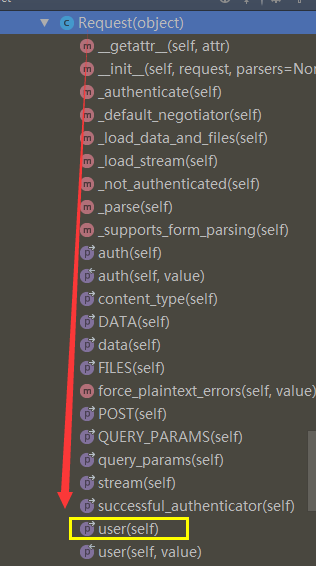
    @property

    def user(self):

        """

        Returns the user associated with the current request, as authenticated

        by the authentication classes provided to the request.

        """

        if not hasattr(self, '_user'):

            with wrap_attributeerrors():

                self._authenticate()  #

        return self._user  #返回user
d、执行self._authenticate() 开始用户认证,如果验证成功后返回元组: (用户,用户Token)
 def _authenticate(self):

        """

        Attempt to authenticate the request using each authentication instance

        in turn.

        """

        #循环对象列表

        for authenticator in self.authenticators:

            try:

                #执行每一个对象的authenticate 方法

                user_auth_tuple = authenticator.authenticate(self)

            except exceptions.APIException:

                self._not_authenticated()

                raise

            if user_auth_tuple is not None:

                self._authenticator = authenticator

                self.user, self.auth = user_auth_tuple  #返回一个元组,user,和auth,赋给了self,

                # 只要实例化Request,就会有一个request对象,就可以request.user,request.auth了

                return

        self._not_authenticated()
e、在user_auth_tuple = authenticator.authenticate(self) 进行验证,如果验证成功,执行类里的authenticatie方法
f、如果用户没有认证成功:self._not_authenticated()
 def _not_authenticated(self):

        """

        Set authenticator, user & authtoken representing an unauthenticated request.

        Defaults are None, AnonymousUser & None.

        """

        #如果跳过了所有认证,默认用户和Token和使用配置文件进行设置

        self._authenticator = None  #

        if api_settings.UNAUTHENTICATED_USER:

            self.user = api_settings.UNAUTHENTICATED_USER() # 默认值为:匿名用户AnonymousUser

        else:

            self.user = None  # None 表示跳过该认证

        if api_settings.UNAUTHENTICATED_TOKEN:

            self.auth = api_settings.UNAUTHENTICATED_TOKEN()  # 默认值为:None

        else:

            self.auth = None

    # (user, token)

    # 表示验证通过并设置用户名和Token;

    # AuthenticationFailed异常
3、执行get/post/delete等方法
4、对返回结果在进行加工
Rest Framework 认证源码流程的更多相关文章
- restful framework 认证源码流程
一.请求到来之后,都要先执行dispatch方法,dispatch方法方法根据请求方式的不同触发get/post/put/delete等方法 注意,APIView中的dispatch方法有很多的功能 ...
- Django后端项目----restful framework 认证源码流程
一.请求到来之后,都要先执行dispatch方法,dispatch方法方法根据请求方式的不同触发get/post/put/delete等方法 注意,APIView中的dispatch方法有很多的功能 ...
- Django Rest Framework框架源码流程
在详细说django-rest-framework源码流程之前,先要知道什么是RESTFUL.REST API . RESTFUL是所有Web应用都应该遵守的架构设计指导原则. REST是Repres ...
- Django rest_framework 认证源码流程
一.请求到来后,都要先执行dispatch方法 dispatch根据请求方式的不同触发get/post/put/delete等方法 注意,APIView中的dispatch方法有很多的功能 def d ...
- Django drf:序列化增删改查、局部与全局钩子源码流程、认证源码分析、执行流程
一.序列化类的增.删.改.查 用drf的序列化组件 -定义一个类继承class BookSerializer(serializers.Serializer): -写字段,如果不指定source ...
- Flask 源码流程,上下文管理
源码流程 创建对象 from flask import Flask """ 1 实例化对象 app """ app = Flask(__na ...
- Django session 源码流程
流程 Django session源码流程 首先执行的是SessionMiddleware的init方法 import_module(settings.SESSION_ENGINE) 导入了一个 dj ...
- Shiro 登录认证源码详解
Shiro 登录认证源码详解 Apache Shiro 是一个强大且灵活的 Java 开源安全框架,拥有登录认证.授权管理.企业级会话管理和加密等功能,相比 Spring Security 来说要更加 ...
- ES6.3.2 index操作源码流程
ES 6.3.2 index 操作源码流程 client 发送请求 TransportBulkAction#doExecute(Task,BulkRequest,listener) 解析请求,是否要自 ...
随机推荐
- https://www.adminsub.net/tcp-udp-port-finder/14000 ——查找tcp端口对应的服务 可以看某些端口是否让恶意软件开启
效果: TCP/UDP Port FinderPort number or name:Enter port number (e.g. 21), service (e.g. ssh, ftp) or t ...
- docker 部署一个 aspnetmvc 程序
准备mvc的程序[asp.net mvc5 网站] 使用刚才创建的镜像,并把上诉文件目录挂载到iis指定磁盘docker run -d -p 83:80 --name docker-drgs -v ...
- 条款3:尽可能的使用const
const成员函数的一般好处有: 它使得class接口比较容易理解. 它使得操纵const对象成为可能. 使用的过程中应该在const与non const成员函数之间避免代码重复: class Tex ...
- UI - 视图控制器跳转另一个视图控制器特效总结
1. 从一个视图控制器跳转另一个视图控制器的方式是可以进行设置的 CATransition *animation = [[CATransition alloc]init]; animation.dur ...
- Chrome字体变粗
如图.解决方案,看看CSS中用了什么字体,卸载某个字体. 因为我装了一个新的字体,CSS中有这个字体的网页都会变粗.删掉这个字体就恢复正常了
- 在ubuntu14.4里编译UBOOT出错
出错信息如下: OBJCOPY examples/standalone/hello_world.bin LDS u-boot.lds LD u-boot./scripts/dtc ...
- Leetcode 1005. Maximize Sum Of Array After K Negations
class Solution(object): def largestSumAfterKNegations(self, A, K): """ :type A: List[ ...
- 设计模式之原型(prototype)模式
相信大多数的人都看过<西游记>,对孙悟空拔毛变出小猴子的故事情节应该都很熟悉.孙悟空可以用猴毛根据自己的形象复制出很多跟自己一模一样的小猴兵出来,其实在设计模式中也有一个类似的模式,我们可 ...
- win7下破解无线网密码
很多朋友喜欢做一些比较有成就感的事情,例如破解别人的密码,现在破解的方式大部分还是以跑字典这种没有任何技术含量的手段进行,那么破解的成功与否就和我们的字典有很多的关系了,本次经验就来教大家怎样进行字典 ...
- WPF:XAML概述
简介 XAML是eXtensible Application Markup Language可扩展应用程序标记语言,它是微软公司为构建应用程序用户界面而创建的一种新的描述性语言.XAML提供了一种便于 ...