
Django后端项目----restful framework 认证源码流程
一、请求到来之后,都要先执行dispatch方法,dispatch方法方法根据请求方式的不同触发get/post/put/delete等方法
注意,APIView中的dispatch方法有很多的功能
    def dispatch(self, request, *args, **kwargs):

        """

        `.dispatch()` is pretty much the same as Django's regular dispatch,

        but with extra hooks for startup, finalize, and exception handling.

        """

        self.args = args

        self.kwargs = kwargs

        第一步:对request进行加工(添加数据)

        request = self.initialize_request(request, *args, **kwargs)

        self.request = request

        self.headers = self.default_response_headers  # deprecate?

        try:

            #第二步:

                #处理版权信息

                #认证

                #权限

                #请求用户进行访问频率的限制

            self.initial(request, *args, **kwargs)

            # Get the appropriate handler method

            if request.method.lower() in self.http_method_names:

                handler = getattr(self, request.method.lower(),

                                  self.http_method_not_allowed)

            else:

                handler = self.http_method_not_allowed

            # 第三步、执行:get/post/put/delete函数

            response = handler(request, *args, **kwargs)

        except Exception as exc:

            response = self.handle_exception(exc)

        #第四步、 对返回结果再次进行加工

        self.response = self.finalize_response(request, response, *args, **kwargs)

        return self.response
二、上面是大致步骤,下面我们来具体分析一下,看每个步骤中都具体干了什么事
1、对request进行加工(添加数据)
我们来看看request里面都添加了那些数据
a、首先 request = self.initialize_request(request, *args, **kwargs)点进去,会发现:在Request里面多加了四个,如下
    def initialize_request(self, request, *args, **kwargs):

        """

        Returns the initial request object.

        """

        #吧请求弄成一个字典返回了

        parser_context = self.get_parser_context(request)

        return Request(

            request,

            parsers=self.get_parsers(),  #解析数据,默认的有三种方式,可点进去看

            #self.get_authenticator优先找自己的,没有就找父类的

            authenticators=self.get_authenticators(), #获取认证相关的所有类并实例化,传入request对象供Request使用

            negotiator=self.get_content_negotiator(),

            parser_context=parser_context

        )
b、获取认证相关的类的具体 authenticators=self.get_authenticators(),
    def get_authenticators(self):

        """

        Instantiates and returns the list of authenticators that this view can use.

        """

        #返回的是对象列表

        return [auth() for auth in self.authentication_classes]  #[SessionAuthentication,BaseAuthentication]
c、查看认证的类:self.authentication_classes
authentication_classes = api_settings.DEFAULT_AUTHENTICATION_CLASSES #默认的,如果自己有会优先执行直接的
d、接着走进api_settings
api_settings = APISettings(None, DEFAULTS, IMPORT_STRINGS) #点击继承的DEFAULTS类
DEFAULTS = {

    # Base API policies

    'DEFAULT_AUTHENTICATION_CLASSES': (

        'rest_framework.authentication.SessionAuthentication',   #这时候就找到了他默认认证的类了,可以导入看看

        'rest_framework.authentication.BasicAuthentication'

    ),
e、导入了类看看类里面具体干了什么
from rest_framework.authentication import SessionAuthentication

from rest_framework.authentication import BaseAuthentication
f、看到里面有个authenticate方法和authenticate_header方法
class BaseAuthentication(object):

    """

    All authentication classes should extend BaseAuthentication.

    """

    def authenticate(self, request):

        """

        Authenticate the request and return a two-tuple of (user, token).

        """

        raise NotImplementedError(".authenticate() must be overridden.")

    def authenticate_header(self, request):

        """

        Return a string to be used as the value of the `WWW-Authenticate`

        header in a `401 Unauthenticated` response, or `None` if the

        authentication scheme should return `403 Permission Denied` responses.

        """

        pass
具体处理认证,从headers里面能获取用户名和密码
class BasicAuthentication(BaseAuthentication):

    """

    HTTP Basic authentication against username/password.

    """

    www_authenticate_realm = 'api'

    def authenticate(self, request):

        """

        Returns a `User` if a correct username and password have been supplied

        using HTTP Basic authentication.  Otherwise returns `None`.

        """

        auth = get_authorization_header(request).split()

        if not auth or auth[0].lower() != b'basic':

            return None   #返回none不处理。让下一个处理

        if len(auth) == 1:

            msg = _('Invalid basic header. No credentials provided.')

            raise exceptions.AuthenticationFailed(msg)

        elif len(auth) > 2:

            msg = _('Invalid basic header. Credentials string should not contain spaces.')

            raise exceptions.AuthenticationFailed(msg)

        try:

            auth_parts = base64.b64decode(auth[1]).decode(HTTP_HEADER_ENCODING).partition(':')   #用partition切割冒号也包括

        except (TypeError, UnicodeDecodeError, binascii.Error):

            msg = _('Invalid basic header. Credentials not correctly base64 encoded.')

            raise exceptions.AuthenticationFailed(msg)

        userid, password = auth_parts[0], auth_parts[2]  # 返回用户和密码

        return self.authenticate_credentials(userid, password, request)

    def authenticate_credentials(self, userid, password, request=None):

        """

        Authenticate the userid and password against username and password

        with optional request for context.

        """

        credentials = {

            get_user_model().USERNAME_FIELD: userid,

            'password': password

        }

        user = authenticate(request=request, **credentials)

        if user is None:

            raise exceptions.AuthenticationFailed(_('Invalid username/password.'))

        if not user.is_active:

            raise exceptions.AuthenticationFailed(_('User inactive or deleted.'))

        return (user, None)

    def authenticate_header(self, request):

        return 'Basic realm="%s"' % self.www_authenticate_realm
g、当然restfulframework默认定义了两个类。我们也可以自定制类,自己有就用自己的了,自己没有就去找父类的了,但是里面必须实现authenticate方法,不然会报错。
2、进行一下操作
- 处理版权信息
- 认证
- 权限
- 请求用户进行访问频率的限制
我们主要来看一下认证流程
认证流程:
a、首先 self.initial(request, *args, **kwargs)可以看到做了以下操作
    def initial(self, request, *args, **kwargs):

        """

        Runs anything that needs to occur prior to calling the method handler.

        """

        self.format_kwarg = self.get_format_suffix(**kwargs)

        # Perform content negotiation and store the accepted info on the request

        neg = self.perform_content_negotiation(request)

        request.accepted_renderer, request.accepted_media_type = neg

        # Determine the API version, if versioning is in use.

        #2.1 处理版本信息

        version, scheme = self.determine_version(request, *args, **kwargs)

        request.version, request.versioning_scheme = version, scheme

        # Ensure that the incoming request is permitted

        #2.2 认证

        self.perform_authentication(request)

        # 2.3 权限

        self.check_permissions(request)

        # 2.4 请求用户进行访问频率的限制

        self.check_throttles(request)
b、我们先来看认证,self.perform_authentication(request) 具体干了什么,按住ctrl点击进去
    def perform_authentication(self, request):

        """

        Perform authentication on the incoming request.

        Note that if you override this and simply 'pass', then authentication

        will instead be performed lazily, the first time either

        `request.user` or `request.auth` is accessed.

        """

        request.user   #执行request的user,这是的request已经是加工后的request了
c、那么我们可以从视图里面导入一下Request,找到request对象的user方法
from rest_framework.views import Request
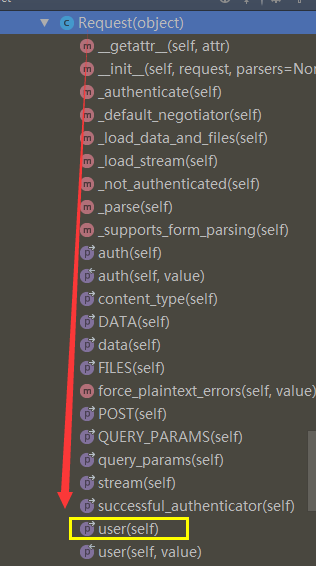
    @property

    def user(self):

        """

        Returns the user associated with the current request, as authenticated

        by the authentication classes provided to the request.

        """

        if not hasattr(self, '_user'):

            with wrap_attributeerrors():

                self._authenticate()  #

        return self._user  #返回user
d、执行self._authenticate() 开始用户认证,如果验证成功后返回元组: (用户,用户Token)
 def _authenticate(self):

        """

        Attempt to authenticate the request using each authentication instance

        in turn.

        """

        #循环对象列表

        for authenticator in self.authenticators:

            try:

                #执行每一个对象的authenticate 方法

                user_auth_tuple = authenticator.authenticate(self)

            except exceptions.APIException:

                self._not_authenticated()

                raise

            if user_auth_tuple is not None:

                self._authenticator = authenticator

                self.user, self.auth = user_auth_tuple  #返回一个元组,user,和auth,赋给了self,

                # 只要实例化Request,就会有一个request对象,就可以request.user,request.auth了

                return

        self._not_authenticated()
e、在user_auth_tuple = authenticator.authenticate(self) 进行验证,如果验证成功,执行类里的authenticatie方法
f、如果用户没有认证成功:self._not_authenticated()
 def _not_authenticated(self):

        """

        Set authenticator, user & authtoken representing an unauthenticated request.

        Defaults are None, AnonymousUser & None.

        """

        #如果跳过了所有认证,默认用户和Token和使用配置文件进行设置

        self._authenticator = None  #

        if api_settings.UNAUTHENTICATED_USER:

            self.user = api_settings.UNAUTHENTICATED_USER() # 默认值为:匿名用户AnonymousUser

        else:

            self.user = None  # None 表示跳过该认证

        if api_settings.UNAUTHENTICATED_TOKEN:

            self.auth = api_settings.UNAUTHENTICATED_TOKEN()  # 默认值为:None

        else:

            self.auth = None

    # (user, token)

    # 表示验证通过并设置用户名和Token;

    # AuthenticationFailed异常
3、执行get/post/delete等方法
4、对返回结果在进行加工
Django后端项目----restful framework 认证源码流程的更多相关文章
- restful framework 认证源码流程
一.请求到来之后,都要先执行dispatch方法,dispatch方法方法根据请求方式的不同触发get/post/put/delete等方法 注意,APIView中的dispatch方法有很多的功能 ...
- Rest Framework 认证源码流程
一.请求到来之后,都要先执行dispatch方法,dispatch方法方法根据请求方式的不同触发get/post/put/delete等方法 注意,APIView中的dispatch方法有很多的功能 ...
- Django Rest Framework框架源码流程
在详细说django-rest-framework源码流程之前,先要知道什么是RESTFUL.REST API . RESTFUL是所有Web应用都应该遵守的架构设计指导原则. REST是Repres ...
- Django(64)频率认证源码分析与自定义频率认证
前言 有时候我们发送手机验证码,会发现1分钟只能发送1次,这是做了频率限制,限制的时间次数,都由开发者自己决定 频率认证源码分析 def check_throttles(self, request): ...
- Django后端项目---- Rest Framework(2)
一.认证(补充的一个点) 认证请求头 #!/usr/bin/env python # -*- coding:utf-8 -*- from rest_framework.views import API ...
- Django后端项目----RESTful API
一. 什么是RESTful REST与技术无关,代表的是一种软件架构风格,REST是Representational State Transfer的简称,中文翻译为“表征状态转移” REST从资源的角 ...
- Django后端项目---- rest framework(3)
一.版本 程序也来越大时,可能通过版本不同做不同的处理 没用rest_framework之前,我们可以通过以下这样的方式去获取. class UserView(APIView): def get(se ...
- Django rest_framework 认证源码流程
一.请求到来后,都要先执行dispatch方法 dispatch根据请求方式的不同触发get/post/put/delete等方法 注意,APIView中的dispatch方法有很多的功能 def d ...
- Django后端项目---- rest framework(4)
一.分页 试问如果当数据量特别大的时候,你是怎么解决分页的? 方式a.记录当前访问页数的数据id 方式b.最多显示120页等 方式c.只显示上一页,下一页,不让选择页码,对页码进行加密 1.基于lim ...
随机推荐
- SQL语法集合
查询 select * from table limit 0,10 取0位置后面的10条记录 limit 0 表示从第一条记录开始 起始位置从0开始 10 表示取 ...
- Element-diag中遮罩
<el-dialog title="收货地址" :visible.sync="dialogFormVisible" append-to-body> ...
- resful规范
1.简介 什么是resful resful是一个规范,说白了就是面向资源编程,把网络中所有的东西,想象成资源 2.规范 10条规范 1)API与用户的通信协议,总是用HTTPS协议:HTTPS比htt ...
- PHP自动加载SPL的四种处理方式
libs目录下有3个类文件: Test.class.php <?php class Test { public function __construct() { echo "Loadi ...
- Linux下samba服务搭建
参考: https://www.cnblogs.com/lxyqwer/p/7271369.html https://www.cnblogs.com/liulipeng/p/3406352.html ...
- mybatis 调用oracle存储过程如何返回out参数值
调试了半天,其实整体用map传入传出也挺简单, 主要是调用存储过程 select标签里平时习惯不写 statementType="CALLABLE",调用没有out参数时也能正常用 ...
- iOS 点击返回键崩溃的未解之谜
1. iOS8出现. 2.点击进去下一层View,然后返回,再返回上一级的视图的时候奔溃. 3.只有点击进去一下层View的时候才出现. 4. 报错的是给一个未知对象发送这个消息 gestureRec ...
- 【转360】KB4041678 Windows 仅安全更新(2017.10) 补丁更新后执行SQL出错! http://bbs.360.cn/thread-15201531-1-1.html
把EXCEL20003表数据导入到MDB数据库中sql命令语句\"SELECT * INTO 表 FROM [Excel 8.0;DATABASE=C:\\1.xls].[Sheet1$]\ ...
- Permission denied: user=root, access=WRITE, inode="/":hadoopuser:supergroup:drwxr-xr-x
提示往HDFS写文件是不容许的. 在conf/hdfs-site.xml中加入: <property> <name>dfs.permissions</name> & ...
- mysql 增加列,修改列名、列属性,删除列语句
mysql增加列,修改列名.列属性,删除列语句 mysql修改表名,列名,列类型,添加表列,删除表列 alter table test rename test1; --修改表名 alter t ...