
selenium Select用法笔记
- select_by value:参数为option中的value属性,例如:HTML代码中 <ignore_js_op>
 ,应该是value="volvo"这个值,所以应该为小写;
 - select_by_visible_text:参数为option的text值, <ignore_js_op>
 ,应该是红线标出部分的值,所以应该是大写;
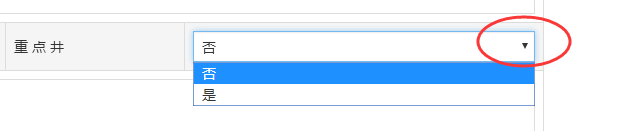
 - Select(driver.find_element_by_name("isImportant")).select_by_visible_text(u"是")
- deselect_all(self)
| Clear all selected entries. This is only valid when the SELECT supports multiple selections.
| throws NotImplementedError If the SELECT does not support multiple selections
- select_by_index(self, index)
| Select the option at the given index. This is done by examing the "index" attribute of an
| element, and not merely by counting.
|
| :Args:
| - index - The option at this index will be selected
|
| throws NoSuchElementException If there is no option with specisied index in SELECT
- select_by_value(self, value)
| Select all options that have a value matching the argument. That is, when given "foo" this
| would select an option like:
|
| <option value="foo">Bar</option>
|
| :Args:
| - value - The value to match against
|
| throws NoSuchElementException If there is no option with specisied value in SELECT
|
- select_by_visible_text(self, text)
| Select all options that display text matching the argument. That is, when given "Bar" this
| would select an option like:
|
| <option value="foo">Bar</option>
|
| :Args:
| - text - The visible text to match against
|
| throws NoSuchElementException If there is no option with specisied text in SELECT
selenium Select用法笔记的更多相关文章
- python+selenium七:下拉框、选项框、select用法
# from selenium import webdriverfrom selenium.webdriver.common.action_chains import ActionChainsimpo ...
- Selenium Grid 学习笔记
Selenium Grid 学习笔记http://www.docin.com/p-765680298.html
- jquery中关于append()的用法笔记---append()节点移动与复制之说
jquery中关于append()的用法笔记---append()节点移动与复制之说 今天看一本关于jquery的基础教程,看到其中一段代码关于append()的一行,总是百思不得其解.于是查了查官方 ...
- html select用法总结
本文将介绍select 原生的常用方法,这些都是经过测试,兼容ie6到ie10,及chrome,火狐等,也就是说大部分浏览器都兼容.如果大家发现有不兼容的情况,可以跟我留言. 我们对基本的用法了如指掌 ...
- 网络通信 --> select()用法
select()用法 头文件 #include <sys/time.h> #include <sys/types.h> #include <unistd.h> 定义 ...
- 【Python爬虫】selenium基础用法
selenium 基础用法 阅读目录 初识selenium 基本使用 查找元素 元素互交操作 执行JavaScript 获取元素信息 等待 前进后退 Cookies 选项卡管理 异常处理 初识sele ...
- golang学习之select用法
早期的select函数是用来监控一系列的文件句柄,一旦其中一个文件句柄发生IO操作,该select调用就会被返回.golang在语言级别直接支持select,用于处理异步IO问题. select用法同 ...
- 数据库Oracle的select用法(部分)
Oracle的select用法(部分): 1.查询所有: select * from employees; 2.加上where子句:用选择限制行 select * from employees whe ...
- <自动化测试>之<selenium API 用法2>
不知道之前的selenium API 用法1,有没有去练习, 个人认为线性代码还是要靠敲的, 后面的模块化除了多敲还需要一定的编程思想去理解, 今天下午不是很忙就给来这儿补充点selenium api ...
随机推荐
- mysql 数据包太小会引发错误信息
Error querying database. Cause: com.mysql.cj.jdbc.exceptions.PacketTooBigException: Packet for quer ...
- sqoop将oracle数据导入hdfs集群
使用sqoop将oracle数据导入hdfs集群 集群环境: hadoop1.0.0 hbase0.92.1 zookeeper3.4.3 hive0.8.1 sqoop-1.4.1-incubati ...
- BZOJ4373 算术天才⑨与等差数列(线段树)
看上去很难维护,考虑找一些必要条件.首先显然最大值-最小值=k*(r-l).然后区间内的数需要模k同余.最后区间内的数两两不同(k=0除外).冷静一下可以发现这些条件组合起来就是充分的了. 考虑怎么维 ...
- [CF1031E]Triple Flips
题目大意:给你一个长度为$n$的$01$串,一次操作定义为:选取$3$个等距的元素,使其$0$变$1$,$1$变$0$,要求在$\Big\lfloor \dfrac n 3\Big\rfloor+12 ...
- [Leetcode] Populating next right pointer in each node ii 填充每个节点的右指针
Follow up for problem "Populating Next Right Pointers in Each Node". What if the given tre ...
- 无人值守安装linux系统
需要使用到的服务:PXE + DHCP+TFTP+ Kickstart+ FTP KickStart是一种无人职守安装方式 执行 PXE + KickStart安装需要准备内容: • DHCP 服务 ...
- HDU 多校对抗赛 A Maximum Multiple
Maximum Multiple Time Limit: 4000/2000 MS (Java/Others) Memory Limit: 32768/32768 K (Java/Others) ...
- 用npm安装express时报proxy的错误的解决方法
首先要说明一点:当使用npm install <module-name>时安装组件时,安装的目录是cmd的目录+node_modules+组件名 例子如下:假如你现在安装express这个 ...
- 修改select样式,vue select
<style> .selectbox{ width: 200px; display: inline-block; overflow-x: hidden; height: 28px; lin ...
- css实现九宫格图片自适应布局
我之前写九宫格自适应布局的时候,每个格子是使用媒体查询器(@media)或者js动态设置css,根据不同的手机屏幕宽度,适配不同手机,但是这样有个很大的缺点,那就是移动端的屏幕尺寸太多了,就得写很多代 ...