
thinkphp5最美跳转页面
声明下:此教程来自TP官网,如果需要看原文,请点击一下链接 http://www.thinkphp.cn/code/3437.html
先给大家看下效果:
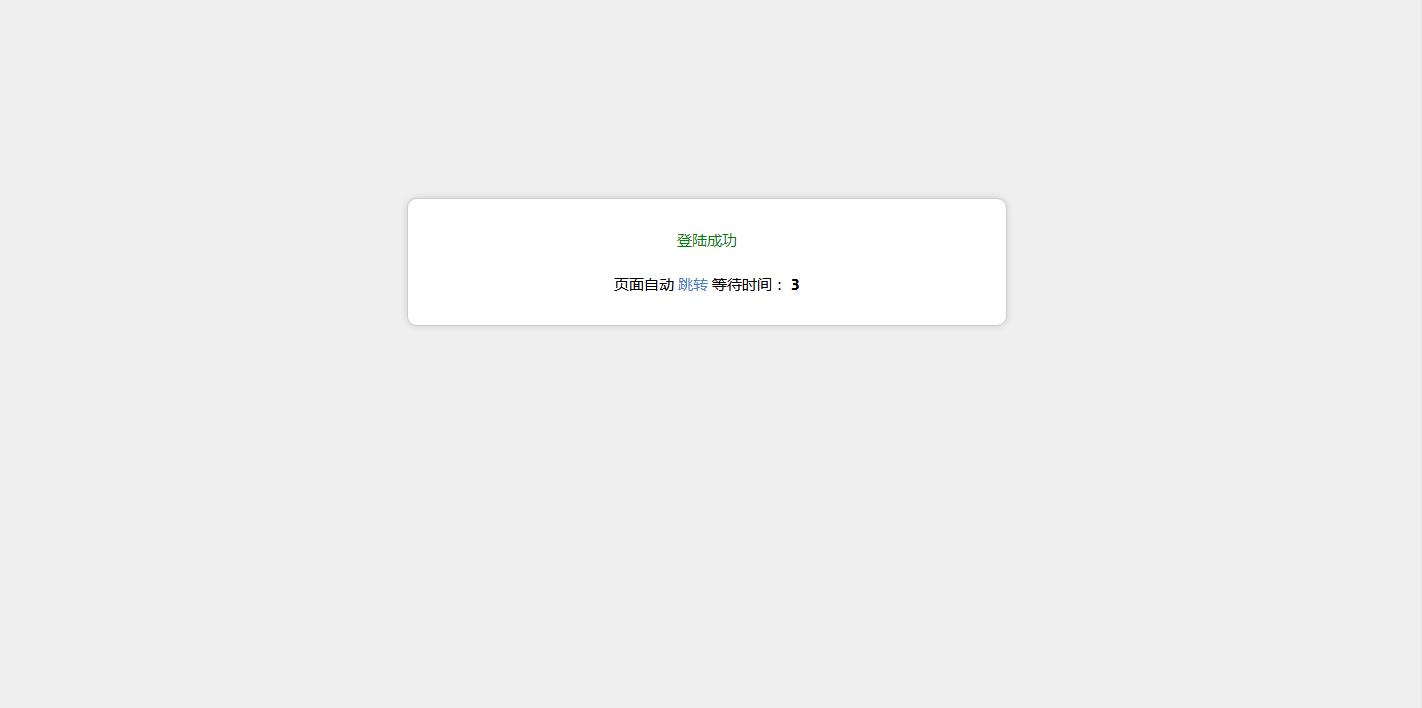

直接撸代码:
第一步:为了增加对移动设备的支持,在common.php加入以下函数:

function isMobile()

{

    if (isset ($_SERVER['HTTP_X_WAP_PROFILE']))

    {

        return true;

    }

    if (isset ($_SERVER['HTTP_VIA']))

    {

        return stristr($_SERVER['HTTP_VIA'], "wap") ? true : false;

    }

    if (isset ($_SERVER['HTTP_USER_AGENT']))

    {

        $clientkeywords = array ('nokia',

            'sony',

            'ericsson',

            'mot',

            'samsung',

            'htc',

            'sgh',

            'lg',

            'sharp',

            'sie-',

            'philips',

            'panasonic',

            'alcatel',

            'lenovo',

            'iphone',

            'ipod',

            'blackberry',

            'meizu',

            'android',

            'netfront',

            'symbian',

            'ucweb',

            'windowsce',

            'palm',

            'operamini',

            'operamobi',

            'openwave',

            'nexusone',

            'cldc',

            'midp',

            'wap',

            'mobile'

            );

        if (preg_match("/(" . implode('|', $clientkeywords) . ")/i", strtolower($_SERVER['HTTP_USER_AGENT'])))

        {

            return true;

        }

    }

    if (isset ($_SERVER['HTTP_ACCEPT']))

    {

        if ((strpos($_SERVER['HTTP_ACCEPT'], 'vnd.wap.wml') !== false) && (strpos($_SERVER['HTTP_ACCEPT'], 'text/html') === false || (strpos($_SERVER['HTTP_ACCEPT'], 'vnd.wap.wml') < strpos($_SERVER['HTTP_ACCEPT'], 'text/html'))))

        {

            return true;

        }

    }

    return false;

}
第2步:替换模板
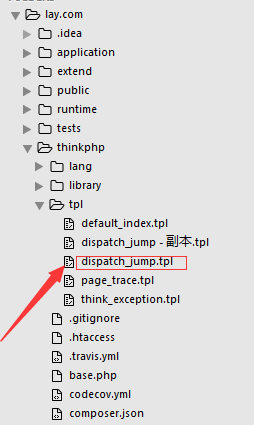
这个文件里面的代码全部删除,加入以下代码:
{__NOLAYOUT__}<!DOCTYPE html PUBLIC "-//W3C//DTD XHTML 1.0 Transitional//EN" "http://www.w3.org/TR/xhtml1/DTD/xhtml1-transitional.dtd">

<html xmlns="http://www.w3.org/1999/xhtml">

<head>

<meta name="viewport" content="width=device-width, initial-scale=1.0, minimum-scale=0.5, maximum-scale=2.0, user-scalable=yes" />

    <meta http-equiv="Content-Type" content="text/html; charset=utf-8" />

    <title>跳转提示</title>

    <?php if(isMobile()==true){?>

    <style type="text/css">

        body, h1, h2, p,dl,dd,dt{margin: ;padding: ;font: 15px/1.5 微软雅黑,tahoma,arial;}

        body{background:#efefef;}

        h1, h2, h3, h4, h5, h6 {font-size: %;cursor:default;}

        ul, ol {list-style: none outside none;}

        a {text-decoration: none;color:#447BC4}

        a:hover {text-decoration: underline;}

        .ip-attack{width:%; margin:200px auto ;}

        .ip-attack dl{ background:#fff; padding:30px; border-radius:10px;border: 1px solid #CDCDCD;-webkit-box-shadow:   8px #CDCDCD;-moz-box-shadow:   8px #cdcdcd;box-shadow:   8px #CDCDCD;}

        .ip-attack dt{text-align:center;}

        .ip-attack dd{font-size:16px; color:#; text-align:center;}

        .tips{text-align:center; font-size:14px; line-height:50px; color:#;}

    </style>

<?php }else{ ?>

<style type="text/css">

        body, h1, h2, p,dl,dd,dt{margin: ;padding: ;font: 15px/1.5 微软雅黑,tahoma,arial;}

        body{background:#efefef;}

        h1, h2, h3, h4, h5, h6 {font-size: %;cursor:default;}

        ul, ol {list-style: none outside none;}

        a {text-decoration: none;color:#447BC4}

        a:hover {text-decoration: underline;}

        .ip-attack{width:600px; margin:200px auto ;}

        .ip-attack dl{ background:#fff; padding:30px; border-radius:10px;border: 1px solid #CDCDCD;-webkit-box-shadow:   8px #CDCDCD;-moz-box-shadow:   8px #cdcdcd;box-shadow:   8px #CDCDCD;}

        .ip-attack dt{text-align:center;}

        .ip-attack dd{font-size:16px; color:#; text-align:center;}

        .tips{text-align:center; font-size:14px; line-height:50px; color:#;}

    </style>

<?php }?>

</head>

<body>

    <div class="ip-attack"><dl>

        <?php switch ($code) {?>

            <?php case :?>

            <dt style="color: green"><?php echo(strip_tags($msg));?></dt>

            <?php break;?>

            <?php case :?>

            <dt style="color: red"><?php echo(strip_tags($msg));?></dt>

            <?php break;?>

        <?php } ?>

        <br>

        <dt>

            页面自动 <a id="href" href="<?php echo($url);?>">跳转</a> 等待时间: <b id="wait"><?php echo($wait);?></b>

        </dt></dl>

    </div>

    <script type="text/javascript">

        (function(){

            var wait = document.getElementById('wait'),

                href = document.getElementById('href').href;

            var interval = setInterval(function(){

                var time = --wait.innerHTML;

                if(time <= ) {

                    location.href = href;

                    clearInterval(interval);

                };

            }, );

        })();

    </script>

</body>

</html>
搞定!!!
thinkphp5最美跳转页面的更多相关文章
- JS定时刷新页面及跳转页面
JS定时刷新页面及跳转页面 Javascript 返回上一页1. Javascript 返回上一页 history.go(-1), 返回两个页面: history.go(-2); 2. history ...
- Webform Session、Cookies传值,跳转页面方式
Session:每个独立的浏览器都会创建一个独立的Session,不是一台电脑一个Session 存放位置:服务器上 作用:只要里面有内容,那么这个网站中所有的C#端都能访问到这个变量 优点:安全,速 ...
- 跳转页面,传递参数——android
android 跳转页面并传递对象(实体类)——项目中是集港收货类 网上资料:两种传递方法Serializable,parcelable 优劣比较:Serializable数据更持久化,网络传输或数据 ...
- Response.Redirect 无法跳转页面
错误现象:Response.Redirect(Server.MapPath("BackIndex.aspx")); 打断点测试执行了这一句,Server.MapPath(" ...
- xamarin.ios 跳转页面
一:用Segue跳转页面 按住Ctrl连线,选择show,后台覆写 ShouldPerformSegue方法,返回True跳转,False取消跳转. 二:通过代码跳转至StoryBoard页面 U ...
- 常用的js跳转页面方法实现汇总
1.window.location.href方式 <script language="javascript" type="text/javascript" ...
- JavaScript学习笔记-简单的倒计时跳转页面
<!DOCTYPE html> <html lang="en" xmlns="http://www.w3.org/1999/xhtml"> ...
- iOS极光推送 点击推送消息跳转页面
- (BOOL)application:(UIApplication *)application didFinishLaunchingWithOptions:(NSDictionary *)launc ...
- 使用Android点击按钮跳转页面
1.首先新建一个Android工程,命名为MyApp(名字可以自己随意起); 2.以原有的MainActivity.java文件为登录界面,然后在src文件中的包上面右击选择New目录下的Other中 ...
随机推荐
- WIN8/8.1/10换系统常见的几个问题
1.如果高级选项中没有UEFI固件设置,这该怎么进入BIOS呢? 答:还有一种方法是,首先关闭快速启动,然后重启,开机画面出来之后按F1,F2,F12,delete,总有一个是对的(不确定的话可以四个 ...
- Spark中如何生成Avro文件
研究spark的目的之一就是要取代MR,目前我司MR的一个典型应用场景即为生成Avro文件,然后加载到HIVE表里,所以如何在Spark中生成Avro文件,就是必然之路了. 我本人由于对java不熟, ...
- 在submit_bio处使用stapn
想着在submit_bio的地方,发现在guru模式下,stap是经常性地把内核整挂呀,不得已,也没有发现stap什么比较好的调试方法,所以索性直接使用stap的语法了,但是发现有问题呢,有的时候bv ...
- http请求的过程
http请求格式: http请求格式由四部分组成,分别是:请求行,请求头,空行,消息体,每个部分占一行. 请求行是消息体的第一行,由三部分组成,分别是:请求方法,请求资源的url,http的版本号. ...
- Linux中安装apache
一.前言 安装的背景就是公司项目要用,自己在linux安装软件不多,过程比较曲折,需要记录一下(最近几篇博客好像都会有这种高大上的背景)~先说下笔者安装环境以及相关软件版本: 操作系统:RedHat ...
- Hibernate映射关系之_多对多
多对多关系由于效率的原因,实际中会拆成相互的一对多的关系,不再累述
- 隐马尔可夫模型HMM
隐马尔可夫模型HMM的探究 1 HMM基本概念1.1 定义1.2 观测序列生成过程1.3 HMM的三个问题2 概率计算算法2.1 直接计算算法2.2 前向算法forward algorithm2.3 ...
- 大数据分析中Redis应用
大数据分析中Redis 大数据时代,海量数据分析就像吃饭一样,成为了我们每天的工作.为了更好的为公司提供运营决策,各种抖机灵甚至异想天开的想法都会紧跟着接踵而来!业务多变,决定了必须每天修改系统,重新 ...
- 【bzoj2141】排队 分块+树状数组
题目描述 排排坐,吃果果,生果甜嗦嗦,大家笑呵呵.你一个,我一个,大的分给你,小的留给我,吃完果果唱支歌,大家乐和和.红星幼儿园的小朋友们排起了长长地队伍,准备吃果果.不过因为小朋友们的身高有所区别, ...
- 深入了解一下Redis的内存模型!
一.前言 Redis是目前最火爆的内存数据库之一,通过在内存中读写数据,大大提高了读写速度,可以说Redis是实现网站高并发不可或缺的一部分. 我们使用Redis时,会接触Redis的5种对象类型(字 ...