
ANT+JMETER集成1(生成报告)
配置build.xml文件时,网上找了各种版本的代码都会报错,
终于找到个可以生成报告的build源码了
链接:
http://www.cnblogs.com/hanxiaomin/p/6731810.html
修改Jmeter的bin目录下jmeter.properties文件的配置:jmeter.save.saveservice.output_format=xml
build.xml
<?xml version="1.0" encoding="UTF-8"?>
<project name="ant-jmeter-test" default="run" basedir=".">
<taskdef resource="net/sf/antcontrib/antlib.xml" />
<!-- (1)需要改成自己本地的 Jmeter 目录-->
<property name="jmeter.home" value="C:\Users\Administrator\Desktop\apache-jmeter-3.0"/>
<property name="report.title" value="report"/>
<!-- (2)jmeter生成jtl格式的结果报告的路径-->
<property name="jmeter.result.jtl.dir" value="C:\Users\Administrator\Desktop\apache-jmeter-3.0\demo\resultLog\jtl"/>
<!-- (3)jmeter生成html格式的结果报告的路径-->
<property name="jmeter.result.html.dir" value="C:\Users\Administrator\Desktop\apache-jmeter-3.0\demo\resultLog\html"/>
<!-- 生成的报告的前缀 -->
<property name="ReportName" value="TestReport"/>
<property name="jmeter.result.jtlName" value="${jmeter.result.jtl.dir}/${ReportName}.jtl"/>
<property name="jmeter.result.htmlName" value="${jmeter.result.html.dir}/${ReportName}.html"/> <target name="run">
<antcall target="test"/>
<antcall target="report"/>
<!--antcall target="mail"/-->
</target>
<target name="test">
<taskdef name="jmeter" classname="org.programmerplanet.ant.taskdefs.jmeter.JMeterTask"/>
<jmeter jmeterhome="${jmeter.home}" resultlog="${jmeter.result.jtlName}">
<!-- (4)build.xml的存放的路径-->
<testplans dir="C:\Users\Administrator\Desktop\apache-jmeter-3.0\demo" includes="*.jmx"/>
<property name="jmeter.save.saveservice.output_format" value="xml"/>
</jmeter>
</target>
<path id="xslt.classpath">
<fileset dir="${jmeter.home}/lib" includes="xalan*.jar"/>
<fileset dir="${jmeter.home}/lib" includes="serializer*.jar"/>
</path>
<target name="report">
<tstamp>
<format property="report.datestamp" pattern="yyyy/MM/dd HH:mm"/>
</tstamp>
<xslt
classpathref="xslt.classpath"
force="true"
in="${jmeter.result.jtlName}"
out="${jmeter.result.htmlName}"
style="${jmeter.home}/extras/jmeter-results-detail-report_21.xsl">
<param name="dateReport" expression="${report.datestamp}"/>
</xslt> <copy todir="${jmeter.result.html.dir}">
<fileset dir="${jmeter.home}/extras">
<include name="collapse.png"/>
<include name="expand.png"/>
</fileset>
</copy>
</target>
<path id="lib_classpath">
<fileset dir="${basedir}/">
<include name="mail*.jar" />
<include name="activation*.jar" />
<include name="commons-email*.jar" />
<include name="ant-contrib*.jar" />
</fileset>
</path>
<!--target name="mail">
<for list="hanxm@thunisoft.com" param="tmp" >
<sequential>
<echo>message @{tmp}</echo>
<mail mailhost="smtp.thunisoft.com" mailport="25" ssl="false" subject="ant mail" messagemimetype="text/html" user="zhangjn" password="*******" tolist="@{tmp}">
<from address="zhangjn@thunisoft.com" />
<fileset dir="${jmeter.result.html.dir}">
<include name="*.html" />
<include name="*.png" />
</fileset>
<message>支持多人同时发邮件!!<br /><br /></message>
</mail>
</sequential>
</for>
</target-->
</project>
build.xml
<?xml version="1.0"?>
<xsl:stylesheet xmlns:xsl="http://www.w3.org/1999/XSL/Transform" version="1.0"> <!--
Licensed to the Apache Software Foundation (ASF) under one or more
contributor license agreements. See the NOTICE file distributed with
this work for additional information regarding copyright ownership.
The ASF licenses this file to You under the Apache License, Version 2.0
(the "License"); you may not use this file except in compliance with
the License. You may obtain a copy of the License at http://www.apache.org/licenses/LICENSE-2.0 Unless required by applicable law or agreed to in writing, software
distributed under the License is distributed on an "AS IS" BASIS,
WITHOUT WARRANTIES OR CONDITIONS OF ANY KIND, either express or implied.
See the License for the specific language governing permissions and
limitations under the License.
--> <!--
Stylesheet for processing 2.1 output format test result files
To uses this directly in a browser, add the following to the JTL file as line 2:
<?xml-stylesheet type="text/xsl" href="../extras/jmeter-results-detail-report_21.xsl"?>
and you can then view the JTL in a browser
--> <xsl:output method="html" indent="yes" encoding="UTF-8" doctype-public="-//W3C//DTD HTML 4.01 Transitional//EN" /> <!-- Defined parameters (overrideable) -->
<xsl:param name="showData" select="'n'"/>
<xsl:param name="titleReport" select="'Load Test Results'"/>
<xsl:param name="dateReport" select="'date not defined'"/> <xsl:template match="testResults">
<html>
<head>
<title><xsl:value-of select="$titleReport" /></title>
<style type="text/css">
body {
font:normal 68% verdana,arial,helvetica;
color:#000000;
}
table tr td, table tr th {
font-size: 68%;
}
table.details tr th{
color: #ffffff;
font-weight: bold;
text-align:center;
background:#2674a6;
white-space: nowrap;
}
table.details tr td{
background:#eeeee0;
white-space: nowrap;
}
h1 {
margin: 0px 0px 5px; font: 165% verdana,arial,helvetica
}
h2 {
margin-top: 1em; margin-bottom: 0.5em; font: bold 125% verdana,arial,helvetica
}
h3 {
margin-bottom: 0.5em; font: bold 115% verdana,arial,helvetica
}
.Failure {
font-weight:bold; color:red;
} img
{
border-width: 0px;
} .expand_link
{
position=absolute;
right: 0px;
width: 27px;
top: 1px;
height: 27px;
} .page_details
{
display: none;
} .page_details_expanded
{
display: block;
display/* hide this definition from IE5/6 */: table-row;
} </style>
<script language="JavaScript"><![CDATA[
function expand(details_id)
{ document.getElementById(details_id).className = "page_details_expanded";
} function collapse(details_id)
{ document.getElementById(details_id).className = "page_details";
} function change(details_id)
{
if(document.getElementById(details_id+"_image").src.match("expand"))
{
document.getElementById(details_id+"_image").src = "collapse.png";
expand(details_id);
}
else
{
document.getElementById(details_id+"_image").src = "expand.png";
collapse(details_id);
}
}
]]></script>
</head>
<body> <xsl:call-template name="pageHeader" /> <xsl:call-template name="summary" />
<hr size="1" width="95%" align="center" /> <xsl:call-template name="pagelist" />
<hr size="1" width="95%" align="center" /> <xsl:call-template name="detail" /> </body>
</html>
</xsl:template> <xsl:template name="pageHeader">
<h1><xsl:value-of select="$titleReport" /></h1>
<table width="100%">
<tr>
<td align="left">Date report: <xsl:value-of select="$dateReport" /></td>
<td align="right">Designed for use with <a href="http://jmeter.apache.org/">JMeter</a> and <a href="http://ant.apache.org">Ant</a>.</td>
</tr>
</table>
<hr size="1" />
</xsl:template> <xsl:template name="summary">
<h2>Summary</h2>
<table align="center" class="details" border="0" cellpadding="5" cellspacing="2" width="95%">
<tr valign="top">
<th># Samples</th>
<th>Failures</th>
<th>Success Rate</th>
<th>Average Time</th>
<th>Min Time</th>
<th>Max Time</th>
</tr>
<tr valign="top">
<xsl:variable name="allCount" select="count(/testResults/*)" />
<xsl:variable name="allFailureCount" select="count(/testResults/*[attribute::s='false'])" />
<xsl:variable name="allSuccessCount" select="count(/testResults/*[attribute::s='true'])" />
<xsl:variable name="allSuccessPercent" select="$allSuccessCount div $allCount" />
<xsl:variable name="allTotalTime" select="sum(/testResults/*/@t)" />
<xsl:variable name="allAverageTime" select="$allTotalTime div $allCount" />
<xsl:variable name="allMinTime">
<xsl:call-template name="min">
<xsl:with-param name="nodes" select="/testResults/*/@t" />
</xsl:call-template>
</xsl:variable>
<xsl:variable name="allMaxTime">
<xsl:call-template name="max">
<xsl:with-param name="nodes" select="/testResults/*/@t" />
</xsl:call-template>
</xsl:variable>
<xsl:attribute name="class">
<xsl:choose>
<xsl:when test="$allFailureCount > 0">Failure</xsl:when>
</xsl:choose>
</xsl:attribute>
<td align="center">
<xsl:value-of select="$allCount" />
</td>
<td align="center">
<xsl:value-of select="$allFailureCount" />
</td>
<td align="center">
<xsl:call-template name="display-percent">
<xsl:with-param name="value" select="$allSuccessPercent" />
</xsl:call-template>
</td>
<td align="center">
<xsl:call-template name="display-time">
<xsl:with-param name="value" select="$allAverageTime" />
</xsl:call-template>
</td>
<td align="center">
<xsl:call-template name="display-time">
<xsl:with-param name="value" select="$allMinTime" />
</xsl:call-template>
</td>
<td align="center">
<xsl:call-template name="display-time">
<xsl:with-param name="value" select="$allMaxTime" />
</xsl:call-template>
</td>
</tr>
</table>
</xsl:template> <xsl:template name="pagelist">
<h2>Pages</h2>
<table align="center" class="details" border="0" cellpadding="5" cellspacing="2" width="95%">
<tr valign="top">
<th>URL</th>
<th># Samples</th>
<th>Failures</th>
<th>Success Rate</th>
<th>Average Time</th>
<th>Min Time</th>
<th>Max Time</th>
<th></th>
</tr>
<xsl:for-each select="/testResults/*[not(@lb = preceding::*/@lb)]">
<xsl:variable name="label" select="@lb" />
<xsl:variable name="count" select="count(../*[@lb = current()/@lb])" />
<xsl:variable name="failureCount" select="count(../*[@lb = current()/@lb][attribute::s='false'])" />
<xsl:variable name="successCount" select="count(../*[@lb = current()/@lb][attribute::s='true'])" />
<xsl:variable name="successPercent" select="$successCount div $count" />
<xsl:variable name="totalTime" select="sum(../*[@lb = current()/@lb]/@t)" />
<xsl:variable name="averageTime" select="$totalTime div $count" />
<xsl:variable name="minTime">
<xsl:call-template name="min">
<xsl:with-param name="nodes" select="../*[@lb = current()/@lb]/@t" />
</xsl:call-template>
</xsl:variable>
<xsl:variable name="maxTime">
<xsl:call-template name="max">
<xsl:with-param name="nodes" select="../*[@lb = current()/@lb]/@t" />
</xsl:call-template>
</xsl:variable>
<tr valign="top">
<xsl:attribute name="class">
<xsl:choose>
<xsl:when test="$failureCount > 0">Failure</xsl:when>
</xsl:choose>
</xsl:attribute>
<td>
<xsl:if test="$failureCount > 0">
<a><xsl:attribute name="href">#<xsl:value-of select="$label" /></xsl:attribute>
<xsl:value-of select="$label" />
</a>
</xsl:if>
<xsl:if test="0 >= $failureCount">
<xsl:value-of select="$label" />
</xsl:if>
</td>
<td align="center">
<xsl:value-of select="$count" />
</td>
<td align="center">
<xsl:value-of select="$failureCount" />
</td>
<td align="right">
<xsl:call-template name="display-percent">
<xsl:with-param name="value" select="$successPercent" />
</xsl:call-template>
</td>
<td align="right">
<xsl:call-template name="display-time">
<xsl:with-param name="value" select="$averageTime" />
</xsl:call-template>
</td>
<td align="right">
<xsl:call-template name="display-time">
<xsl:with-param name="value" select="$minTime" />
</xsl:call-template>
</td>
<td align="right">
<xsl:call-template name="display-time">
<xsl:with-param name="value" select="$maxTime" />
</xsl:call-template>
</td>
<td align="center">
<a href="">
<xsl:attribute name="href"><xsl:text/>javascript:change('page_details_<xsl:value-of select="position()" />')</xsl:attribute>
<img src="expand.png" alt="expand/collapse"><xsl:attribute name="id"><xsl:text/>page_details_<xsl:value-of select="position()" />_image</xsl:attribute></img>
</a>
</td>
</tr> <tr class="page_details">
<xsl:attribute name="id"><xsl:text/>page_details_<xsl:value-of select="position()" /></xsl:attribute>
<td colspan="8" bgcolor="#FF0000">
<div align="center">
<b>Details for Page "<xsl:value-of select="$label" />"</b>
<table bordercolor="#000000" bgcolor="#2674A6" border="0" cellpadding="1" cellspacing="1" width="95%">
<tr>
<th>Thread</th>
<th>Iteration</th>
<th>Time (milliseconds)</th>
<th>Bytes</th>
<th>Success</th>
</tr> <xsl:for-each select="../*[@lb = $label and @tn != $label]">
<tr>
<td><xsl:value-of select="@tn" /></td>
<td align="center"><xsl:value-of select="position()" /></td>
<td align="right"><xsl:value-of select="@t" /></td>
<!-- TODO allow for missing bytes field -->
<td align="right"><xsl:value-of select="@by" /></td>
<td align="center"><xsl:value-of select="@s" /></td>
</tr>
</xsl:for-each> </table>
</div>
</td>
</tr> </xsl:for-each>
</table>
</xsl:template> <xsl:template name="detail">
<xsl:variable name="allFailureCount" select="count(/testResults/*[attribute::s='false'])" /> <xsl:if test="$allFailureCount > 0">
<h2>Failure Detail</h2> <xsl:for-each select="/testResults/*[not(@lb = preceding::*/@lb)]"> <xsl:variable name="failureCount" select="count(../*[@lb = current()/@lb][attribute::s='false'])" /> <xsl:if test="$failureCount > 0">
<h3><xsl:value-of select="@lb" /><a><xsl:attribute name="name"><xsl:value-of select="@lb" /></xsl:attribute></a></h3> <table align="center" class="details" border="0" cellpadding="5" cellspacing="2" width="95%">
<tr valign="top">
<th>Response</th>
<th>Failure Message</th>
<xsl:if test="$showData = 'y'">
<th>Response Data</th>
</xsl:if>
</tr> <xsl:for-each select="/testResults/*[@lb = current()/@lb][attribute::s='false']">
<tr>
<td><xsl:value-of select="@rc | @rs" /> - <xsl:value-of select="@rm" /></td>
<td><xsl:value-of select="assertionResult/failureMessage" /></td>
<xsl:if test="$showData = 'y'">
<td><xsl:value-of select="./binary" /></td>
</xsl:if>
</tr>
</xsl:for-each> </table>
</xsl:if> </xsl:for-each>
</xsl:if>
</xsl:template> <xsl:template name="min">
<xsl:param name="nodes" select="/.." />
<xsl:choose>
<xsl:when test="not($nodes)">NaN</xsl:when>
<xsl:otherwise>
<xsl:for-each select="$nodes">
<xsl:sort data-type="number" />
<xsl:if test="position() = 1">
<xsl:value-of select="number(.)" />
</xsl:if>
</xsl:for-each>
</xsl:otherwise>
</xsl:choose>
</xsl:template> <xsl:template name="max">
<xsl:param name="nodes" select="/.." />
<xsl:choose>
<xsl:when test="not($nodes)">NaN</xsl:when>
<xsl:otherwise>
<xsl:for-each select="$nodes">
<xsl:sort data-type="number" order="descending" />
<xsl:if test="position() = 1">
<xsl:value-of select="number(.)" />
</xsl:if>
</xsl:for-each>
</xsl:otherwise>
</xsl:choose>
</xsl:template> <xsl:template name="display-percent">
<xsl:param name="value" />
<xsl:value-of select="format-number($value,'0.00%')" />
</xsl:template> <xsl:template name="display-time">
<xsl:param name="value" />
<xsl:value-of select="format-number($value,'0 ms')" />
</xsl:template> </xsl:stylesheet>
jmeter-results-detail-report.xls
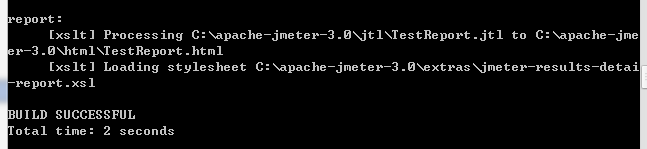
运行后会提示:UTF-8编码错误,改成utf8就可以啦
打开html文件夹下的报告

数据出来了
ANT+JMETER集成1(生成报告)的更多相关文章
- Jenkins+Ant+JMeter集成
Tomcat是jenkins运行的容器,jenkins实际上是依赖于Tomcat才能启动的.Jenkins可以调度ant的脚本. Ant和maven类似,maven是执行pom文件,ant是执行bui ...
- ANT+JMETER集成
一.ant安装 环境准备: 1.安装jdk http://www.oracle.com/technetwork/java/javase/downloads/index.html 注意:最好与jmete ...
- ANT+JMETER集成2 (发送邮件)
折腾一天发现各种build源码都不能发送邮件,试了很多次,终于能发送邮件 先看成果 build源码贴出来 <?xml version="1.0" encoding=" ...
- jenkins+jmeter+ant+jmeter在Jenkins上报告
1.jmeter+ant 参考 http://www.cnblogs.com/dieyaxianju/p/8268802.html 2.在jenkins上配置 3.执行成功 4.配置报告 参考 下载 ...
- 通过no-gui模式运行jmeter脚本与生成报告
说明:使用NO-GUI 模式,即命令行模式运行 JMeter 测试脚本能够大大缩减所需要的系统资源. 步骤:在GUI(图形化界面)模式调整好脚本,通过FTP工具将需要测试的.jmx文件传输到linux ...
- ANT+JMETER集成3 (添加邮件附件)
在build.xml文件<email>中加入下面几行代码 <fileset dir="C:\apache-jmeter-3.0\html/"> <in ...
- Jenkins + Jmeter +Ant自动化集成环境搭建(一)
所需工具 一.jmeter 工具下载 https://jmeter.apache.org/ 配置环境JDK等及各种插件可以看小七之前的教程 二.Ant安装(http://ant.apache.org ...
- Jenkins+Ant+JMeter报告自动化
1.参考Jenkins+Ant+JMeter集成,安装Jenkins(不需要安装Performance Plugin插件),建立Slave节点,连接Slave节点,创建任务等. 2.将Jenkins+ ...
- jmeter学习记录--09--命令行运行与生成报告
一. 使用命令行方式运行Jmeter 1.1 为什么 使用GUI方式启动jmeter,运行线程较多的测试时,会造成内存和CPU的大量消耗,导致客户机卡死. 所以正确的打开方式是在GUI模式下调 ...
随机推荐
- CSU-1632 Repeated Substrings[后缀数组求重复出现的子串数目]
评测地址:https://cn.vjudge.net/problem/CSU-1632 Description 求字符串中所有出现至少2次的子串个数 Input 第一行为一整数T(T<=10)表 ...
- FFF at Valentine(强连通分量缩点+拓扑排序)
FFF at Valentine Time Limit: 6000/3000 MS (Java/Others) Memory Limit: 65536/65536 K (Java/Others) ...
- Permutation Descent Counts(递推)
1968: Permutation Descent Counts Submit Page Summary Time Limit: 1 Sec Memory Limit: 128 Mb ...
- QL 获取当前日期,年、月、日、周、时、分、秒
?select GETDATE() as '当前日期', DateName(year,GetDate()) as '年', DateName(month,GetDate()) as '月', Date ...
- JavaScript处理数据完成左侧二级菜单的搭建
我们在项目中应用的后台管理框架基本上都是大同小异,左侧是一个二级菜单,点击选中的菜单,右侧对应的页面展示.我把前端页面封装数据的过程整理了一下,虽然不一定适合所有的管理页面,仅作为案例来参考,只是希望 ...
- mailing list的原理
1 发往mailing list邮箱的邮件会被所有订阅了该邮箱的人收到 说白了,就是一种邮件群发机制,为了简化群发,不是将所有的收件人放到收件人列表中,而是发往总的邮箱即可. 2 要向该mailing ...
- mysql数据库补充知识4 数据备份和pymysql模块
一 介绍 #注意: 批量加注释:ctrl+?键 批量去注释:ctrl+shift+?键 二 MySQL数据备份 #1. 物理备份: 直接复制数据库文件,适用于大型数据库环境.但不能恢复到异构系统中如W ...
- [笔记]如何将传统的回调函数转换为C#5.0支持的await格式
C#5.0引入了编译器支持的 async 和 await 关键字,这就为开发者提供了使用同步思想写异步代码的方便. 但是有些传统函数仅提供了异步回调实现,如何对其封装,使其可以享受await的便利呢? ...
- LeetCode:二进制求和【67】
LeetCode:二进制求和[67] 题目描述 给定两个二进制字符串,返回他们的和(用二进制表示). 输入为非空字符串且只包含数字 1 和 0. 示例 1: 输入: a = "11" ...
- 42和为S的两个数字
题目描述 输入一个递增排序的数组和一个数字S,在数组中查找两个数,是的他们的和正好是S,如果有多对数字的和等于S,输出两个数的乘积最小的. 输出描述: 对应每个测试案例,输出两个数,小的先输出. 设置 ...