
DI 依赖注入之unity的MVC版本使用Microsoft.Practices.Unity1.2与2.0版本对比
DI 依赖注入之unity的MVC版本使用Microsoft.Practices.Unity1.2与2.0版本对比
参考:https://www.cnblogs.com/xishuai/p/3670292.html
必读:
在unity1.2中我们使用构造器注入、属性注入和方法注入会有parameterType节点,就是说在constructor、property和method这些节点可以配置这些方式注入所依赖的类型,但是在unity2.0并不存在parameterType节点了,所有类型注册都是通过register节点进行配置的,相当于unity1.2中的type节点,虽然unity2.0存在constructor、property和method节点,但我感觉只是针对构造器、属性和方法本身进行注入。另外在unity2.0配置中alias节点下的生命管理周期配置并不需要了。
一.下载安装:
Microsoft.Practices.Unity.dll
Microsoft.Practices.Unity.Configuration.dll
下载地址:
二.配置:
1.在App_Start文件夹下创建UnityConfig.cs文件
using Microsoft.Practices.Unity;

using Microsoft.Practices.Unity.Configuration;

using System;

using System.Collections.Generic;

using System.Configuration;

using System.Linq;

using System.Web;

using System.Web.Mvc;

using ZLP.BLL;

using ZLP.DAL;

using ZLP.IBLL;

using ZLP.IDAL;

using ZLP.MVC.Controllers;

namespace ZLP.MVC

{

    public class UnityConfig

    {

        public static void RegisterComponents()

        {

            var container = new UnityContainer();

            //代码注入

           // container.RegisterType<IUserDAL, UserDAL>();

            //container.RegisterType<IUserBLL, UserBLL>();

            //配置文件注入

            var section=(UnityConfigurationSection)ConfigurationManager.GetSection(UnityConfigurationSection.SectionName);

            section.Configure(container);

            DependencyResolver.SetResolver(new ZLPDependencyResolver(container));

        }

    }

}
2.在App_Start文件夹下创建ZLPDependencyResolver.cs文件(创建一个实现IDependencyResolver的类)
using Microsoft.Practices.Unity;

using System;

using System.Collections.Generic;

using System.Linq;

using System.Web;

using System.Web.Mvc;

namespace ZLP.MVC

{

    public class ZLPDependencyResolver : IDependencyResolver

    {

        public ZLPDependencyResolver(IUnityContainer container)

        {

            this.container = container;

        }

        IUnityContainer container;

        public object GetService(Type serviceType)

        {

            try

            {

                return this.container.Resolve(serviceType);

            }

            catch (Exception)

            {

                return null;

            }

        }

        public IEnumerable<object> GetServices(Type serviceType)

        {

            try

            {

                return this.container.ResolveAll(serviceType);

            }

            catch (Exception)

            {

                return Enumerable.Empty<object>();

            }

        }

    }

}
3.在Global文件中Application_Start方法中增加一行代码
using System;

using System.Collections.Generic;

using System.Linq;

using System.Web;

using System.Web.Mvc;

using System.Web.Optimization;

using System.Web.Routing;

namespace ZLP.MVC

{

    public class MvcApplication : System.Web.HttpApplication

    {

        protected void Application_Start()

        {

            AreaRegistration.RegisterAllAreas();

            UnityConfig.RegisterComponents();//增加unity的方法调用

            FilterConfig.RegisterGlobalFilters(GlobalFilters.Filters);

            RouteConfig.RegisterRoutes(RouteTable.Routes);

            BundleConfig.RegisterBundles(BundleTable.Bundles);

        }

    }

}
using System;

using System.Collections.Generic;

using System.Linq;

using System.Web;

using System.Web.Mvc;

using System.Web.Optimization;

using System.Web.Routing;

namespace ZLP.MVC

{

    public class MvcApplication : System.Web.HttpApplication

    {

        protected void Application_Start()

        {

            AreaRegistration.RegisterAllAreas();

            UnityConfig.RegisterComponents();//增加unity的方法调用

            FilterConfig.RegisterGlobalFilters(GlobalFilters.Filters);

            RouteConfig.RegisterRoutes(RouteTable.Routes);

            BundleConfig.RegisterBundles(BundleTable.Bundles);

        }

    }

}
using System;

using System.Collections.Generic;

using System.Linq;

using System.Web;

using System.Web.Mvc;

using System.Web.Optimization;

using System.Web.Routing;

namespace ZLP.MVC

{

    public class MvcApplication : System.Web.HttpApplication

    {

        protected void Application_Start()

        {

            AreaRegistration.RegisterAllAreas();

            UnityConfig.RegisterComponents();//增加unity的方法调用

            FilterConfig.RegisterGlobalFilters(GlobalFilters.Filters);

            RouteConfig.RegisterRoutes(RouteTable.Routes);

            BundleConfig.RegisterBundles(BundleTable.Bundles);

        }

    }

}
三.配置文件:
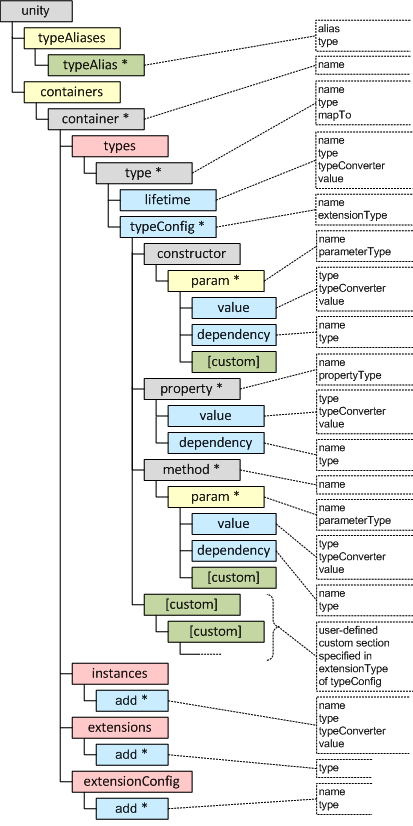
版本:1.2
1.2中的节点:
  <configSections>

    <section name="unity" type="Microsoft.Practices.Unity.Configuration.UnityConfigurationSection, Microsoft.Practices.Unity.Configuration"/>

  </configSections>

  <unity>

    <typeAliases>

      <typeAlias alias="IUserBLL" type="ZLP.IBLL.IUserBLL,ZLP.IBLL" />

      <typeAlias alias="UserBLL" type="ZLP.BLL.UserBLL,ZLP.BLL" />

    </typeAliases>

    <containers>

      <container name="defaultContainer">

        <type type="IUserBLL" mapTo="UserBLL" name="a"></type >

      </container>

    </containers>

  </unity>
版本:2.0
2.0中节点变更为如下:
- The <unity> Configuration Section
- The <container> Element
- The <register> Element
- The <lifetime> Element
- The <constructor> Element
- The <property> Element
- The <method> Element
- The <param> Element
- The <dependency> Element
- The <value> Element
- The <optional> Element
- The <array> Element
- The <extension> Element
- The <instance> Element
- The <namespace > Element
- The <alias> Element
- The <sectionExtension> Element
<configSections>

    <section name="unity" type="Microsoft.Practices.Unity.Configuration.UnityConfigurationSection, Microsoft.Practices.Unity.Configuration" />

  </configSections>

  <unity>

    <alias alias="IUserDAL" type="ZLP.IDAL.IUserDAL,ZLP.IDAL" />

    <alias alias="UserDAL" type="ZLP.DAL.UserDAL,ZLP.DAL" />

    <alias alias="IUserBLL" type="ZLP.IBLL.IUserBLL,ZLP.IBLL" />

    <alias alias="UserBLL" type="ZLP.BLL.UserBLL,ZLP.BLL" />

    <container>

      <register type="IUserDAL" mapTo="UserDAL"></register>

      <register type="IUserBLL" mapTo="UserBLL"></register>

    </container>

  </unity>
- 详细的查看官方地址:https://docs.microsoft.com/en-us/previous-versions/msp-n-p/ff660914(v=pandp.20)?redirectedfrom=MSDN#config_registerelement
DI 依赖注入之unity的MVC版本使用Microsoft.Practices.Unity1.2与2.0版本对比的更多相关文章
- DI 依赖注入之unity(mvc)
DI 依赖注入之unity(使用unity.mvc) 一.nuget下载安装: 使用Nuget安装Unity.MVC 安装完成后会在~/App_Start/目录下自动生成UnityMvcActivat ...
- AutoFac IoC DI 依赖注入
AutoFac IoC DI 依赖注入 记录点点滴滴知识,为了更好的服务后来者! 一.为什么使用AutoFac? 之前介绍了Unity和Ninject两个IOC容器,但是发现园子里用AutoFac的貌 ...
- DI 依赖注入之StructureMap框架
DI 依赖注入之StructureMap框架 一.简叙: structureMap只是DI框架中的其中之一. 二.安装及使用: 1.懒人方法: 使用MVC5项目时,可以直接在nuget程序包中安装S ...
- 控制反转、依赖注入、Unity容器
控制反转原则 依赖注入 Install-Package Unity:https://www.nuget.org/packages/Unity/ Github:https://github.com/un ...
- 谈谈php里的IOC控制反转,DI依赖注入
理论 发现问题 在深入细节之前,需要确保我们理解"IOC控制反转"和"DI依赖注入"是什么,能够解决什么问题,这些在维基百科中有非常清晰的说明. 控制反转(In ...
- 依赖注入与Unity(一) 介绍
在你学习依赖注入和Unity之前,你需要明白你为什么要使用它们.为了明白为什么要使用它们,你应该明白依赖注入和Unity能够帮助你解决什么类型的问题.作为介绍部分,这一章不会涉及太多关于Uni ...
- 【依赖注入】Unity和Autofac
全面理解ASP.NET Core依赖注入:https://www.cnblogs.com/jesse2013/p/di-in-aspnetcore.html MSDN:https://docs.mic ...
- IoC 依赖注入容器 Unity
原文:IoC 依赖注入容器 Unity IoC 是什么? 在软件工程领域,“控制反转(Inversion of Control,缩写为IoC)”是一种编程技术,表述在面向对象编程中,可描述为在编译时静 ...
- 依赖注入之unity(winform方式)
依赖注入之unity(winform方式) 要讲unity就必须先了解DI和IOC及DIP,如下链接提供DI和IOC的基础:https://www.cnblogs.com/zlp520/p/12015 ...
随机推荐
- 获取PostgreSQL数据库中得JSON值
在PostgreSQL数据库中有一列为JSON,要获取JSON中得数据可以用下面sql: select orderno as OrderNo ,amount as Amount ,ordertime ...
- Flask基于websocket的简单聊天室
1.安装gevent-websocket pip install -i https://pypi.tuna.tsinghua.edu.cn/simple/ gevent-websocket 2.cha ...
- javascript format 字符串 函数
函数实现如下: function format(string) { var args = arguments; var pattern = new RegExp("%([1-" + ...
- ES6 变量与解构(二)
一.变量的声明与使用 [测试示例需要在node环境中测试,浏览器环境下并不完全兼容ES6代码]ES6中可以使用 {} 来包含任意一段代码,被 {} 包裹的内容称为一个代码块(局部作用域) let关键字 ...
- 记录下vue 中引用echarts 出现 "TypeError: Cannot read property 'getAttribute' of undefined"问题
今天做项目,用echarts展示数据 ,自己测试 先测试 了下.写的代码html: <div ref="myChart" style="height:300px;w ...
- ios证书制作与上架指南
项目开发完了,要上架 ios AppStore 记录一下经过,以及需要提前准备和预防的东西,以便下次省心! 一.首先要申请开发者账号: 账号按流程注册申请,当时申请了够10遍,总结以下经验: 1.申请 ...
- python调用函数设置超时机制
有时候需要给函数设置超时机制,以防止它卡住我们的程序,这里可以用python的signal模块,signal模块可以实现程序内部的信号处理. # coding:utf8 import time imp ...
- 浅析Volatile关键字
浅析Volatile关键字 在java中线程并发中,线程之间通信方式分为两种:共享内存和消息传递.共享内存指的是多个线程之间共享内存的属性状态:消息传递指的是线程之间发送信息来通信.在介绍volati ...
- 实时通讯之Socket.io
WebSocket WebSocket是HTML5开始提供的一种浏览器与服务器间进行全双工通讯的网络技术.使用WebSocket,浏览器和服务器只需要要做一个握手的动作,然后,浏览器和服务器之间就形成 ...
- 在windows下安装Superset
前言 最近想用一下Superset,这个是一个开源项目,可以直接通过写sql来生成图表,有时候对一些图表需求比较多的时候,可以用的上. Superset是由Airbnb(知名在线房屋短租公司)开源BI ...