
cratedb 做为prometheus 的后端存储
prometheus 提供了remote_write 以及remote_read 的数据存储方式,可以帮助我们进行数据的长时间存储、方便查询
cratedb 提供了对应的adapter,可以直接进行适配。
以下演示一个简单的cratedb 集群以及通过write 以及read 存储通过grok exporter 暴露的日记prometheus metrics
环境准备
- 数据请求流程
inputlog->grok exporter -> prometheus->cratedb adpater->cratedb cluster - docker-compose 文件
version: "3"
services:
grafana:
image: grafana/grafana
ports:
- "3000:3000"
prometheus:
image: prom/prometheus
volumes:
- "./prometheus.yml:/etc/prometheus/prometheus.yml"
ports:
- "9090:9090"
cratedb-adapter:
image: crate/crate_adapter
command: -config.file /opt/config/config.yml
ports:
- "9268:9268"
volumes:
- "./cratedb-adapter:/opt/config"
grok:
image: dalongrong/grok-exporter
volumes:
- "./grok/example:/opt/example"
- "./grok/grok.yaml:/grok/config.yml"
ports:
- "9144:9144"
crate1:
image: crate
volumes:
- "./cratedb/data1:/data"
- "./cratedb/1.yaml:/crate/config/crate.yml"
ports:
- "4200:4200"
- "4300:4300"
- "5432:5432"
crate2:
image: crate
volumes:
- "./cratedb/data2:/data"
- "./cratedb/2.yaml:/crate/config/crate.yml"
ports:
- "4201:4200"
- "4301:4300"
- "5433:5432"
crate3:
image: crate
volumes:
- "./cratedb/data3:/data"
- "./cratedb/3.yaml:/crate/config/crate.yml"
ports:
- "4202:4200"
- "4302:4300"
- "5434:5432"
- prometheus 配置
通过静态配置的方式添加target,统计配置了remote_write 以及remote_read
scrape_configs:
- job_name: grok
metrics_path: /metrics
scrape_interval: 10s
scrape_timeout: 10s
static_configs:
- targets: ['grok:9144']
- job_name: cratedb-adapter
metrics_path: /metrics
scrape_interval: 10s
scrape_timeout: 10s
static_configs:
- targets: ['cratedb-adapter:9268']
remote_write:
- url: http://cratedb-adapter:9268/write
remote_read:
- url: http://cratedb-adapter:9268/read
- cratedb 集群配置
当前使用的是社区版本,对于集群模式,最大支持的是3个节点的,但是一般场景也够用了
- node1 配置
cluster.name: cratecluster
node.name: crate1
node.master: true
node.data: true
http.port: 4200
psql.port: 5432
transport.tcp.port: 4300
discovery.seed_hosts: ["crate1"]
cluster.initial_master_nodes: ["crate1"]
http.cors.enabled: true
http.cors.allow-origin: "*"
gateway.expected_nodes: 3
gateway.recover_after_nodes: 2
gateway.recover_after_time: 5m
network.host: _local_,_site_
path.logs: /data/log
path.data: /data/data
blobs.path: /data/blobs
- node2 配置
cluster.name: cratecluster
node.name: crate2
node.master: false
node.data: true
http.port: 4200
psql.port: 5432
transport.tcp.port: 4300
discovery.seed_hosts: ["crate1"]
cluster.initial_master_nodes: ["crate1"]
http.cors.enabled: true
http.cors.allow-origin: "*"
gateway.expected_nodes: 3
gateway.recover_after_nodes: 2
gateway.recover_after_time: 5m
network.host: _local_,_site_
path.logs: /data/log
path.data: /data/data
blobs.path: /data/blobs
- node3 配置cluster.name: cratecluster
node.name: crate3
node.master: false
node.data: true
http.port: 4200
psql.port: 5432
transport.tcp.port: 4300
discovery.seed_hosts: ["crate1"]
cluster.initial_master_nodes: ["crate1"]
http.cors.enabled: true
http.cors.allow-origin: "*"
network.host: _local_,_site_
gateway.expected_nodes: 3
gateway.recover_after_nodes: 2
gateway.recover_after_time: 5m
path.logs: /data/log
path.data: /data/data
blobs.path: /data/blobs
- grok exporter配置
定义的日志匹配模式
global:
config_version: 2
input:
type: file
path: /opt/example/examples.log
readall: true
grok:
patterns_dir: ./patterns
metrics:
- type: counter
name: grok_example_lines_total
help: Counter metric example with labels.
match: '%{DATE} %{TIME} %{USER:user} %{NUMBER}'
labels:
user: '{{.user}}'
server:
port: 9144
- cratedb adapter 配置
暴露write 以及read 服务,因为使用集群模式,所以我 配置了多个节点
crate_endpoints:
- host: "crate1" # Host to connect to (default: "localhost").
port: 5432 # Port to connect to (default: 5432).
user: "crate" # Username to use (default: "crate")
password: "" # Password to use (default: "").
schema: "" # Schema to use (default: "").
max_connections: 5 # The maximum number of concurrent connections (default: 5).
enable_tls: false # Whether to connect using TLS (default: false).
allow_insecure_tls: false # Whether to allow insecure / invalid TLS certificates (default: false).
- host: "crate2" # Host to connect to (default: "localhost").
port: 5432 # Port to connect to (default: 5432).
user: "crate" # Username to use (default: "crate")
password: "" # Password to use (default: "").
schema: "" # Schema to use (default: "").
max_connections: 5 # The maximum number of concurrent connections (default: 5).
enable_tls: false # Whether to connect using TLS (default: false).
allow_insecure_tls: false # Whether to allow insecure / invalid TLS certificates (default: false).
- host: "crate3" # Host to connect to (default: "localhost").
port: 5432 # Port to connect to (default: 5432).
user: "crate" # Username to use (default: "crate")
password: "" # Password to use (default: "").
schema: "" # Schema to use (default: "").
max_connections: 5 # The maximum number of concurrent connections (default: 5).
enable_tls: false # Whether to connect using TLS (default: false).
allow_insecure_tls: false # Whether to allow insecure / invalid TLS certificates (default: false).
- metrics 的table
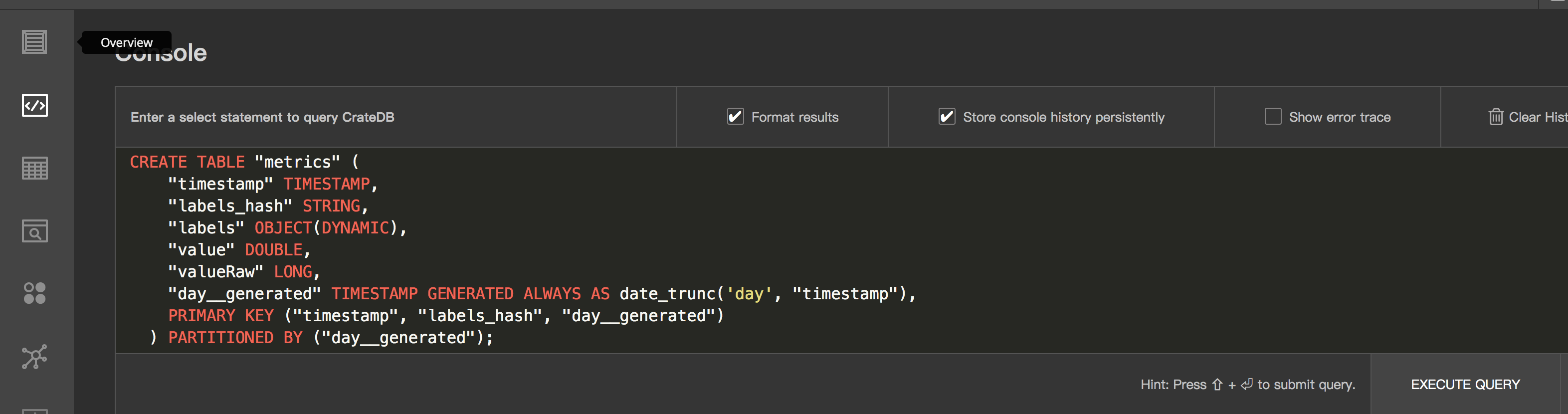
使用cratedb 我们需要先定义table,table 的schema 定义官方提供了模版
CREATE TABLE "metrics" (
"timestamp" TIMESTAMP,
"labels_hash" STRING,
"labels" OBJECT(DYNAMIC),
"value" DOUBLE,
"valueRaw" LONG,
"day__generated" TIMESTAMP GENERATED ALWAYS AS date_trunc('day', "timestamp"),
PRIMARY KEY ("timestamp", "labels_hash", "day__generated")
) PARTITIONED BY ("day__generated");
启动&&测试
- 启动集群
docker-compose up -d
- 效果

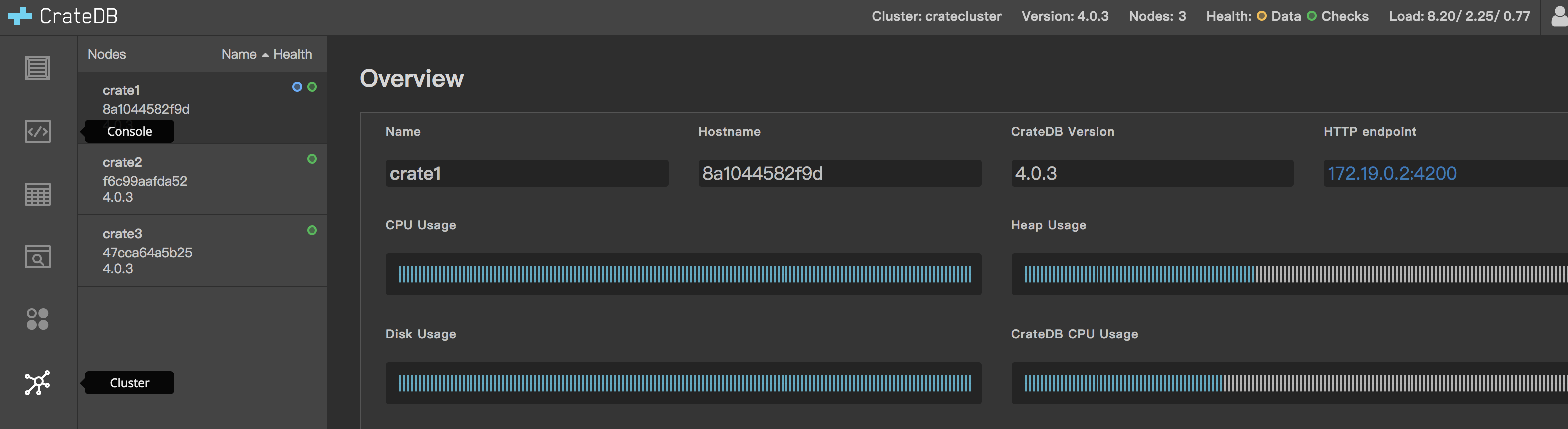
- 通过admin ui 创建table
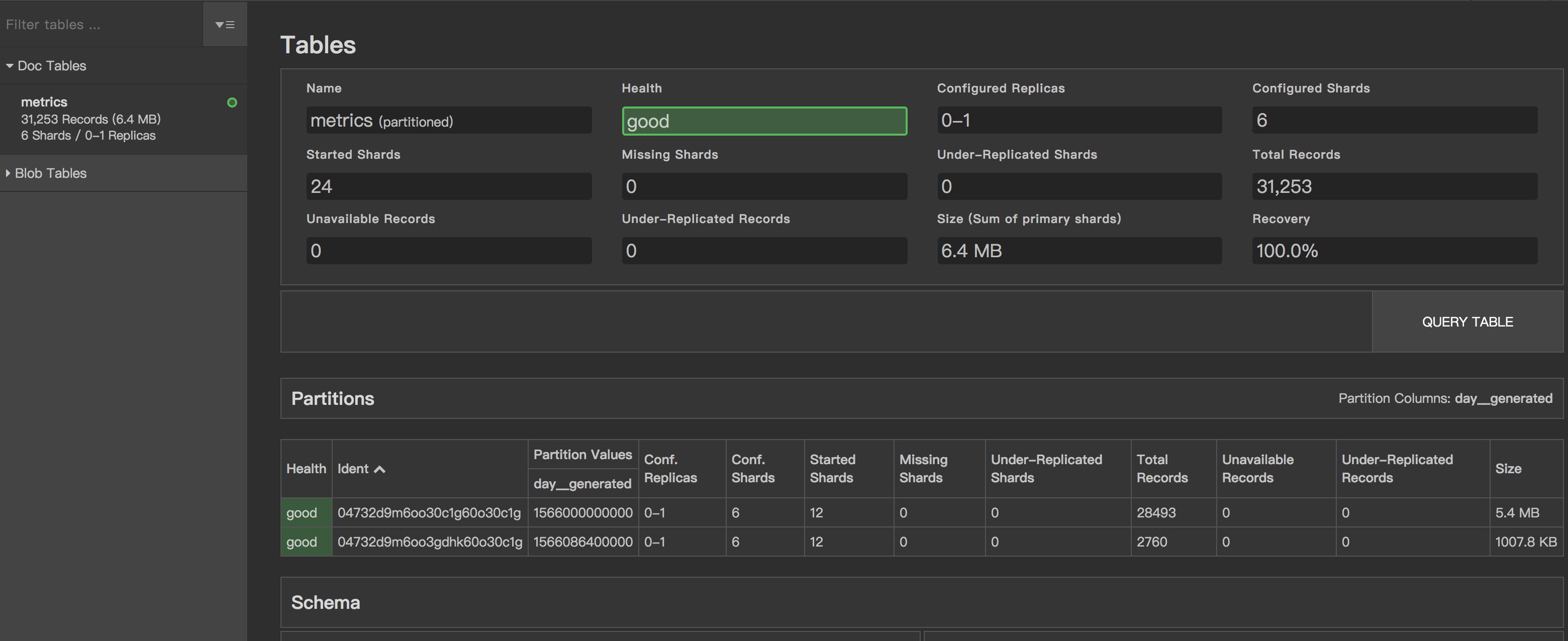
- 写入数据统计
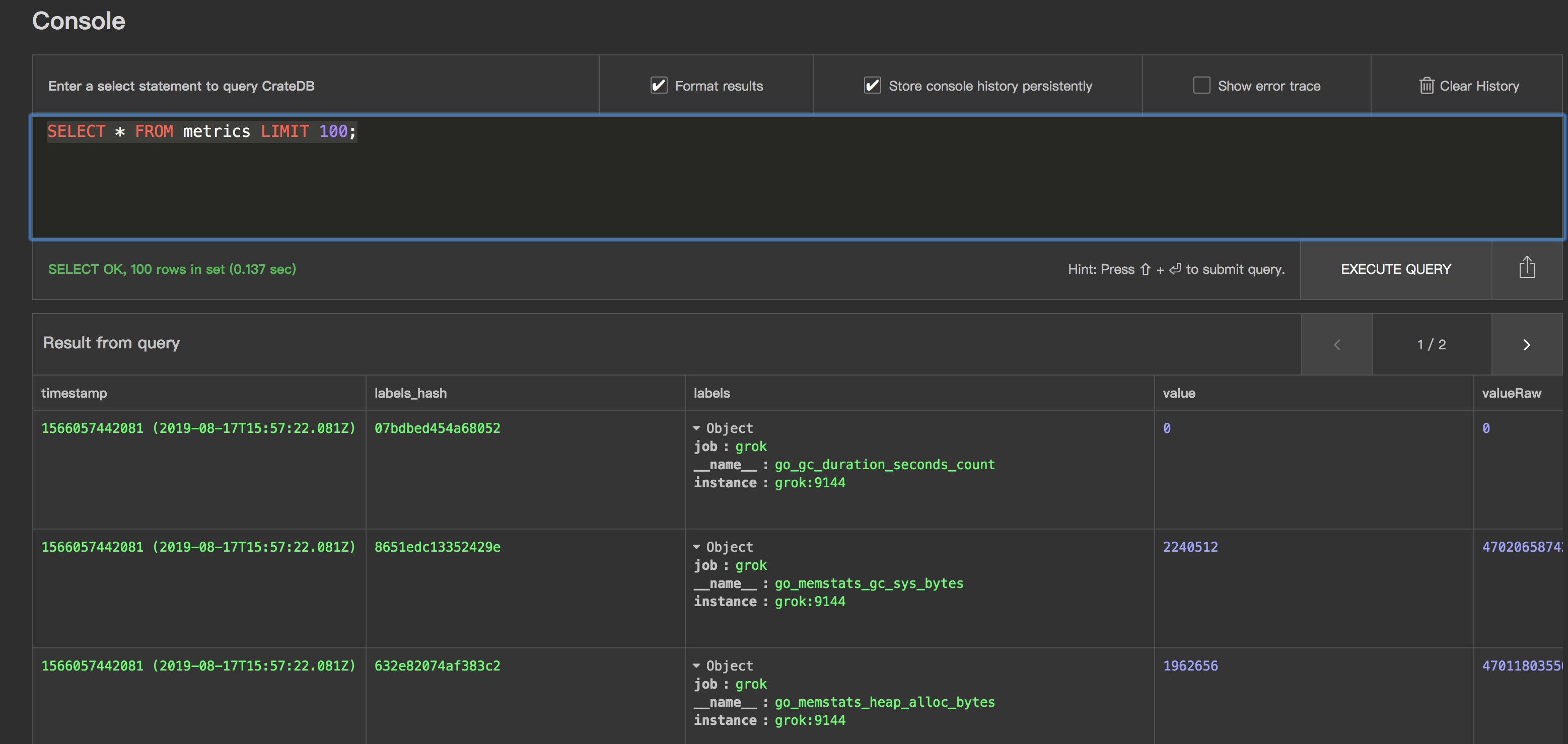
- 数据查询效果
说明
使用crate adapter 进行mtrics 数据的持久化存储也是一个不错的选择,以上演示没有包含关于grafana与prometheus 的集成,可以参考github
的完整配置自己添加下,这样就相对完整了,同时因为暴露了pg 协议的数据,我们可以直接通过grafanna 进行数据查看,展示。
参考资料
https://github.com/crate/crate_adapter
https://github.com/crate/crate
https://crate.io/docs/crate/reference/en/latest/config/cluster.html
https://github.com/fstab/grok_exporter
https://github.com/rongfengliang/prometheus-cratedb-cluster-docker-compose
cratedb 做为prometheus 的后端存储的更多相关文章
- 使用 opendistro for elasticsearch 做为graylog的后端存储
graylog 是一个很不错的日志分析.收集.报警平台,包好了丰富的插件,同时内部的架构设计很不错 input 组件很多,使用stream.pipeline可以方便的进行数据处理,可以同时3.0 对于 ...
- jaeger使用yugabyte作为后端存储的尝试以及几个问题
前边写过使用scylladb 做为jaeger 的后端存储,还是一个不错选择的包括性能以及 兼容性,对于 yugabyte 当前存在兼容性的问题,需要版本的支持,或者尝试进行一些变动 create 语 ...
- Flocker 做为后端存储代理 docker volume-driver 支持
docker Flocker https://github.com/ClusterHQ/flocker/ 文档: https://docs.clusterhq.com/en/latest/docker ...
- Openstack_后端存储平台Ceph
框架图 介绍 一种为优秀的性能.可靠性和可扩展性而设计的统一的.分布式文件系统 特点 CRUSH算法 Crush算法是ceph的两大创新之一,简单来说,ceph摒弃了传统的集中式存储元数据寻址的方案, ...
- 9 云计算系列之Cinder的安装与NFS作为cinder后端存储
preface 在前面我们知道了如何搭建Openstack的keystone,glance,nova,neutron,horizon这几个服务,然而在这几个服务中唯独缺少存储服务,那么下面我们就学习块 ...
- OpenStack Cinder 与各种后端存储技术的集成叙述与实践
先说下下loop设备 loop设备及losetup命令介绍 1. loop设备介绍 在类 UNIX 系统里,loop 设备是一种伪设备(pseudo-device),或者也可以说是仿真设备.它能使我们 ...
- influxdb和boltDB简介——MVCC+B+树,Go写成,Bolt类似于LMDB,这个被认为是在现代kye/value存储中最好的,influxdb后端存储有LevelDB换成了BoltDB
influxdb influxdb是最新的一个时间序列数据库,最新一两年才产生,但已经拥有极高的人气.influxdb 是用Go写的,0.9版本的influxdb对于之前会有很大的改变,后端存储有Le ...
- Openstack使用NFS作为后端存储
续:Openstack块存储cinder安装配置 接上使用ISCSI作为后端存储,使用NFS作为后端存储配置 参考官方文档:https://wiki.openstack.org/wiki/How_to ...
- [转帖]influxdb和boltDB简介——MVCC+B+树,Go写成,Bolt类似于LMDB,这个被认为是在现代kye/value存储中最好的,influxdb后端存储有LevelDB换成了BoltDB
influxdb和boltDB简介——MVCC+B+树,Go写成,Bolt类似于LMDB,这个被认为是在现代kye/value存储中最好的,influxdb后端存储有LevelDB换成了BoltDB ...
随机推荐
- 关于MVC与三层架构
详情 回答一: 当然啊,你要明白三层架构的MVC的区别和联系: 三层架构是最基本的项目分层结果,而MVC则是三层架构的一个变体,MVC是一种好的开发模式.首先你要明白MVC分别代表的是什么意思. M ...
- docker学习之路-build asp.net core 2.2产生 warning MSB3245: Could not resolve this reference.错误的解决办法
在docker build的时候有时我们可以直接使用dotnet publish来发布,但是如果用docker构建镜像的时候却会出现下面的错误: 解决办法:https://stackoverflow. ...
- Spring项目中的数据库加密
有时候为了安全,我们需要对数据库密码进行加密: SpringDruid数据源加密数据库密码 当我们初步开始打造系统时,什么都没有一片空白,而数据源使用的是SpringDruid时,我们可以通过这篇博客 ...
- vue + yarn 项目开发 (一)
1.打开src文件夹中的main.js文件,添加引用element ui框架 import ElementUI from 'element-ui' import 'element-ui/lib/the ...
- OpenFire后台插件上传获取webshell及免密码登录linux服务器
1.目标获取 (1)fofa.so网站使用搜索body="Openfire, 版本: " && country=JP,可以获取日本存在的Openfire服务器.如图 ...
- 内网漫游之SOCKS代理大结局
0×01 引言 在实际渗透过程中,我们成功入侵了目标服务器.接着我们想在本机上通过浏览器或者其他客户端软件访问目标机器内部网络中所开放的端口,比如内网的3389端口.内网网站8080端口等等.传统的方 ...
- Java学习之:Spring的扩展配置
1.在配置文件applicationContext.xml中,引入相关的配置文件方式: 2.使用Jndi数据源的方式改造配置文件applicationContext.xml: 3.注释配置文件appl ...
- AI涉及到数学的一些面试题汇总
[LeetCode] Maximum Product Subarray的4种解法 leetcode每日解题思路 221 Maximal Square LeetCode:Subsets I II (2) ...
- 微服务spring-cloud 学习第一天
了解微服务 微服务架构风格是一种将单一应用程序开发为一组小型服务的方法,每个服务运行在自己的进程中,服务间通信采用轻量级通信机制(通常使用HTTP).这些服务围绕业务能力构建并且可通过自动部署 ...
- 宝塔面板1G内存安装mysql5.7提示“至少需要XX兆内存”的解决办法
打开文件:/www/server/panel/class/panelPlugin.py 搜索关键词:“至少” (可能在134行) 然后把这行if语句注释掉,如下图: