
Web运行控制台输出乱码解决总结
<!DOCTYPE html>

<html lang="en">

<head>

    <meta charset="UTF-8">

    <title>Title</title>

</head>

<body>

    <form action="/AServlet" method="post">

        用户名:<input type="text" name="username" value="李四"/><br/>

        <input type="submit" value="提交">

    </form>

    <hr/>

    <a href="/AServlet?username=张三">GET</a>

</body>

</html>
 @WebServlet(name = "AServlet",urlPatterns = "/AServlet")

 public class AServlet extends HttpServlet {

     public void doPost(HttpServletRequest request, HttpServletResponse response)

             throws ServletException, IOException {

         request.setCharacterEncoding("utf-8");

         String username = request.getParameter("username");

         response.setContentType("text/html;charset=utf-8");

         PrintWriter out = response.getWriter();

         out.print(username);

         System.out.println(username);

     }

     protected void doGet(HttpServletRequest request, HttpServletResponse response)

             throws ServletException, IOException {

         String name = request.getParameter("username");

         response.setContentType("text/html;charset=utf-8");

         PrintWriter out = response.getWriter();

         out.print(name);

         System.out.println(name);

     }

 }
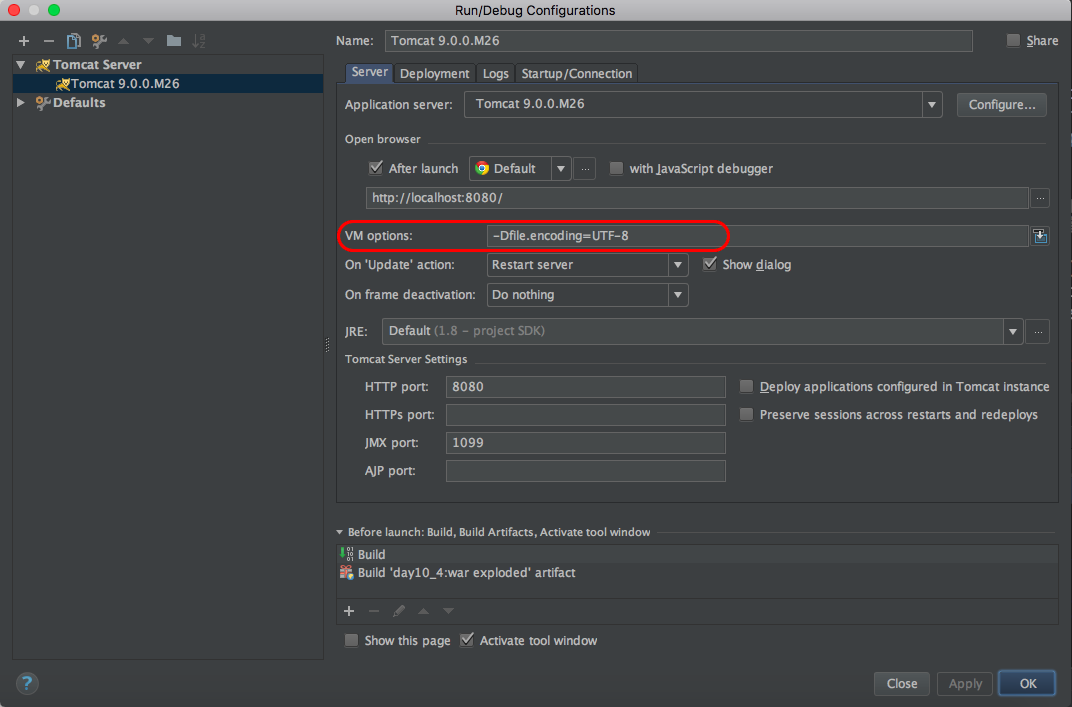
使用:chrome Version 60.0.3112.113,结果:控制台输出正常。
使用:QQBrowser Version 4.2.4761.400 (64-bit),结果:控制台输出正常。
使用:Safari Version 10.1.2 (12603.3.8),结果:控制台输出正常。
使用:Firefox 55.0.3 (64 位),结果:控制台输出正常。
更换操作系统为中文,结果一致,排除系统语言方面原因。
注意:如果使用doPost()方法获取表单,则需在获取参数前设置: request.setCharacterEncoding("utf-8"); 否则会控制台会出现乱码。
参考:http://blog.csdn.net/rznice/article/details/41006913
Web运行控制台输出乱码解决总结的更多相关文章
- Eclipse设置之:代码注释/server 控制台输出乱码解决
1 Eclipse设置 Configure clean up style The location is here: And the configuration should fo ...
- Spring Boot2解决idea console 控制台输出乱码
Idea默认配置是采用GBK, 而项目工程文件采用的是UTF-8. 编码不一致,导致idea Console控制台输出乱码. 网上的解决方案,大都是直接修改Settings=>Editor=&g ...
- 解决Tomcat控制台输出乱码问题
解决Tomcat控制台输出乱码问题 打开Edit Configuration,在VM options一栏输入 -Dfile.encoding=UTF-8 然后到IDEA的bin目录找到 idea64. ...
- CRT远程连接server字符输出乱码解决一例
CRT远程连接server字符输出乱码解决一例 环境: server:Centos 6.2 远端:win 7 CRT版本号:7.1.1 现象回想: 1.server端:中文字符显示正常,例如以下: 2 ...
- [WDS] Warnings while compiling. vue 项目运行控制台输出太多警告信息
vue项目运行控制台输出太多警告信息,我们需要vue 忽略警告, 解决方法:找到build/webpack.base.conf.js 文件 注释掉: // ...(config.dev.useEsl ...
- Eclipse中执行Maven命令时控制台输出乱码
Maven 默认编码为 GBK: 在 Eclipse 控制台输出乱码: 解决方法:将以下代码添加到 pom.xml 的 <project> 节点下: <project> …… ...
- [WDS] Warnings while compiling. vue项目运行控制台输出太多警告信息
vue项目运行控制台输出太多警告信息,我们需要vue 忽略警告,如Expected indentation of 0 spaces but found 2 这种警告都提示,很影响视觉体验! 解 ...
- Maven 执行Javadoc时控制台输出乱码问题
1.0 Maven 执行Javadoc时控制台输出乱码问题 问题描述 最近项目中使用maven-javadoc-plugin生成javadoc时,myEclipse控制台乱码. 插件配置 问题分析 ...
- eclipse控制台中文乱码解决
Eclipse控制台中的中文输出乱码问题 博客分类: MySql EclipseTomcatXMLWeb 今天做S2SH集成的例子,所有该设置的地方都设置成了UTF-8,包括tomcat的配置文件s ...
随机推荐
- npm 查看express版本
npm list 名称 eg: npm list express
- Display all 2232 possibilities? (y or n)
Linux下我在没输入任何命令的情况下摁了两下tab键,然后就出现了这个提示:Display all 2232 possibilities? (y or n) 我觉得摁y的话就会显示所有的现阶段命令. ...
- How to write date range query in Nest ElasticSearch client?
Looking at the source code, there are two overloads of the OnField method. When I use the the that t ...
- (转)Javascript模块化编程(二):AMD规范
转自 ruanyifeng 系列目录: Javascript模块化编程(一):模块的写法 Javascript模块化编程(二):AMD规范 Javascript模块化编程(三):Require.js的 ...
- 何在不联网的情况下ping通主机与虚拟机
选择NAT模式,VM对windows选择ping操作时选择VMnet8的IP地址.
- linux inotifywait 下监控是否有IO
帮助: JDU:/host-001e67a8d50b /log/today # inotifywait -h inotifywait 3.14 Wait for a particular event ...
- 安装Ubunutu音频视频库
sudo apt-get install ubuntu-restricted-extras
- InnoDB的后台线程(IO线程,master线程,锁监控线程,错误监控线程)和内存(缓冲池,重做日志缓冲池,额外内存池)
InnoDB有多个内存块,你可以认为这些内存块组成了一个大的内存池,负责如下工作: 维护所有进程/线程需要访问的多个内部数据结构. 缓存磁盘上的数据,方便快速地读取,并且在对磁盘文件的数据进行修改之前 ...
- JavaScript函数——闭包
闭包 概念 只有函数内部的子函数才能读取局部变量,所以闭包可以理解成"定义在一个函数内部的函数".在本质上,闭包是将函数内部和函数外部连接起来的桥梁 例子 function out ...
- LOJ #6022. 重组病毒
Description 支持以下操作 1.access一个点 2.问一个点上面的重链的个数 3.换根 , 并access原来的根 Solution 对于重链个数 , 我们在 \(access\) 的时 ...