
Android-自定义联系人快速索引
效果图:
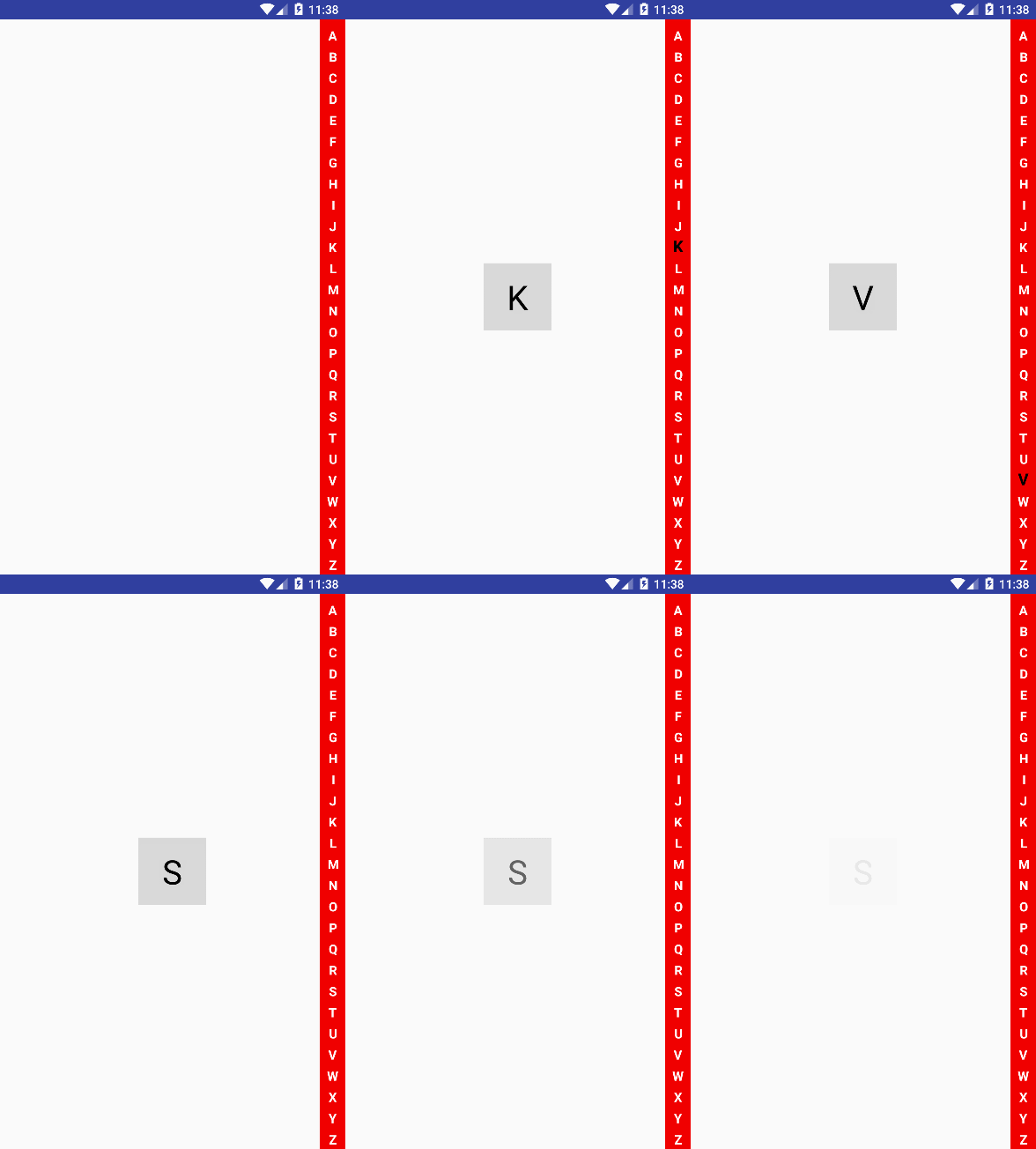
布局去指定
view.custom.shangguigucustomview.MyCustomIndexView 自定义View对象
<!-- 自定义联系人快速索引 -->

<RelativeLayout

    xmlns:android="http://schemas.android.com/apk/res/android"

    xmlns:tools="http://schemas.android.com/tools"

    android:layout_width="match_parent"

    android:layout_height="match_parent"

    android:orientation="vertical"

    tools:context=".ShangGuiguTestActivity">

    <ListView

        android:layout_width="match_parent"

        android:layout_height="wrap_content">

    </ListView>

    <TextView

        android:id="@+id/tv_word"

        android:layout_width="80dp"

        android:layout_height="80dp"

        android:background="#22000000"

        android:layout_centerInParent="true"

        android:textSize="40dp"

        android:textColor="@android:color/black"

        android:gravity="center_horizontal|center_vertical"

        android:visibility="gone"

        />

    <view.custom.shangguigucustomview.MyCustomIndexView

        android:id="@+id/mycustom_indexview"

        android:layout_width="30dp"

        android:layout_height="match_parent"

        android:layout_alignParentRight="true"

        android:background="#f00000"

        />

</RelativeLayout>
自定义联系人快速索引处理类:
public class MyCustomIndexView extends View { // 为什么是继承View,因为不需要操纵孩子,只需要操纵TextView

    private static final String TAG = MyCustomIndexView.class.getSimpleName();

    private String[] words = {"A", "B", "C", "D", "E", "F", "G", "H", "I",

            "J", "K", "L", "M", "N", "O", "P", "Q", "R", "S", "T", "U", "V",

            "W", "X", "Y", "Z"};

    private IMyCustomIndexBack iBack2;

    public void setBack(IMyCustomIndexBack iBack2) {

        this.iBack2 = iBack2;

    }

    private Paint paint;

    public MyCustomIndexView(Context context, @Nullable AttributeSet attrs) {

        super(context, attrs);

        paint = new Paint();

        paint.setTextSize(40);

        paint.setAntiAlias(true);

        paint.setTypeface(Typeface.DEFAULT_BOLD);

        paint.setColor(Color.WHITE);

    }

    private int indexViewWidth;

    private int itemIndexViewHeight;

    private int heightMeasureSpec;

    private int itemHeight;

    @Override

    protected void onMeasure(int widthMeasureSpec, int heightMeasureSpec) {

        super.onMeasure(widthMeasureSpec, heightMeasureSpec);

        itemIndexViewHeight = heightMeasureSpec / words.length;

        indexViewWidth = widthMeasureSpec;

        this.heightMeasureSpec = heightMeasureSpec;

        // setMeasuredDimension(indexViewWidth, indexViewHeight);

        // itemHeight = getMeasuredHeight() / words.length;

        itemHeight = MeasureSpec.getSize(heightMeasureSpec) / words.length;

        Log.i(TAG, "高度实验: getMeasuredHeight():"+getMeasuredHeight() + " heightMeasureSpec:" + heightMeasureSpec);

    }

    @Override

    protected void onDraw(Canvas canvas) {

        super.onDraw(canvas);

        int w = MeasureSpec.getSize(indexViewWidth);

        int h = MeasureSpec.getSize(itemIndexViewHeight);

        int defaultH = MeasureSpec.getSize(heightMeasureSpec);

        int defaultH26 = defaultH / words.length;

        for (int i=0; i<words.length;i++) {

            if (wordIndexValue==i) {

                paint.setColor(Color.BLACK);

                paint.setTextSize(50);

            } else {

                paint.setColor(Color.WHITE);

                paint.setTextSize(40);

            }

            String word = words[i];

            // 我要得到字体到宽度

            Rect rect = new Rect();

            // 需要用到画笔 把值处理好传递给Rect

            paint.getTextBounds(word, 0, 1, rect);

            canvas.drawText(word, (w/2) - rect.width()/2, i==0?defaultH26:defaultH26*(i+1), paint);

        }

    }

    private int wordIndexValue = -1;

    private int tempWordIndexValue;

    @Override

    public boolean onTouchEvent(MotionEvent event) {

        super.onTouchEvent(event);

        switch (event.getAction()) {

            case MotionEvent.ACTION_DOWN:

            case MotionEvent.ACTION_MOVE:

                /*float endY = event.getY();

                Log.i(TAG, "endy:" + endY);

                // 得到字母索引

                int abcIndex =  (int) (endY / itemIndexViewHeight);

                Log.i(TAG, "abcIndex:" + abcIndex);*/

                float Y = event.getY();

                wordIndexValue = (int) (Y/itemHeight);//字母索引

                Log.i(TAG, "wordIndexValue;" + wordIndexValue);

                if (tempWordIndexValue != wordIndexValue) {

                    iBack2.back(wordIndexValue, words[wordIndexValue]);

                }

                tempWordIndexValue = wordIndexValue;

                invalidate();

                break;

            case MotionEvent.ACTION_UP:

                iBack2.upEnd();

                tempWordIndexValue = 0;

                wordIndexValue = -1;

                invalidate();

                break;

            default:

                break;

        }

        return true;

    }

}
如何使用自定义联系人快速索引:
/**

         * 自定义联系人快速索引

         */

        tv_word = (TextView) findViewById(R.id.tv_word);

        final MyCustomIndexView  myCustomIndexView = findViewById(R.id.mycustom_indexview);

        myCustomIndexView.setBack(new IMyCustomIndexBack() {

            @Override

            public void back(int index, String word) {

                tv_word.setVisibility(View.VISIBLE);

                tv_word.setText(word);

                // Toast.makeText(MainActivity.this, "index:" + index + " word:" + word, Toast.LENGTH_SHORT).show();

            }

            @Override

            public void upEnd() {

                handler.sendEmptyMessageDelayed(0, 0);

            }

        });
/**

     * 自定义联系人快速索引

     */

    private Handler handler = new Handler(){

        @Override

        public void handleMessage(Message msg) {

            super.handleMessage(msg);

            AlphaAnimation alphaAnimation = new AlphaAnimation(1.0f, 0.0f);

            alphaAnimation.setDuration(3000);

            alphaAnimation.setFillAfter(true);

            tv_word.startAnimation(alphaAnimation);

            // tv_word.setVisibility(View.GONE);

        }

    };
Android-自定义联系人快速索引的更多相关文章
- Android 自定义支持快速搜索筛选的选择控件(一)
Android 自定义支持快速搜索筛选的选择控件 项目中遇到选择控件选项过多,需要快速查找匹配的情况. 做了简单的Demo,效果图如下: 源码地址:https://github.com/whieenz ...
- Android 自定义View-字母索引表(一)
在有些Android应用中,为了方便快速定位,经常会看到屏幕右侧有一个字母索引表,今天尝试使用自定义View的方式实现了索引表的基本布局. 字母索引表的样式如下面的示意图所示, 此时我们至少需要知道以 ...
- Android自定义模糊匹配搜索控件(二)
在项目中遇到一个需要通过某个字的值筛选匹配带出其他信息的需求,在这里将实现思路整理出来. 源码地址:https://github.com/whieenz/SearchSelect 先看效果图 上图中的 ...
- Android 快速索引(城市列表和联系人)
最近需要实现一个城市列表的快速索引功能.类似于联系人应用,根据姓名首字母快速索引功能. 要实现这个功能只需要解决两个问题:1.对列表进行分组(具有同一特征),并且能够快速定位到该组的第一项 2.右侧分 ...
- Android ListView A~Z快速索引(改进版)
上一篇文章虽然实现了ListView 快速索引的效果,但是有一个小小的Bug.这个Bug我在前面也说了,这篇文章就来解决这个Bug. 我研究的时候发现只要showBg值为true,中间的字母就显示,而 ...
- 快速索引 (对View的自定义)
快速索引 (对View的自定义) 快速索引应用场景: 微信好友列表, 联系人通讯录, 应用管理, 文件管理等. 快速索引7步曲: *1. A-Z索引的绘制. * 2. 处理Touch事件. * 3. ...
- Android系统联系人全特效实现(下),字母表快速滚动
在上一篇文章中,我和大家一起实现了类似于Android系统联系人的分组导航和挤压动画功能,不过既然文章名叫做<Android系统联系人全特效实现>,那么没有快速滚动功能显然是称不上&quo ...
- android系统联系人分组特效实现(2)---字母表快速滚动
要实现这种功能,只需要在 android系统联系人分组特效实现(1)---分组导航和挤压动画 的基础上再加上一个自定义控件即可完成. 1.新建项目,继续新建一个java类,BladeView,用 ...
- 【Android】如何快速构建Android Demo
[Android]如何快速构建Android Demo 简介 在 Android 学习的过程中,经常需要针对某些项目来写一些测试的例子,或者在做一些 demo 的时候,都需要先写 Activity 然 ...
随机推荐
- 学习笔记之LeetCode
LeetCode Online Judge https://leetcode.com/ Leetcode:在线编程网站-各大IT公司的笔试面试题 http://blog.csdn.net/huixin ...
- Python实现进度条总结
先说一下文本系统的控制符:\r: 将光标移动到当前行的首位而不换行:\n: 将光标移动到下一行,并不移动到首位:\r\n: 将光标移动到下一行首位. 环境:root@ubuntu16: ...
- 精《Linux内核精髓:精通Linux内核必会的75个绝技》一HACK #5 使用checkpatch.pl检查补丁的格式
HACK #5 使用checkpatch.pl检查补丁的格式 本节介绍发布前检查补丁格式的方法.Linux内核是由多个开发者进行开发的.因此,为了保持补丁评估与源代码的可读性,按照统一的规则进行编写是 ...
- requests and BeautifulSoup
requests Python标准库中提供了:urllib.urllib2.httplib等模块以供Http请求,但是,它的 API 太渣了.它是为另一个时代.另一个互联网所创建的.它需要巨量的工作, ...
- 一些linux知识和http知识
1 yum安装比源码编译安装 有的模块不能自定义安装 只能安装默认的模块进行安装 2 关于php的fastcgi 如果使用fastcgi 那么需要启动服务 如果不使用fastcgi 那么不需要启 ...
- WordPress部署
WordPress部署 WordPress是一个门户.博客网站的制作工具,php开发,自带后台,可以很简便的安装主题,还拥有一个庞大的主题网站生态. 软件下载:https://cn.wordpress ...
- 「小程序JAVA实战」小程序视频列表到详情功能(58)
转自:https://idig8.com/2018/09/23/xiaochengxujavashizhanxiaochengxushipinliebiaodaoxiangqinggongneng57 ...
- 初认识ZK
转自:https://www.jianshu.com/p/8e322462bcca 前言: 前段时间做了sdk直播服务,由于给游戏接入,所以必须要考虑并发性能问题,大家知道直播聊天,房间人数多了的话是 ...
- viewer.js--一个强大的jQuery图像查看插件
Viewer 是一款强大的 jQuery 图像浏览插件. 主要功能: 支持选项 支持方法 支持事件 支持触摸 支持移动 支持缩放 支持旋转 支持键盘 跨浏览器支持 查看演示 立即下载 部分插 ...
- Ubuntu开机自动挂载分区
虽然我基本上都是使用Linux的,但是仍然有些时候需要切换到Windows(双系统),如果所有的分区都使用ext4等Linux分区格式,则在Windows下访问十分不方便. 因此,我一般会将一些两个系 ...