
Android-自定义联系人快速索引
效果图:
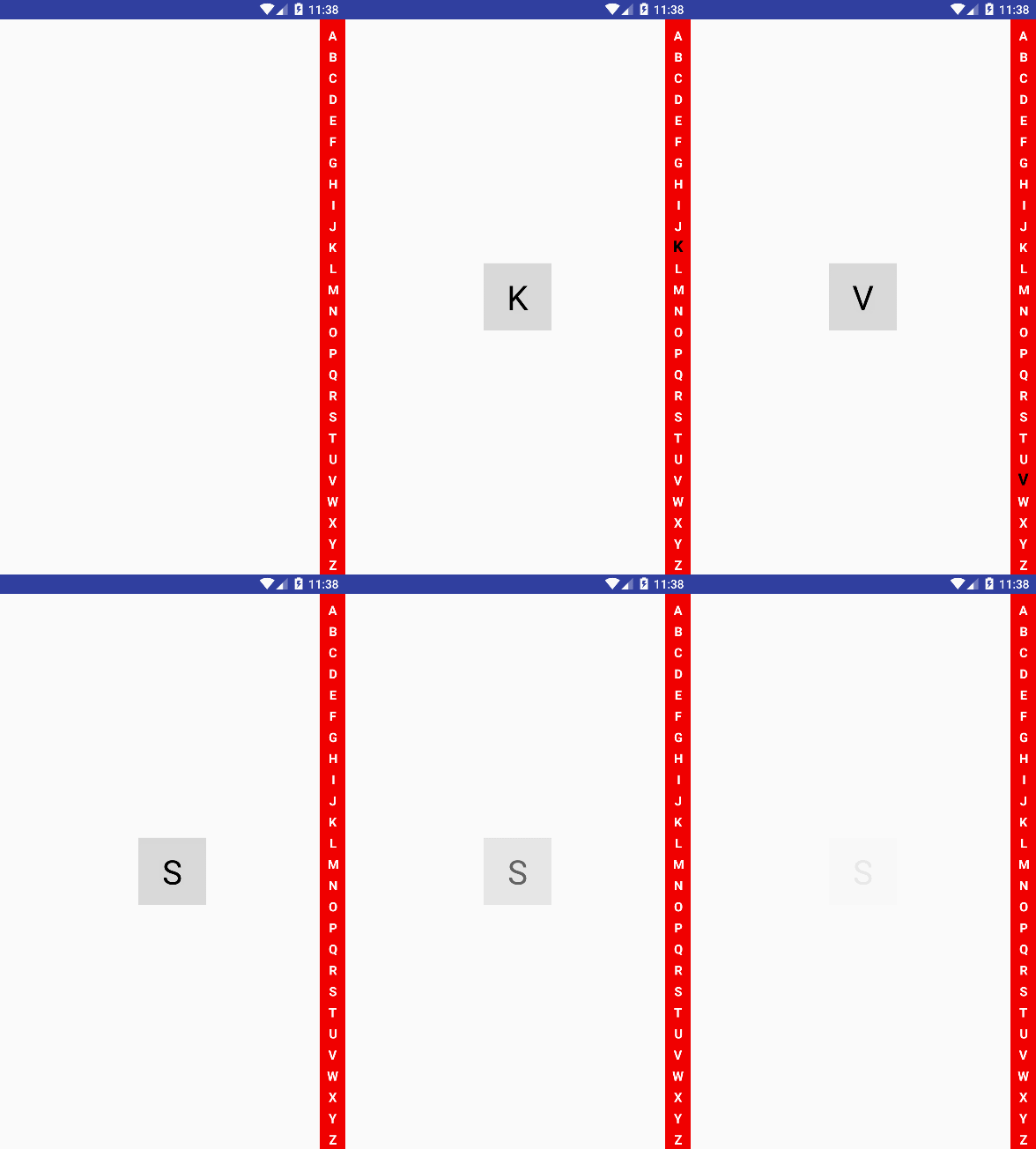
布局去指定
view.custom.shangguigucustomview.MyCustomIndexView 自定义View对象
<!-- 自定义联系人快速索引 -->

<RelativeLayout

    xmlns:android="http://schemas.android.com/apk/res/android"

    xmlns:tools="http://schemas.android.com/tools"

    android:layout_width="match_parent"

    android:layout_height="match_parent"

    android:orientation="vertical"

    tools:context=".ShangGuiguTestActivity">

    <ListView

        android:layout_width="match_parent"

        android:layout_height="wrap_content">

    </ListView>

    <TextView

        android:id="@+id/tv_word"

        android:layout_width="80dp"

        android:layout_height="80dp"

        android:background="#22000000"

        android:layout_centerInParent="true"

        android:textSize="40dp"

        android:textColor="@android:color/black"

        android:gravity="center_horizontal|center_vertical"

        android:visibility="gone"

        />

    <view.custom.shangguigucustomview.MyCustomIndexView

        android:id="@+id/mycustom_indexview"

        android:layout_width="30dp"

        android:layout_height="match_parent"

        android:layout_alignParentRight="true"

        android:background="#f00000"

        />

</RelativeLayout>
自定义联系人快速索引处理类:
public class MyCustomIndexView extends View { // 为什么是继承View,因为不需要操纵孩子,只需要操纵TextView

    private static final String TAG = MyCustomIndexView.class.getSimpleName();

    private String[] words = {"A", "B", "C", "D", "E", "F", "G", "H", "I",

            "J", "K", "L", "M", "N", "O", "P", "Q", "R", "S", "T", "U", "V",

            "W", "X", "Y", "Z"};

    private IMyCustomIndexBack iBack2;

    public void setBack(IMyCustomIndexBack iBack2) {

        this.iBack2 = iBack2;

    }

    private Paint paint;

    public MyCustomIndexView(Context context, @Nullable AttributeSet attrs) {

        super(context, attrs);

        paint = new Paint();

        paint.setTextSize(40);

        paint.setAntiAlias(true);

        paint.setTypeface(Typeface.DEFAULT_BOLD);

        paint.setColor(Color.WHITE);

    }

    private int indexViewWidth;

    private int itemIndexViewHeight;

    private int heightMeasureSpec;

    private int itemHeight;

    @Override

    protected void onMeasure(int widthMeasureSpec, int heightMeasureSpec) {

        super.onMeasure(widthMeasureSpec, heightMeasureSpec);

        itemIndexViewHeight = heightMeasureSpec / words.length;

        indexViewWidth = widthMeasureSpec;

        this.heightMeasureSpec = heightMeasureSpec;

        // setMeasuredDimension(indexViewWidth, indexViewHeight);

        // itemHeight = getMeasuredHeight() / words.length;

        itemHeight = MeasureSpec.getSize(heightMeasureSpec) / words.length;

        Log.i(TAG, "高度实验: getMeasuredHeight():"+getMeasuredHeight() + " heightMeasureSpec:" + heightMeasureSpec);

    }

    @Override

    protected void onDraw(Canvas canvas) {

        super.onDraw(canvas);

        int w = MeasureSpec.getSize(indexViewWidth);

        int h = MeasureSpec.getSize(itemIndexViewHeight);

        int defaultH = MeasureSpec.getSize(heightMeasureSpec);

        int defaultH26 = defaultH / words.length;

        for (int i=0; i<words.length;i++) {

            if (wordIndexValue==i) {

                paint.setColor(Color.BLACK);

                paint.setTextSize(50);

            } else {

                paint.setColor(Color.WHITE);

                paint.setTextSize(40);

            }

            String word = words[i];

            // 我要得到字体到宽度

            Rect rect = new Rect();

            // 需要用到画笔 把值处理好传递给Rect

            paint.getTextBounds(word, 0, 1, rect);

            canvas.drawText(word, (w/2) - rect.width()/2, i==0?defaultH26:defaultH26*(i+1), paint);

        }

    }

    private int wordIndexValue = -1;

    private int tempWordIndexValue;

    @Override

    public boolean onTouchEvent(MotionEvent event) {

        super.onTouchEvent(event);

        switch (event.getAction()) {

            case MotionEvent.ACTION_DOWN:

            case MotionEvent.ACTION_MOVE:

                /*float endY = event.getY();

                Log.i(TAG, "endy:" + endY);

                // 得到字母索引

                int abcIndex =  (int) (endY / itemIndexViewHeight);

                Log.i(TAG, "abcIndex:" + abcIndex);*/

                float Y = event.getY();

                wordIndexValue = (int) (Y/itemHeight);//字母索引

                Log.i(TAG, "wordIndexValue;" + wordIndexValue);

                if (tempWordIndexValue != wordIndexValue) {

                    iBack2.back(wordIndexValue, words[wordIndexValue]);

                }

                tempWordIndexValue = wordIndexValue;

                invalidate();

                break;

            case MotionEvent.ACTION_UP:

                iBack2.upEnd();

                tempWordIndexValue = 0;

                wordIndexValue = -1;

                invalidate();

                break;

            default:

                break;

        }

        return true;

    }

}
如何使用自定义联系人快速索引:
/**

         * 自定义联系人快速索引

         */

        tv_word = (TextView) findViewById(R.id.tv_word);

        final MyCustomIndexView  myCustomIndexView = findViewById(R.id.mycustom_indexview);

        myCustomIndexView.setBack(new IMyCustomIndexBack() {

            @Override

            public void back(int index, String word) {

                tv_word.setVisibility(View.VISIBLE);

                tv_word.setText(word);

                // Toast.makeText(MainActivity.this, "index:" + index + " word:" + word, Toast.LENGTH_SHORT).show();

            }

            @Override

            public void upEnd() {

                handler.sendEmptyMessageDelayed(0, 0);

            }

        });
/**

     * 自定义联系人快速索引

     */

    private Handler handler = new Handler(){

        @Override

        public void handleMessage(Message msg) {

            super.handleMessage(msg);

            AlphaAnimation alphaAnimation = new AlphaAnimation(1.0f, 0.0f);

            alphaAnimation.setDuration(3000);

            alphaAnimation.setFillAfter(true);

            tv_word.startAnimation(alphaAnimation);

            // tv_word.setVisibility(View.GONE);

        }

    };
Android-自定义联系人快速索引的更多相关文章
- Android 自定义支持快速搜索筛选的选择控件(一)
Android 自定义支持快速搜索筛选的选择控件 项目中遇到选择控件选项过多,需要快速查找匹配的情况. 做了简单的Demo,效果图如下: 源码地址:https://github.com/whieenz ...
- Android 自定义View-字母索引表(一)
在有些Android应用中,为了方便快速定位,经常会看到屏幕右侧有一个字母索引表,今天尝试使用自定义View的方式实现了索引表的基本布局. 字母索引表的样式如下面的示意图所示, 此时我们至少需要知道以 ...
- Android自定义模糊匹配搜索控件(二)
在项目中遇到一个需要通过某个字的值筛选匹配带出其他信息的需求,在这里将实现思路整理出来. 源码地址:https://github.com/whieenz/SearchSelect 先看效果图 上图中的 ...
- Android 快速索引(城市列表和联系人)
最近需要实现一个城市列表的快速索引功能.类似于联系人应用,根据姓名首字母快速索引功能. 要实现这个功能只需要解决两个问题:1.对列表进行分组(具有同一特征),并且能够快速定位到该组的第一项 2.右侧分 ...
- Android ListView A~Z快速索引(改进版)
上一篇文章虽然实现了ListView 快速索引的效果,但是有一个小小的Bug.这个Bug我在前面也说了,这篇文章就来解决这个Bug. 我研究的时候发现只要showBg值为true,中间的字母就显示,而 ...
- 快速索引 (对View的自定义)
快速索引 (对View的自定义) 快速索引应用场景: 微信好友列表, 联系人通讯录, 应用管理, 文件管理等. 快速索引7步曲: *1. A-Z索引的绘制. * 2. 处理Touch事件. * 3. ...
- Android系统联系人全特效实现(下),字母表快速滚动
在上一篇文章中,我和大家一起实现了类似于Android系统联系人的分组导航和挤压动画功能,不过既然文章名叫做<Android系统联系人全特效实现>,那么没有快速滚动功能显然是称不上&quo ...
- android系统联系人分组特效实现(2)---字母表快速滚动
要实现这种功能,只需要在 android系统联系人分组特效实现(1)---分组导航和挤压动画 的基础上再加上一个自定义控件即可完成. 1.新建项目,继续新建一个java类,BladeView,用 ...
- 【Android】如何快速构建Android Demo
[Android]如何快速构建Android Demo 简介 在 Android 学习的过程中,经常需要针对某些项目来写一些测试的例子,或者在做一些 demo 的时候,都需要先写 Activity 然 ...
随机推荐
- scrollWidth,clientWidth,offsetWidth的区别 ---转载的
转载自博客:http://www.cnblogs.com/kongxianghai/p/4192032.html 通过一个demo测试这三个属性的差别. 说明: scrollWidth:对象的实际内容 ...
- 转转转!!Spring MVC控制器用@ResponseBody声明返回json数据报406的问题
本打算今天早点下班,结果下午测试调试程序发现一个问题纠结到晚上才解决,现在写一篇博客来总结下. 是这样的,本人在Spring mvc控制层用到了@ResponseBody标注,以便返回的数据为json ...
- jquery.raty.js 评星插件的使用
需要实现一个五星好评的功能,所以找到了这个JQ插件,使用起来还算简单,在这里记录下使用的方式. 第一步:导入这个插件和压缩包中的img文件夹 <script type="text/ja ...
- django-渲染页面+locals
from django.shortcuts import render, redirect from django.views import View from django.http import ...
- Matlab信号处理工具箱函数
波形产生和绘图chirp 产生扫描频率余弦diric 产生Dirichlet函数或周期Sinc函数gauspuls 产生高斯调制正弦脉冲pulstran 产生脉冲串rectpuls 产生非周期矩形信号 ...
- 在ubuntu14.04上搭建OpenVPN服务
简介 在连接了不可信的网络环境后,让手机或者计算机安全的访问互联网,使用虚拟专用网络(Virtual Private Network,VPN)是一个解决办法.OpenVPN是一个SSL VPN完整解决 ...
- IOS AudioServicesPlaySystemSound 后台锁屏播放
AudioServicesPlaySystemSound 想在锁屏后台播放报警提示音. 添加了UIBackgroundModes,audio,官方审核不通过! IOS的闹钟是怎么实现的,锁屏不能播放声 ...
- 搭建 redis 集群 (redis-cluster)
一 所需软件:Redis.Ruby语言运行环境.Redis的Ruby驱动redis-xxxx.gem.创建Redis集群的工具redis-trib.rb 二 安装配置redis redis下载地址 ...
- http://www.5xcg.com/bbs/forum.php?mod=viewthread&tid=51143&extra=page%3D1
http://www.5xcg.com/bbs/forum.php?mod=viewthread&tid=51143&extra=page%3D1 因为身在酒店设备有限,只能尽量把文字 ...
- CentOS装机必备-基本设置以及缺失文件
主要是虚拟机中安装CentOS每次总会做一些设置,记录下来方便以后. 纯粹基本设置,比如本地SecureCRT可以连接虚拟机中的CentOS. 复杂的非基本设置见:Linux 命令集锦 设置网络 自 ...