
Echarts 有点难度的柱状图
本次的难点在于交叉传数据,又要把四组20个不同日期 显示上!
先看效果图:
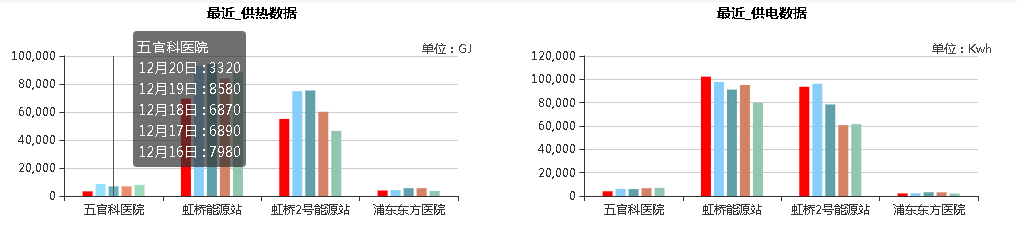
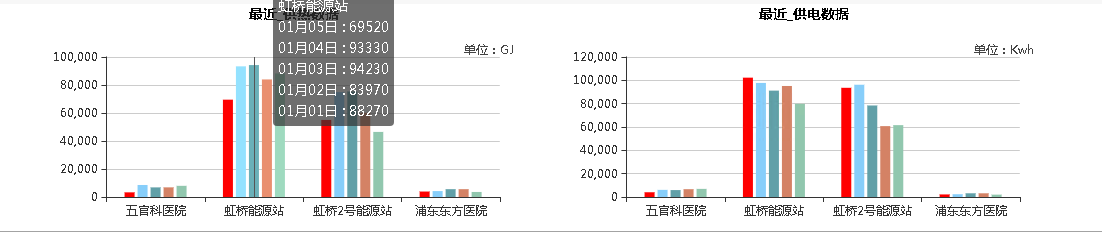
数据传递方式:图

function func_echarts_2ba() {

    var echarts_2bar = echarts.init(document.getElementById('id_echarts_2bar'));

    echarts_2bar.option_2bar = {

        title: { subtext: '单位:GJ', x: 'right', top: -12, subtextStyle: { "fontSize": 12, "fontFamily": "Microsoft YaHei", "color": "#444" } },

        color: ['#FF0000', '#87cefa', '#61a0a8', '#d48265', '#91c7ae'],

        //tooltip: {

        //    trigger: 'item',

        //    axisPointer: { // 坐标轴指示器,坐标轴触发有效

        //        type: 'shadow' // 默认为直线,可选为:'line' | 'shadow'

        //    }

        //},

        //legend: {

        //    data: ['最近第1天', '最近第2天', '最近第3天', '最近第4天', '最近第5天'],

        //    align: 'right',

        //    right: 10

        //},

        grid: {

            height: 160,

            left: '3%',

            right: '4%',

            bottom: '3%',

            containLabel: true

        },

        xAxis: [{

            type: 'category',

            axisLabel:{

                interval:0//横轴信息全部显示

                //rotate:-30,//-30度角倾斜显示

            }  ,

            data: ['五官科医院', '虹桥能源站', '虹桥2号能源站', '浦东东方医院'],

        }],

        yAxis: [{

            type: 'value',

            name: '',

            axisLabel: {

                formatter: '{value}'

            }

        }],

        series: [{

            name: '最近第1天',

            type: 'bar',

            barWidth: 10,

           data:[]

        //  data: [3900, 12, 31, 34, 31]

        }, {

            name: '最近第2天',

            type: 'bar',

            barWidth: 10,

            data:[]

          // data: [4230, 20, 5, 9, 3]

        }, {

            name: '最近第3天',

            type: 'bar',

            barWidth: 10,

          data:[]

          //  data: [5590, 1, 2, 3, 1]

        },

        {

            name: '最近第4天',

            type: 'bar',

            barWidth: 10,

            data:[]

          // data: [5590, 2, 3, 1, 0.5]

        },

        {

            name: '最近第5天',

            type: 'bar',

            barWidth: 10,

           data:[]

          // data: [3600, 2, 3, 1, 0.5]

        }

        ]

    };

    echarts_2bar.setOption(echarts_2bar.option_2bar);

    $.ajax({

        type: "post",

        url: ajaxurl,

        data:

        {

            async: false,

            operate: "echarts_2bar"

        },

        dataType: "json",        //返回数据形式为json

        success: function (result) {

            echarts_2bar.setOption(

                               {

                                   tooltip: {

                                       trigger: 'axis',

                                       formatter: function (params) {

                                           var relVal = params[0].name;

                                           //for (var i = 0, l = params.length; i < l; i++) {

                                           if (params[0].name == "虹桥能源站") {

                                               relVal += '<br/>' + formatMonth(result[5].stat_dayofmonth) + ' : ' + params[0].value;

                                               relVal += '<br/>' + formatMonth(result[6].stat_dayofmonth) + ' : ' + params[1].value;

                                               relVal += '<br/>' + formatMonth(result[7].stat_dayofmonth) + ' : ' + params[2].value;

                                               relVal += '<br/>' + formatMonth(result[8].stat_dayofmonth) + ' : ' + params[3].value;

                                               relVal += '<br/>' + formatMonth(result[9].stat_dayofmonth) + ' : ' + params[4].value;

                                           } else if (params[0].name == "虹桥2号能源站") {

                                               relVal += '<br/>' + formatMonth(result[10].stat_dayofmonth) + ' : ' + params[0].value;

                                               relVal += '<br/>' + formatMonth(result[11].stat_dayofmonth) + ' : ' + params[1].value;

                                               relVal += '<br/>' + formatMonth(result[12].stat_dayofmonth) + ' : ' + params[2].value;

                                               relVal += '<br/>' + formatMonth(result[13].stat_dayofmonth) + ' : ' + params[3].value;

                                               relVal += '<br/>' + formatMonth(result[14].stat_dayofmonth) + ' : ' + params[4].value;

                                           } else if (params[0].name == "浦东东方医院") {

                                               relVal += '<br/>' + formatMonth(result[15].stat_dayofmonth) + ' : ' + params[0].value;

                                               relVal += '<br/>' + formatMonth(result[16].stat_dayofmonth) + ' : ' + params[1].value;

                                               relVal += '<br/>' + formatMonth(result[17].stat_dayofmonth) + ' : ' + params[2].value;

                                               relVal += '<br/>' + formatMonth(result[18].stat_dayofmonth) + ' : ' + params[3].value;

                                               relVal += '<br/>' + formatMonth(result[19].stat_dayofmonth) + ' : ' + params[4].value;

                                           } else {

                                               relVal += '<br/>' + formatMonth(result[0].stat_dayofmonth) + ' : ' + params[0].value;

                                               relVal += '<br/>' + formatMonth(result[1].stat_dayofmonth) + ' : ' + params[1].value;

                                               relVal += '<br/>' + formatMonth(result[2].stat_dayofmonth) + ' : ' + params[2].value;

                                               relVal += '<br/>' + formatMonth(result[3].stat_dayofmonth) + ' : ' + params[3].value;

                                               relVal += '<br/>' + formatMonth(result[4].stat_dayofmonth) + ' : ' + params[4].value;

                                           }

                                           return relVal;

                                       }

                                   },

                                   series: [

    { data: [JSON.stringify(result[0].heat_supply),  JSON.stringify(result[5].heat_supply),JSON.stringify(result[10].heat_supply),

           JSON.stringify(result[15].heat_supply) ] },

  { data: [JSON.stringify(result[1].heat_supply),

           JSON.stringify(result[6].heat_supply),

          JSON.stringify(result[11].heat_supply),

         JSON.stringify(result[16].heat_supply)] },

 {

     data: [JSON.stringify(result[2].heat_supply),

           JSON.stringify(result[7].heat_supply),

           JSON.stringify(result[12].heat_supply),

           JSON.stringify(result[17].heat_supply)] },

 { data: [JSON.stringify(result[3].heat_supply),

         JSON.stringify(result[8].heat_supply),

         JSON.stringify(result[13].heat_supply),

         JSON.stringify(result[18].heat_supply)] },

 { data: [JSON.stringify(result[4].heat_supply),

         JSON.stringify(result[9].heat_supply),

         JSON.stringify(result[14].heat_supply),

         JSON.stringify(result[19].heat_supply)] }

                                   ]

                               })

        },

        error: function (errorMsg) { }

    });

}
function formatMonth(val) {

    if (val.length == 8) {

        return val.substr(4, 2) + "月" + val.substr(6,2) + "日";

    } else {

        return val;

    }

}
Echarts 有点难度的柱状图的更多相关文章
- echarts 圆形图、柱状图
首先引入echarts的js包 <script type="text/javascript" src="js/esl.js"></script ...
- Webstorm+Webpack+echarts构建个性化定制的数据可视化图表&&两个echarts详细教程(柱状图,南丁格尔图)
Webstorm+Webpack+echarts ECharts 特性介绍 ECharts,一个纯 Javascript 的图表库,可以流畅的运行在 PC 和移动设备上,兼容当前绝大部分浏览器(I ...
- echarts异步加载柱状图遇到的错误- Error: Component series. not exists. Load it first.
今天看了下echarts教程之中的异步加载柱状图,我按照教程中的代码敲出来之后再运行,就报了一个 Error: Component series. not exists. Load it first. ...
- Echarts动态加载柱状图和折线图混合展示的实例
一.引入echarts文件: <script type="text/javascript" src="echarts.js"></script ...
- Echarts动态加载柱状图的实例
一.引入echarts.js文件(下载页:http://echarts.baidu.com/download.html) 二.HTML代码: <div style="width: 10 ...
- Qt+ECharts开发笔记(五):ECharts的动态排序柱状图介绍、基础使用和Qt封装Demo
前言 上一篇的demo使用隐藏js代码的方式,实现了一个饼图的基本交互方式,并预留了Qt模块对外的基础接口. 本篇的demo实现了自动排序的柱状图,实现了一个自动排序柱状图的基本交互方式,即Qt ...
- [echarts] 同指标对比柱状图
需求:对比课程通过率最高的8个课程和最低的8个课程以及全校的平均通过率 http://echarts.baidu.com/echarts2/doc/example/bar1.html option = ...
- echarts入门1【柱状图/饼图】
这几天刚好用到了echarts,不过项目使用的前端框架非常老了,由此可见echarts兼容性还是hin好的,以后的项目中可能也会遇到很多,准备由浅至深的学习一下echarts,今天先从最基础的开始记录 ...
- 图表echarts折线图,柱状图,饼状图
总体就是有折线图相关图标的设置,x,y轴的设置,x,y轴或者数据加上单位的设置.饼状图如何默认显示几个数据中的某个数据 折线图:legend(小标题)中间默认是圆圈 改变成直线 在legend设置的时 ...
随机推荐
- linux进程管理(一)
进程介绍 程序和进程 程序是为了完成某种任务而设计的软件,比如OpenOffice是程序.什么是进程呢?进程就是运行中的程序. 一个运行着的程序,可能有多个进程. 比如自学it网所用的WWW服务器是a ...
- ISE14.7生成.bit文件和mcs文件
1.FPGA bit文件加载步骤(加载到FPGA的RAM中,用于在线调试,掉电丢失) 第一步:选择Tools->IMPCAT->选择OK: 第二步:双击Boundary Scan-> ...
- 【Oracle 12c】CUUG OCP认证071考试原题解析(35)
35.choose the best answer View the Exhibit and examine the description of the EMPLOYEES table. Evalu ...
- C# Winform下一个热插拔的MIS/MRP/ERP框架16(窗体基类场景2)
如果没有特别需求,和场景1一样只变更表名,主键字段,检测字段等名称,不需要写其它代码了. * 清单列表+单笔编辑/保存,适用于大多数基础资料管理以及简单的单据资料录入(当然,排版是要改一改的): * ...
- bzoj1047理想的正方形
题目链接 纪念又双叒叕的一道暴力碾标算的题 我们考虑纯暴力 #include<iostream> #include<cstdio> #include<algorithm& ...
- react onclick传递参数
最近在做react项目的时候,被一个小问题绊了一脚,记录一下 onClick 传入参数 onClick={e=>{this.Mallclose(e,index)} onClick={this.M ...
- centos启动错误:Inodes that were part of a corrupted orphan linked list found.
centos启动时,提示错误: /dev/mapper/VolGroup-lv_root contains a file system with errors,check forced. /dev/m ...
- Spark累加器
spark累计器 因为task的执行是在多个Executor中执行,所以会出现计算总量的时候,每个Executor只会计算部分数据,不能全局计算. 累计器是可以实现在全局中进行累加计数. 注意: 累加 ...
- Windows开发经验 - Visual Studio 2017
1. 调试子进程 Visual Studio 2017及更早的版本原生不支持调试子进程,不确定未来是否会支持.可以通过官方插件让Visual Studio能够调试子进程. https://market ...
- JavaSwing程序设计(目录)
一.JavaSwing 概述 JavaSwing 图形界面概述 二.JavaSwing 基本组件 JLabel(标签) JButton(按钮) JTextField(文本框) JPasswordFie ...