
自定义Graph Component:1.2-其它Tokenizer具体实现
本文主要介绍了Rasa中相关Tokenizer的具体实现,包括默认Tokenizer和第三方Tokenizer。前者包括JiebaTokenizer、MitieTokenizer、SpacyTokenizer和WhitespaceTokenizer,后者包括BertTokenizer和AnotherWhitespaceTokenizer。
一.JiebaTokenizer
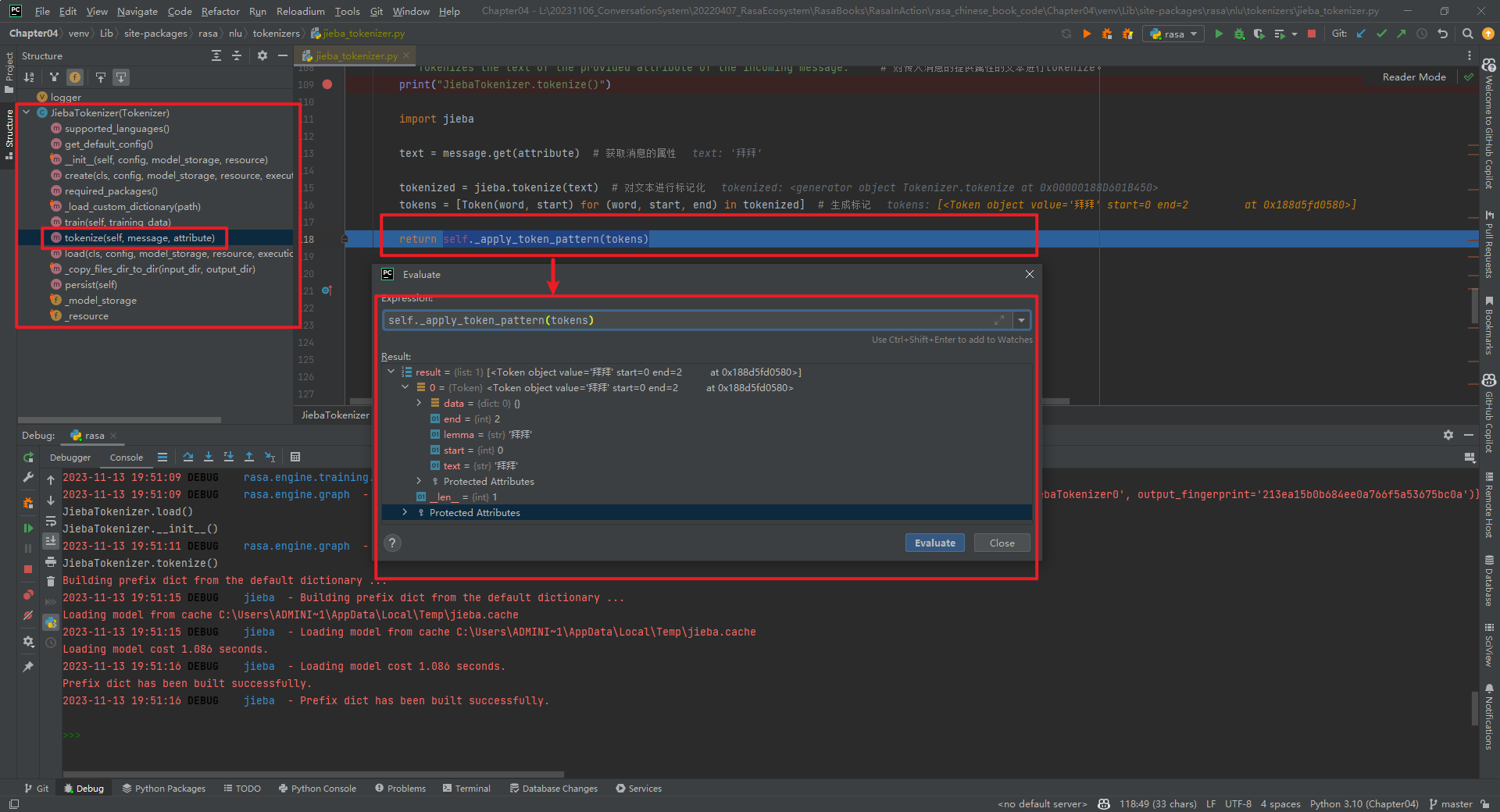
JiebaTokenizer类整体代码结构,如下所示:
加载自定义字典代码,如下所示[3]:
@staticmethod
def _load_custom_dictionary(path: Text) -> None:
    """Load all the custom dictionaries stored in the path.  # 加载存储在路径中的所有自定义字典。
    More information about the dictionaries file format can be found in the documentation of jieba. https://github.com/fxsjy/jieba#load-dictionary
    """
    print("JiebaTokenizer._load_custom_dictionary()")
    import jieba

    jieba_userdicts = glob.glob(f"{path}/*")  # 获取路径下的所有文件。
    for jieba_userdict in jieba_userdicts:  # 遍历所有文件。
        logger.info(f"Loading Jieba User Dictionary at {jieba_userdict}")  # 加载结巴用户字典。
        jieba.load_userdict(jieba_userdict)  # 加载用户字典。
实现分词的代码为tokenize()方法,如下所示:
def tokenize(self, message: Message, attribute: Text) -> List[Token]:
    """Tokenizes the text of the provided attribute of the incoming message."""  # 对传入消息的提供属性的文本进行tokenize。
    print("JiebaTokenizer.tokenize()")

    import jieba

    text = message.get(attribute)  # 获取消息的属性

    tokenized = jieba.tokenize(text)  # 对文本进行标记化
    tokens = [Token(word, start) for (word, start, end) in tokenized]  # 生成标记

    return self._apply_token_pattern(tokens)
self._apply_token_pattern(tokens)数据类型为List[Token]。Token的数据类型为:
class Token:
    # 由将单个消息拆分为多个Token的Tokenizers使用
    def __init__(
        self,
        text: Text,
        start: int,
        end: Optional[int] = None,
        data: Optional[Dict[Text, Any]] = None,
        lemma: Optional[Text] = None,
    ) -> None:
        """创建一个Token
        Args:
            text: The token text.  # token文本
            start: The start index of the token within the entire message.  # token在整个消息中的起始索引
            end: The end index of the token within the entire message.  # token在整个消息中的结束索引
            data: Additional token data.  # 附加的token数据
            lemma: An optional lemmatized version of the token text.  # token文本的可选词形还原版本
        """
        self.text = text
        self.start = start
        self.end = end if end else start + len(text)
        self.data = data if data else {}
        self.lemma = lemma or text
特别说明:JiebaTokenizer组件的is_trainable=True。
二.MitieTokenizer
MitieTokenizer类整体代码结构,如下所示:
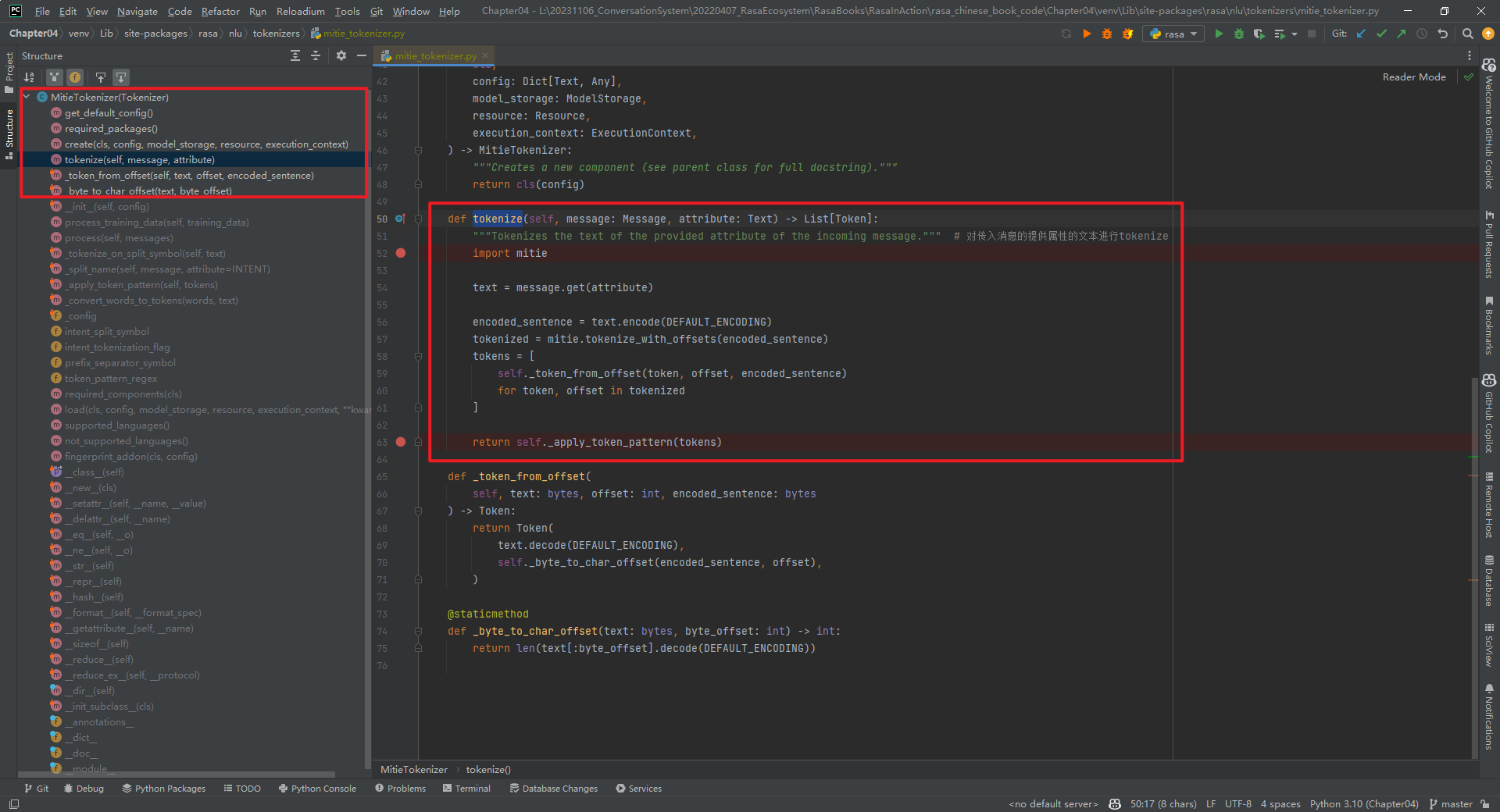
核心代码tokenize()方法代码,如下所示:
def tokenize(self, message: Message, attribute: Text) -> List[Token]:
    """Tokenizes the text of the provided attribute of the incoming message."""  # 对传入消息的提供属性的文本进行tokenize
    import mitie

    text = message.get(attribute)

    encoded_sentence = text.encode(DEFAULT_ENCODING)
    tokenized = mitie.tokenize_with_offsets(encoded_sentence)
    tokens = [
        self._token_from_offset(token, offset, encoded_sentence)
        for token, offset in tokenized
    ]

    return self._apply_token_pattern(tokens)
特别说明:mitie库在Windows上安装可能麻烦些。MitieTokenizer组件的is_trainable=False。
三.SpacyTokenizer
首先安装Spacy类库和模型[4][5],如下所示:
pip3 install -U spacy
python3 -m spacy download zh_core_web_sm
SpacyTokenizer类整体代码结构,如下所示:
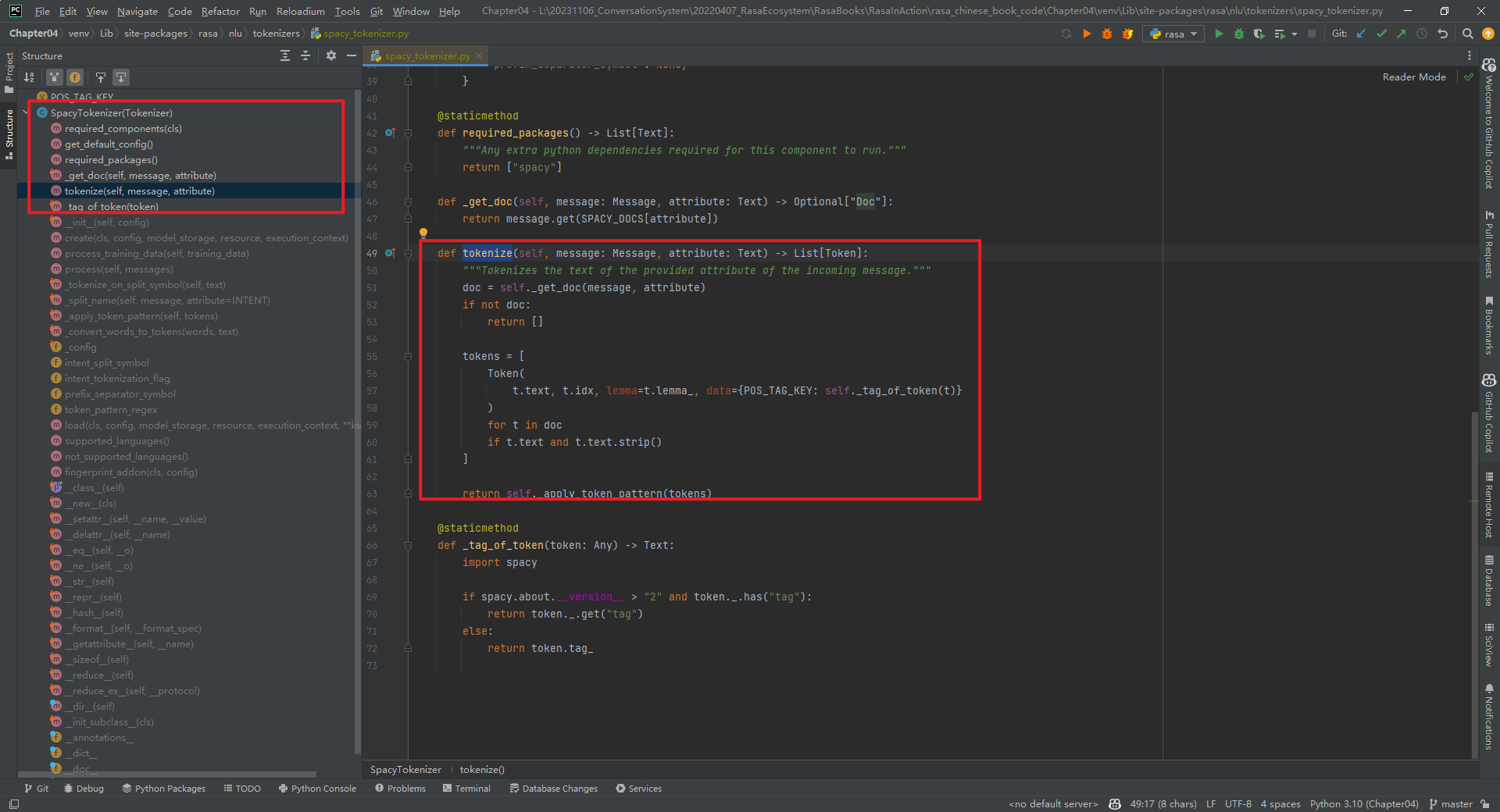
核心代码tokenize()方法代码,如下所示:
def tokenize(self, message: Message, attribute: Text) -> List[Token]:
    """Tokenizes the text of the provided attribute of the incoming message."""  # 对传入消息的提供属性的文本进行tokenize
    doc = self._get_doc(message, attribute)  # doc是一个Doc对象
    if not doc:
        return []

    tokens = [
        Token(
            t.text, t.idx, lemma=t.lemma_, data={POS_TAG_KEY: self._tag_of_token(t)}
        )
        for t in doc
        if t.text and t.text.strip()
    ]
特别说明:SpacyTokenizer组件的is_trainable=False。即SpacyTokenizer只有运行组件run_SpacyTokenizer0,没有训练组件。如下所示:

四.WhitespaceTokenizer
WhitespaceTokenizer主要是针对英文的,不可用于中文。WhitespaceTokenizer类整体代码结构,如下所示:
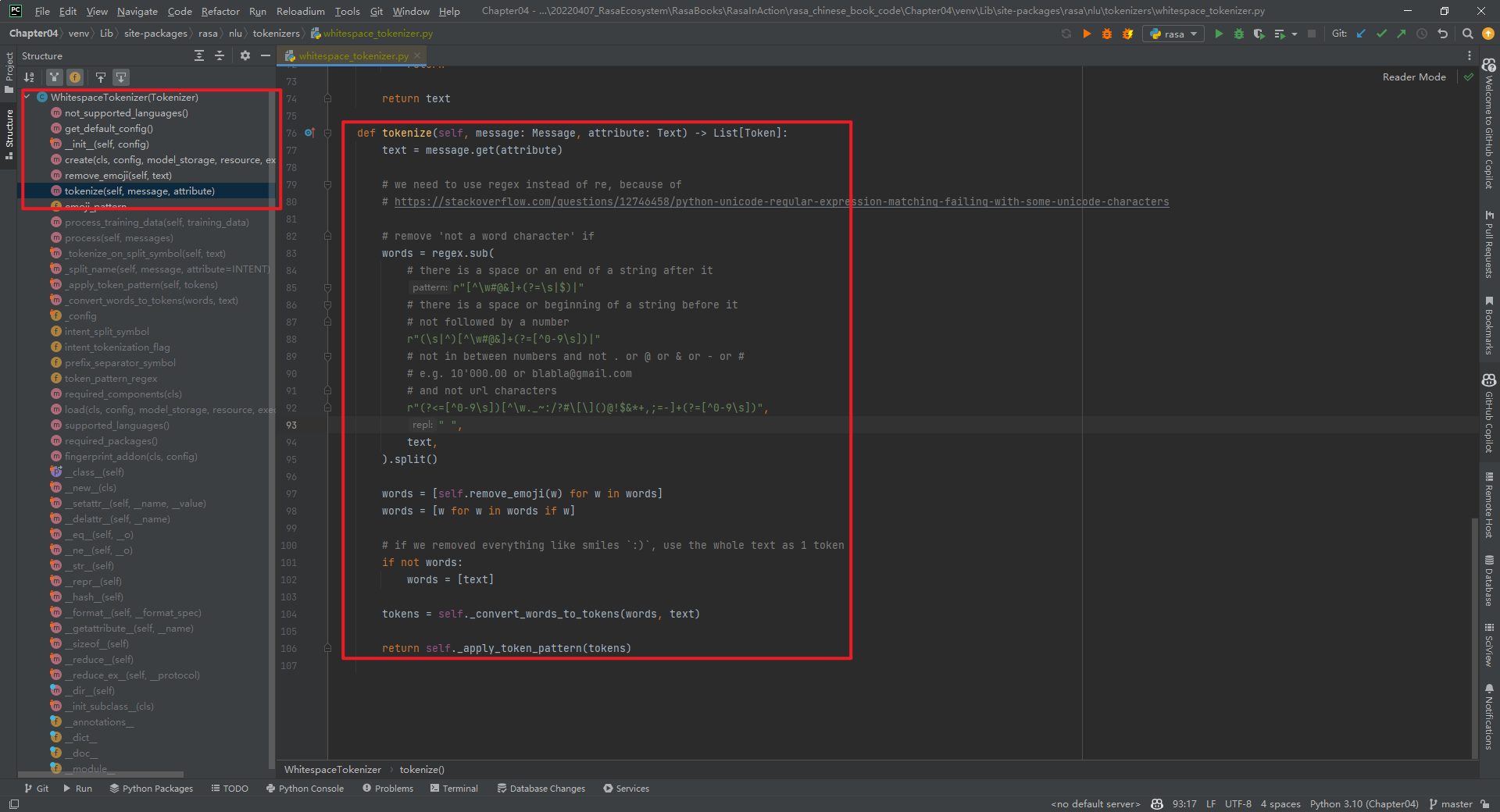
其中,predict_schema和train_schema,如下所示:
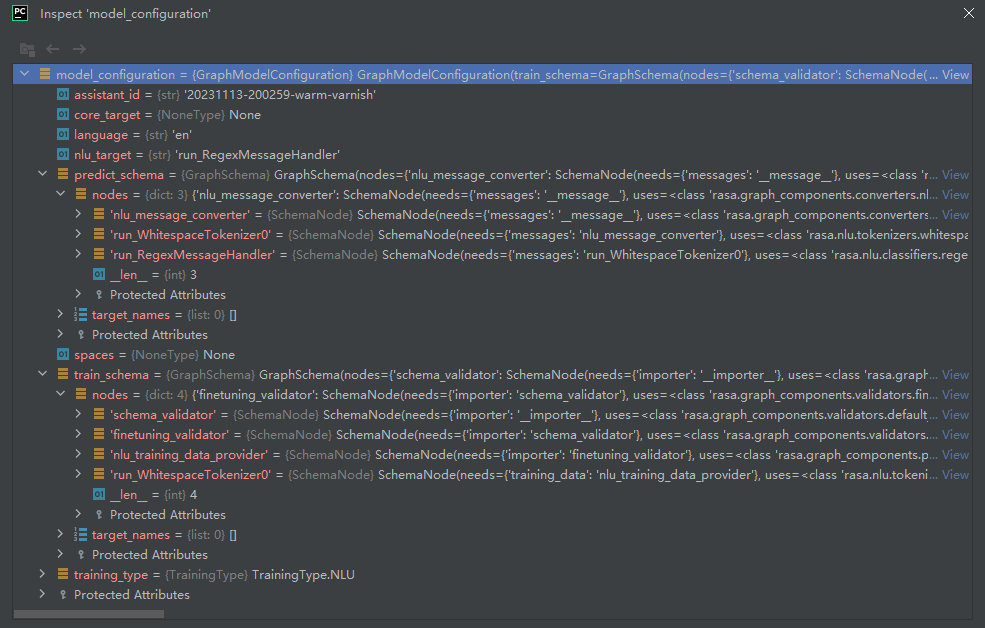
rasa shell nlu --debug结果,如下所示:
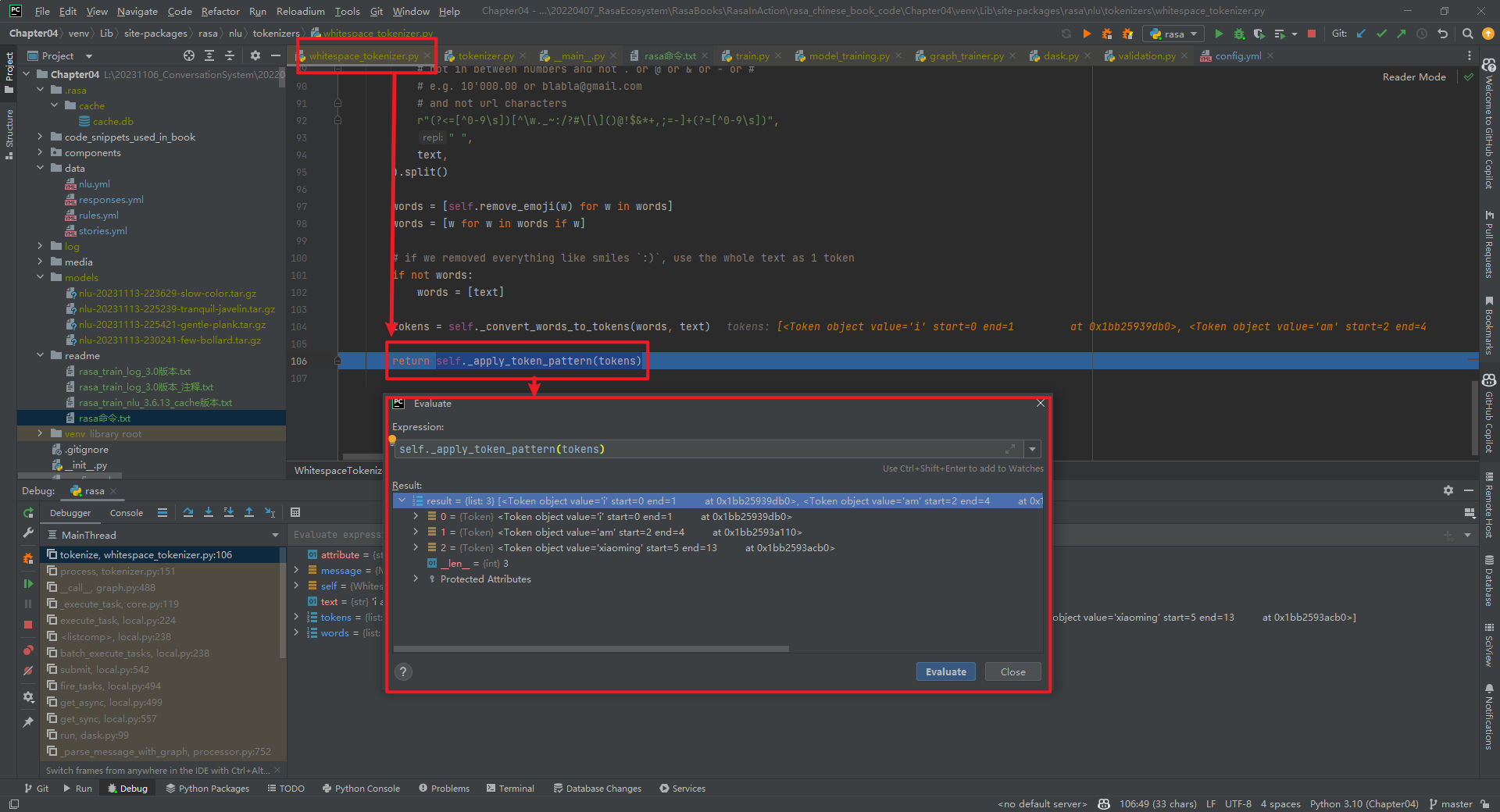
特别说明:WhitespaceTokenizer组件的is_trainable=False。
五.BertTokenizer
rasa shell nlu --debug结果,如下所示:

  BertTokenizer代码具体实现,如下所示:
"""
https://github.com/daiyizheng/rasa-chinese-plus/blob/master/rasa_chinese_plus/nlu/tokenizers/bert_tokenizer.py
"""
from typing import List, Text, Dict, Any
from rasa.engine.recipes.default_recipe import DefaultV1Recipe
from rasa.shared.nlu.training_data.message import Message
from transformers import AutoTokenizer
from rasa.nlu.tokenizers.tokenizer import Tokenizer, Token
@DefaultV1Recipe.register(
DefaultV1Recipe.ComponentType.MESSAGE_TOKENIZER, is_trainable=False
)
class BertTokenizer(Tokenizer):
def __init__(self, config: Dict[Text, Any] = None) -> None:
"""
:param config: {"pretrained_model_name_or_path":"", "cache_dir":"", "use_fast":""}
"""
super().__init__(config)
self.tokenizer = AutoTokenizer.from_pretrained(
config["pretrained_model_name_or_path"], # 指定预训练模型的名称或路径
cache_dir=config.get("cache_dir"), # 指定缓存目录
use_fast=True if config.get("use_fast") else False # 是否使用快速模式
)
@classmethod
def required_packages(cls) -> List[Text]:
return ["transformers"] # 指定依赖的包
@staticmethod
def get_default_config() -> Dict[Text, Any]:
"""The component's default config (see parent class for full docstring)."""
return {
# Flag to check whether to split intents
"intent_tokenization_flag": False,
# Symbol on which intent should be split
"intent_split_symbol": "_",
# Regular expression to detect tokens
"token_pattern": None,
# Symbol on which prefix should be split
"prefix_separator_symbol": None,
}
def tokenize(self, message: Message, attribute: Text) -> List[Token]:
text = message.get(attribute) # 获取文本
encoded_input = self.tokenizer(text, return_offsets_mapping=True, add_special_tokens=False) # 编码文本
token_position_pair = zip(encoded_input.tokens(), encoded_input["offset_mapping"]) # 将编码后的文本和偏移量映射成一个元组
tokens = [Token(text=token_text, start=position[0], end=position[1]) for token_text, position in token_position_pair] # 将元组转换成Token对象
return self._apply_token_pattern(tokens)
特别说明:BertTokenizer组件的is_trainable=False。
六.AnotherWhitespaceTokenizer
AnotherWhitespaceTokenizer代码具体实现,如下所示:
from __future__ import annotations
from typing import Any, Dict, List, Optional, Text

from rasa.engine.graph import ExecutionContext
from rasa.engine.recipes.default_recipe import DefaultV1Recipe
from rasa.engine.storage.resource import Resource
from rasa.engine.storage.storage import ModelStorage
from rasa.nlu.tokenizers.tokenizer import Token, Tokenizer
from rasa.shared.nlu.training_data.message import Message

@DefaultV1Recipe.register(
    DefaultV1Recipe.ComponentType.MESSAGE_TOKENIZER, is_trainable=False
)
class AnotherWhitespaceTokenizer(Tokenizer):
    """Creates features for entity extraction."""
    @staticmethod
    def not_supported_languages() -> Optional[List[Text]]:
        """The languages that are not supported."""
        return ["zh", "ja", "th"]

    @staticmethod
    def get_default_config() -> Dict[Text, Any]:
        """Returns the component's default config."""
        return {
            # This *must* be added due to the parent class.
            "intent_tokenization_flag": False,
            # This *must* be added due to the parent class.
            "intent_split_symbol": "_",
            # This is a, somewhat silly, config that we pass
            "only_alphanum": True,
        }

    def __init__(self, config: Dict[Text, Any]) -> None:
        """Initialize the tokenizer."""
        super().__init__(config)
        self.only_alphanum = config["only_alphanum"]

    def parse_string(self, s):
        if self.only_alphanum:
            return "".join([c for c in s if ((c == " ") or str.isalnum(c))])
        return s

    @classmethod
    def create(
        cls,
        config: Dict[Text, Any],
        model_storage: ModelStorage,
        resource: Resource,
        execution_context: ExecutionContext,
    ) -> AnotherWhitespaceTokenizer:
        return cls(config)

    def tokenize(self, message: Message, attribute: Text) -> List[Token]:
        text = self.parse_string(message.get(attribute))
        words = [w for w in text.split(" ") if w]

        # if we removed everything like smiles `:)`, use the whole text as 1 token
        if not words:
            words = [text]

        # the ._convert_words_to_tokens() method is from the parent class.
        tokens = self._convert_words_to_tokens(words, text)

        return self._apply_token_pattern(tokens)
特别说明:AnotherWhitespaceTokenizer组件的is_trainable=False。
参考文献:
[1]自定义Graph Component:1.1-JiebaTokenizer具体实现:https://mp.weixin.qq.com/s/awGiGn3uJaNcvJBpk4okCA
[2]https://github.com/RasaHQ/rasa
[3]https://github.com/fxsjy/jieba#load-dictionary
[4]spaCy GitHub:https://github.com/explosion/spaCy
[5]spaCy官网:https://spacy.io/
[6]https://github.com/daiyizheng/rasa-chinese-plus/blob/master/rasa_chinese_plus/nlu/tokenizers/bert_tokenizer.py
自定义Graph Component:1.2-其它Tokenizer具体实现的更多相关文章
- 自定义组件Component
定义compa组件 由4个页面构成 compa.js: compa.json: compa.wxml: compa:wxss: 1.compa.json:在json文件进行自定义组件声明 { &quo ...
- ionic3.x angular4.x ng4.x 自定义组件component双向绑定之自定义计数器
本文主要示例在ionic3.x环境下实现一个自定义计数器,实现后最终效果如图: 1.使用命令创建一个component ionic g component CounterInput 类似的命令还有: ...
- Yii2.0 高级模版编写使用自定义组件(component)
翻译自:http://www.yiiframework.com/wiki/760/yii-2-0-write-use-a-custom-component-in-yii2-0-advanced-tem ...
- angular custom Element 自定义web component
angular 自定义web组件: 首先创建一个名为myCustom的组件. 引入app.module: ... import {customComponent} from ' ./myCustom. ...
- Magicodes.WeiChat——自定义knockoutjs template、component实现微信自定义菜单
本人一向比较喜欢折腾,玩了这么久的knockoutjs,总觉得不够劲,于是又开始准备折腾自己了. 最近在完善Magicodes.WeiChat微信开发框架时,发现之前做的自定义菜单这块太不给力了,而各 ...
- weex 自定义Component
扩展iOS的功能 ~ Component 与UI控件相关 ,即通过原生方法创建UI界面,返回给weex 使用 一. 新建 WXComponent 的子类 在子类实现WXComponent 的 ...
- springboot +spring security4 自定义手机号码+短信验证码登录
spring security 默认登录方式都是用户名+密码登录,项目中使用手机+ 短信验证码登录, 没办法,只能实现修改: 需要修改的地方: 1 .自定义 AuthenticationProvide ...
- Spring Security验证流程剖析及自定义验证方法
Spring Security的本质 Spring Security本质上是一连串的Filter, 然后又以一个独立的Filter的形式插入到Filter Chain里,其名为FilterChainP ...
- zabbix监控之自定义item
zabbix安装完成后,当需要使用自定义脚本构建自定义item必须注意以下几点: 1.首先使用zabbix_get手动在zabbix-server服务端获取监控的默认的item值,如下: [root@ ...
- Cacti自定义脚本,监测Docker信息(Script/Command方式)
一 环境背景 监控主机A:192.168.24.231:被监控主机B:192.168.24.233 A/B主机,通过公私钥建立ssh连接 [操作B主机时不需要输入密码,详见笔记:http://app. ...
随机推荐
- 给C#新增一个时间类型: YearMonth
在.Net Framework中,我们常用的时间类型是DateTime.直到.Net6微软加入了两个新的时间类型:DateOnly和TimeOnly,才弥补了之前的不足. DateOnly:表示仅日期 ...
- mysql系列03---事务
一.事务简介 事务是一组操作的集合,它是一个不可分割的工作单位,事务会把所有的操作作为一个整体一起向系统提交或撤销 操作请求,即这些操作要么同时成功,要么同时失败. 二.事物的四大特性 一个事务具有A ...
- 痞子衡嵌入式:恩智浦i.MX RT1xxx系列MCU启动那些事(10.A)- FlexSPI NAND启动时间(RT1170)
大家好,我是痞子衡,是正经搞技术的痞子.今天痞子衡给大家介绍的是恩智浦i.MX RT1170 FlexSPI NAND启动时间. 本篇是 i.MXRT1170 启动时间评测第四弹,前三篇分别给大家评测 ...
- 修复mbr分区
修复mbr分区 实验条件 1.备份mbr引导扇区到其他磁盘 2.模拟破坏mbr引导扇区 3.引导镜像急救模式进行mbr扇区恢复 实验 1,添加一块新的磁盘 2,分区,查看分区情况 3,格式化,并挂载 ...
- 为react项目添加开发/提交规范(前端工程化、eslint、prettier、husky、commitlint、stylelint)
因历史遗留原因,接手的项目没有代码提醒/格式化,包括 eslint.pretttier,也没有 commit 提交校验,如 husky.commitlint.stylelint,与其期待自己或者同事的 ...
- windows配置supervisor实现nginx自启
前言 有些老项目的nginx部署在windows server上,而且服务器比较老旧,经常异常重启.鉴于个人并不熟悉windows server,因此配置supervisor自启nginx,实现win ...
- Java源代码是如何编译,加载到内存中的?
1.前言 相信许多开发同学看过<深入理解java虚拟机>,也阅读过java虚拟机规范,书籍和文档给人的感觉不够直观,本文从一个简单的例子来看看jvm是如何工作的吧. 本文所有操作均在mac ...
- 一个简单利用WebGL绘制频谱瀑布图示例
先看效果 还是比较节省性能的,这个还是包含了生成测试数据的性能,实际应用如果是直接通信获得数据应该还能少几毫秒吧! 准备工作 用了React,但是关系不大 WebGL的基础用法(推荐看一看掘金里的一个 ...
- CTFshow misc1-10
小提示:需要从图片上提取flag文字,可以通过截图翻译或者微信发送图片,这两个的ai图像识别挺好用的. misc1: 解压打开就能看见flag,提取出来就行 misc2: 记事本打开,看见 ng字符, ...
- .NET Core WebAPI 基础 文件上传
昨天分享了一个在WebApi中如何接收参数的文章 .NET API 中的 FromRoute.FromQuery.FromBody 用法 - 一事冇诚 - 博客园 (cnblogs.com),然后有新 ...