
urllib+BeautifulSoup爬取并解析2345天气王历史天气数据
urllib+BeautifulSoup爬取并解析2345天气王历史天气数据
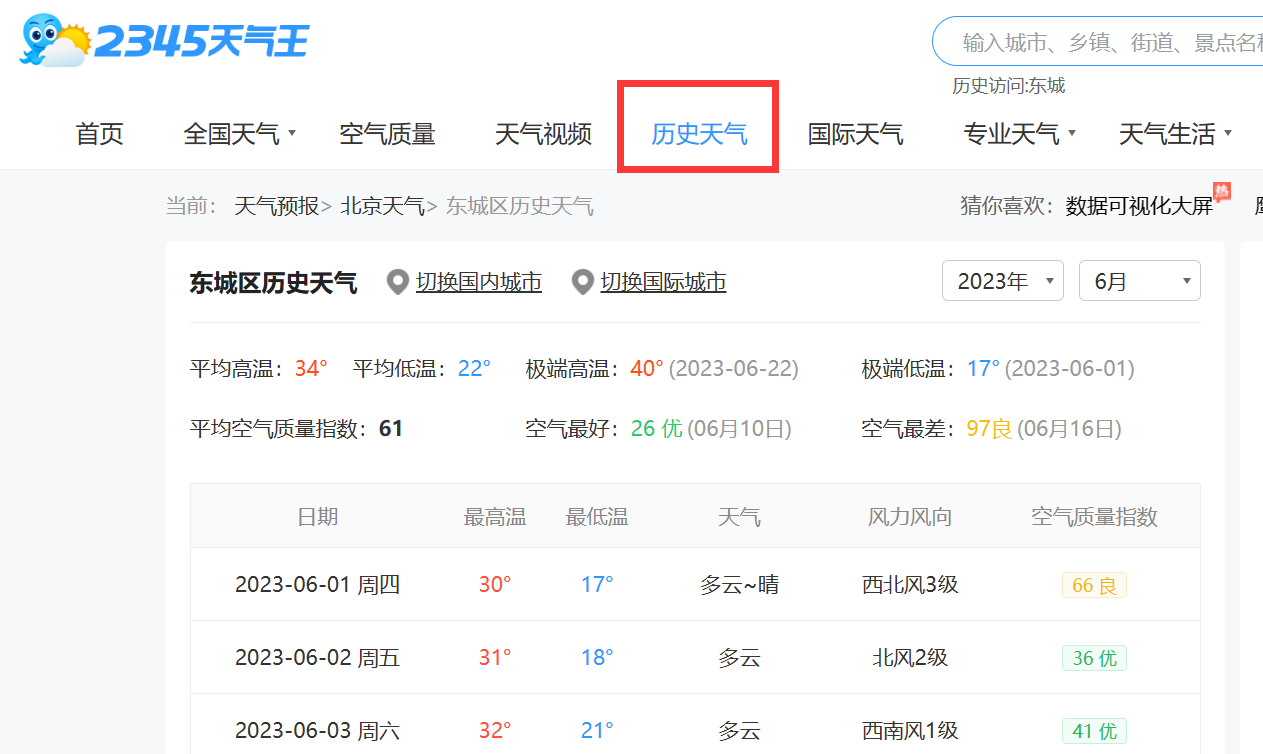
1、代码
import json

import logging

import urllib.parse

from datetime import date, datetime

from random import randint

from time import sleep

import pymysql

from bs4 import BeautifulSoup

# 定义目标URL

import requests

def weather_req():

    month_list = [1,2,3,4,5,6]  # 月份

    code_list = get_code()  # 获取所有的 天气code 和 地区code

    # 需要 2018 1月 到 2023 6月

    url = "https://tianqi.2345.com/Pc/GetHistory"   # 原始URL

    full_url = ""   # 最终拼好的url

    # 定义请求头

    headers = {

        'User-Agent': 'Mozilla/5.0 (Windows NT 10.0; Win64; x64) AppleWebKit/537.36 (KHTML, like Gecko) Chrome/114.0.0.0 Safari/537.36 Edg/114.0.1823.58',

    }

    # 定义GET参数

    params = {

        'areaInfo[areaId]': 70809,

        'areaInfo[areaType]': 2,

        'date[year]': 2023,

        'date[month]': 6

    }

    # 遍历 天气code 和 地区code 的列表

    for code_item in code_list:

        weather_code = code_item[0] # 拿到天气code

        area_code = code_item[1]    # 拿到地区code

        # 修改 url 参数 天气code的值

        params['areaInfo[areaId]'] = weather_code

        # 开始遍历月份列表

        for month_item in month_list:

            print(f"正在爬取天气ID为【{weather_code}】,地区ID为【{area_code}】的第【{month_item}】月的数据!")

            # 修改 month 的值为新值

            params['date[month]'] = month_item

            # 编码 GET参数

            encoded_params = urllib.parse.urlencode(params)

            # 拼接完整的URL

            full_url = url + '?' + encoded_params

            print(full_url)

            try:

                sleep(randint(1, 3))    # 睡眠(随机1-3秒)

                # 发起请求

                res = requests.get(full_url, headers=headers)

                res_data = json.loads(res.text)

                weather_data = res_data['data']

                # print(weather_data)

                # 解析数据

                soup = BeautifulSoup(weather_data, 'html.parser')

                # 拿到需要的table

                table_data = soup.find('table', attrs={'class': 'history-table'})

                # print(type(table_data),'\n',table_data)

                all_tr = table_data.find_all('tr')  # 拿到所有的tr

                # print(all_tr[0])

                weather_list = []   # 这是要存储数据的list

                # 开始遍历tr列表 一个列表存储了某地区的某年份的某月完整的数据

                for i in range(1, len(all_tr)):

                    temp_list = []  # 暂时存储一天的数据 每次循环都刷新

                    tr_item = all_tr[i] # 拿到一个tr数据

                    all_td = tr_item.find_all("td") # 拿到一个tr里的所有td,td里面的text就是需要的值

                    rdate = str(all_td[0].text)  # 日期 2023-01-01 周日

                    # 日期需要转化格式,去掉星期

                    rdate_new = rdate.split(" ")[0] # 拿到日期字符串

                    # 解析字符串为日期对象

                    date_object = datetime.strptime(rdate_new, "%Y-%m-%d")

                    # 将日期对象格式化为 MySQL 可存储的日期字符串

                    mysql_date = date_object.strftime("%Y-%m-%d")   # 最终被存储的日期

                    wind_and_power = all_td[4].text # 风向和风力是在一起的 需要解析

                    wind = str(wind_and_power).split("风")[0]    # 风向

                    winp = str(wind_and_power).split("风")[1]   # 风力

                    temp_max = str(all_td[1].text)  # 最高温

                    temp_min = str(all_td[2].text)  # 最低温

                    weather = str(all_td[3].text)   # 天气情况

                    # 把上面的变量存储到 temp_list 然后再一起存到 weather_list

                    temp_list.append(mysql_date)    # 日期

                    temp_list.append(weather_code)  # 天气编码

                    temp_list.append(area_code) # 地区编码

                    temp_list.append(wind)  # 风向

                    temp_list.append(winp) # 风力

                    temp_list.append(temp_max)  # 最高温度

                    temp_list.append(temp_min)  # 最低温度

                    temp_list.append(weather)   # 天气情况

                    weather_list.append(temp_list)

                print(weather_list)

                # 开始插入数据 【某个地区的,某一年的,某一个月份的数据】

                conn_his,cursor_his = get_conn()    # 建立数据库连接

                # 遍历数据

                for save_item in weather_list:

                    INSERT_SQL = "insert into w_weather_day_history (rdate,weather_code,area_code,wind,winp,temp_max,temp_min,weather) " \

                                 "values(%s,%s,%s,%s,%s,%s,%s,%s)" \

                                 "              "%("\""+save_item[0]+"\"",

                                                  "\""+save_item[1]+"\"",

                                                  "\""+save_item[2]+"\"",

                                                  "\""+save_item[3]+"\""

                                                 ,"\""+save_item[4]+"\""

                                                 ,"\""+save_item[5]+"\""

                                                 ,"\""+save_item[6]+"\""

                                                 ,"\""+save_item[7]+"\"")

                    print(INSERT_SQL)

                    cursor_his.execute(INSERT_SQL)  # 执行sql语句

                    conn_his.commit()  # 提交事务

                    print("--------------------------------------------------")

            except urllib.error.URLError as e:

                print("发生错误:", e)

def get_code():

    conn,cursor = get_conn()

    SQL = "select fwc.weather_code,fwc.area_code from f_weather_area_code fwc;"

    cursor.execute(SQL)

    res = cursor.fetchall()

    print(res)

    return res

def get_conn():

    """

    :return: 连接,游标

    """

    # 创建连接

    conn = pymysql.connect(host="127.0.0.1",

                    user="root",

                    password="reliable",

                    db="weather",

                    charset="utf8")

    # 创建游标

    cursor = conn.cursor()  # 执行完毕返回的结果集默认以元组显示

    return conn, cursor

def close_conn(conn, cursor):

    if cursor:

        cursor.close()

    if conn:

        conn.close()

if __name__ == '__main__':

    # get_code()

    weather_req()

2、分析
url构成如下:
基础url:https://tianqi.2345.com/Pc/GetHistory
参数:
params = {

        'areaInfo[areaId]': 70809,

        'areaInfo[areaType]': 2,

        'date[year]': 2023,

        'date[month]': 6

    }
areaInfo[areaId] 表示的是 某地区的天气编码,这个需要去自己获取。
areaInfo[areaType] 不用管
后面两个参数就是年份和月份了
3、发起请求demo
url = "https://tianqi.2345.com/Pc/GetHistory"   # 原始URL

    full_url = ""   # 最终拼好的url

    # 定义请求头

    headers = {

        'User-Agent': 'Mozilla/5.0 (Windows NT 10.0; Win64; x64) AppleWebKit/537.36 (KHTML, like Gecko) Chrome/114.0.0.0 Safari/537.36 Edg/114.0.1823.58',

    }

    # 定义GET参数

    params = {

        'areaInfo[areaId]': 70809,

        'areaInfo[areaType]': 2,

        'date[year]': 2023,

        'date[month]': 6

    }

    # 解析参数

    encoded_params = urllib.parse.urlencode(params)

    # 拼接完整的URL

    full_url = url + '?' + encoded_params

    sleep(randint(1, 3))    # 睡眠(随机1-3秒)

    # 发起请求

    res = requests.get(full_url, headers=headers)

    res_data = json.loads(res.text)

    weather_data = res_data['data']
4、解析数据demo
# 解析数据

soup = BeautifulSoup(weather_data, 'html.parser')

# 拿到需要的table

table_data = soup.find('table', attrs={'class': 'history-table'})

# print(type(table_data),'\n',table_data)

all_tr = table_data.find_all('tr')  # 拿到所有的tr
urllib+BeautifulSoup爬取并解析2345天气王历史天气数据的更多相关文章
- Python使用urllib,urllib3,requests库+beautifulsoup爬取网页
Python使用urllib/urllib3/requests库+beautifulsoup爬取网页 urllib urllib3 requests 笔者在爬取时遇到的问题 1.结果不全 2.'抓取失 ...
- PYTHON 爬虫笔记九:利用Ajax+正则表达式+BeautifulSoup爬取今日头条街拍图集(实战项目二)
利用Ajax+正则表达式+BeautifulSoup爬取今日头条街拍图集 目标站点分析 今日头条这类的网站制作,从数据形式,CSS样式都是通过数据接口的样式来决定的,所以它的抓取方法和其他网页的抓取方 ...
- beautifulsoup爬取糗事百科
# _*_ coding:utf-8 _*_ import urllib2 from bs4 import BeautifulSoup user_agent = "Mozilla/5.0 ( ...
- nodejs中使用cheerio爬取并解析html网页
nodejs中使用cheerio爬取并解析html网页 转 https://www.jianshu.com/p/8e4a83e7c376 cheerio用于node环境,用法与语法都类似于jquery ...
- Python爬取网上车市[http://www.cheshi.com/]的数据
#coding:utf8 #爬取网上车市[http://www.cheshi.com/]的数据 import requests, json, time, re, os, sys, time,urlli ...
- python网络爬虫之解析网页的BeautifulSoup(爬取电影图片)[三]
目录 前言 一.BeautifulSoup的基本语法 二.爬取网页图片 扩展学习 后记 前言 本章同样是解析一个网页的结构信息 在上章内容中(python网络爬虫之解析网页的正则表达式(爬取4k动漫图 ...
- python 3.6 urllib库实现天气爬取、邮件定时给妹子发送天气
#由于每天早上要和妹子说早安,于是做个定时任务,每天早上自动爬取天气,发送天气问好邮件##涉及模块:#(1)定时任务:windows的定时任务# 配置教程链接:http://b ...
- 使用正则表达式和urllib模块爬取最好大学排名信息
题目 使用urllib模块编程实现爬取网站的大学排名. (网址:http://www.zuihaodaxue.cn/zuihaodaxuepaiming2016.html) (1)获取网站页面,分析代 ...
- Python爬虫学习之使用beautifulsoup爬取招聘网站信息
菜鸟一只,也是在尝试并学习和摸索爬虫相关知识. 1.首先分析要爬取页面结构.可以看到一列搜索的结果,现在需要得到每一个链接,然后才能爬取对应页面. 关键代码思路如下: html = getHtml(& ...
- python简单爬虫 用beautifulsoup爬取百度百科词条
目标:爬取“湖南大学”百科词条并处理数据 需要获取的数据: 源代码: <div class="basic-info cmn-clearfix"> <dl clas ...
随机推荐
- [BUUCTF][WEB][ACTF2020 新生赛]Upload 1
打开靶机url,右键查看网页源代码 其中有一段代码 <div class="light"><span class="glow"> < ...
- Mybatis模糊查询无法确定参数$1的数据类型: ERROR: could not determine data type of parameter $1
Mybatis模糊查询无法确定参数$1的数据类型: 报错ERROR: could not determine data type of parameter $1 修改前: SELECT count(0 ...
- flutter打包android的一些配置修改(解决白屏,视频闪退)
1.打包后视频播放闪退 视频播放器选择了flutter_tencentplayer(https://github.com/qq326646683/flutter_tencentplayer) 解决:不 ...
- J-link虚拟串口波特率异常问题
J-LINK V9以上自带了虚拟串口,使用非常方便. 但最近遇到问题,发现打开虚拟串口时电脑接收到的是乱码.到官网搜索了一下,发现最高波特率是115200,我使用的是256000,于是降低波特率. 官 ...
- [Node] nvm 安装 node 和 npm
Node JS 安装 安装 node version manager (nvm) Windows: https://github.com/coreybutler/nvm-windows/release ...
- consul 的 HTTP API 和使用方法
目录 搭建起 consul Consul 的 HTTP API Service API 简单地注册服务 健康检查的配置和查询 建议读者先学习笔者的另一篇文章 学习搭建 Consul 服务发现与服务网格 ...
- Java 内部类 注意点
1 package com.bytezreo.innerclass2; 2 3 /** 4 * 5 * @Description 内部类 注意点 6 * @author Bytezero·zhengl ...
- gRPC入门学习之旅(一)
gRpc简介 gRPC 是Google公司开发的基于HTTP/2设计,面向移动的一个高性能.开源和通用的 RPC 框架,是一款语言中立.平台中立.开源的远程过程调用(RPC)系统. gRpc官网地址: ...
- 使用 ASP.NET Core MVC 创建 Web API 系列文章目录
使用 ASP.NET Core MVC 创建 Web API(一) 使用 ASP.NET Core MVC 创建 Web API(二) 使用 ASP.NET Core MVC 创建 Web API(三 ...
- vscode 自定义 当前行转大写快捷键 alt + shift + U
vscode 自定义 当前行转大写快捷键 alt + shift + U